
遮罩 HUD 指示器 蒙板 弹窗
遮罩 HUD 指示器 蒙板 弹窗
UIAlertView的使用<代理方法处理按钮点击>
UIAlertView *alertView = [[UIAlertView alloc] initWithTitle:@"警告" message:@"是否要删除它?" delegate:self cancelButtonTitle:@"是" otherButtonTitles:@"否", nil];

//加登录框

    alertView.alertViewStyle = UIAlertViewStyleLoginAndPasswordInput;

    [alertView show];

/hud/HUDimage/iOS%20Simulator%20Screen%20Shot%202015年7月7日%20下午3.34.43.png)
UIActionSheet的使用 <代理方法处理按钮点击>
UIActionSheet *sheet = [[UIActionSheet alloc] initWithTitle:@"警告:确定要删除它?" delegate:self cancelButtonTitle:@"取消" destructiveButtonTitle:@"确定" otherButtonTitles:@"随便", nil];

    [sheet showInView:self.view];

/hud/HUDimage/iOS%20Simulator%20Screen%20Shot%202015年7月7日%20下午3.37.52.png)
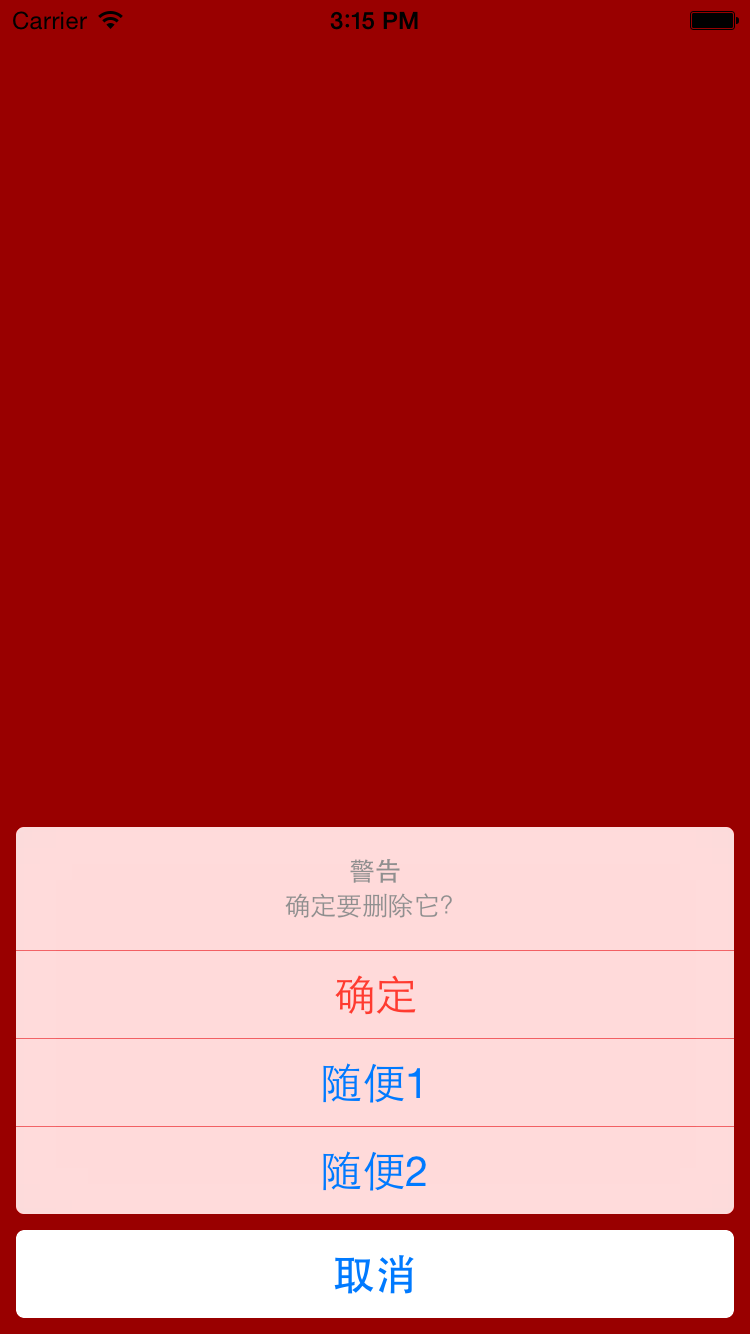
UIAlertController的使用:UIAlertControllerStyleActionSheet
UIAlertController *alertController = [UIAlertController alertControllerWithTitle:@"警告" message:@"确定要删除它?" preferredStyle:UIAlertControllerStyleActionSheet];

    // 添加按钮 <UIAlertActionStyleDestructive>

    UIAlertAction *sure = [UIAlertAction actionWithTitle:@"确定" style:UIAlertActionStyleDestructive handler:^(UIAlertAction *action) {

        NSLog(@"点击了【确定】按钮");

    }];

    [alertController addAction:sure];

    [alertController addAction:[UIAlertAction actionWithTitle:@"随便1" style:UIAlertActionStyleDefault handler:^(UIAlertAction *action) {

        NSLog(@"点击了【随便1】按钮");

    }]];

    [alertController addAction:[UIAlertAction actionWithTitle:@"随便2" style:UIAlertActionStyleDefault handler:^(UIAlertAction *action) {

        NSLog(@"点击了【随便2】按钮");

    }]];

    [alertController addAction:[UIAlertAction actionWithTitle:@"取消" style:UIAlertActionStyleCancel handler:^(UIAlertAction *action) {

        NSLog(@"点击了【取消】按钮");

    }]];

    // 在当前控制器上面弹出另一个控制器:alertController  显示

    [self presentViewController:alertController animated:YES completion:nil];
/hud/HUDimage/iOS%20Simulator%20Screen%20Shot%202015年7月7日%20下午3.15.07.png)
UIAlertController的使用:UIAlertControllerStyleAlert<一>
 UIAlertController *alertController = [UIAlertController alertControllerWithTitle:@"警告" message:@"message:确定?" preferredStyle:UIAlertControllerStyleAlert];

    // 添加按钮

    UIAlertAction *sure = [UIAlertAction actionWithTitle:@"确定" style:UIAlertActionStyleDestructive handler:^(UIAlertAction *action) {

        NSLog(@"点击了【确定】按钮");

    }];

    [alertController addAction:sure];

    [alertController addAction:[UIAlertAction actionWithTitle:@"取消" style:UIAlertActionStyleCancel handler:^(UIAlertAction *action) {

        NSLog(@"点击了【取消】按钮");

    }]];

    [alertController addAction:[UIAlertAction actionWithTitle:@"按钮" style:UIAlertActionStyleDefault handler:^(UIAlertAction *action) {

        NSLog(@"点击了【按钮】按钮");

    }]];

    // 还可以添加文本框

    [alertController addTextFieldWithConfigurationHandler:^(UITextField *textField) {

        textField.textColor = [UIColor redColor];

        textField.secureTextEntry = YES; // 暗文

        textField.placeholder = @"请输入密码";

    }];

    // 在当前控制器上面弹出另一个控制器:alertController

    [self presentViewController:alertController animated:YES completion:nil];
/hud/HUDimage/iOS%20Simulator%20Screen%20Shot%202015年7月7日%20下午3.24.29.png)

UIAlertController的使用:UIAlertControllerStyleAlert<二>
 UIAlertController *alertController = [UIAlertController alertControllerWithTitle:@"警告" message:@"message:确定?" preferredStyle:UIAlertControllerStyleAlert];

    // 添加按钮

    UIAlertAction *sure = [UIAlertAction actionWithTitle:@"确定" style:UIAlertActionStyleDestructive handler:^(UIAlertAction *action) {

        NSLog(@"点击了【确定】按钮");

    }];

    [alertController addAction:sure];

    [alertController addAction:[UIAlertAction actionWithTitle:@"取消" style:UIAlertActionStyleCancel handler:^(UIAlertAction *action) {

        NSLog(@"点击了【取消】按钮");

    }]];

    // 在当前控制器上面弹出另一个控制器:alertController

    [self presentViewController:alertController animated:YES completion:nil];
/hud/HUDimage/iOS%20Simulator%20Screen%20Shot%202015年7月7日%20下午3.27.40.png)

介绍框架<一> SVProgressHUD
// 下面这些消息需要主动调用dismiss方法来隐藏

    [SVProgressHUD show];

    [SVProgressHUD showWithMaskType:SVProgressHUDMaskTypeBlack]; // 增加灰色蒙板

    [SVProgressHUD showWithStatus:@"正在加载中..."];//下面添加提醒文字

    // 延迟2秒后 取消显示

    dispatch_after(dispatch_time(DISPATCH_TIME_NOW, (int64_t)(2.0 * NSEC_PER_SEC)), dispatch_get_main_queue(), ^{

        [SVProgressHUD dismiss];

    });

    // 下面这些消息会自动消失

//    [SVProgressHUD showInfoWithStatus:@"数据加载完毕!"];

//    [SVProgressHUD showSuccessWithStatus:@"成功加载到4条新数据!"];

//    [SVProgressHUD showErrorWithStatus:@"网络错误,请稍等!"];

    // 延迟2秒后做一些事情

//    dispatch_after(dispatch_time(DISPATCH_TIME_NOW, (int64_t)(2.0 * NSEC_PER_SEC)), dispatch_get_main_queue(), ^{

//        [SVProgressHUD dismiss];

//    });

//   [SVProgressHUD showProgress:progress status:[NSString stringWithFormat:@"已下载%.0f%%", progress * 100]];
另一框架 MBProgressHUD
遮罩 HUD 指示器 蒙板 弹窗的更多相关文章
- WPF蒙板弹窗
由于界面设计需要,要给弹窗添加蒙板效果,在百度和google搜索了半天,竟然没有一个满意的方案,最后只能自己想办法实现了一个,原理还是比较简单的,现在分享给大家. 先看一下效果.. 原理其实 ...
- SVG 2D入门9 - 蒙板
SVG支持的蒙板 SVG支持多种蒙板特效,使用这些特性,我们可以做出很多很炫的效果.至于中文中把mask叫做"蒙板"还是"遮罩"就不去区分了,这里都叫做蒙板吧. ...
- WPF通过不透明蒙板切割显示子控件
版权声明:本文为博主原创文章,遵循 CC 4.0 BY-SA 版权协议,转载请附上原文出处链接和本声明.本文链接:https://blog.csdn.net/Backspace110/article/ ...
- WPF弹出带蒙板的消息框
效果图 思路 拿到父级窗体的内容,放入一个容器里,再在容器里放入一个半透明层.将整个容器赋给父级窗体的内容. 关闭时反向操作. 代码 消息窗弹出时 /// <summary> /// 弹出 ...
- NeHe OpenGL教程 第二十课:蒙板
转自[翻译]NeHe OpenGL 教程 前言 声明,此 NeHe OpenGL教程系列文章由51博客yarin翻译(2010-08-19),本博客为转载并稍加整理与修改.对NeHe的OpenGL管线 ...
- 利用 js 实现弹出蒙板(model)功能
关于 js 实现一个简单的蒙板功能(model) 思路: 创建一个蒙板, 设置蒙板的堆叠顺序保证能将其它元素盖住 position: absolute; top: 0; left: 0; displa ...
- CLIP PATH (MASK) GENERATOR是一款在线制作生成clip-path路径的工具,可以直接生成SVG代码以及配合Mask制作蒙板。
CLIP PATH (MASK) GENERATOR是一款在线制作生成clip-path路径的工具,可以直接生成SVG代码以及配合Mask制作蒙板. CLIP PATH (MASK) GENERATO ...
- cocos2d-x之蒙板,局部高亮可点,CCRenderTexture
转自:http://www.2cto.com/kf/201207/144656.html 蒙板,局部高亮可点的用处大多是在新手引导的时候,引导玩家一步一步的走游戏的操作流程. 之前写了一个cocos2 ...
- Android 图片合成:添加蒙板效果 不规则相框 透明度渐变效果的实现
Android 图片合成:添加蒙板效果 不规则相框 透明度渐变效果的实现 暂时还未有时间开发这效果,所以先贴出来. 先贴一张效果图,这是一张手机截屏: 左上方的风景图:背景图片 右上方的人物图:前景图 ...
随机推荐
- 辛星浅析一次ajax的实现过程
说到ajax,那绝对是一个老生常谈的话题,近些年ajax技术的使用颇为盛行. 以下我们就以jQuery为例来从一个真实的项目中看一下ajax的实例. 首先是前端页面,这个页面我们使用的是bootstr ...
- Oracle可插拔数据库的jdbc连接串写法
我在服务器上部署某个第三方系统的数据库的时候,服务器数据库版本为oracle 12c.我采用的方式是新建了一个实例.访问正常. 后来项目的负责人告诉我,oracle12C支持所谓的可插拔数据库.可插拔 ...
- 2016/04/13 ①html 中各种分割线------------------------------------------ ② 控制文字显示
①各种分割线Html代码 1.<HR> 2.<HR align=center width=300 color=#987cb9 SIZE=1>align 线条位置(可选left. ...
- ubuntu查看文件的权限
查看linux文件的权限: 查看path路径下名为filename的文件或文件夹的权限: ls -l path/filename ls -l path/filename 查看path路径下的所有文件的 ...
- Nginx——静态资源服务器(一)
java web的项目中,我们经常将项目部署到Tomcat或者jetty上,可以通过Tomcat或者jetty启动的服务来访问静态资源.但是随着Nginx的普及,用Nginx来作为静态资源服务器,似乎 ...
- HBase使用教程
1 基本介绍 1.1 前言 HBase – Hadoop Database.是一个分布式的.面向列的开源数据库,该技术来源于 Fay Chang 所撰写的Google论文"Bigta ...
- 用 kGDB 调试 Linux 内核
简介 这个文档记录了用kGDB调试Linux内核的全过程,都是在前人工作基础上的一些总结.以下操作都是基于特定板子来进行,但是大部分都能应用于其他平台. 要使用KGDB来调试内核,首先需要修改conf ...
- AnimatorCompatHelper clearInterpolator
supportLib 26.0.0+以上AnimatorCompatHelper类被移除 所以clearInterpolator(view)找不到 替换方案: TimeInterpolator mDe ...
- bzoj-1192 [HNOI2006]鬼谷子的钱袋(水题)
题目链接: [HNOI2006]鬼谷子的钱袋 Time Limit: 10 Sec Memory Limit: 162 MB Description 鬼谷子非常聪明,正因为这样,他非常繁忙,经常有各 ...
- bzoj 5457 城市
题目大意: 树上每个点有种类$a_i$和数量$b_i$,求每个点的子树内数量最多的种类的数量和这个数量 思路: 显然是线段树合并裸题 学习一下$dsu \space on \space tree$ 主 ...