
Xshell配色方案啊【学习笔记】
自己移植从putty版本移植到Xshell的配色方案,效果不错,看上去挺舒服。
 [myisayme]

 text(bold)=eaeaea

 magenta(bold)=ff55ff

 text=ffffff

 green=a7e22e

 red(bold)=fb2608

 green(bold)=a7e22e

 black(bold)=

 black=

 red=fb2608

 blue=009ddc

 blue(bold)=009ddc

 yellow(bold)=66d9ee

 cyan=ffd204

 cyan(bold)=ffd204

 yellow=66d9ee

 magenta=ff55ff

 background=

 white=d9d8d8

 white(bold)=ffffff

 fore

 [Names]

 count=

 name0=myisayme
putty版本的配色方案-
 Windows Registry Editor Version 5.00

 [HKEY_CURRENT_USER\Software\SimonTatham\PuTTY\Sessions\pax-zhuangzb]

 ; Default Foreground

 "Colour0"="217,216,216"

 ; Default Bold Foreground

 "Colour1"="217,216,216"

 ; Default Background

 "Colour2"="28,28,28"

 ; Default Background

 "Colour3"="28,63,149"

 ; Cursor Text  -------------

 "Colour4"="28,28,28"

 ; Cursor Color

 "Colour5"="231,231,232"

 ; ANSI Black  -------

 "Colour6"="115,113,113"

 ; ANSI Black Bold  -

 "Colour7"="115,113,113"

 ; ANSI Red  -------

 "Colour8"="251,38,8"

 ; ANSI Red Bold  -------

 "Colour9"="251,38,8"

 ; ANSI Green  ---------

 "Colour10"="167,226,46"

 ; ANSI Green Bold  -------

 "Colour11"="167,226,46"

 ; ANSI Yellow  --------

 "Colour12"="102,217,238"

 ; ANSI Yellow Bold  --------

 "Colour13"="102,217,238"

 ; ANSI Blue  ----------

 "Colour14"="0,157,220"

 ; ANSI Blue Bold  -----------

 "Colour15"="0,157,220"

 ; ANSI Magenta  -------------

 "Colour16"="255,85,255"

 ; ANSI Magenta Bold  ---------

 "Colour17"="255,85,255"

 ; ANSI Cyan   -----------

 "Colour18"="255,210,4"

 ; ANSI Cyan Bold  --------------

 "Colour19"="255,210,4"

 ; ANSI White  ----------------

 "Colour20"="217,216,216"

 ; ANSI White Bold  -------------

 "Colour21"="255,255,255"
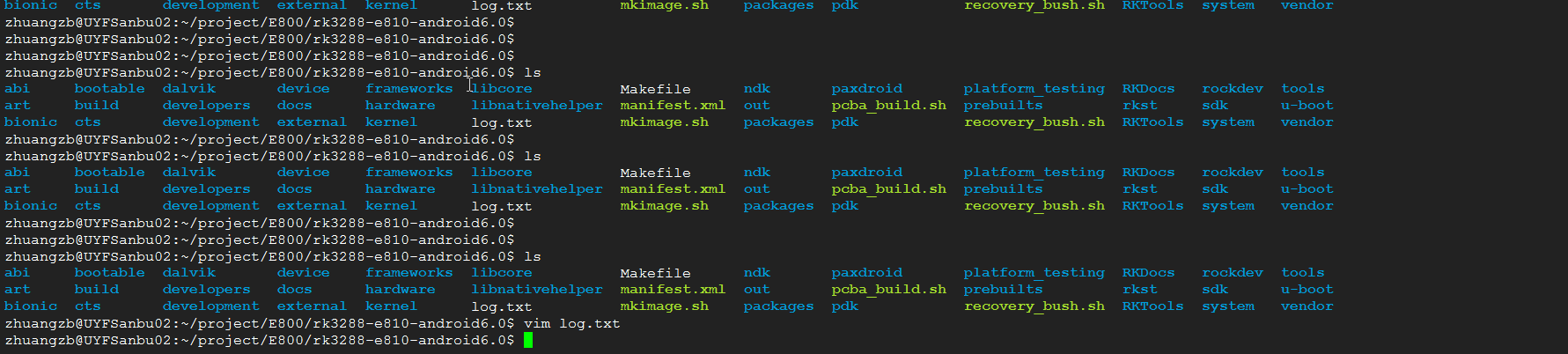
效果图:

Xshell配色方案啊【学习笔记】的更多相关文章
- Xshell配色方案
几个比较喜欢的Xshell配色方案,备份记录下 [Names] count=1 name0=SolarizedDark [SolarizedDark] text(bold)=839496 magent ...
- Linux学习笔记之Xshell配色方案定制
点击 Xshell 面板顶部的如下按钮. 点击 Browse 按钮,弹出如下面板,选择 ANSI Colors on Black,然后点击右侧save as 按钮,命名为 zkl. 这里其实就是复 ...
- Xshell 配色方案 Ubuntu Solarized_Dark isayme
前言 最近在用Ubuntu,发现它的配色方案挺好看的,所以查了下有没有大神做过Xshell的Ubuntu配色方案. 一看,果然还是有大佬做了这个的. 三套配色配置如下: 1. Ubuntu的Solar ...
- XSHELL配色方案及导入配色方案的方法
[ubuntu] text(bold)=ffffff magenta(bold)=ad7fa8 text=ffffff white(bold)=eeeeec green=4e9a06 red(bold ...
- Xshell配色方案(Solarized Dark)
将以下内容复制并保存到文件中,文件名以xc为后缀,如:Solarized Dark.xcs [Solarized Dark] text= cyan(bold)=93a1a1 text(bold)= m ...
- 自己用的Xshell配色方案
[comfort]text=dce2e2cyan(bold)=2ad1b8text(bold)=dce2e2magenta=dd3682green=55bb55green(bold)=55bb55ba ...
- Xshell 配色方案
[wsp] text=cOc0c0 cyan(bold)=50ebfc text(bold)=9999e8 magenta=7b5175 green=008000 green(bold)=1cc470 ...
- Xshell配色方案推荐
使用方法: 新建mycolor.xcs文件 复制粘贴如下代码,将文件导入,修改自己喜欢的字体即可 [mycolor] text=00ff80 cyan(bold)=00ffff text(bold)= ...
- 我的xshell配色方案,绿色/护眼/留存/备份
[mycolor] text(bold)=e9e9e9 magenta(bold)=ff00ff text=00ff80 white(bold)=fdf6e3 green=80ff00 red(bol ...
随机推荐
- 构造From窗体获取数据库数据,去除数据库中无用信息,并赋值给字段,最后画出图
private void cbNum_SelectedIndexChanged(object sender, EventArgs e) { FieldListLug.Clear();//继续清除字段 ...
- 梦想CAD控件文字COM接口知识点
一.参数绘制文字 在CAD设计时,需要绘制文字,用户可以设置设置绘制文字的高度等属性. 主要用到函数说明: _DMxDrawX::DrawText 绘制一个单行文字.详细说明如下: 参数 说明 DOU ...
- CMU Database Systems - Two-phase Locking
首先锁是用来做互斥的,解决并发执行时的数据不一致问题 如图会导致,不可重复读 如果这里用lock就可以解决,数据库里面有个LockManager来作为master,负责锁的记录和授权 数据库里面的基本 ...
- linux 挂载数据盘
完整的阿里云挂载数据盘方法如下: 1.入手阿里云后查看有几块硬盘:(只显示概况,不显示分区情况) fdisk -l|grep Disk 2.查看硬盘分区 fdisk -l 如果有提示:disk /de ...
- UVA - 820 Internet Bandwidth(最大流模板题)
题目: 思路: 直接套最大流的模板就OK了,注意一下输出的格式. 代码: #include <bits/stdc++.h> #define inf 0x3f3f3f3f #define M ...
- Idea+maven+testng+reportng生成测试报告
TestNG自带的测试报告不是很好用,所以一般结合reportng生成美观的测试报告. 首先,在pom.xml中添加testng和reportng相关依赖 <dependencies> & ...
- SQL学习笔记:库和表的创建
目录 创建和删除数据库 创建和删除表 添加.修改和删除字段 创建和删除数据库 CREATE DATABASE justForLearn; DROP DATABASE justForLearn; 创建和 ...
- LightOJ 1348 Aladdin and the Return Journey
Aladdin and the Return Journey Time Limit: 2000ms Memory Limit: 32768KB This problem will be judged ...
- Introduction to TensorFlow
Lecture note 1: Introduction to TensorFlow Why TensorFlow TensorFlow was originally created by resea ...
- poj 1364 查分约束
#include<stdio.h> #include<iostream> #include<stack> #include<string.h> usin ...