
SpringCloud 源码系列(2)—— 注册中心 Eureka(中)
五、服务注册
1、实例信息注册器初始化
服务注册的代码位置不容易发现,我们看 DiscoveryClient 初始化调度任务的这个方法,这段代码会去初始化一个实例信息复制器 InstanceInfoReplicator,这个复制器就包含了实例的注册(明明是注册却叫 Replicator 感觉怪怪的)。
① DiscoveryClient 初始化调度器的流程
- 先基于 DiscoveryClient、InstanceInfo 构造 InstanceInfoReplicator,然后还有两个参数为实例信息复制间隔时间(默认30秒)、并发的数量(默认为2)。
- 创建了一个实例状态变更监听器,并注册到 ApplicationInfoManager。当实例状态变更时,就会触发这个监听器,并调用 InstanceInfoReplicator 的 onDemandUpdate 方法。
- 启动 InstanceInfoReplicator,默认延迟40秒,也就是说服务启动可能40秒之后才会注册到注册中心。
 1 private void initScheduledTasks() {

 2     // 省略定时刷新注册表的任务...

 3

 4     if (clientConfig.shouldRegisterWithEureka()) {

 5         // 省略定时心跳的任务...

 6

 7         // 实例信息复制器,用于定时更新自己状态,并向注册中心注册

 8         instanceInfoReplicator = new InstanceInfoReplicator(

 9                 this,

10                 instanceInfo,

11                 clientConfig.getInstanceInfoReplicationIntervalSeconds(),

12                 2); // burstSize

13

14         // 实例状态变更的监听器

15         statusChangeListener = new ApplicationInfoManager.StatusChangeListener() {

16             @Override

17             public String getId() {

18                 return "statusChangeListener";

19             }

20

21             @Override

22             public void notify(StatusChangeEvent statusChangeEvent) {

23                 if (statusChangeEvent.getStatus() == InstanceStatus.DOWN) {

24                     logger.error("Saw local status change event {}", statusChangeEvent);

25                 } else {

26                     logger.info("Saw local status change event {}", statusChangeEvent);

27                 }

28                 instanceInfoReplicator.onDemandUpdate();

29             }

30         };

31

32         // 向 ApplicationInfoManager 注册状态变更监听器

33         if (clientConfig.shouldOnDemandUpdateStatusChange()) {

34             applicationInfoManager.registerStatusChangeListener(statusChangeListener);

35         }

36

37         // 启动实例信息复制器,默认延迟时间40秒

38         instanceInfoReplicator.start(clientConfig.getInitialInstanceInfoReplicationIntervalSeconds());

39     } else {

40         logger.info("Not registering with Eureka server per configuration");

41     }

42 }
② InstanceInfoReplicator 的构造方法
- 创建了一个单线程的调度器
- 设置 started 为 false
- 创建了以分钟为单位的限流器,每分钟默认最多只能调度4次
 1 InstanceInfoReplicator(DiscoveryClient discoveryClient, InstanceInfo instanceInfo, int replicationIntervalSeconds, int burstSize) {

 2     this.discoveryClient = discoveryClient;

 3     this.instanceInfo = instanceInfo;

 4     // 单线程的调度器

 5     this.scheduler = Executors.newScheduledThreadPool(1,

 6             new ThreadFactoryBuilder()

 7                     .setNameFormat("DiscoveryClient-InstanceInfoReplicator-%d")

 8                     .setDaemon(true)

 9                     .build());

10

11     this.scheduledPeriodicRef = new AtomicReference<Future>();

12     // started 设置为 false

13     this.started = new AtomicBoolean(false);

14     // 以分钟为单位的限流器

15     this.rateLimiter = new RateLimiter(TimeUnit.MINUTES);

16     // 间隔时间,默认为30秒

17     this.replicationIntervalSeconds = replicationIntervalSeconds;

18     this.burstSize = burstSize;

19     // 允许每分钟更新的频率 60 * 2 / 30 = 4

20     this.allowedRatePerMinute = 60 * this.burstSize / this.replicationIntervalSeconds;

21     logger.info("InstanceInfoReplicator onDemand update allowed rate per min is {}", allowedRatePerMinute);

22 }
③ 启动 InstanceInfoReplicator
- 将 started 设置为 true,代表已经启动了
- 调用 instanceInfo.setIsDirty() 方法,将实例设置为 dirty=true,并更新了最后一次设置 dirty 的时间戳
- InstanceInfoReplicator 实现了 Runnable,它本身被当成任务来调度,然后延迟40秒开始调度当前任务,并将 Future 放到本地变量中
 1 public void start(int initialDelayMs) {

 2     // 启动时 started 设置为 true

 3     if (started.compareAndSet(false, true)) {

 4         // 设置为 dirty,便于下一次心跳时同步到 eureka server

 5         instanceInfo.setIsDirty();

 6         // 延迟40秒后开始调度当前任务

 7         Future next = scheduler.schedule(this, initialDelayMs, TimeUnit.SECONDS);

 8         // 将 Future 放到本地变量中

 9         scheduledPeriodicRef.set(next);

10     }

11 }

12

13 ///////

14

15 public synchronized void setIsDirty() {

16     isInstanceInfoDirty = true;

17     lastDirtyTimestamp = System.currentTimeMillis();

18 }
2、客户端实例注册
① 实现注册的run方法
接着看 InstanceInfoReplicator 的 run 方法,这个方法就是完成注册的核心位置。
- 首先会更新实例的信息,如果有变更就会设置 dirty=true
- 如过是 dirty 的,就会调用 DiscoveryClient 的 register 方法注册实例
- 实例注册后,就把 dirty 设置为 false
- 最后在 finally 中继续下一次的调度,默认是每隔30秒调度一次,注意他这里是把调度结果 Future 放到本地变量中
 1 public void run() {

 2     try {

 3         // 更新本地实例信息,如果实例信息有变更,则 dirty=true

 4         discoveryClient.refreshInstanceInfo();

 5

 6         // 设置为 dirty 时的时间戳

 7         Long dirtyTimestamp = instanceInfo.isDirtyWithTime();

 8         if (dirtyTimestamp != null) {

 9             // 注册实例

10             discoveryClient.register();

11             // 设置 dirty=false

12             instanceInfo.unsetIsDirty(dirtyTimestamp);

13         }

14     } catch (Throwable t) {

15         logger.warn("There was a problem with the instance info replicator", t);

16     } finally {

17         // 30秒之后再调度

18         Future next = scheduler.schedule(this, replicationIntervalSeconds, TimeUnit.SECONDS);

19         scheduledPeriodicRef.set(next);

20     }

21 }
② 实例信息刷新
再来细看下 refreshInstanceInfo 刷新实例信息的方法:
- 首先刷新了数据中心的信息
- 然后刷新续约信息,主要就是将 EurekaClientConfig 的续约配置与本地的续约配置做对比,如果变更了就重新创建续约信息,并设置实例为dirty。这种情况一般就是运行期间动态更新实例的配置,然后重新注册实例信息。
- 接着使用健康检查器检查实例健康状况,从 getHealthCheckHandler 这段代码进去不难发现,我们可以自定义健康检查器,例如当本地的一些资源未创建成功、某些核心线程池down了就认为实例不可用,这个时候就可以自定义健康检查器。如果没有自定义健康检查器,那就直接返回实例当前的状态。我们可以实现 HealthCheckHandler 接口自定义健康检查器。
- 最后就会调用 ApplicationInfoManager 的 setInstanceStatus 设置实例状态,会判断如果状态发生变更,就会发出状态变更的通知,这样就会触发前面定义的状态变更监听器,然后调用 InstanceInfoReplicator 的 onDemandUpdate 方法。


 1 void refreshInstanceInfo() {

 2     // 如果有必要,就更新数据中心的信息

 3     applicationInfoManager.refreshDataCenterInfoIfRequired();

 4     // 如果有必要,就更新续约信息,比如动态更新了配置文件,这时就更新续约信息 LeaseInfo,并将实例设置为 dirty

 5     applicationInfoManager.refreshLeaseInfoIfRequired();

 6

 7     InstanceStatus status;

 8     try {

 9         // 用监控检查器检查实例的状态

10         status = getHealthCheckHandler().getStatus(instanceInfo.getStatus());

11     } catch (Exception e) {

12         logger.warn("Exception from healthcheckHandler.getStatus, setting status to DOWN", e);

13         status = InstanceStatus.DOWN;

14     }

15

16     if (null != status) {

17         // 设置实例状态,实例状态变了会触发状态变更的监听器

18         applicationInfoManager.setInstanceStatus(status);

19     }

20 }

21

22 /////////////////////////////////

23

24 public void refreshLeaseInfoIfRequired() {

25     // 当前实例续约信息

26     LeaseInfo leaseInfo = instanceInfo.getLeaseInfo();

27     if (leaseInfo == null) {

28         return;

29     }

30     // 从配置中获取续约信息

31     int currentLeaseDuration = config.getLeaseExpirationDurationInSeconds();

32     int currentLeaseRenewal = config.getLeaseRenewalIntervalInSeconds();

33     // 如果续约信息变了,就重新创建续约信息,并设置实例为 dirty

34     if (leaseInfo.getDurationInSecs() != currentLeaseDuration || leaseInfo.getRenewalIntervalInSecs() != currentLeaseRenewal) {

35         LeaseInfo newLeaseInfo = LeaseInfo.Builder.newBuilder()

36                 .setRenewalIntervalInSecs(currentLeaseRenewal)

37                 .setDurationInSecs(currentLeaseDuration)

38                 .build();

39         instanceInfo.setLeaseInfo(newLeaseInfo);

40         instanceInfo.setIsDirty();

41     }

42 }

43

44 /////////////////////////////////

45

46 public HealthCheckHandler getHealthCheckHandler() {

47     HealthCheckHandler healthCheckHandler = this.healthCheckHandlerRef.get();

48     if (healthCheckHandler == null) {

49         // 可以自定义 HealthCheckHandler 实现健康检查

50         if (null != healthCheckHandlerProvider) {

51             healthCheckHandler = healthCheckHandlerProvider.get();

52         } else if (null != healthCheckCallbackProvider) {

53             // 可以自定义 HealthCheckCallback 实现健康检查,HealthCheckCallback 已过期,建议使用 HealthCheckHandler

54             healthCheckHandler = new HealthCheckCallbackToHandlerBridge(healthCheckCallbackProvider.get());

55         }

56

57         if (null == healthCheckHandler) {

58             // 没有自定义的就是用默认的桥接类

59             healthCheckHandler = new HealthCheckCallbackToHandlerBridge(null);

60         }

61         this.healthCheckHandlerRef.compareAndSet(null, healthCheckHandler);

62     }

63

64     return this.healthCheckHandlerRef.get();

65 }

66

67 //////////////////////////////////////

68

69 public synchronized void setInstanceStatus(InstanceStatus status) {

70     InstanceStatus next = instanceStatusMapper.map(status);

71     if (next == null) {

72         return;

73     }

74

75     // 如果状态变更了,才会返回之前的状态,然后触发状态变更监听器

76     InstanceStatus prev = instanceInfo.setStatus(next);

77     if (prev != null) {

78         for (StatusChangeListener listener : listeners.values()) {

79             try {

80                 listener.notify(new StatusChangeEvent(prev, next));

81             } catch (Exception e) {

82                 logger.warn("failed to notify listener: {}", listener.getId(), e);

83             }

84         }

85     }

86 }
③ 向 eureka server 注册
在 run 方法里调用了 discoveryClient.register() 方法实现了客户端实例向注册中心的注册,进入到 register 方法可以看到,他就是使用前面构造的 EurekaTransport 来发起远程调用。
一层层进去,很容易发现就是调用了 eureka-server 的 POST /apps/{appName} 接口,后面我们就从 eureka-core 中找这个接口就可以找到注册中心实现服务注册的入口了。
 1 boolean register() throws Throwable {

 2     logger.info(PREFIX + "{}: registering service...", appPathIdentifier);

 3     EurekaHttpResponse<Void> httpResponse;

 4     try {

 5         // registrationClient => JerseyReplicationClient

 6         httpResponse = eurekaTransport.registrationClient.register(instanceInfo);

 7     } catch (Exception e) {

 8         logger.warn(PREFIX + "{} - registration failed {}", appPathIdentifier, e.getMessage(), e);

 9         throw e;

10     }

11     if (logger.isInfoEnabled()) {

12         logger.info(PREFIX + "{} - registration status: {}", appPathIdentifier, httpResponse.getStatusCode());

13     }

14     return httpResponse.getStatusCode() == Status.NO_CONTENT.getStatusCode();

15 }

16

17 /////////////////////////////////

18

19 public EurekaHttpResponse<Void> register(InstanceInfo info) {

20     // 调用的是 POST apps/{appName} 接口

21     String urlPath = "apps/" + info.getAppName();

22     ClientResponse response = null;

23     try {

24         Builder resourceBuilder = jerseyClient.resource(serviceUrl).path(urlPath).getRequestBuilder();

25         addExtraHeaders(resourceBuilder);

26         response = resourceBuilder

27                 .header("Accept-Encoding", "gzip")

28                 .type(MediaType.APPLICATION_JSON_TYPE)

29                 .accept(MediaType.APPLICATION_JSON)

30                 // post 方法

31                 .post(ClientResponse.class, info);

32         return anEurekaHttpResponse(response.getStatus()).headers(headersOf(response)).build();

33     } finally {

34         if (logger.isDebugEnabled()) {

35             logger.debug("Jersey HTTP POST {}/{} with instance {}; statusCode={}", serviceUrl, urlPath, info.getId(),

36                     response == null ? "N/A" : response.getStatus());

37         }

38         if (response != null) {

39             response.close();

40         }

41     }

42 }
④ 注册中心设置实例状态为已启动
再回想下注册中心的初始化流程,在最后调用 openForTraffic 方法时,最后也会调用 ApplicationInfoManager 的 setInstanceStatus 方法,将实例状态设置为已启动,这个时候就会触发客户端注册到注册中心的动作。
applicationInfoManager.setInstanceStatus(InstanceStatus.UP);
⑤ 完成监听实例变更的方法
状态变更器会调用 onDemandUpdate 方法来完成实例状态变更后的逻辑。
- 它这里一个是用到了限流器来限制每分钟这个方法只能被调用4次,即避免了频繁的注册行为
- 然后在调度时,它会从本地变量中取出上一次调度的 Future,如果任务还没执行完,它会直接取消掉
- 最后就是调用 run 方法,完成服务的注册
 1 public boolean onDemandUpdate() {

 2     // 限流控制

 3     if (rateLimiter.acquire(burstSize, allowedRatePerMinute)) {

 4         if (!scheduler.isShutdown()) {

 5             scheduler.submit(new Runnable() {

 6                 @Override

 7                 public void run() {

 8                     logger.debug("Executing on-demand update of local InstanceInfo");

 9

10                     // 如果上一次的任务还没有执行完,直接取消掉,然后执行注册的任务

11                     Future latestPeriodic = scheduledPeriodicRef.get();

12                     if (latestPeriodic != null && !latestPeriodic.isDone()) {

13                         logger.debug("Canceling the latest scheduled update, it will be rescheduled at the end of on demand update");

14                         latestPeriodic.cancel(false);

15                     }

16

17                     InstanceInfoReplicator.this.run();

18                 }

19             });

20             return true;

21         } else {

22             logger.warn("Ignoring onDemand update due to stopped scheduler");

23             return false;

24         }

25     } else {

26         logger.warn("Ignoring onDemand update due to rate limiter");

27         return false;

28     }

29 }
⑥ 限流器
最后简单看下限流器 RateLimiter 的设计:
- 从它的注释中可以看出,eureka 的 RateLimiter 是基于令牌桶算法实现的限流器
- acquire 方法有两个参数:
- burstSize:允许以突发方式进入系统的最大请求数
- averageRate:设置的时间窗口内允许进入的请求数
 1 /**

 2  * Rate limiter implementation is based on token bucket algorithm. There are two parameters:

 3  * <ul>

 4  * <li>

 5  *     burst size - maximum number of requests allowed into the system as a burst

 6  * </li>

 7  * <li>

 8  *     average rate - expected number of requests per second (RateLimiters using MINUTES is also supported)

 9  * </li>

10  * </ul>

11  *

12  * @author Tomasz Bak

13  */

14 public class RateLimiter {

15

16     private final long rateToMsConversion;

17

18     private final AtomicInteger consumedTokens = new AtomicInteger();

19     private final AtomicLong lastRefillTime = new AtomicLong(0);

20

21     @Deprecated

22     public RateLimiter() {

23         this(TimeUnit.SECONDS);

24     }

25

26     public RateLimiter(TimeUnit averageRateUnit) {

27         switch (averageRateUnit) {

28             case SECONDS:

29                 rateToMsConversion = 1000;

30                 break;

31             case MINUTES:

32                 rateToMsConversion = 60 * 1000;

33                 break;

34             default:

35                 throw new IllegalArgumentException("TimeUnit of " + averageRateUnit + " is not supported");

36         }

37     }

38

39     public boolean acquire(int burstSize, long averageRate) {

40         return acquire(burstSize, averageRate, System.currentTimeMillis());

41     }

42

43     public boolean acquire(int burstSize, long averageRate, long currentTimeMillis) {

44         if (burstSize <= 0 || averageRate <= 0) { // Instead of throwing exception, we just let all the traffic go

45             return true;

46         }

47

48         refillToken(burstSize, averageRate, currentTimeMillis);

49         return consumeToken(burstSize);

50     }

51

52     private void refillToken(int burstSize, long averageRate, long currentTimeMillis) {

53         // 上一次填充 token 的时间

54         long refillTime = lastRefillTime.get();

55         // 时间差

56         long timeDelta = currentTimeMillis - refillTime;

57         // 固定生成令牌的速率,即每分钟4次

58         // 例如刚好间隔15秒进来一个请求,就是 15000 * 4 / 60000 = 1,newTokens 代表间隔了多少次,如果等于0,说明间隔不足15秒

59         long newTokens = timeDelta * averageRate / rateToMsConversion;

60         if (newTokens > 0) {

61             long newRefillTime = refillTime == 0

62                     ? currentTimeMillis

63                     // 注意这里不是直接设置的当前时间戳,而是根据 newTokens 重新计算的,因为有可能同一周期内同时有多个请求进来,这样可以保持一个固定的周期

64                     : refillTime + newTokens * rateToMsConversion / averageRate;

65             if (lastRefillTime.compareAndSet(refillTime, newRefillTime)) {

66                 while (true) {

67                     // 调整令牌的数量

68                     int currentLevel = consumedTokens.get();

69                     int adjustedLevel = Math.min(currentLevel, burstSize);

70                     // currentLevel 可能为2,重置为了 0 或 1

71                     int newLevel = (int) Math.max(0, adjustedLevel - newTokens);

72                     if (consumedTokens.compareAndSet(currentLevel, newLevel)) {

73                         return;

74                     }

75                 }

76             }

77         }

78     }

79

80     private boolean consumeToken(int burstSize) {

81         while (true) {

82             int currentLevel = consumedTokens.get();

83             // 突发数量为2,也就是允许15秒内最多有两次请求进来

84             if (currentLevel >= burstSize) {

85                 return false;

86             }

87             if (consumedTokens.compareAndSet(currentLevel, currentLevel + 1)) {

88                 return true;

89             }

90         }

91     }

92

93     public void reset() {

94         consumedTokens.set(0);

95         lastRefillTime.set(0);

96     }

97 }
3、Eureka Server 接收注册请求
① 找到实例注册的API入口
从前面的分析中,我们知道服务端注册的API是 POST /apps/{appName},由于 eureka 是基于 jersey 来通信的,想找到API入口还是有点费劲的,至少没有 springmvc 那么容易。
先看 ApplicationsResource 这个类,可以找到 getApplicationResource 这个方法的路径是符合 /apps/{appName} 这个规则的。然后可以看到它里面创建了 ApplicationResource,再进入到这个类里面,就可以找到 @Post 标注的 addInstance 方法,这就是注册的入口了。可以看到它是调用了注册表的 register 方法来注册实例的。
 1 @Path("/{version}/apps")

 2 @Produces({"application/xml", "application/json"})

 3 public class ApplicationsResource {

 4     private final EurekaServerConfig serverConfig;

 5     private final PeerAwareInstanceRegistry registry;

 6     private final ResponseCache responseCache;

 7

 8     // 符合规则 /apps/{appName}

 9     @Path("{appId}")

10     public ApplicationResource getApplicationResource(

11             @PathParam("version") String version,

12             @PathParam("appId") String appId) {

13         CurrentRequestVersion.set(Version.toEnum(version));

14         try {

15             // 真正的入口

16             return new ApplicationResource(appId, serverConfig, registry);

17         } finally {

18             CurrentRequestVersion.remove();

19         }

20     }

21 }

22

23 /////////////////////////////////

24

25 @Produces({"application/xml", "application/json"})

26 public class ApplicationResource {

27

28     private final PeerAwareInstanceRegistry registry;

29

30     @POST

31     @Consumes({"application/json", "application/xml"})

32     public Response addInstance(InstanceInfo info,

33                                 @HeaderParam(PeerEurekaNode.HEADER_REPLICATION) String isReplication) {

34         logger.debug("Registering instance {} (replication={})", info.getId(), isReplication);

35

36         registry.register(info, "true".equals(isReplication));

37         return Response.status(204).build();  // 204 to be backwards compatible

38     }

39 }
addInstance 接口有两个参数:
- InstanceInfo:服务实例,主要有两块数据:
- 基本信息:主机名、IP地址、端口号、URL地址
- 租约信息:保持心跳的间隔时间、最近心跳的时间、服务注册的时间、服务启动的时间
- isReplication:这个参数是从请求头中取的,表示是否是在同步 server 节点的实例。在集群模式下,因为客户端实例注册到注册中心后,会同步到其它 server节点,所以如果是eureka-server之间同步信息,这个参数就为 true,避免循环同步。
② 实例注册
进入到注册表的 register 方法,可以看到主要就是调用父类的 register 方法注册实例,然后同步到 eureka server 集群中的其它 server 节点。集群同步放到后面来看,现在只需要知道注册实例时会同步到其它server节点即可。
 1 @Override

 2 public void register(final InstanceInfo info, final boolean isReplication) {

 3     int leaseDuration = Lease.DEFAULT_DURATION_IN_SECS;

 4     // 如果实例中没有周期的配置,就设置为默认的 90 秒

 5     if (info.getLeaseInfo() != null && info.getLeaseInfo().getDurationInSecs() > 0) {

 6         leaseDuration = info.getLeaseInfo().getDurationInSecs();

 7     }

 8     // 注册实例

 9     super.register(info, leaseDuration, isReplication);

10     // 复制到集群其它 server 节点

11     replicateToPeers(Action.Register, info.getAppName(), info.getId(), info, null, isReplication);

12 }
接着看父类的注册方法,它的主要流程如下:
- 首先可以看到eureka server保存注册表(registry)的数据结构是 ConcurrentHashMap<String, Map<String, Lease<InstanceInfo>>>,key 就是服务名称,value 就是对应的实例,因为一个服务可能会部署多个实例。
- 根据服务名称从注册表拿到实例表,然后根据实例ID拿到实例的租约信息 Lease<InstanceInfo>
- 如果租约信息存在,说明已经注册过相同的实例了,然后就对比已存在实例和新注册实例的最后更新时间,如果新注册的是旧的,就替换为已存在的实例来完成注册
- 如果租约信息不存在,说明是一个新注册的实例,这时会更新两个阈值:
- 期望续约的客户端数量 +1
- 每分钟续约次数的阈值,如果低于这个值,说明有很多客户端没有发送心跳,这时eureka就认为可能网络出问题了,就会有另一些机制,这个后面再说
- 然后就根据注册的实例信息和续约周期创建新的租约,并放入注册表中去
- 接着根据当前时间戳、服务名称、实例ID封装一个 Pair,然后放入到最近注册的队列中 recentRegisteredQueue,先记住这个队列就行了
- 根据实例的 overriddenStatus 判断,不为空的话,可能就只是要更新实例的状态,这个时候就会只变更实例的状态,而不会改变 dirty
- 然后是设置了实例的启动时间戳,设置了实例的 ActionType 为 ADDED
- 将租约加入到最近变更的队列 recentlyChangedQueue,先记住这个队列
- 最后一步失效缓存,一步步进去可以发现,主要就是将读写缓存 readWriteCacheMap 中与这个实例相关的缓存失效掉,这个缓存后面分析抓取注册表的时候再来细看
 1 public void register(InstanceInfo registrant, int leaseDuration, boolean isReplication) {

 2     read.lock();

 3     try {

 4         // registry => ConcurrentHashMap<String, Map<String, Lease<InstanceInfo>>>

 5         Map<String, Lease<InstanceInfo>> gMap = registry.get(registrant.getAppName());

 6         REGISTER.increment(isReplication);

 7         if (gMap == null) {

 8             // 初次注册时,创建一个 ConcurrentHashMap,key 为 appName

 9             final ConcurrentHashMap<String, Lease<InstanceInfo>> gNewMap = new ConcurrentHashMap<String, Lease<InstanceInfo>>();

10             gMap = registry.putIfAbsent(registrant.getAppName(), gNewMap);

11             if (gMap == null) {

12                 gMap = gNewMap;

13             }

14         }

15         Lease<InstanceInfo> existingLease = gMap.get(registrant.getId());

16         // Retain the last dirty timestamp without overwriting it, if there is already a lease

17         if (existingLease != null && (existingLease.getHolder() != null)) {

18             // 已存在的实例的最后更新时间

19             Long existingLastDirtyTimestamp = existingLease.getHolder().getLastDirtyTimestamp();

20             // 新注册的实例的最后更新时间

21             Long registrationLastDirtyTimestamp = registrant.getLastDirtyTimestamp();

22             logger.debug("Existing lease found (existing={}, provided={}", existingLastDirtyTimestamp, registrationLastDirtyTimestamp);

23

24             // 如果存在的实例比新注册尽量的实例后更新,就直接把新注册的实例设置为已存在的实例

25             if (existingLastDirtyTimestamp > registrationLastDirtyTimestamp) {

26                 logger.warn("There is an existing lease and the existing lease's dirty timestamp {} is greater" +

27                         " than the one that is being registered {}", existingLastDirtyTimestamp, registrationLastDirtyTimestamp);

28                 logger.warn("Using the existing instanceInfo instead of the new instanceInfo as the registrant");

29                 registrant = existingLease.getHolder();

30             }

31         } else {

32             // 新注册时,续约信息不存在

33             synchronized (lock) {

34                 if (this.expectedNumberOfClientsSendingRenews > 0) {

35                     // Since the client wants to register it, increase the number of clients sending renews

36                     // 期望续约的客户端数量 + 1

37                     this.expectedNumberOfClientsSendingRenews = this.expectedNumberOfClientsSendingRenews + 1;

38                     // 更新每分钟续约请求次数的阀值,这个阀值在后面很多地方都会用到

39                     updateRenewsPerMinThreshold();

40                 }

41             }

42             logger.debug("No previous lease information found; it is new registration");

43         }

44         // 创建新的续约

45         Lease<InstanceInfo> lease = new Lease<InstanceInfo>(registrant, leaseDuration);

46         if (existingLease != null) {

47             lease.setServiceUpTimestamp(existingLease.getServiceUpTimestamp());

48         }

49         gMap.put(registrant.getId(), lease);

50         // 放入最近注册的队列

51         recentRegisteredQueue.add(new Pair<Long, String>(

52                 System.currentTimeMillis(),

53                 registrant.getAppName() + "(" + registrant.getId() + ")"));

54         // 覆盖状态

55         if (!InstanceStatus.UNKNOWN.equals(registrant.getOverriddenStatus())) {

56             logger.debug("Found overridden status {} for instance {}. Checking to see if needs to be add to the "

57                             + "overrides", registrant.getOverriddenStatus(), registrant.getId());

58             if (!overriddenInstanceStatusMap.containsKey(registrant.getId())) {

59                 logger.info("Not found overridden id {} and hence adding it", registrant.getId());

60                 overriddenInstanceStatusMap.put(registrant.getId(), registrant.getOverriddenStatus());

61             }

62         }

63         InstanceStatus overriddenStatusFromMap = overriddenInstanceStatusMap.get(registrant.getId());

64         if (overriddenStatusFromMap != null) {

65             logger.info("Storing overridden status {} from map", overriddenStatusFromMap);

66             registrant.setOverriddenStatus(overriddenStatusFromMap);

67         }

68

69         // Set the status based on the overridden status rules

70         InstanceStatus overriddenInstanceStatus = getOverriddenInstanceStatus(registrant, existingLease, isReplication);

71         // 仅仅是变更实例状态,不会设置为 dirty

72         registrant.setStatusWithoutDirty(overriddenInstanceStatus);

73

74         // If the lease is registered with UP status, set lease service up timestamp

75         if (InstanceStatus.UP.equals(registrant.getStatus())) {

76             // UP 时设置 Lease 的时间戳

77             lease.serviceUp();

78         }

79         // 设置动作是 ADDED,这个在后面会做 switch 判断

80         registrant.setActionType(ActionType.ADDED);

81         // 添加到最近变更的队列

82         recentlyChangedQueue.add(new RecentlyChangedItem(lease));

83         // 设置最后更新时间

84         registrant.setLastUpdatedTimestamp();

85         // 失效缓存

86         invalidateCache(registrant.getAppName(), registrant.getVIPAddress(), registrant.getSecureVipAddress());

87         logger.info("Registered instance {}/{} with status {} (replication={})",

88                 registrant.getAppName(), registrant.getId(), registrant.getStatus(), isReplication);

89     } finally {

90         read.unlock();

91     }

92 }
更新每分钟续约次数的阈值:
1 protected void updateRenewsPerMinThreshold() {

2     // 每分钟续约阈值 = 期望续约的客户端数量 * (60 / 续约间隔时间) * 续约百分比

3     // 例如,一共注册了 10 个实例,那么期望续约的客户端数量为 10,间隔时间默认为 30秒,就是每个客户端应该每30秒发送一次心跳,续约百分比默认为 0.85

4     // 每分钟续约次数阈值 = 10 * (60.0 / 30) * 0.85 = 17,也就是说每分钟至少要接收到 17 此续约请求

5     this.numberOfRenewsPerMinThreshold = (int) (this.expectedNumberOfClientsSendingRenews

6             * (60.0 / serverConfig.getExpectedClientRenewalIntervalSeconds())

7             * serverConfig.getRenewalPercentThreshold());

8 }
这就是注册表 registry 缓存服务实例信息的结构,可以看出 eureka 是基于内存来组织注册表的,使用的是 ConcurrentHashMap 来保证多线程并发安全。

4、Eureka Server 控制台
前面已经将服务实例注册上去了,现在来看下 eureka server 的控制台页面是怎么获取这些数据的。

前面已经分析过 eureka-server 的 web.xml 中配置了欢迎页为 status.jsp ,这就是控制台的页面。
从 status.jsp 可以看出,其实就是从 EurekaServerContext 上下文获取注册表,然后读取注册表注册的服务实例,然后遍历展示到表格中。
  1 <%@ page language="java" import="java.util.*,java.util.Map.Entry,com.netflix.discovery.shared.Pair,

  2 com.netflix.discovery.shared.*,com.netflix.eureka.util.*,com.netflix.appinfo.InstanceInfo.*,

  3 com.netflix.appinfo.DataCenterInfo.*,com.netflix.appinfo.AmazonInfo.MetaDataKey,com.netflix.eureka.resources.*,

  4 com.netflix.eureka.*,com.netflix.appinfo.*,com.netflix.eureka.util.StatusUtil" pageEncoding="UTF-8" %>

  5 <%

  6 String path = request.getContextPath();

  7 String basePath = request.getScheme()+"://"+request.getServerName()+":"+request.getServerPort()+path+"/";

  8 %>

  9

 10 <!DOCTYPE HTML PUBLIC "-//W3C//DTD HTML 4.01 Transitional//EN">

 11

 12 <html>

 13   <head>

 14     <base href="<%=basePath%>">

 15

 16     <title>Eureka</title>

 17     <link rel="stylesheet" type="text/css" href="./css/main.css">

 18     <script type="text/javascript" src="./js/jquery-1.11.1.js" ></script>

 19     <script type="text/javascript" src="./js/jquery.dataTables.js" ></script>

 20     <script type="text/javascript" >

 21        $(document).ready(function() {

 22            $('table.stripeable tr:odd').addClass('odd');

 23            $('table.stripeable tr:even').addClass('even');

 24            $('#instances thead th').each(function () {

 25                var title = $('#instances thead th').eq($(this).index()).text();

 26                $(this).html(title + '</br><input type="text" placeholder="Search ' + title + '" />');

 27            });

 28            // DataTable

 29            var table = $('#instances').DataTable({"paging": false, "bInfo": false, "sDom": 'ltipr', "bSort": false});

 30            // Apply the search

 31            table.columns().eq(0).each(function (colIdx) {

 32                $('input', table.column(colIdx).header()).on('keyup change', function () {

 33                    table.column(colIdx).search(this.value).draw();

 34                });

 35            });

 36        });

 37     </script>

 38   </head>

 39

 40   <body id="one">

 41     <jsp:include page="header.jsp" />

 42     <jsp:include page="navbar.jsp" />

 43     <div id="content">

 44       <div class="sectionTitle">Instances currently registered with Eureka</div>

 45         <table id='instances' class="stripeable">

 46            <thead><tr><th>Application</th><th>AMIs</th><th>Availability Zones</th><th>Status</th></tr></thead>

 47            <tfoot><tr><th>Application</th><th>AMIs</th><th>Availability Zones</th><th>Status</th></tr></tfoot>

 48            <tbody>

 49            <%

 50                // 获取 eureka server 上下文 EurekaServerContext

 51            EurekaServerContext serverContext = (EurekaServerContext) pageContext.getServletContext()

 52                    .getAttribute(EurekaServerContext.class.getName());

 53            // 从上下文中取出注册表,

 54            for(Application app : serverContext.getRegistry().getSortedApplications()) {

 55                out.print("<tr><td><b>" + app.getName() + "</b></td>");

 56                Map<String, Integer> amiCounts = new HashMap<String, Integer>();

 57                Map<InstanceStatus,List<Pair<String, String>>> instancesByStatus =

 58                    new HashMap<InstanceStatus, List<Pair<String,String>>>();

 59                Map<String,Integer> zoneCounts = new HashMap<String, Integer>();

 60

 61                for(InstanceInfo info : app.getInstances()){

 62                    String id = info.getId();

 63                    String url = info.getStatusPageUrl();

 64                    InstanceStatus status = info.getStatus();

 65                    String ami = "n/a";

 66                    String zone = "";

 67                    if(info.getDataCenterInfo().getName() == Name.Amazon){

 68                        AmazonInfo dcInfo = (AmazonInfo)info.getDataCenterInfo();

 69                        ami = dcInfo.get(MetaDataKey.amiId);

 70                        zone = dcInfo.get(MetaDataKey.availabilityZone);

 71                    }

 72

 73                    Integer count = amiCounts.get(ami);

 74                    if(count != null){

 75                        amiCounts.put(ami, Integer.valueOf(count.intValue()+1));

 76                    }else {

 77                        amiCounts.put(ami, Integer.valueOf(1));

 78                    }

 79

 80                    count = zoneCounts.get(zone);

 81                    if(count != null){

 82                        zoneCounts.put(zone, Integer.valueOf(count.intValue()+1));

 83                    }else {

 84                        zoneCounts.put(zone, Integer.valueOf(1));

 85                    }

 86                    List<Pair<String, String>> list = instancesByStatus.get(status);

 87

 88                    if(list == null){

 89                        list = new ArrayList<Pair<String,String>>();

 90                        instancesByStatus.put(status, list);

 91                    }

 92                    list.add(new Pair<String, String>(id, url));

 93                }

 94                StringBuilder buf = new StringBuilder();

 95                for (Iterator<Entry<String, Integer>> iter =

 96                    amiCounts.entrySet().iterator(); iter.hasNext();) {

 97                    Entry<String, Integer> entry = iter.next();

 98                    buf.append("<b>").append(entry.getKey()).append("</b> (").append(entry.getValue()).append("), ");

 99                }

100                out.println("<td>" + buf.toString() + "</td>");

101                buf = new StringBuilder();

102                for (Iterator<Entry<String, Integer>> iter =

103                    zoneCounts.entrySet().iterator(); iter.hasNext();) {

104                    Entry<String, Integer> entry = iter.next();

105                    buf.append("<b>").append(entry.getKey()).append("</b> (").append(entry.getValue()).append("), ");

106                }

107                out.println("<td>" + buf.toString() + "</td>");

108                buf = new StringBuilder();

109                for (Iterator<Entry<InstanceStatus, List<Pair<String,String>>>> iter =

110                    instancesByStatus.entrySet().iterator(); iter.hasNext();) {

111                    Entry<InstanceStatus, List<Pair<String,String>>> entry = iter.next();

112                    List<Pair<String, String>> value = entry.getValue();

113                    InstanceStatus status = entry.getKey();

114                    if(status != InstanceStatus.UP){

115                        buf.append("<font color=red size=+1><b>");

116                    }

117                    buf.append("<b>").append(status.name()).append("</b> (").append(value.size()).append(") - ");

118                    if(status != InstanceStatus.UP){

119                        buf.append("</font></b>");

120                    }

121

122                    for(Pair<String,String> p : value) {

123                        String id = p.first();

124                        String url = p.second();

125                        if(url != null && url.startsWith("http")){

126                            buf.append("<a href=\"").append(url).append("\">");

127                        }else {

128                            url = null;

129                        }

130                        buf.append(id);

131                        if(url != null){

132                            buf.append("</a>");

133                        }

134                        buf.append(", ");

135                    }

136                }

137                out.println("<td>" + buf.toString() + "</td></tr>");

138            }

139            %>

140            </tbody>

141            </table>

142       </div>

143       <div>

144       <div class="sectionTitle">General Info</div>

145       <table id='generalInfo' class="stripeable">

146           <tr><th>Name</th><th>Value</th></tr>

147            <%

148            StatusInfo statusInfo = (new StatusUtil(serverContext)).getStatusInfo();

149            Map<String,String> genMap = statusInfo.getGeneralStats();

150            for (Map.Entry<String,String> entry : genMap.entrySet()) {

151              out.print("<tr>");

152              out.print("<td>" + entry.getKey() +  "</td><td>" + entry.getValue() + "</td>");

153              out.print("</tr>");

154            }

155            Map<String,String> appMap = statusInfo.getApplicationStats();

156            for (Map.Entry<String,String> entry : appMap.entrySet()) {

157              out.print("<tr>");

158              out.print("<td>" + entry.getKey() +  "</td><td>" + entry.getValue() + "</td>");

159              out.print("</tr>");

160            }

161            %>

162            </table>

163       </div>

164       <div>

165       <div class="sectionTitle">Instance Info</div>

166         <table id='instanceInfo' class="stripeable">

167           <tr><th>Name</th><th>Value</th></tr>

168            <%

169            InstanceInfo instanceInfo = statusInfo.getInstanceInfo();

170            Map<String,String> instanceMap = new HashMap<String,String>();

171            instanceMap.put("ipAddr", instanceInfo.getIPAddr());

172            instanceMap.put("status", instanceInfo.getStatus().toString());

173            if(instanceInfo.getDataCenterInfo().getName() == DataCenterInfo.Name.Amazon) {

174                AmazonInfo info = (AmazonInfo) instanceInfo.getDataCenterInfo();

175                instanceMap.put("availability-zone", info.get(AmazonInfo.MetaDataKey.availabilityZone));

176                instanceMap.put("public-ipv4", info.get(AmazonInfo.MetaDataKey.publicIpv4));

177                instanceMap.put("instance-id", info.get(AmazonInfo.MetaDataKey.instanceId));

178                instanceMap.put("public-hostname", info.get(AmazonInfo.MetaDataKey.publicHostname));

179                instanceMap.put("ami-id", info.get(AmazonInfo.MetaDataKey.amiId));

180                instanceMap.put("instance-type", info.get(AmazonInfo.MetaDataKey.instanceType));

181            }

182            for (Map.Entry<String,String> entry : instanceMap.entrySet()) {

183              out.print("<tr>");

184              out.print("<td>" + entry.getKey() +  "</td><td>" + entry.getValue() + "</td>");

185              out.print("</tr>");

186            }

187            %>

188            </table>

189     </div>

190

191   </body>

192 </html>
5、服务注册的整体流程图
下面通过一张图来看看服务实例注册的整个流程。

六、抓取注册表
1、Eureka Client 启动时全量抓取注册表
客户端启动初始化 DiscoveryClient 时,其中有段代码如下:这一步调用 fetchRegistry 就是在启动时全量抓取注册表缓存到本地中。
 1 if (clientConfig.shouldFetchRegistry()) {

 2     try {

 3         // 拉取注册表:全量抓取和增量抓取

 4         boolean primaryFetchRegistryResult = fetchRegistry(false);

 5         if (!primaryFetchRegistryResult) {

 6             logger.info("Initial registry fetch from primary servers failed");

 7         }

 8         boolean backupFetchRegistryResult = true;

 9         if (!primaryFetchRegistryResult && !fetchRegistryFromBackup()) {

10             backupFetchRegistryResult = false;

11             logger.info("Initial registry fetch from backup servers failed");

12         }

13         if (!primaryFetchRegistryResult && !backupFetchRegistryResult && clientConfig.shouldEnforceFetchRegistryAtInit()) {

14             throw new IllegalStateException("Fetch registry error at startup. Initial fetch failed.");

15         }

16     } catch (Throwable th) {

17         logger.error("Fetch registry error at startup: {}", th.getMessage());

18         throw new IllegalStateException(th);

19     }

20 }
进入 fetchRegistry 方法,可以看到,首先获取本地的 Applications,如果为空就会调用 getAndStoreFullRegistry 方法全量抓取注册表并缓存到本地。
 1 private boolean fetchRegistry(boolean forceFullRegistryFetch) {

 2     Stopwatch tracer = FETCH_REGISTRY_TIMER.start();

 3

 4     try {

 5         // 获取本地的应用实例

 6         Applications applications = getApplications();

 7

 8         if (clientConfig.shouldDisableDelta()

 9                 || (!Strings.isNullOrEmpty(clientConfig.getRegistryRefreshSingleVipAddress()))

10                 || forceFullRegistryFetch

11                 || (applications == null)

12                 || (applications.getRegisteredApplications().size() == 0)

13                 || (applications.getVersion() == -1)) //Client application does not have latest library supporting delta

14         {

15             // 全量抓取注册表

16             getAndStoreFullRegistry();

17         } else {

18             // 增量更新注册表

19             getAndUpdateDelta(applications);

20         }

21         applications.setAppsHashCode(applications.getReconcileHashCode());

22         logTotalInstances();

23     } catch (Throwable e) {

24         logger.info(PREFIX + "{} - was unable to refresh its cache! This periodic background refresh will be retried in {} seconds. status = {} stacktrace = {}",

25                 appPathIdentifier, clientConfig.getRegistryFetchIntervalSeconds(), e.getMessage(), ExceptionUtils.getStackTrace(e));

26         return false;

27     } finally {

28         if (tracer != null) {

29             tracer.stop();

30         }

31     }

32

33     // 发出缓存刷新的通知

34     onCacheRefreshed();

35

36     // Update remote status based on refreshed data held in the cache

37     updateInstanceRemoteStatus();

38

39     // registry was fetched successfully, so return true

40     return true;

41 }
进入 getAndStoreFullRegistry 方法可以发现,就是调用 GET /apps 接口抓取全量注册表,因此等会服务端就从这个入口进去看抓取全量注册表的逻辑。注册表抓取回来之后,就放到本地变量 localRegionApps 中。
 1 private boolean fetchRegistry(boolean forceFullRegistryFetch) {

 2     Stopwatch tracer = FETCH_REGISTRY_TIMER.start();

 3

 4     try {

 5         // 获取本地的应用实例

 6         Applications applications = getApplications();

 7

 8         if (clientConfig.shouldDisableDelta()

 9                 || (!Strings.isNullOrEmpty(clientConfig.getRegistryRefreshSingleVipAddress()))

10                 || forceFullRegistryFetch

11                 || (applications == null)

12                 || (applications.getRegisteredApplications().size() == 0)

13                 || (applications.getVersion() == -1)) //Client application does not have latest library supporting delta

14         {

15             // 全量抓取注册表

16             getAndStoreFullRegistry();

17         } else {

18             // 增量更新注册表

19             getAndUpdateDelta(applications);

20         }

21         applications.setAppsHashCode(applications.getReconcileHashCode());

22         logTotalInstances();

23     } catch (Throwable e) {

24         logger.info(PREFIX + "{} - was unable to refresh its cache! This periodic background refresh will be retried in {} seconds. status = {} stacktrace = {}",

25                 appPathIdentifier, clientConfig.getRegistryFetchIntervalSeconds(), e.getMessage(), ExceptionUtils.getStackTrace(e));

26         return false;

27     } finally {

28         if (tracer != null) {

29             tracer.stop();

30         }

31     }

32

33     // 发出缓存刷新的通知

34     onCacheRefreshed();

35

36     // Update remote status based on refreshed data held in the cache

37     updateInstanceRemoteStatus();

38

39     // registry was fetched successfully, so return true

40     return true;

41 }
2、Eureka Server 注册表多级缓存机制
① 全量抓取注册表的接口
全量抓取注册表的接口是 GET /apps,跟找注册接口是类似的,最终可以找到 ApplicationsResource 的 getContainers 方法就是全量抓取注册表的入口。
- 可以看出,我们可以通过请求头来指定返回 xml 格式还是 json 格式,可以指定是否要压缩返回等。
- 然后创建了全量缓存的 Key
- 接着根据缓存的 key 从 responseCache 中全量抓取注册表
 1 @GET

 2 public Response getContainers(@PathParam("version") String version,

 3                               @HeaderParam(HEADER_ACCEPT) String acceptHeader,

 4                               @HeaderParam(HEADER_ACCEPT_ENCODING) String acceptEncoding,

 5                               @HeaderParam(EurekaAccept.HTTP_X_EUREKA_ACCEPT) String eurekaAccept,

 6                               @Context UriInfo uriInfo,

 7                               @Nullable @QueryParam("regions") String regionsStr) {

 8     // 省略部分代码...

 9

10     // JSON 类型

11     KeyType keyType = Key.KeyType.JSON;

12     String returnMediaType = MediaType.APPLICATION_JSON;

13     if (acceptHeader == null || !acceptHeader.contains(HEADER_JSON_VALUE)) {

14         keyType = Key.KeyType.XML;

15         returnMediaType = MediaType.APPLICATION_XML;

16     }

17

18     // 全量注册表的缓存key

19     Key cacheKey = new Key(Key.EntityType.Application,

20             ResponseCacheImpl.ALL_APPS,

21             keyType, CurrentRequestVersion.get(), EurekaAccept.fromString(eurekaAccept), regions

22     );

23

24     Response response;

25     if (acceptEncoding != null && acceptEncoding.contains(HEADER_GZIP_VALUE)) {

26         // 压缩返回

27         response = Response.ok(responseCache.getGZIP(cacheKey))

28                 .header(HEADER_CONTENT_ENCODING, HEADER_GZIP_VALUE)

29                 .header(HEADER_CONTENT_TYPE, returnMediaType)

30                 .build();

31     } else {

32         // 根据缓存 key 从 responseCache 获取全量注册表

33         response = Response.ok(responseCache.get(cacheKey))

34                 .build();

35     }

36     CurrentRequestVersion.remove();

37     return response;

38 }
② ResponseCache 多级缓存读取
ResponseCache 就是 eureka server 读取注册表的核心组件,它的内部采用了多级缓存的机制来快速响应客户端抓取注册表的请求,下面就来看看 ResponseCache。
缓存读取的流程:
- 如果设置了使用只读缓存(默认true),就先从只读缓存 readOnlyCacheMap 中读取;readOnlyCacheMap 使用 ConcurrentHashMap 实现,ConcurrentHashMap 支持并发访问,读取速度很快。
- 如果读写缓存中没有,就从读写缓存 readWriteCacheMap 中读取,读取出来后并写入到只读缓存中;readWriteCacheMap 使用 google guava 的 LoadingCache 实现,LoadingCache 支持在没有元素的时候使用 CacheLoader 加载元素。
- 如果没有开启使用只读缓存,就直接从读写缓存中获取。
 1 public String get(final Key key) {

 2     return get(key, shouldUseReadOnlyResponseCache);

 3 }

 4

 5 ////////////////////////////////////////////////////

 6

 7 String get(final Key key, boolean useReadOnlyCache) {

 8     // => getValue

 9     Value payload = getValue(key, useReadOnlyCache);

10     if (payload == null || payload.getPayload().equals(EMPTY_PAYLOAD)) {

11         return null;

12     } else {

13         return payload.getPayload();

14     }

15 }

16

17 ////////////////////////////////////////////////////

18

19 Value getValue(final Key key, boolean useReadOnlyCache) {

20     Value payload = null;

21     try {

22         if (useReadOnlyCache) {

23             // 开启使用只读缓存,则先从只读缓存读取

24             // readOnlyCacheMap => ConcurrentHashMap<Key, Value>

25             final Value currentPayload = readOnlyCacheMap.get(key);

26             if (currentPayload != null) {

27                 payload = currentPayload;

28             } else {

29                 // 只读缓存中没有,则从读写缓存中读取,然后放入只读缓存中

30                 // readWriteCacheMap => LoadingCache<Key, Value>

31                 payload = readWriteCacheMap.get(key);

32                 readOnlyCacheMap.put(key, payload);

33             }

34         } else {

35             // 未开启只读缓存,就从读写缓存中读取

36             payload = readWriteCacheMap.get(key);

37         }

38     } catch (Throwable t) {

39         logger.error("Cannot get value for key : {}", key, t);

40     }

41     return payload;

42 }
③ ResponseCache 初始化
分析 eureka server EurekaBootStrap 启动初始化时,最后有一步去初始化 eureka server 上下文,它里面就会去初始化注册表,初始化注册表的时候就会初始化 ResponseCache,这里就来分析下这个初始化干了什么。
- 主要就是使用 google guava cache 构造了一个读写缓存 readWriteCacheMap,初始容量为 1000。注意这个读写缓存的特性:每隔 180 秒定时过期,然后元素不存在的时候就会使用 CacheLoader 从注册表中读取。
- 接着如果配置了使用只读缓存,还会开启一个定时任务,每隔30秒将读写缓存 readWriteCacheMap 的数据同步到只读缓存 readOnlyCacheMap。
 1 ResponseCacheImpl(EurekaServerConfig serverConfig, ServerCodecs serverCodecs, AbstractInstanceRegistry registry) {

 2     this.serverConfig = serverConfig;

 3     this.serverCodecs = serverCodecs;

 4     // 是否使用只读缓存,默认为 true

 5     this.shouldUseReadOnlyResponseCache = serverConfig.shouldUseReadOnlyResponseCache();

 6     // 保存注册表

 7     this.registry = registry;

 8     // 缓存更新间隔时间,默认30秒

 9     long responseCacheUpdateIntervalMs = serverConfig.getResponseCacheUpdateIntervalMs();

10     // 使用 google guava cache 构造一个读写缓存

11     this.readWriteCacheMap =

12             // 初始容量为1000

13             CacheBuilder.newBuilder().initialCapacity(serverConfig.getInitialCapacityOfResponseCache())

14                     // 缓存的数据在写入多久后过期,默认180秒,也就是说 readWriteCacheMap 会定时过期

15                     .expireAfterWrite(serverConfig.getResponseCacheAutoExpirationInSeconds(), TimeUnit.SECONDS)

16                     .removalListener(new RemovalListener<Key, Value>() {

17                         @Override

18                         public void onRemoval(RemovalNotification<Key, Value> notification) {

19                             Key removedKey = notification.getKey();

20                             if (removedKey.hasRegions()) {

21                                 Key cloneWithNoRegions = removedKey.cloneWithoutRegions();

22                                 regionSpecificKeys.remove(cloneWithNoRegions, removedKey);

23                             }

24                         }

25                     })

26                     // 当key对应的元素不存在时,使用定义 CacheLoader 加载元素

27                     .build(new CacheLoader<Key, Value>() {

28                         @Override

29                         public Value load(Key key) throws Exception {

30                             if (key.hasRegions()) {

31                                 Key cloneWithNoRegions = key.cloneWithoutRegions();

32                                 regionSpecificKeys.put(cloneWithNoRegions, key);

33                             }

34                             // 获取元素

35                             Value value = generatePayload(key);

36                             return value;

37                         }

38                     });

39

40     if (shouldUseReadOnlyResponseCache) {

41         // 如果配置了使用只读缓存,就开启一个定时任务,定期将 readWriteCacheMap 的数据同步到 readOnlyCacheMap 中

42         // 默认间隔时间是 30 秒

43         timer.schedule(getCacheUpdateTask(),

44                 new Date(((System.currentTimeMillis() / responseCacheUpdateIntervalMs) * responseCacheUpdateIntervalMs)

45                         + responseCacheUpdateIntervalMs),

46                 responseCacheUpdateIntervalMs);

47     }

48

49     try {

50         Monitors.registerObject(this);

51     } catch (Throwable e) {

52         logger.warn("Cannot register the JMX monitor for the InstanceRegistry", e);

53     }

54 }
generatePayload 方法:
 1 private Value generatePayload(Key key) {

 2     Stopwatch tracer = null;

 3     try {

 4         String payload;

 5         switch (key.getEntityType()) {

 6             case Application:

 7                 boolean isRemoteRegionRequested = key.hasRegions();

 8

 9                 // 获取所有应用

10                 if (ALL_APPS.equals(key.getName())) {

11                     if (isRemoteRegionRequested) {

12                         tracer = serializeAllAppsWithRemoteRegionTimer.start();

13                         payload = getPayLoad(key, registry.getApplicationsFromMultipleRegions(key.getRegions()));

14                     } else {

15                         tracer = serializeAllAppsTimer.start();

16                         // 从注册表读取所有服务实例

17                         payload = getPayLoad(key, registry.getApplications());

18                     }

19                 }

20                 // 增量获取应用

21                 else if (ALL_APPS_DELTA.equals(key.getName())) {

22                     if (isRemoteRegionRequested) {

23                         tracer = serializeDeltaAppsWithRemoteRegionTimer.start();

24                         versionDeltaWithRegions.incrementAndGet();

25                         versionDeltaWithRegionsLegacy.incrementAndGet();

26                         payload = getPayLoad(key,

27                                 registry.getApplicationDeltasFromMultipleRegions(key.getRegions()));

28                     } else {

29                         tracer = serializeDeltaAppsTimer.start();

30                         versionDelta.incrementAndGet();

31                         versionDeltaLegacy.incrementAndGet();

32                         payload = getPayLoad(key, registry.getApplicationDeltas());

33                     }

34                 } else {

35                     tracer = serializeOneApptimer.start();

36                     payload = getPayLoad(key, registry.getApplication(key.getName()));

37                 }

38                 break;

39             case VIP:

40             case SVIP:

41                 tracer = serializeViptimer.start();

42                 payload = getPayLoad(key, getApplicationsForVip(key, registry));

43                 break;

44             default:

45                 logger.error("Unidentified entity type: {} found in the cache key.", key.getEntityType());

46                 payload = "";

47                 break;

48         }

49         return new Value(payload);

50     } finally {

51         if (tracer != null) {

52             tracer.stop();

53         }

54     }

55 }
3、Eureka Server 注册表多级缓存过期机制
这节来总结下 eureka server 注册表多级缓存的过期时机,其实前面都已经分析过了。
① 主动过期
分析服务注册时已经说过,服务注册完成后,调用了 invalidateCache 来失效缓存,进去可以看到就是将读写缓存 readWriteCacheMap 中的服务、所有服务、增量服务的缓存失效掉。
那这里就要注意了,如果服务注册、下线、故障之类的,这里只是失效了读写缓存,然后可能要间隔30秒才能同步到只读缓存 readOnlyCacheMap,那么其它客户端可能要隔30秒后才能感知到。
1 private void invalidateCache(String appName, @Nullable String vipAddress, @Nullable String secureVipAddress) {

2     // invalidate cache

3     responseCache.invalidate(appName, vipAddress, secureVipAddress);

4 }
缓存失效:
 1 @Override

 2 public void invalidate(String appName, @Nullable String vipAddress, @Nullable String secureVipAddress) {

 3     for (Key.KeyType type : Key.KeyType.values()) {

 4         for (Version v : Version.values()) {

 5             invalidate(

 6                     // 失效服务的缓存

 7                     new Key(Key.EntityType.Application, appName, type, v, EurekaAccept.full),

 8                     new Key(Key.EntityType.Application, appName, type, v, EurekaAccept.compact),

 9                     // 失效所有 APP 的缓存

10                     new Key(Key.EntityType.Application, ALL_APPS, type, v, EurekaAccept.full),

11                     new Key(Key.EntityType.Application, ALL_APPS, type, v, EurekaAccept.compact),

12                     // 失效增量 APP 的缓存

13                     new Key(Key.EntityType.Application, ALL_APPS_DELTA, type, v, EurekaAccept.full),

14                     new Key(Key.EntityType.Application, ALL_APPS_DELTA, type, v, EurekaAccept.compact)

15             );

16             if (null != vipAddress) {

17                 invalidate(new Key(Key.EntityType.VIP, vipAddress, type, v, EurekaAccept.full));

18             }

19             if (null != secureVipAddress) {

20                 invalidate(new Key(Key.EntityType.SVIP, secureVipAddress, type, v, EurekaAccept.full));

21             }

22         }

23     }

24 }

25

26 public void invalidate(Key... keys) {

27     for (Key key : keys) {

28         logger.debug("Invalidating the response cache key : {} {} {} {}, {}",

29                 key.getEntityType(), key.getName(), key.getVersion(), key.getType(), key.getEurekaAccept());

30

31         // 失效读写缓存

32         readWriteCacheMap.invalidate(key);

33         Collection<Key> keysWithRegions = regionSpecificKeys.get(key);

34         if (null != keysWithRegions && !keysWithRegions.isEmpty()) {

35             for (Key keysWithRegion : keysWithRegions) {

36                 logger.debug("Invalidating the response cache key : {} {} {} {} {}",

37                         key.getEntityType(), key.getName(), key.getVersion(), key.getType(), key.getEurekaAccept());

38                 readWriteCacheMap.invalidate(keysWithRegion);

39             }

40         }

41     }

42 }
② 定时过期
读写缓存 readWriteCacheMap 在构建的时候,指定了一个自动过期的时间,默认值是180秒,所以往 readWriteCacheMap 中放入一个数据过后,等180秒过后,它就自动过期了。然后下次读取的时候发现缓存中没有这个 key,就会使用 CacheLoader 重新加载到这个缓存中。
这种定时过期机制就是每隔一段时间来同步注册表与缓存的数据。
③ 被动过期
初始化 ResponseCache 时,如果启用了只读缓存,就会创建一个定时任务(每隔30秒运行一次)来同步 readWriteCacheMap 与 readOnlyCacheMap 中的数据,对于 readOnlyCacheMap 来说这就是一种被动过期。
 1 private TimerTask getCacheUpdateTask() {

 2     return new TimerTask() {

 3         @Override

 4         public void run() {

 5             logger.debug("Updating the client cache from response cache");

 6             for (Key key : readOnlyCacheMap.keySet()) {

 7                 if (logger.isDebugEnabled()) {

 8                     logger.debug("Updating the client cache from response cache for key : {} {} {} {}",

 9                             key.getEntityType(), key.getName(), key.getVersion(), key.getType());

10                 }

11                 try {

12                     CurrentRequestVersion.set(key.getVersion());

13                     // 获取读写缓存中的数据

14                     Value cacheValue = readWriteCacheMap.get(key);

15                     // 获取只读缓存中的数据

16                     Value currentCacheValue = readOnlyCacheMap.get(key);

17                     // 如果 readOnlyCacheMap 中缓存的值与 readWriteCacheMap 缓存的值不同,就用 readWriteCacheMap 的值覆盖 readOnlyCacheMap 的值

18                     if (cacheValue != currentCacheValue) {

19                         readOnlyCacheMap.put(key, cacheValue);

20                     }

21                 } catch (Throwable th) {

22                     logger.error("Error while updating the client cache from response cache for key {}", key.toStringCompact(), th);

23                 } finally {

24                     CurrentRequestVersion.remove();

25                 }

26             }

27         }

28     };

29 }
4、Eureka Client 定时拉取增量注册表
① 客户端注册表刷新定时任务
前面介绍 DiscoveryClient 初始化时,在初始化调度任务这一步,如果要抓取注册表,就会创建一个调度器每隔 30 秒执行一次 cacheRefreshTask,它对 CacheRefreshThread 做了封装,进去可以看到,它其实就是调用 refreshRegistry 方法刷新注册表。
 1 private void initScheduledTasks() {

 2     if (clientConfig.shouldFetchRegistry()) {

 3         // 抓取注册表的间隔时间,默认30秒

 4         int registryFetchIntervalSeconds = clientConfig.getRegistryFetchIntervalSeconds();

 5         // 刷新缓存调度器延迟时间扩大倍数,在任务超时的时候,将扩大延迟时间

 6         // 这在出现网络抖动、eureka-sever 不可用时,可以避免频繁发起无效的调度

 7         int expBackOffBound = clientConfig.getCacheRefreshExecutorExponentialBackOffBound();

 8         // 注册表刷新的定时任务

 9         cacheRefreshTask = new TimedSupervisorTask(

10                 "cacheRefresh",

11                 scheduler,

12                 cacheRefreshExecutor,

13                 registryFetchIntervalSeconds,

14                 TimeUnit.SECONDS,

15                 expBackOffBound,

16                 new CacheRefreshThread() // 刷新注册表的任务

17         );

18         // 30秒后开始调度刷新注册表的任务

19         scheduler.schedule(

20                 cacheRefreshTask,

21                 registryFetchIntervalSeconds, TimeUnit.SECONDS);

22     }

23 }
refreshRegistry 方法:
 1 class CacheRefreshThread implements Runnable {

 2     public void run() {

 3         refreshRegistry();

 4     }

 5 }

 6

 7 @VisibleForTesting

 8 void refreshRegistry() {

 9     try {

10         boolean isFetchingRemoteRegionRegistries = isFetchingRemoteRegionRegistries();

11

12         boolean remoteRegionsModified = false;

13         // This makes sure that a dynamic change to remote regions to fetch is honored.

14         String latestRemoteRegions = clientConfig.fetchRegistryForRemoteRegions();

15         if (null != latestRemoteRegions) {

16             String currentRemoteRegions = remoteRegionsToFetch.get();

17             if (!latestRemoteRegions.equals(currentRemoteRegions)) {

18                 // Both remoteRegionsToFetch and AzToRegionMapper.regionsToFetch need to be in sync

19                 synchronized (instanceRegionChecker.getAzToRegionMapper()) {

20                     if (remoteRegionsToFetch.compareAndSet(currentRemoteRegions, latestRemoteRegions)) {

21                         String[] remoteRegions = latestRemoteRegions.split(",");

22                         remoteRegionsRef.set(remoteRegions);

23                         instanceRegionChecker.getAzToRegionMapper().setRegionsToFetch(remoteRegions);

24                         remoteRegionsModified = true;

25                     } else {

26                         logger.info("Remote regions to fetch modified concurrently," +

27                                 " ignoring change from {} to {}", currentRemoteRegions, latestRemoteRegions);

28                     }

29                 }

30             } else {

31                 // Just refresh mapping to reflect any DNS/Property change

32                 instanceRegionChecker.getAzToRegionMapper().refreshMapping();

33             }

34         }

35

36         // 抓取注册表

37         boolean success = fetchRegistry(remoteRegionsModified);

38         if (success) {

39             registrySize = localRegionApps.get().size();

40             lastSuccessfulRegistryFetchTimestamp = System.currentTimeMillis();

41         }

42

43         if (logger.isDebugEnabled()) {

44             StringBuilder allAppsHashCodes = new StringBuilder();

45             allAppsHashCodes.append("Local region apps hashcode: ");

46             allAppsHashCodes.append(localRegionApps.get().getAppsHashCode());

47             allAppsHashCodes.append(", is fetching remote regions? ");

48             allAppsHashCodes.append(isFetchingRemoteRegionRegistries);

49             for (Map.Entry<String, Applications> entry : remoteRegionVsApps.entrySet()) {

50                 allAppsHashCodes.append(", Remote region: ");

51                 allAppsHashCodes.append(entry.getKey());

52                 allAppsHashCodes.append(" , apps hashcode: ");

53                 allAppsHashCodes.append(entry.getValue().getAppsHashCode());

54             }

55             logger.debug("Completed cache refresh task for discovery. All Apps hash code is {} ",

56                     allAppsHashCodes);

57         }

58     } catch (Throwable e) {

59         logger.error("Cannot fetch registry from server", e);

60     }

61 }
refreshRegistry 里面又调用了 fetchRegistry 抓取注册表,fetchRegistry 在前面分析全量抓取注册表时已经展示过了。全量抓取注册表之后,本地 applications 不为空了,这时就会走 getAndUpdateDelta 增量更新的方法。
 1 private boolean fetchRegistry(boolean forceFullRegistryFetch) {

 2     Stopwatch tracer = FETCH_REGISTRY_TIMER.start();

 3

 4     try {

 5         // 获取本地的应用实例

 6         Applications applications = getApplications();

 7

 8         if (clientConfig.shouldDisableDelta()

 9                 || (!Strings.isNullOrEmpty(clientConfig.getRegistryRefreshSingleVipAddress()))

10                 || forceFullRegistryFetch

11                 || (applications == null)

12                 || (applications.getRegisteredApplications().size() == 0)

13                 || (applications.getVersion() == -1)) //Client application does not have latest library supporting delta

14         {

15             logger.info("Disable delta property : {}", clientConfig.shouldDisableDelta());

16             logger.info("Single vip registry refresh property : {}", clientConfig.getRegistryRefreshSingleVipAddress());

17             logger.info("Force full registry fetch : {}", forceFullRegistryFetch);

18             logger.info("Application is null : {}", (applications == null));

19             logger.info("Registered Applications size is zero : {}",

20                     (applications.getRegisteredApplications().size() == 0));

21             logger.info("Application version is -1: {}", (applications.getVersion() == -1));

22             // 全量抓取注册表

23             getAndStoreFullRegistry();

24         } else {

25             // 增量更新注册表

26             getAndUpdateDelta(applications);

27         }

28         applications.setAppsHashCode(applications.getReconcileHashCode());

29         logTotalInstances();

30     } catch (Throwable e) {

31         logger.info(PREFIX + "{} - was unable to refresh its cache! This periodic background refresh will be retried in {} seconds. status = {} stacktrace = {}",

32                 appPathIdentifier, clientConfig.getRegistryFetchIntervalSeconds(), e.getMessage(), ExceptionUtils.getStackTrace(e));

33         return false;

34     } finally {

35         if (tracer != null) {

36             tracer.stop();

37         }

38     }

39

40     // 发出刷新缓存的通知

41     onCacheRefreshed();

42

43     // Update remote status based on refreshed data held in the cache

44     updateInstanceRemoteStatus();

45

46     // registry was fetched successfully, so return true

47     return true;

48 }
② 增量更新本地注册表
接着看 getAndUpdateDelta 增量更新方法:
- 首先调用 eureka server GET /apps/delta 接口获取增量的注册表
- 如果增量的注册表为空,就会调用 getAndStoreFullRegistry 方法全量抓取注册表
- 增量注册表不为空,就将其合并到本地注册表中
- 然后根据本地注册表的 applications 重新计算一个 hash 值
- eureka server 返回的 delta 中包含一个 appsHashCode,代表了 eureka server 端的注册表的 hash 值,如果与本地计算的 hash 值不同,则说明本地注册表与server端注册表不一致,那就会全量拉取注册表更新到本地缓存中
可以看到,eureka 增量抓取的思路来更新本地缓存,并使用了 hash 值来保证服务端与本地的数据一致性。在分布式系统里,要进行数据同步,采用 hash 值比对的思想,这是值得学习的一个思路。
 1 private void getAndUpdateDelta(Applications applications) throws Throwable {

 2     long currentUpdateGeneration = fetchRegistryGeneration.get();

 3

 4     Applications delta = null;

 5     // 调用远程接口增量抓取:GET apps/delta

 6     EurekaHttpResponse<Applications> httpResponse = eurekaTransport.queryClient.getDelta(remoteRegionsRef.get());

 7     if (httpResponse.getStatusCode() == Status.OK.getStatusCode()) {

 8         delta = httpResponse.getEntity();

 9     }

10

11     // 如果增量抓取的数据为空,就会进行一次全量抓取

12     if (delta == null) {

13         logger.warn("The server does not allow the delta revision to be applied because it is not safe. "

14                 + "Hence got the full registry.");

15         getAndStoreFullRegistry();

16     }

17

18     else if (fetchRegistryGeneration.compareAndSet(currentUpdateGeneration, currentUpdateGeneration + 1)) {

19         logger.debug("Got delta update with apps hashcode {}", delta.getAppsHashCode());

20         String reconcileHashCode = "";

21         // 加锁更新本地注册表

22         if (fetchRegistryUpdateLock.tryLock()) {

23             try {

24                 // 抓取到增量的注册表后,跟本地的注册表合并

25                 updateDelta(delta);

26                 // 注册表合并完成后,根据本地 applications 计算一个 hash 值

27                 reconcileHashCode = getReconcileHashCode(applications);

28             } finally {

29                 fetchRegistryUpdateLock.unlock();

30             }

31         } else {

32             logger.warn("Cannot acquire update lock, aborting getAndUpdateDelta");

33         }

34         // delta 中会返回 server 端注册表的 hash 值,如果和本地计算出来的 hash 值不一样,

35         // 说明本地注册表跟 server 端注册表不一样,就会从 server 全量拉取注册表更新到本地缓存

36         if (!reconcileHashCode.equals(delta.getAppsHashCode()) || clientConfig.shouldLogDeltaDiff()) {

37             reconcileAndLogDifference(delta, reconcileHashCode);  // this makes a remoteCall

38         }

39     } else {

40         logger.warn("Not updating application delta as another thread is updating it already");

41         logger.debug("Ignoring delta update with apps hashcode {}, as another thread is updating it already", delta.getAppsHashCode());

42     }

43 }
③ 增量注册表合并到本地
再来看下增量注册表合并到本地发方法 updateDelta,其实就是遍历返回来的服务实例,然后根据实例的 ActionType 分别处理,比如前面分析实例注册时 ActionType 就设置了 ADDED,后面分析实例下线时还可以看到设置了 ActionType 为 DELETED。
 1 private void updateDelta(Applications delta) {

 2     int deltaCount = 0;

 3     // 变量增量注册的服务

 4     for (Application app : delta.getRegisteredApplications()) {

 5         // 遍历实例

 6         for (InstanceInfo instance : app.getInstances()) {

 7             Applications applications = getApplications();

 8             String instanceRegion = instanceRegionChecker.getInstanceRegion(instance);

 9             if (!instanceRegionChecker.isLocalRegion(instanceRegion)) {

10                 Applications remoteApps = remoteRegionVsApps.get(instanceRegion);

11                 if (null == remoteApps) {

12                     remoteApps = new Applications();

13                     remoteRegionVsApps.put(instanceRegion, remoteApps);

14                 }

15                 applications = remoteApps;

16             }

17

18             ++deltaCount;

19             // ADDED 新增的实例:服务注册

20             if (ActionType.ADDED.equals(instance.getActionType())) {

21                 Application existingApp = applications.getRegisteredApplications(instance.getAppName());

22                 if (existingApp == null) {

23                     applications.addApplication(app);

24                 }

25                 logger.debug("Added instance {} to the existing apps in region {}", instance.getId(), instanceRegion);

26                 applications.getRegisteredApplications(instance.getAppName()).addInstance(instance);

27             }

28             // MODIFIED 变更的实例:续约,信息变更

29             else if (ActionType.MODIFIED.equals(instance.getActionType())) {

30                 Application existingApp = applications.getRegisteredApplications(instance.getAppName());

31                 if (existingApp == null) {

32                     applications.addApplication(app);

33                 }

34                 logger.debug("Modified instance {} to the existing apps ", instance.getId());

35

36                 applications.getRegisteredApplications(instance.getAppName()).addInstance(instance);

37

38             }

39             // DELETED 移除实例:实例下线、故障

40             else if (ActionType.DELETED.equals(instance.getActionType())) {

41                 Application existingApp = applications.getRegisteredApplications(instance.getAppName());

42                 if (existingApp != null) {

43                     logger.debug("Deleted instance {} to the existing apps ", instance.getId());

44                     existingApp.removeInstance(instance);

45                     /*

46                      * We find all instance list from application(The status of instance status is not only the status is UP but also other status)

47                      * if instance list is empty, we remove the application.

48                      */

49                     if (existingApp.getInstancesAsIsFromEureka().isEmpty()) {

50                         applications.removeApplication(existingApp);

51                     }

52                 }

53             }

54         }

55     }

56     logger.debug("The total number of instances fetched by the delta processor : {}", deltaCount);

57

58     getApplications().setVersion(delta.getVersion());

59     getApplications().shuffleInstances(clientConfig.shouldFilterOnlyUpInstances());

60

61     for (Applications applications : remoteRegionVsApps.values()) {

62         applications.setVersion(delta.getVersion());

63         applications.shuffleInstances(clientConfig.shouldFilterOnlyUpInstances());

64     }

65 }
5、Eureka Server 返回增量注册表
① 抓取增量注册表的入口
从前分析知道,增量抓取注册表单接口为 GET/apps/delta,可以很容易找到位于 ApplicationsResource 下的 getContainerDifferential 就是抓取增量注册表的入口。
可以看到,跟抓取注册表类似,也是先构建一个缓存的Key,然后从多级缓存 ResponseCache 中获取。这里的key是 ALL_APPS_DELTA。
 1 @Path("delta")

 2 @GET

 3 public Response getContainerDifferential(

 4         @PathParam("version") String version,

 5         @HeaderParam(HEADER_ACCEPT) String acceptHeader,

 6         @HeaderParam(HEADER_ACCEPT_ENCODING) String acceptEncoding,

 7         @HeaderParam(EurekaAccept.HTTP_X_EUREKA_ACCEPT) String eurekaAccept,

 8         @Context UriInfo uriInfo, @Nullable @QueryParam("regions") String regionsStr) {

 9

10     Key cacheKey = new Key(Key.EntityType.Application,

11             // 增量服务:ALL_APPS_DELTA

12             ResponseCacheImpl.ALL_APPS_DELTA,

13             keyType, CurrentRequestVersion.get(), EurekaAccept.fromString(eurekaAccept), regions

14     );

15

16     final Response response;

17

18     if (acceptEncoding != null && acceptEncoding.contains(HEADER_GZIP_VALUE)) {

19          response = Response.ok(responseCache.getGZIP(cacheKey))

20                 .header(HEADER_CONTENT_ENCODING, HEADER_GZIP_VALUE)

21                 .header(HEADER_CONTENT_TYPE, returnMediaType)

22                 .build();

23     } else {

24         // 从多级缓存中获取增量注册表

25         response = Response.ok(responseCache.get(cacheKey)).build();

26     }

27

28     CurrentRequestVersion.remove();

29     return response;

30 }
与全量抓取注册表,读取多级缓存的流程都是类似的,唯一的区别就是 Key 不同,全量抓取时是 ALL_APPS,增量抓取时 ALL_APPS_DELTA,区别就在于 readWriteCacheMap 加载数据到缓存中时走的逻辑不一样,可以再看看下面的 generatePayload 方法就知道了。
 1 private Value generatePayload(Key key) {

 2     Stopwatch tracer = null;

 3     try {

 4         String payload;

 5         switch (key.getEntityType()) {

 6             case Application:

 7                 boolean isRemoteRegionRequested = key.hasRegions();

 8

 9                 // 获取所有应用

10                 if (ALL_APPS.equals(key.getName())) {

11                     if (isRemoteRegionRequested) {

12                         tracer = serializeAllAppsWithRemoteRegionTimer.start();

13                         payload = getPayLoad(key, registry.getApplicationsFromMultipleRegions(key.getRegions()));

14                     } else {

15                         tracer = serializeAllAppsTimer.start();

16                         // 从注册表读取所有服务实例

17                         payload = getPayLoad(key, registry.getApplications());

18                     }

19                 }

20                 // 增量获取应用

21                 else if (ALL_APPS_DELTA.equals(key.getName())) {

22                     if (isRemoteRegionRequested) {

23                         tracer = serializeDeltaAppsWithRemoteRegionTimer.start();

24                         versionDeltaWithRegions.incrementAndGet();

25                         versionDeltaWithRegionsLegacy.incrementAndGet();

26                         payload = getPayLoad(key,

27                                 registry.getApplicationDeltasFromMultipleRegions(key.getRegions()));

28                     } else {

29                         tracer = serializeDeltaAppsTimer.start();

30                         versionDelta.incrementAndGet();

31                         versionDeltaLegacy.incrementAndGet();

32                         // 获取增量注册表

33                         payload = getPayLoad(key, registry.getApplicationDeltas());

34                     }

35                 } else {

36                     tracer = serializeOneApptimer.start();

37                     payload = getPayLoad(key, registry.getApplication(key.getName()));

38                 }

39                 break;

40             case VIP:

41             case SVIP:

42                 tracer = serializeViptimer.start();

43                 payload = getPayLoad(key, getApplicationsForVip(key, registry));

44                 break;

45             default:

46                 logger.error("Unidentified entity type: {} found in the cache key.", key.getEntityType());

47                 payload = "";

48                 break;

49         }

50         return new Value(payload);

51     } finally {

52         if (tracer != null) {

53             tracer.stop();

54         }

55     }

56 }
② 增量注册表的设计
之后会调用 registry.getApplicationDeltas() 获取增量注册表,进去可以发现,增量的注册表其实就是 recentlyChangedQueue 这个最近变更队列里的数据,通过遍历 recentlyChangedQueue 生成 Applications。
在返回 apps 之前,先获取了本地所有应用,并计算了一个 hash 值,然后设置到 apps 中。这就和前一节对应起来了,抓取增量注册表时,服务端会返回一个全量注册表的 hash 值,然后客户端将增量注册表合并到本地后,再根据本地的全量注册表计算一个 hash 值,然后将两个 hash 值做对比,如果不一致,说明服务端和客户端的数据是不一致的,这时客户端就会重新向服务端全量拉取注册表到本地。
 1 public Applications getApplicationDeltas() {

 2     GET_ALL_CACHE_MISS_DELTA.increment();

 3     Applications apps = new Applications();

 4     apps.setVersion(responseCache.getVersionDelta().get());

 5     Map<String, Application> applicationInstancesMap = new HashMap<String, Application>();

 6     write.lock();

 7     try {

 8         // 最近变更队列 recentlyChangedQueue,这就是增量的注册表

 9         // recentlyChangedQueue 只保留了最近3分钟有变化的实例,如实例上线、下线、故障剔除

10         Iterator<RecentlyChangedItem> iter = this.recentlyChangedQueue.iterator();

11         logger.debug("The number of elements in the delta queue is : {}",

12                 this.recentlyChangedQueue.size());

13         while (iter.hasNext()) {

14             Lease<InstanceInfo> lease = iter.next().getLeaseInfo();

15             InstanceInfo instanceInfo = lease.getHolder();

16             logger.debug(

17                     "The instance id {} is found with status {} and actiontype {}",

18                     instanceInfo.getId(), instanceInfo.getStatus().name(), instanceInfo.getActionType().name());

19             Application app = applicationInstancesMap.get(instanceInfo

20                     .getAppName());

21             if (app == null) {

22                 app = new Application(instanceInfo.getAppName());

23                 applicationInstancesMap.put(instanceInfo.getAppName(), app);

24                 apps.addApplication(app);

25             }

26             app.addInstance(new InstanceInfo(decorateInstanceInfo(lease)));

27         }

28

29         // 省略部分代码...

30

31         // 获取所有应用实例

32         Applications allApps = getApplications(!disableTransparentFallback);

33         // 根据所有应用实例计算一个 hash 值,并设置到要返回的 apps 中

34         apps.setAppsHashCode(allApps.getReconcileHashCode());

35         return apps;

36     } finally {

37         write.unlock();

38     }

39 }
再来看看 recentlyChangedQueue 是如何设计来保存增量信息的。
再看看前面提到过的注册表初始化的构造方法,最后创建了一个每隔30秒执行一次的定时调度任务。这个任务会遍历 recentlyChangedQueue 这个队列,判断每个元素的最后更新时间是否超过了 180 秒,如果超过了,就会从队列中移除这个元素。超过 180 秒的实例变更信息,就会认为这些变更信息都已经同步到客户端了,因为客户端是每隔30秒拉取一次增量注册表的。因此客户端多次拉取增量注册表可能拉取到同样的变更信息,不过最终合并到本地都是一样的。
因此可以看出,eureka 利用 recentlyChangedQueue 这个最近变更队列保存了最近3分钟以内实例的变更信息,如新服务注册、服务下线等,然后客户端每次就是拉取这个变更队列。
 1 protected AbstractInstanceRegistry(EurekaServerConfig serverConfig, EurekaClientConfig clientConfig, ServerCodecs serverCodecs) {

 2     this.serverConfig = serverConfig;

 3     this.clientConfig = clientConfig;

 4     this.serverCodecs = serverCodecs;

 5     // 最近下线的循环队列

 6     this.recentCanceledQueue = new CircularQueue<Pair<Long, String>>(1000);

 7     // 最近注册的循环队列

 8     this.recentRegisteredQueue = new CircularQueue<Pair<Long, String>>(1000);

 9

10     // 最近一分钟续约的计数器

11     this.renewsLastMin = new MeasuredRate(1000 * 60 * 1);

12

13     // 一个定时调度任务,定时剔除最近改变队列中过期的实例

14     this.deltaRetentionTimer.schedule(getDeltaRetentionTask(),

15             // 调度任务延迟 30 秒开始执行

16             serverConfig.getDeltaRetentionTimerIntervalInMs(),

17             // 默认每隔 30 秒执行一次

18             serverConfig.getDeltaRetentionTimerIntervalInMs());

19 }

20

21 /////////////////////////////////////////

22

23 private TimerTask getDeltaRetentionTask() {

24     return new TimerTask() {

25

26         @Override

27         public void run() {

28             // 最近变更的队列

29             Iterator<RecentlyChangedItem> it = recentlyChangedQueue.iterator();

30             while (it.hasNext()) {

31                 // 最近更新时间超过 180 秒就认为数据已经同步到各个客户端了,就从队列中移除

32                 if (it.next().getLastUpdateTime() <

33                         // retentionTimeInMSInDeltaQueue:delta队列数据保留时间,默认 180 秒

34                         System.currentTimeMillis() - serverConfig.getRetentionTimeInMSInDeltaQueue()) {

35                     it.remove();

36                 } else {

37                     break;

38                 }

39             }

40         }

41

42     };

43 }
7、Eureka 抓取注册表总体流程图
下面还是用一张图整体展示下服务抓取注册表的整理流程。
服务注册、服务下线、实例故障剔除都会将读写缓存 readWriteCacheMap 中对应的实例失效掉,然后加入到最近变更队列 recentlyChangedQueue 中,因此这三种情况下,增量抓取注册表的逻辑都是类似的。

七、服务续约
在分布式系统中,服务续约机制是非常重要的,这样能让中心系统(注册中心)知道客户端还存活着。接下来就来看看服务续约的机制。
1、Eureka Client 定时发送心跳
在初始化 DiscoveryClient 的调度任务时,下面这部分代码就是在创建定时发送心跳的任务,心跳每隔30秒发送一次。发送心跳的接口是 PUT /apps/{appName}/{instanceId}。
 1 private void initScheduledTasks() {

 2     // 定时刷新本地缓存...

 3

 4     if (clientConfig.shouldRegisterWithEureka()) {

 5         // 续约间隔时间,默认30秒

 6         int renewalIntervalInSecs = instanceInfo.getLeaseInfo().getRenewalIntervalInSecs();

 7         // 心跳调度器的延迟时间扩大倍数,默认10

 8         int expBackOffBound = clientConfig.getHeartbeatExecutorExponentialBackOffBound();

 9         logger.info("Starting heartbeat executor: " + "renew interval is: {}", renewalIntervalInSecs);

10

11         // 心跳的定时任务

12         heartbeatTask = new TimedSupervisorTask(

13                 "heartbeat",

14                 scheduler,

15                 heartbeatExecutor,

16                 renewalIntervalInSecs,

17                 TimeUnit.SECONDS,

18                 expBackOffBound,

19                 new HeartbeatThread()

20         );

21         // 30秒后开始调度心跳的任务

22         scheduler.schedule(

23                 heartbeatTask,

24                 renewalIntervalInSecs, TimeUnit.SECONDS);

25

26         // 服务注册...

27     } else {

28         logger.info("Not registering with Eureka server per configuration");

29     }

30 }

31

32 //////////////////////////////////////////////

33

34 private class HeartbeatThread implements Runnable {

35     public void run() {

36         if (renew()) {

37             lastSuccessfulHeartbeatTimestamp = System.currentTimeMillis();

38         }

39     }

40 }

41

42 //////////////////////////////////////////////

43

44 boolean renew() {

45     EurekaHttpResponse<InstanceInfo> httpResponse;

46     try {

47         // 发送心跳的接口:PUT /apps/{appName}/{instanceId}

48         httpResponse = eurekaTransport.registrationClient.sendHeartBeat(instanceInfo.getAppName(), instanceInfo.getId(), instanceInfo, null);

49         logger.debug(PREFIX + "{} - Heartbeat status: {}", appPathIdentifier, httpResponse.getStatusCode());

50         if (httpResponse.getStatusCode() == Status.NOT_FOUND.getStatusCode()) {

51             REREGISTER_COUNTER.increment();

52             logger.info(PREFIX + "{} - Re-registering apps/{}", appPathIdentifier, instanceInfo.getAppName());

53             long timestamp = instanceInfo.setIsDirtyWithTime();

54             // 服务端未找到对应的实例,就重新注册

55             boolean success = register();

56             if (success) {

57                 instanceInfo.unsetIsDirty(timestamp);

58             }

59             return success;

60         }

61         // 续约成功

62         return httpResponse.getStatusCode() == Status.OK.getStatusCode();

63     } catch (Throwable e) {

64         logger.error(PREFIX + "{} - was unable to send heartbeat!", appPathIdentifier, e);

65         return false;

66     }

67 }
2、Eureka Server 接收心跳续约
顺着 PUT /apps/{appName}/{instanceId} 找可以发现,服务端接收注册的入口在 InstanceResource 的 renewLease 方法中,它调用了注册表单 renew 方法进行服务续约。
 1 @PUT

 2 public Response renewLease(

 3         @HeaderParam(PeerEurekaNode.HEADER_REPLICATION) String isReplication,

 4         @QueryParam("overriddenstatus") String overriddenStatus,

 5         @QueryParam("status") String status,

 6         @QueryParam("lastDirtyTimestamp") String lastDirtyTimestamp) {

 7     boolean isFromReplicaNode = "true".equals(isReplication);

 8     // 调用注册表的 renew 进行服务续约

 9     boolean isSuccess = registry.renew(app.getName(), id, isFromReplicaNode);

10

11     // Not found in the registry, immediately ask for a register

12     if (!isSuccess) {

13         logger.warn("Not Found (Renew): {} - {}", app.getName(), id);

14         return Response.status(Status.NOT_FOUND).build();

15     }

16     // Check if we need to sync based on dirty time stamp, the client

17     // instance might have changed some value

18     Response response;

19     if (lastDirtyTimestamp != null && serverConfig.shouldSyncWhenTimestampDiffers()) {

20         response = this.validateDirtyTimestamp(Long.valueOf(lastDirtyTimestamp), isFromReplicaNode);

21         // Store the overridden status since the validation found out the node that replicates wins

22         if (response.getStatus() == Response.Status.NOT_FOUND.getStatusCode()

23                 && (overriddenStatus != null)

24                 && !(InstanceStatus.UNKNOWN.name().equals(overriddenStatus))

25                 && isFromReplicaNode) {

26             registry.storeOverriddenStatusIfRequired(app.getAppName(), id, InstanceStatus.valueOf(overriddenStatus));

27         }

28     } else {

29         response = Response.ok().build();

30     }

31     logger.debug("Found (Renew): {} - {}; reply status={}", app.getName(), id, response.getStatus());

32     return response;

33 }
进去可以看到,调用了父类的 renew 方法续约,然后会判断 isReplication ,如果是复制,说明是来自 eureka-server 集群中其它节点的同步请求,就复制到其它节点。复制到其它集群这块代码在前面已经提到过了,就不再展示。
1 public boolean renew(final String appName, final String id, final boolean isReplication) {

2     // 调用父类(AbstractInstanceRegistry)的 renew 续约

3     if (super.renew(appName, id, isReplication)) {

4         // 续约完成后同步到集群其它节点

5         replicateToPeers(Action.Heartbeat, appName, id, null, null, isReplication);

6         return true;

7     }

8     return false;

9 }
接着看父类的 renew 续约方法:
- 首先根据服务名从注册表中取出租约信息
- 然后根据实例ID取出实例的租约信息
- 然后判断是否是覆盖实例状态
- 将最近一分钟续约次数计数器 renewsLastMin +1
- 最后调用实例租约对象的 renew 方法进行续约,其内部只是更新了租约的最后更新时间 lastUpdateTimestamp ,更新为当前时间+续约间隔时间。
 1 public boolean renew(String appName, String id, boolean isReplication) {

 2     RENEW.increment(isReplication);

 3     // 根据服务名从注册表取出租约信息

 4     Map<String, Lease<InstanceInfo>> gMap = registry.get(appName);

 5     Lease<InstanceInfo> leaseToRenew = null;

 6     if (gMap != null) {

 7         // 根据实例ID取出实例租约信息

 8         leaseToRenew = gMap.get(id);

 9     }

10     if (leaseToRenew == null) {

11         RENEW_NOT_FOUND.increment(isReplication);

12         logger.warn("DS: Registry: lease doesn't exist, registering resource: {} - {}", appName, id);

13         return false;

14     } else {

15         InstanceInfo instanceInfo = leaseToRenew.getHolder();

16         if (instanceInfo != null) {

17             // touchASGCache(instanceInfo.getASGName());

18             InstanceStatus overriddenInstanceStatus = this.getOverriddenInstanceStatus(

19                     instanceInfo, leaseToRenew, isReplication);

20             if (overriddenInstanceStatus == InstanceStatus.UNKNOWN) {

21                 logger.info("Instance status UNKNOWN possibly due to deleted override for instance {}"

22                         + "; re-register required", instanceInfo.getId());

23                 RENEW_NOT_FOUND.increment(isReplication);

24                 return false;

25             }

26             if (!instanceInfo.getStatus().equals(overriddenInstanceStatus)) {

27                 logger.info(

28                         "The instance status {} is different from overridden instance status {} for instance {}. "

29                                 + "Hence setting the status to overridden status", instanceInfo.getStatus().name(),

30                                 overriddenInstanceStatus.name(),

31                                 instanceInfo.getId());

32                 instanceInfo.setStatusWithoutDirty(overriddenInstanceStatus);

33

34             }

35         }

36         // 最近一分钟续约计数器+1

37         renewsLastMin.increment();

38         // 续约

39         leaseToRenew.renew();

40         return true;

41     }

42 }

43

44 ////////////////////////////////////////////////

45

46 public void renew() {

47     // 更新最后更新时间,在当前时间的基础上加了周期时间,默认90秒

48     lastUpdateTimestamp = System.currentTimeMillis() + duration;

49 }
八、服务下线
1、Eureka Client 下线
eureka client 服务关闭停止时,会触发 DiscoveryClient 的 shutdown 关闭 eureka-client,我们就从 shutdown 方法来看看 eureka-client 的下线。
- 首先移除了注册的状态变更器,这个时候不再需要监听实例状态的变更了
- 然后关闭了一系列的调度任务,停止与 eureka-server 的交互,比如定时发送心跳。同时也释放了资源。
- 之后调用了 unregister 取消注册,其实就是调用了 server 端的 DELETE /apps/{appName}/{instanceId} 下线实例
- 最后再关闭了一些其它资源,如 EurekaTransport。
 1 @PreDestroy

 2 @Override

 3 public synchronized void shutdown() {

 4     if (isShutdown.compareAndSet(false, true)) {

 5         logger.info("Shutting down DiscoveryClient ...");

 6

 7         // 移除状态变更监听器

 8         if (statusChangeListener != null && applicationInfoManager != null) {

 9             applicationInfoManager.unregisterStatusChangeListener(statusChangeListener.getId());

10         }

11

12         // 停止调度任务,释放资源:

13         //    instanceInfoReplicator、heartbeatExecutor、cacheRefreshExecutor

14         //    scheduler、cacheRefreshTask、heartbeatTask

15         cancelScheduledTasks();

16

17         // If APPINFO was registered

18         if (applicationInfoManager != null

19                 && clientConfig.shouldRegisterWithEureka()

20                 && clientConfig.shouldUnregisterOnShutdown()) {

21             applicationInfoManager.setInstanceStatus(InstanceStatus.DOWN);

22             // 调用 eureka-server 的下线接口下线实例

23             unregister();

24         }

25

26         // 继续释放资源

27         if (eurekaTransport != null) {

28             eurekaTransport.shutdown();

29         }

30         heartbeatStalenessMonitor.shutdown();

31         registryStalenessMonitor.shutdown();

32

33         Monitors.unregisterObject(this);

34

35         logger.info("Completed shut down of DiscoveryClient");

36     }

37 }

38

39 void unregister() {

40     // It can be null if shouldRegisterWithEureka == false

41     if(eurekaTransport != null && eurekaTransport.registrationClient != null) {

42         try {

43             logger.info("Unregistering ...");

44             // 取消注册:DELETE /apps/{appName}/{instanceId}

45             EurekaHttpResponse<Void> httpResponse = eurekaTransport.registrationClient.cancel(instanceInfo.getAppName(), instanceInfo.getId());

46             logger.info(PREFIX + "{} - deregister  status: {}", appPathIdentifier, httpResponse.getStatusCode());

47         } catch (Exception e) {

48             logger.error(PREFIX + "{} - de-registration failed{}", appPathIdentifier, e.getMessage(), e);

49         }

50     }

51 }
2、Eureka Server 服务下线
顺着 DELETE /apps/{appName}/{instanceId} 接口可以找到 InstanceResouce 的 cancelLease 方法就是客户端下线的入口。
进入注册的 cancel 方法,可以看到与前面的一些接口是类似的,先调用服务的 cancel 方法下线实例,然后调用 replicateToPeers 复制到集群中其它节点。然后 cancel 方法其实是调用的 internalCancel 方法。
 1 @DELETE

 2 public Response cancelLease(@HeaderParam(PeerEurekaNode.HEADER_REPLICATION) String isReplication) {

 3     try {

 4         // 下线实例

 5         boolean isSuccess = registry.cancel(app.getName(), id,

 6             "true".equals(isReplication));

 7

 8         if (isSuccess) {

 9             logger.debug("Found (Cancel): {} - {}", app.getName(), id);

10             return Response.ok().build();

11         } else {

12             logger.info("Not Found (Cancel): {} - {}", app.getName(), id);

13             return Response.status(Status.NOT_FOUND).build();

14         }

15     } catch (Throwable e) {

16         logger.error("Error (cancel): {} - {}", app.getName(), id, e);

17         return Response.serverError().build();

18     }

19 }

20

21 //////////////////////////////////////////

22

23 public boolean cancel(final String appName, final String id,

24                       final boolean isReplication) {

25     if (super.cancel(appName, id, isReplication)) {

26         replicateToPeers(Action.Cancel, appName, id, null, null, isReplication);

27

28         return true;

29     }

30     return false;

31 }

32

33 //////////////////////////////////////////

34

35 public boolean cancel(String appName, String id, boolean isReplication) {

36     return internalCancel(appName, id, isReplication);

37 }
再来看下 internalCancel 方法:
- 首先根据服务名从注册表取出服务所有实例的租约信息,再根据实例ID移除实例租约信息
- 将移除的实例加入到最近下线的一个循环队列 recentCanceledQueue
- 下线实例,注意这里设置了实例的下线时间 evictionTimestamp 为当前时间
- 然后设置实例的 ActionType 为 DELETED,再将下线的实例加入最近变更的队列 recentlyChangedQueue
- 之后失效掉缓存 readWriteCacheMap,服务实例变更了就必须清理缓存。不过 readWriteCacheMap 可能要30秒才会同步到 readOnlyCacheMap。
- 最后将期望续约的客户端数量-1,然后更新了每分钟续约次数阈值
 1 protected boolean internalCancel(String appName, String id, boolean isReplication) {

 2     read.lock();

 3     try {

 4         CANCEL.increment(isReplication);

 5         // 根据服务名称取出服务租约信息

 6         Map<String, Lease<InstanceInfo>> gMap = registry.get(appName);

 7         Lease<InstanceInfo> leaseToCancel = null;

 8         if (gMap != null) {

 9             // 根据实例ID移除实例租约信息

10             leaseToCancel = gMap.remove(id);

11         }

12         // 将移除的实例ID加入到最近下线的队列中

13         recentCanceledQueue.add(new Pair<Long, String>(System.currentTimeMillis(), appName + "(" + id + ")"));

14         InstanceStatus instanceStatus = overriddenInstanceStatusMap.remove(id);

15         if (instanceStatus != null) {

16             logger.debug("Removed instance id {} from the overridden map which has value {}", id, instanceStatus.name());

17         }

18         if (leaseToCancel == null) {

19             CANCEL_NOT_FOUND.increment(isReplication);

20             logger.warn("DS: Registry: cancel failed because Lease is not registered for: {}/{}", appName, id);

21             return false;

22         } else {

23             // 下线实例,设置了实例的下线时间 evictionTimestamp 为当前时间戳

24             leaseToCancel.cancel();

25             InstanceInfo instanceInfo = leaseToCancel.getHolder();

26             String vip = null;

27             String svip = null;

28             if (instanceInfo != null) {

29                 // 设置实例 ActionType 为 DELETED

30                 instanceInfo.setActionType(ActionType.DELETED);

31                 // 加入最近变更队列中

32                 recentlyChangedQueue.add(new RecentlyChangedItem(leaseToCancel));

33                 instanceInfo.setLastUpdatedTimestamp();

34                 vip = instanceInfo.getVIPAddress();

35                 svip = instanceInfo.getSecureVipAddress();

36             }

37             // 失效缓存

38             invalidateCache(appName, vip, svip);

39             logger.info("Cancelled instance {}/{} (replication={})", appName, id, isReplication);

40         }

41     } finally {

42         read.unlock();

43     }

44

45     synchronized (lock) {

46         // 期望续约的客户端数量 - 1

47         if (this.expectedNumberOfClientsSendingRenews > 0) {

48             // Since the client wants to cancel it, reduce the number of clients to send renews.

49             this.expectedNumberOfClientsSendingRenews = this.expectedNumberOfClientsSendingRenews - 1;

50             // 更新每分钟续约次数的阈值

51             updateRenewsPerMinThreshold();

52         }

53     }

54

55     return true;

56 }
九、服务故障
服务正常停止时,会触发 DiscoveryClient 的 shutdown 方法关闭 eureka-client,并向注册中心发送下线的通知。但如果客户端宕机或非正常关机,注册中心就无法接收到客户端下线的通知了,这时注册中心就会有一个定时任务,根据心跳来判断客户端实例是否故障下线了,然后摘除故障的实例。
1、摘除实例的定时任务初始化
在 EurekaBootStrap 初始化的最后几步中,调用了注册表的 openForTraffic 做一些最后的设置,其中最后一步调用了 super.postInit 方法做最后的初始化,里面就创建了定时摘除过期实例的调度任务。
1 registry.openForTraffic(applicationInfoManager, registryCount);
 1 public void openForTraffic(ApplicationInfoManager applicationInfoManager, int count) {

 2     // 期望的客户端每分钟的续约次数

 3     this.expectedNumberOfClientsSendingRenews = count;

 4     // 更新每分钟续约阈值

 5     updateRenewsPerMinThreshold();

 6     logger.info("Got {} instances from neighboring DS node", count);

 7     logger.info("Renew threshold is: {}", numberOfRenewsPerMinThreshold);

 8     this.startupTime = System.currentTimeMillis();

 9     if (count > 0) {

10         this.peerInstancesTransferEmptyOnStartup = false;

11     }

12     DataCenterInfo.Name selfName = applicationInfoManager.getInfo().getDataCenterInfo().getName();

13     boolean isAws = Name.Amazon == selfName;

14     if (isAws && serverConfig.shouldPrimeAwsReplicaConnections()) {

15         logger.info("Priming AWS connections for all replicas..");

16         primeAwsReplicas(applicationInfoManager);

17     }

18     logger.info("Changing status to UP");

19     // 设置实例状态为已启动

20     applicationInfoManager.setInstanceStatus(InstanceStatus.UP);

21     // 调用父类的后置初始化

22     super.postInit();

23 }
postInit:
- 首先是开启了最近一分钟续约次数的计数器
- 然后创建了定时摘除过期实例的调度任务,调度任务每隔60秒执行一次
 1 protected void postInit() {

 2     // 启动 统计最近一分钟续约次数的计数器

 3     renewsLastMin.start();

 4     if (evictionTaskRef.get() != null) {

 5         evictionTaskRef.get().cancel();

 6     }

 7     // 定时剔除任务

 8     evictionTaskRef.set(new EvictionTask());

 9     evictionTimer.schedule(evictionTaskRef.get(),

10             serverConfig.getEvictionIntervalTimerInMs(),

11             // 每隔60秒执行一次

12             serverConfig.getEvictionIntervalTimerInMs());

13 }
2、定时摘除过期的实例
① 摘除实例的定时任务
可以看到,每次运行摘除实例的任务时,会先获取一个补偿时间,因为两次 EvictionTask 执行的间隔时间可能超过了设置的60秒,比如 GC 导致的停顿或本地时间漂移导致计时不准确等。然后就调用了 evict 方法摘除实例。
在计算时间差的场景中,这种补偿时间的思路是值得学习的,要考虑到时间差的不准确性。
 1 class EvictionTask extends TimerTask {

 2

 3     private final AtomicLong lastExecutionNanosRef = new AtomicLong(0l);

 4

 5     @Override

 6     public void run() {

 7         try {

 8             // 获取补偿时间,因为两次 EvictionTask 执行的间隔时间可能超过了设置的60秒,比如 GC 导致的停顿或本地时间漂移导致计时不准确

 9             long compensationTimeMs = getCompensationTimeMs();

10             logger.info("Running the evict task with compensationTime {}ms", compensationTimeMs);

11             evict(compensationTimeMs);

12         } catch (Throwable e) {

13             logger.error("Could not run the evict task", e);

14         }

15     }

16

17     long getCompensationTimeMs() {

18         long currNanos = getCurrentTimeNano();

19         long lastNanos = lastExecutionNanosRef.getAndSet(currNanos);

20         if (lastNanos == 0L) {

21             return 0L;

22         }

23         // 两次任务运行的间隔时间

24         long elapsedMs = TimeUnit.NANOSECONDS.toMillis(currNanos - lastNanos);

25         // 补偿时间 = 任务运行间隔时间 - 剔除任务的间隔时间(默认60秒)

26         long compensationTime = elapsedMs - serverConfig.getEvictionIntervalTimerInMs();

27         return compensationTime <= 0L ? 0L : compensationTime;

28     }

29

30     long getCurrentTimeNano() {  // for testing

31         return System.nanoTime();

32     }

33 }
② 摘除实例
摘除实例的过程如下:
- 首先判断是否启用了租约过期的机制(主要就是自我保护机制,下一章节再说)。
- 遍历注册表,判断实例是否过期,将过期的实例加入集合列表中。
- 计算摘除实例的数量限制,主要就是出于自我保护机制,避免一次摘除过多实例。
- 然后就是从要摘除的集合中随机选择限制数量内的过期实例来摘除掉。
- 摘除实例其实就是调用了实例下线的方法 internalCancel,主要就是从注册表中移除实例、加入最近变更的队列、失效缓存等,具体可以回看服务下线那节。
 1 public void evict(long additionalLeaseMs) {

 2     logger.debug("Running the evict task");

 3

 4     // 是否启用了租约过期

 5     if (!isLeaseExpirationEnabled()) {

 6         logger.debug("DS: lease expiration is currently disabled.");

 7         return;

 8     }

 9

10     // We collect first all expired items, to evict them in random order. For large eviction sets,

11     // if we do not that, we might wipe out whole apps before self preservation kicks in. By randomizing it,

12     // the impact should be evenly distributed across all applications.

13     List<Lease<InstanceInfo>> expiredLeases = new ArrayList<>();

14     for (Entry<String, Map<String, Lease<InstanceInfo>>> groupEntry : registry.entrySet()) {

15         Map<String, Lease<InstanceInfo>> leaseMap = groupEntry.getValue();

16         if (leaseMap != null) {

17             for (Entry<String, Lease<InstanceInfo>> leaseEntry : leaseMap.entrySet()) {

18                 Lease<InstanceInfo> lease = leaseEntry.getValue();

19                 // 判断实例租约是否过期

20                 if (lease.isExpired(additionalLeaseMs) && lease.getHolder() != null) {

21                     // 加入到过期的集合列表中

22                     expiredLeases.add(lease);

23                 }

24             }

25         }

26     }

27

28     // 先获取注册表已注册的实例数量

29     int registrySize = (int) getLocalRegistrySize();

30     // 注册表数量保留的阈值:已注册的实例数 * 续约百分比阈值(默认0.85)

31     int registrySizeThreshold = (int) (registrySize * serverConfig.getRenewalPercentThreshold());

32     // 剔除的数量限制,也就是说一次最多只能剔除 15% 的实例

33     int evictionLimit = registrySize - registrySizeThreshold;

34

35     // 得到最小的剔除数量

36     int toEvict = Math.min(expiredLeases.size(), evictionLimit);

37     if (toEvict > 0) {

38         logger.info("Evicting {} items (expired={}, evictionLimit={})", toEvict, expiredLeases.size(), evictionLimit);

39

40         Random random = new Random(System.currentTimeMillis());

41         for (int i = 0; i < toEvict; i++) {

42             // 根据要剔除的数量从 expiredLeases 中随机剔除 toEvict 个过期实例

43             int next = i + random.nextInt(expiredLeases.size() - i);

44             Collections.swap(expiredLeases, i, next);

45             Lease<InstanceInfo> lease = expiredLeases.get(i);

46

47             String appName = lease.getHolder().getAppName();

48             // 实例ID

49             String id = lease.getHolder().getId();

50             EXPIRED.increment();

51             logger.warn("DS: Registry: expired lease for {}/{}", appName, id);

52             // 调用下线的方法

53             internalCancel(appName, id, false);

54         }

55     }

56 }
③ 分批次摘取实例
可以看到,过期的实例并不是一次性摘除的,而是计算了一个阈值 toEvict,一次只随机摘除 toEvict 个过期实例,采用了分批摘取+随机摘取的机制。
比如注册表一共有20个实例,那么最多可以摘除的实例数 toEvict = 20 - 20 * 0.85 = 3 个,也就是说就算有5个实例过期了,那这一次也只能随机摘除其中3个,另外两个要等到下一次执行摘除任务时再摘除。
这种分批摘取机制+随机摘取机制可能会导致有些过期实例要过很久才能下线,尤其是在开发环境这种频繁启动、停止服务的场景中。
3、如何判断实例是否过期
从上面可以看到,eureka 调用了 lease.isExpired(additionalLeaseMs) 来判断实例是否过期。进入 isExpired 这个方法可以看到,如果已经设置了摘除时间,或者 当前时间 > (实例最后更新时间 + 续约周期(90秒) + 补偿时间),就认为实例已经过期了,说明实例已经超过一个周期没有续约了,就认为这个客户端实例发生了故障,无法续约,要被摘除掉。
 1 /**

 2  * Checks if the lease of a given {@link com.netflix.appinfo.InstanceInfo} has expired or not.

 3  *

 4  * Note that due to renew() doing the 'wrong" thing and setting lastUpdateTimestamp to +duration more than

 5  * what it should be, the expiry will actually be 2 * duration. This is a minor bug and should only affect

 6  * instances that ungracefully shutdown. Due to possible wide ranging impact to existing usage, this will

 7  * not be fixed.

 8  *

 9  * @param additionalLeaseMs any additional lease time to add to the lease evaluation in ms.

10  */

11 public boolean isExpired(long additionalLeaseMs) {

12     // 已经设置过剔除时间,或者 当前时间 > (实例最后更新时间 + 续约周期(90秒) + 补偿时间)

13     return (evictionTimestamp > 0 || System.currentTimeMillis() > (lastUpdateTimestamp + duration + additionalLeaseMs));

14 }
这里其实要注意的是另外一个问题,可以看看 isExpired 的注释,eureka 说这其实是一个bug,但不打算修复了,因为它的 duration 其实是被加了两次的,下面来看看怎么回事。
先看下 lastUpdateTimestamp 是如何更新的,在客户端续约的时候会更新 lastUpdateTimestamp,将其设置为 当前时间 + duration 间隔周期(默认90秒),
1 public void renew() {

2     // 更新最后更新时间,在当前时间的基础上加了一个周期间隔时间,默认90秒

3     lastUpdateTimestamp = System.currentTimeMillis() + duration;

4 }
这个 duration 在注册的时候也有设置,我们通过这个来看看它的含义是什么。可以看到,如果客户端没有配置 durationInSecs,就会设置为默认的 90 秒。
从 getDurationInSecs 的注释可以看出,这个 duration 的意思是等待客户端多久没有续约之后就将其剔除,默认为 90 秒。比如客户端每隔 30 秒续约一次,那可能超过3次没有续约之后,就会认为客户端实例故障了,就要将其摘除掉。
 1 public void register(final InstanceInfo info, final boolean isReplication) {

 2     int leaseDuration = Lease.DEFAULT_DURATION_IN_SECS;

 3     // 如果实例中没有周期的配置,就设置为默认的 90 秒

 4     if (info.getLeaseInfo() != null && info.getLeaseInfo().getDurationInSecs() > 0) {

 5         leaseDuration = info.getLeaseInfo().getDurationInSecs();

 6     }

 7     // 注册实例

 8     super.register(info, leaseDuration, isReplication);

 9     // 复制到集群其它 server 节点

10     replicateToPeers(Action.Register, info.getAppName(), info.getId(), info, null, isReplication);

11 }

12

13 //////////////////////////////////////////////

14

15 /**

16  * Returns client specified setting for eviction (e.g. how long to wait w/o

17  * renewal event)

18  *

19  * @return time in milliseconds since epoch.

20  */

21 public int getDurationInSecs() {

22     return durationInSecs;

23 }
但实际上并不是90秒后摘除实例,可以看到 isExpired 里面将 lastUpdateTimestamp 又加了一个 duration,也就是 180 秒了。也就是说客户端实例超过 180 秒未续约才被认为是故障了,然后要将其摘除。
isExpired 的注释也说了,续约的方法 renew() 错误的计算了 lastUpdateTimestamp,实际的过期周期是 2 * duration,但是 eureka 并不打算修复这个bug,因为它的影响范围很小。
所以这里得出一个结论,客户端关闭了(非正常下线),注册表中的实例并不是90秒后就摘除了,至少是 180 秒后才会被摘除。
十、自我保护机制
如果网段偶尔抖动或暂时不可用,就无法接收到客户端的续约,因此 eureka server 为了保证可用性,就会去判断最近一分钟收到的心跳次数是否小于指定的阈值,是的就会触发自我保护机制,关闭租约失效剔除,不再摘除实例,从而保护注册信息。
1、摘除实例时的自我保护机制
摘除实例的 evict 方法调用了 isLeaseExpirationEnabled 这个方法判断是否触发自我保护机制,如果返回 false,就不会摘除实例了。
先看看 isLeaseExpirationEnabled 这个方法:
- 首先,如果没有启用自我保护机制,就返回 true,那就可以摘除实例
- 如果启用了自我保护机制(默认启用),就判断每分钟续约阈值 > 0 且 最近一分钟续约次数 > 每分钟续约阈值 就是启用了租约过期
 1 public boolean isLeaseExpirationEnabled() {

 2     // 先判断是否启用了自我保护机制

 3     if (!isSelfPreservationModeEnabled()) {

 4         // The self preservation mode is disabled, hence allowing the instances to expire.

 5         return true;

 6     }

 7     // 每分钟续约阈值大于0, 且 最近一分钟续约次数 大于 每分钟续约阈值

 8     return numberOfRenewsPerMinThreshold > 0 && getNumOfRenewsInLastMin() > numberOfRenewsPerMinThreshold;

 9 }

10

11 public boolean isSelfPreservationModeEnabled() {

12     return serverConfig.shouldEnableSelfPreservation();

13 }
这个每分钟续约阈值 numberOfRenewsPerMinThreshold 在前面很多地方都看到过了,服务注册、下线、openForTraffic、以及有个定时任务每隔15分钟都会调用下面这个方法来更新 numberOfRenewsPerMinThreshold。
1 protected void updateRenewsPerMinThreshold() {

2     // 每分钟续约阈值 = 期望续约的客户端数量 * (60 / 续约间隔时间) * 续约阈值

3     // 例如,一共注册了 10 个实例,那么期望续约的客户端数量为 10,间隔时间默认为 30秒,就是每个客户端应该每30秒发送一次心跳,续约百分比默认为 0.85

4     // 每分钟续约次数阈值 = 10 * (60.0 / 30) * 0.85 = 17,也就是说每分钟至少要接收到 17 此续约请求

5     this.numberOfRenewsPerMinThreshold = (int) (this.expectedNumberOfClientsSendingRenews

6             * (60.0 / serverConfig.getExpectedClientRenewalIntervalSeconds())

7             * serverConfig.getRenewalPercentThreshold());

8 }
expectedNumberOfClientsSendingRenews 在实例注册的时候会 + 1,在实例下线的时候会 - 1,其代表的就是期望续约的客户端数量。
 1 /////////////// 实例注册 ///////////////

 2 synchronized (lock) {

 3     if (this.expectedNumberOfClientsSendingRenews > 0) {

 4         // Since the client wants to register it, increase the number of clients sending renews

 5         // 期望续约的客户端数量 + 1

 6         this.expectedNumberOfClientsSendingRenews = this.expectedNumberOfClientsSendingRenews + 1;

 7         // 更新每分钟续约请求次数的阈值,这个阈值在后面很多地方都会用到

 8         updateRenewsPerMinThreshold();

 9     }

10 }

11

12

13 /////////////// 实例下线(下线、故障摘除) ///////////////

14 synchronized (lock) {

15     // 期望续约的客户端数量 - 1

16     if (this.expectedNumberOfClientsSendingRenews > 0) {

17         // Since the client wants to cancel it, reduce the number of clients to send renews.

18         this.expectedNumberOfClientsSendingRenews = this.expectedNumberOfClientsSendingRenews - 1;

19         // 更新每分钟续约次数的阈值

20         updateRenewsPerMinThreshold();

21     }

22 }
而最近一分钟续约次数计数器 renewsLastMin 在每个客户端续约的时候就会+1,可以回看下 renew 方法,最后调用了 renewsLastMin.increment() 增加一次续约次数。而 renewsLastMin.getCount() 返回的是上一分钟总的续约次数。
1 public long getNumOfRenewsInLastMin() {

2     return renewsLastMin.getCount();

3 }
根据以上代码举个例子来看看实例故障时的自我保护机制:
- 比如注册了20个实例,实例默认发送心跳续约的间隔时间为30秒,续约的阈值为 0.85,并且开启了自我保护机制。
- 那么期望续约的客户端数量 expectedNumberOfClientsSendingRenews = 20,每分钟发送心跳的阈值 numberOfRenewsPerMinThreshold = 20 * (60 / 30 )* 0.85 = 34。
- 正常来说20个实例每分钟发送心跳的次数 renewsLastMin = 20 * (60 / 30)= 40 次。
- 那么 numberOfRenewsPerMinThreshold(34) > 0 && renewsLastMin(40)> numberOfRenewsPerMinThreshold(34)就是满足的,就允许摘除故障的实例。
- 那如果有 3 个实例上一分钟没有发送续约了,这个时候 renewsLastMin = 17 * (60 / 30)= 34 次,而 numberOfRenewsPerMinThreshold 还是不变,因为注册表的实例并未移除,因此这时条件就不满足了,就算实例真的故障了,也不能摘除实例了。
这就是 eureka-server 的自我保护机制,他认为如果短时间内有过的的实例未发送心跳(超过15%),它会认为是自己网络故障导致客户端不能发送心跳,就进入自我保护机制,避免误摘除实例。
2、自我保护机制导致实例未下线的情况
在开发环境中,因为会频繁重启服务,会发现有些服务已经是下线状态了(DOWN),但服务实例一直未被摘除,就是因为 eureka-server 的自我保护机制导致的,下面来看下。
① 启用自我保护机制的情况
首先 eureka-server 做了如下配置,启用注册中心:
1 eureka:

2   server:

3     # 是否启用自我保护机制

4     enable-self-preservation: true
启动几个客户端实例:

然后快速将 demo-consumer 停止掉(如果正常关闭,会调用 cancel 下线实例),这时就会看到 demo-consumer 已经DOWN了,但是实例一直未被移除。

可以看到,上一分钟续约的次数为 4 次,期望每分钟续约次数为6次,因为不满足判断的条件,所以就触发了自我保护机制,导致一直无法摘除实例。

注意期望续约的客户端数量为4,而实际注册的客户端实例是3个,这是因为 springcloud 在调用 openForTraffic 设置了初始值为 1。

② 关闭自我保护机制的情况
配置如下,关闭自我保护机制:
1 eureka:

2   server:

3     # 是否启用自我保护机制

4     enable-self-preservation: false
这时注册中心控制台会提示我们关闭了自我保护机制:

同样的操作,快速停掉实例,发现实例还是未被摘除:

那其实是因为实例要180秒后才会被认为是过期的,所以等3分钟以后,实例就会下线了。
1 public boolean isExpired(long additionalLeaseMs) {

2     return (evictionTimestamp > 0 || System.currentTimeMillis() > (lastUpdateTimestamp + duration + additionalLeaseMs));

3 }
③ 快速关闭多个实例
这次同时关闭2个实例来看看,在2分钟之后,发现只有一个实例下线了,这因为eureka-server一次只会摘除15%的实例。

④ DOWN 是怎么来的
那么DOWN这个状态是怎么来的呢?由于我本地是用IDEA启动的客户端实例,其实在关闭的时候,会触发状态变更监听器,然后就会触发一次注册的调用,注册的状态是 DOWN,因此实例状态马上就变为 DOWN 了。
如果直接 kill 这个进程,就不会触发状态变更监听器了,注册中心的实例就不会变为 DOWN 了,但是实例已经下线变为不可用的状态了。
⑤ 实例快速下线
经过前面的测试可以总结出来,要想实例快速下线,可以调整如下一些参数。
eureka-server 配置:
1 eureka:

2   server:

3     # 是否启用自我保护机制

4     enable-self-preservation: false

5     # 每分钟续约阈值

6     renewal-percent-threshold: 0

7     # 摘除实例的定时任务的间隔时间

8     eviction-interval-timer-in-ms: 10000
eureka-client 配置:
1 eureka:

2   instance:

3     # 判断实例多久未发送心跳就判定为过期

4     lease-expiration-duration-in-seconds: 60
3、最近一分钟计数器的设计
来看下最近一分钟续约次数计数器 renewsLastMin 是如何统计上一分钟的续约次数的,renewsLastMin 的类型是 MeasuredRate,这个类的设计也是值得学习的一个点。
MeasuredRate 利用两个桶来计数,一个保存上一间隔时间的计数,一个保存当前这一间隔时间的计数,然后使用定时任务每隔一定间隔时间就将当前这个桶的计数替换到上一个桶里。然后增加计数的时候增加当前桶,获取数量的时候从上一个桶里获取,就实现了获取上一个间隔时间的计数。
 1 public class MeasuredRate {

 2     private static final Logger logger = LoggerFactory.getLogger(MeasuredRate.class);

 3     // 利用了两个桶来计数,一个是上一分钟,一个是当前这一分钟

 4     private final AtomicLong lastBucket = new AtomicLong(0);

 5     private final AtomicLong currentBucket = new AtomicLong(0);

 6

 7     private final long sampleInterval;

 8     private final Timer timer;

 9

10     private volatile boolean isActive;

11

12     /**

13      * @param sampleInterval in milliseconds

14      */

15     public MeasuredRate(long sampleInterval) {

16         // 间隔时间

17         this.sampleInterval = sampleInterval;

18         // 定时器

19         this.timer = new Timer("Eureka-MeasureRateTimer", true);

20         this.isActive = false;

21     }

22

23     public synchronized void start() {

24         if (!isActive) {

25             timer.schedule(new TimerTask() {

26                 @Override

27                 public void run() {

28                     try {

29                         // 每分钟执行一次,将当前这一分钟的次数设置到上一分钟的桶里

30                         lastBucket.set(currentBucket.getAndSet(0));

31                     } catch (Throwable e) {

32                         logger.error("Cannot reset the Measured Rate", e);

33                     }

34                 }

35             }, sampleInterval, sampleInterval);

36

37             isActive = true;

38         }

39     }

40

41     public synchronized void stop() {

42         if (isActive) {

43             timer.cancel();

44             isActive = false;

45         }

46     }

47

48     /**

49      * Returns the count in the last sample interval.

50      */

51     public long getCount() {

52         // 获取计数时是获取的上一分钟这个桶的计数

53         return lastBucket.get();

54     }

55

56     /**

57      * Increments the count in the current sample interval.

58      */

59     public void increment() {

60         // 增加计数的时候是增加的当前这个桶的计数

61         currentBucket.incrementAndGet();

62     }

63 }
4、服务故障摘除和自我保护机制图
下面用一张图来总结下服务故障摘除和自我保护机制。
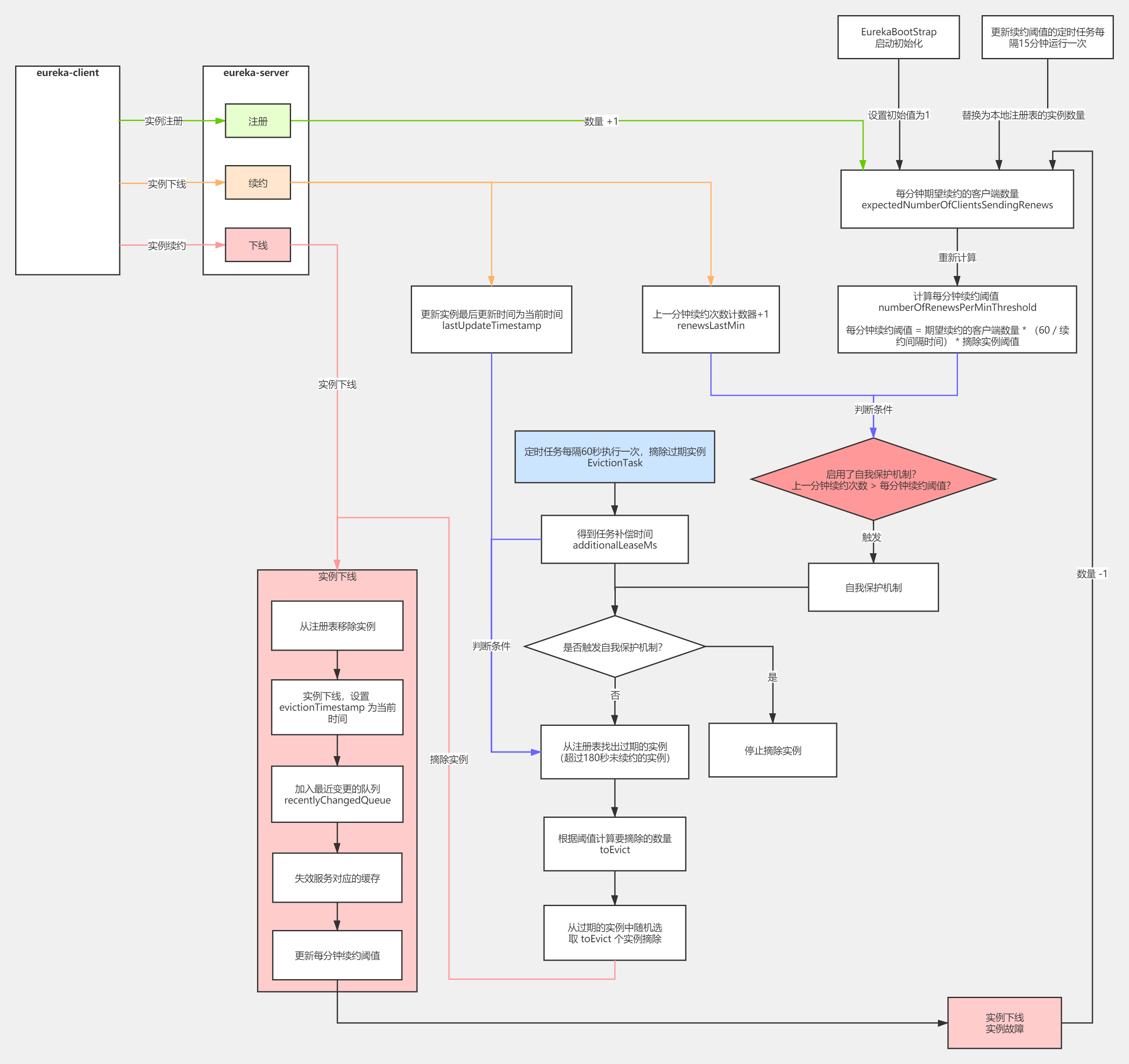
SpringCloud 源码系列(2)—— 注册中心 Eureka(中)的更多相关文章
- SpringCloud 源码系列(6)—— 声明式服务调用 Feign
SpringCloud 源码系列(1)-- 注册中心 Eureka(上) SpringCloud 源码系列(2)-- 注册中心 Eureka(中) SpringCloud 源码系列(3)-- 注册中心 ...
- SpringCloud 源码系列(5)—— 负载均衡 Ribbon(下)
SpringCloud 源码系列(4)-- 负载均衡 Ribbon(上) SpringCloud 源码系列(5)-- 负载均衡 Ribbon(下) 五.Ribbon 核心接口 前面已经了解到 Ribb ...
- SpringCloud 源码系列(1)—— 注册中心 Eureka(上)
Eureka 是 Netflix 公司开源的一个服务注册与发现的组件,和其他 Netflix 公司的服务组件(例如负载均衡.熔断器.网关等)一起,被 Spring Cloud 整合为 Spring C ...
- SpringCloud 源码系列(3)—— 注册中心 Eureka(下)
十一.Eureka Server 集群 在实际的生产环境中,可能有几十个或者几百个的微服务实例,Eureka Server 承担了非常高的负载,而且为了保证注册中心高可用,一般都要部署成集群的,下面就 ...
- 玩转springcloud(二):注册中心-Eureka
一.简介 注册中心 注册中心是服务发现的核心.它保存了各个可用服务实例的网络地址(IP Address和Port).服务注册中心必须要有高可用性和实时更新功能. Netflix Eureka 就是一个 ...
- SpringCloud 源码系列(4)—— 负载均衡 Ribbon
一.负载均衡 1.RestTemplate 在研究 eureka 源码上篇中,我们在 demo-consumer 消费者服务中定义了用 @LoadBalanced 标记的 RestTemplate,然 ...
- 学习一下 SpringCloud (二)-- 服务注册中心 Eureka、Zookeeper、Consul、Nacos
(1) 相关博文地址: 学习一下 SpringCloud (一)-- 从单体架构到微服务架构.代码拆分(maven 聚合): https://www.cnblogs.com/l-y-h/p/14105 ...
- motan源码解读:注册中心zookeeper(2)
上文大概讲解了利用zookeeper如何实现注册中心的.本文主要是从源码角度说明下.代码都在模块motan-registry-zookeeper中,其实在在这个模块中就3个类. ZkNodeType: ...
- springcloud(五,多个服务注册中心eureka)
spring cloud (一.服务注册demo_eureka) spring cloud (二.服务注册安全demo_eureka) spring cloud (三.服务提供者demo_provid ...
随机推荐
- win10安装linux子系统(wsl)
win10安装linux子系统(wsl) 1.打开Microsoft Store 方式一:在电脑左下角打开 方式二:在电脑左下角的搜索里里输入Microsoft Store 打开Microsoft S ...
- xshell连接windows10子系统ubuntu
修改端口 cd /etc/ssh#备份sudo cp sshd_config sshd_config.baksudo vim sshd_config修改sshd_config Port 2233 #修 ...
- requests库中的get()和post()方法
(一)get()方法 查看源码,如下: 1 def get(self, url, params, **kwargs): 2 r"""Sends a GET request ...
- K8S 搭建 Kafka:2.13-2.6.0 和 Zookeeper:3.6.2 集群
搭建 Kafka:2.13-2.6.0 和 Zookeeper:3.6.2 集群 一.服务版本信息: Kafka:v2.13-2.6.0 Zookeeper:v3.6.2 Kubernetes:v1. ...
- Python之使用pip安装三方库Error:Could not find a version that satisfies the requirement <package>(from versions: none),No matching distribution found for <package>
出现多次使用pip安装包时提示以下报错: ERROR: Could not find a version that satisfies the requirement <package> ...
- 转载:Pycharm的常用快捷键
一直想着找一下pycharm的快捷键,但是每次都忘记找了,这次刚好碰到一个很全的,就直接借用别人的来当作自己的笔记ba 转载来源:https://www.cnblogs.com/liangmingsh ...
- [转自王垠]完全用GNU/Linux工作,摈弃Windows低效率的工作方式
ZT (a qinghua student's article) 我已经半年没有使用 Windows 的方式工作了.Linux 高效的完成了我所有的工作. GNU/Linux 不是每个人都想用的.如果 ...
- mdp文件-Chapter1-MINIM.mdp
mdp文件是能量最小化,NVT模拟,NPT模拟与MD模拟的必须文件. mdp文件的详细解释可以参考官方文档http://manual.gromacs.org/online/mdp_opt.html 接 ...
- vue 切换主题(换肤)功能
一:先写好两个css样式放在static文件夹中 二:在index.html中添加css link链接 <link rel="stylesheet" id="sty ...
- rbd的增量备份和恢复
前言 快照的功能一般是基于时间点做一个标记,然后在某些需要的时候,将状态恢复到标记的那个点,这个有一个前提是底层的东西没用破坏,举个简单的例子,Vmware 里面对虚拟机做了一个快照,然后做了一些系统 ...