
POI3.10 根据Excel模版导出数据测试
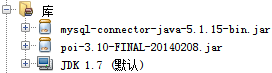
1:所需jar包
2:Mysql数据库表内容如下:

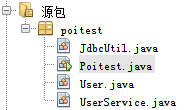
3:代码结构如下:
(1)User.java
public class User {

    private int id;

    private String name;

    private String no;

    private String nativePlace;

    private String edu;

    private Double math;

    private Double computer;

    private Double english;

    private Double sumcount;

    private Double avgcount;

   //setter-getter ...

}
(2)JdbcUtil.java
public class JdbcUtil {

    private static final String URL = "jdbc:mysql://localhost:3306/test";

    private static final String USER = "root";

    private static final String PASSWORD = "mysql";

    private JdbcUtil() {

    }

    static {

        try {

            Class.forName("com.mysql.jdbc.Driver");

        } catch (ClassNotFoundException ex) {

            Logger.getLogger(JdbcUtil.class.getName()).log(Level.SEVERE, null, ex);

        }

    }

    public static Connection getConnection() throws Exception {//建立连接

        return DriverManager.getConnection(URL, USER, PASSWORD);

    }

    public static void free(ResultSet rs, Statement st, Connection conn) {//释放资源

        try {

            if (rs != null) {

                rs.close();

            }

        } catch (SQLException ex) {

            Logger.getLogger(JdbcUtil.class.getName()).log(Level.SEVERE, null, ex);

        } finally {

            try {

                if (st != null) {

                    st.close();

                }

            } catch (SQLException ex) {

                Logger.getLogger(JdbcUtil.class.getName()).log(Level.SEVERE, null, ex);

            } finally {

                if (conn != null) {

                    try {

                        conn.close();

                    } catch (SQLException ex) {

                        Logger.getLogger(JdbcUtil.class.getName()).log(Level.SEVERE, null, ex);

                    }

                }

            }

        }

    }

}
(3)UserService.java
public class UserService {

    public static List<User> getUserList(){

        User user;

        List<User> list = new ArrayList<>();

        String sql = "select id,name,no,nativeplace,edu,math,computer,english,sumcount,avgcount from t_user";

        Connection conn = null;

        PreparedStatement ps = null;

        ResultSet rs = null;

        try {

            conn = JdbcUtil.getConnection();

            ps = conn.prepareStatement(sql);

            rs = ps.executeQuery();

            while(rs.next()){

                user = new User();

                user.setId(rs.getInt("id"));

                user.setName(rs.getString("name"));

                user.setNo(rs.getString("no"));

                user.setNativePlace(rs.getString("nativeplace"));

                user.setEdu(rs.getString("edu"));

                user.setMath(rs.getDouble("math"));

                user.setComputer(rs.getDouble("computer"));

                user.setEnglish(rs.getDouble("english"));

                user.setSumcount(rs.getDouble("sumcount"));

                user.setAvgcount(rs.getDouble("avgcount"));

                list.add(user);

            }

        } catch (Exception ex) {

            Logger.getLogger(UserService.class.getName()).log(Level.SEVERE, null, ex);

        }finally{

            JdbcUtil.free(rs, ps, conn);

        }

        return list;

    }

}
(4)Poitest.java
public class Poitest {

    /**

     * @param args the command line arguments

     */

    public static void main(String[] args) {

        InputStream inputStream = null;

        OutputStream outputStream =null;

        try {

            inputStream = new FileInputStream(new File("E:\\hello_temp.xls"));

            outputStream = new FileOutputStream(new File("E:\\hello1.xls"));

            writeToExcelByTemp2(inputStream,outputStream);

            System.out.println("成功生成");

        } catch (FileNotFoundException ex) {

            Logger.getLogger(Poitest.class.getName()).log(Level.SEVERE, null, ex);

        } catch (IOException ex) {

            Logger.getLogger(Poitest.class.getName()).log(Level.SEVERE, null, ex);

        }finally{

            if(null!=outputStream){

                try {

                    outputStream.close();

                } catch (IOException ex) {

                    Logger.getLogger(Poitest.class.getName()).log(Level.SEVERE, null, ex);

                }

            }

            if(null!=inputStream){

                try {

                    inputStream.close();

                } catch (IOException ex) {

                    Logger.getLogger(Poitest.class.getName()).log(Level.SEVERE, null, ex);

                }

            }

        }

    }

    /**

     * 根据模版生成Excel

     * @param inputStream

     * @param outputStream

     * @throws IOException

     */

     public static void writeToExcelByTemp2(InputStream inputStream, OutputStream outputStream) throws IOException{

        List<User> list = UserService.getUserList();

        int length = list.size();

        //New Workbook

        Workbook wb = new HSSFWorkbook(inputStream);

        //New Sheet

        Sheet sheet = wb.getSheetAt(0);

        int curRowIndex = 0;

        for(int rowIndex=1; rowIndex<=length;rowIndex++){

            curRowIndex = rowIndex;

            //获取一行,如果为空则新建

            Row row = sheet.getRow(rowIndex);

            if(row == null){

                row = sheet.createRow(rowIndex);

            }

            User user = list.get(rowIndex-1);

            //根据user的对象个数创建列数

            for(int cellNum=0; cellNum<10;cellNum++){

                Cell cell = row.getCell(cellNum);

                if(cell==null){

                    cell = row.createCell(cellNum);

                }

                switch(cellNum){

                    case 0:

                        cell.setCellValue(user.getId());

                        break;

                    case 1:

                        cell.setCellValue(user.getName());

                        break;

                    case 2:

                        cell.setCellValue(user.getNo());

                        break;

                    case 3:

                        cell.setCellValue(user.getNativePlace());

                        break;

                    case 4:

                        cell.setCellValue(user.getEdu());

                        break;

                    case 5:

                        cell.setCellValue(user.getMath());

                        break;

                    case 6:

                        cell.setCellValue(user.getComputer());

                        break;

                    case 7:

                        cell.setCellValue(user.getEnglish());

                        break;

                    case 8:

                        cell.setCellFormula("SUM(F"+(rowIndex+1)+":H"+(rowIndex+1)+")");

                        break;

                    case 9:

                       cell.setCellFormula("I" + (rowIndex+1) +"/3");

                        break;

                }

            }

        }

        curRowIndex++;

        Row row = sheet.createRow(curRowIndex);

        Cell cell0 = row.createCell(0);

        cell0.setCellValue("总计");

        Cell cell5 = row.createCell(5);

        cell5.setCellFormula("SUM(F2:"+"F"+(curRowIndex)+")");

        Cell cell6 = row.createCell(6);

        cell6.setCellFormula("SUM(G2:"+"G"+(curRowIndex)+")");

        Cell cell7 = row.createCell(7);

        cell7.setCellFormula("SUM(H2:"+"H"+(curRowIndex)+")");

        Cell cell8 = row.createCell(8);

        cell8.setCellFormula("SUM(I2:"+"I"+(curRowIndex)+")");

        Cell cell9 = row.createCell(9);

        cell9.setCellFormula("AVERAGE(J2:"+"J"+(curRowIndex)+")");

        wb.write(outputStream);

     }

}
Excel模版:

生成结果:

POI3.10 根据Excel模版导出数据测试的更多相关文章
- JAVA实现Excel导出数据(以写好的Excel模版导出)
工作中经常会有将后台数据以Excel导出的功能. 简单的方法有将response的contentType设置为application/vnd.ms-excel: 或在JSP页面直接设置成: <% ...
- [poi使用]使用excel模版导出excel
Apache POI是基于Office Open XML标准(OOXML)和Microsoft的OLE 2复合文档格式(OLE2)处理各种文件格式的开源项目.简而言之,您可以使用Java读写MS ...
- POI3.10读取Excel模板填充数据后生成新的Excel文件
private final DecimalFormat df = new DecimalFormat("#0.00"); public void test(){ String fi ...
- (6) 如何用Apache POI操作Excel文件-----POI-3.10的一个和注解(comment)相关的另外一个bug
如果POI-3.10往一个工作表(sheet)里面插入数据的话,需要注意了,其有一个不太被容易发现的bug. 被插入的工作表(sheet)里面的单元格没有包含任何的注解(comment)的时候,插入一 ...
- jxls使用模版导出Excel
/** * 使用模版导出Excel */ @SuppressWarnings({ "unchecked", "deprecation" } ...
- java+jxls利用excel模版进行导出
大多时候会出现需要导出excel的功能,利用poi可以实现简单的导出,可以说poi的功能非常强大可以做到细节的定制化操作,但相对于在office操作excel,利用poi完全生成excel会显得非常复 ...
- 按模版导出Excel
实现效果: excel模版: ExcelHandle.java package com.common.utils; import java.io.File; import java.io.FileIn ...
- NPOI的使用Excel模板导出
private string ExportScMeeting(DataTable source) { string templateFile = Server.MapPath(@"Excel ...
- C#巧用Excel模版变成把Table打印出来
将一个做好的Excel模版,通过程序填上数据然后打印出来这个需求有两种方法一种是通过代码打开Excel模版然后填入数据然后再打印. 第二种方法就是我将要介绍的 1.将Excel设置好格式另存为HTML ...
随机推荐
- Android中读取assets文件夹中的子文件夹内容
文件结构如下:assets/info/info AssetManager am = this.getResources().getAssets(); InputStream input = null; ...
- getResources().getXml()获取xml
获取XML文件的基本思路是,通过getResources().getXml()获的XML原始文件,得到XmlResourceParser对象,通过该对象来判断是文档的开头还是结尾,是某个标签的开始还是 ...
- Codeforces 366C Dima and Salad
http://codeforces.com/problemset/problem/366/C 题意:在一个冰箱里有n种水果,并且这些水果每一种都有一个美味度和一个卡路里的属性, 小明要从这些水果中选出 ...
- Qt5.3企业版和开源版功能区别
一: Charts Charts是QT提供的图表模块.他提供了非常简便的APIs来绘制令人惊叹的Line, Spline,Area,Scatter,Pie,Donut,Bar,Polar和Box-an ...
- Could not open a connection to your authentication agent
执行ssh-add ~/.ssh/rsa 就会遇到上述错误了 解决方案: 先执行 eval `ssh-agent` (是-键上的那个`) 再执行 ssh-add ~/.ssh/rsa成功 ssh ...
- 人物角色群体攻击判定(三)Physics.OverlapSphere(群体攻击)
使用Physics.OverlapSphere来检测不方便调试, 其他都可以. 核心代码: //检测敌人 public void CheckEnemy() { Collider[] cols = ...
- jquery.validate详解一
jQuery校验 官网地址:http://bassistance.de/jquery-plugins/jquery-plugin-validation 一导入js库 <script src=&q ...
- Funsion Charts 学习(一)
学习官网: http://www.fusioncharts.com/explore/line-area-charts/ 参数: numvdivlines number 垂直线显示vd ...
- oracle生成随机数
UPDATE busi_chance_info t SET t.exp_amount = (SELECT floor(dbms_random.value(1, 10000000)) ...
- Xcode 常用快捷键及代码自动排版
1. 文件CMD + N: 新文件CMD + SHIFT + N: 新项目CMD + O: 打开CMD + S: 保存CMD+OPt+S:保存所有文件CMD + SHIFT + S: 另存为CMD + ...