
C#注册表
C#注册表情缘
记得当时刚接触C#的时候,喜欢编写各种小软件,而注册表系列和网络系列被当时的我认为大牛的必备技能。直到我研究注册表前一天我都感觉他是那么的高深。
今天正好有空,于是就研究了下注册表系列的操作,也随手封装了一个注册表帮助类。简单记一下,当饭后娱乐
完整Demo研究:https://github.com/dunitian/LoTCodeBase/tree/master/NetCode/0.知识拓展/02.注册表系
这个是一些常用的方法和属性(不全,只是列出了比较常用的一些)【OpenSubKey(string name,bool b)当b为true则表示开了可写权限】

//RegistryKey
//属性:
// ValueCount 检索项中值的计数
// SubKeyCount 获取子项个数//方法:
// OpenSubKey(string name,bool b) 获取子项 RegistryKey,b为true时代表可写
// GetSubKeyNames() 获取所有子项名称的字符串数组
// GetValueNames() 检索包含与此项关联的所有值名称的字符串数组
// GetValue(string name) 获取指定名称,不存在名称/值对,则返回 null
// CreateSubKey(string subkey) 创建或者打开子项的名称或路径
// SetValue(string name,object value) 创建或者打开子项的名称或路径
// DeleteSubKeyTree(string subkey) 递归删除指定目录,不存在则抛异常
// DeleteSubKey(string subkey,bool b) 删除子项,b为false则当子项不存在时不抛异常
// DeleteValue(string name,bool b) 删除指定的键值,b为false则当子项不存在时不抛异常
先举个简单的案例:

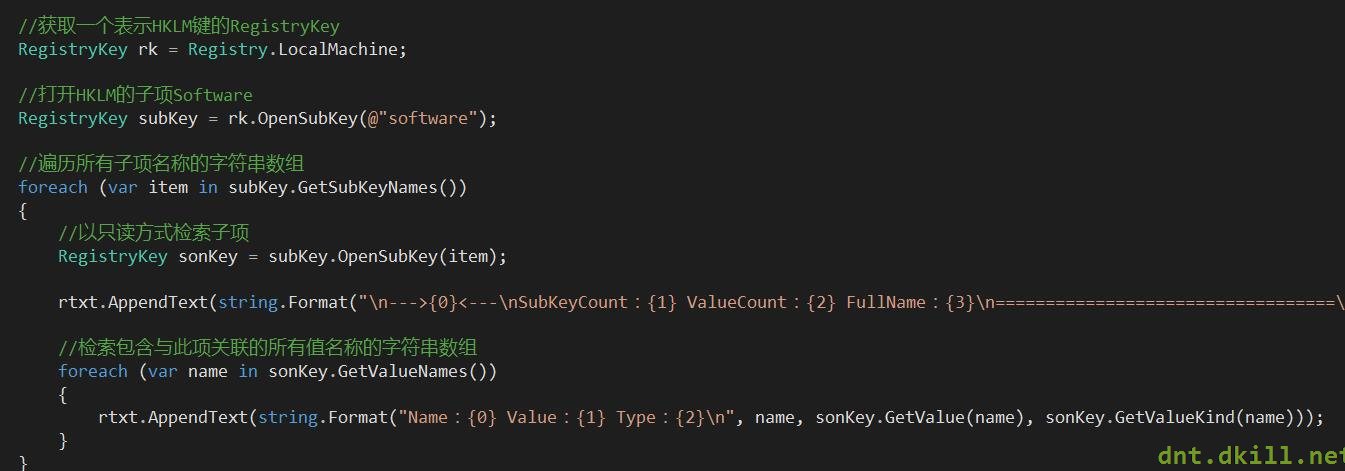
代码如下:
|
1
2
3
4
5
6
7
8
9
10
11
12
13
14
15
16
17
18
19
20
|
//获取一个表示HKLM键的RegistryKey RegistryKey rk = Registry.LocalMachine; //打开HKLM的子项Software RegistryKey subKey = rk.OpenSubKey(@"software"); //遍历所有子项名称的字符串数组 foreach (var item in subKey.GetSubKeyNames()) { //以只读方式检索子项 RegistryKey sonKey = subKey.OpenSubKey(item); rtxt.AppendText(string.Format("\n--->{0}<---\nSubKeyCount:{1} ValueCount:{2} FullName:{3}\n==================================\n", item, sonKey.SubKeyCount, sonKey.ValueCount, sonKey.Name)); //检索包含与此项关联的所有值名称的字符串数组 foreach (var name in sonKey.GetValueNames()) { rtxt.AppendText(string.Format("Name:{0} Value:{1} Type:{2}\n", name, sonKey.GetValue(name), sonKey.GetValueKind(name))); } } |
做个综合的案例:
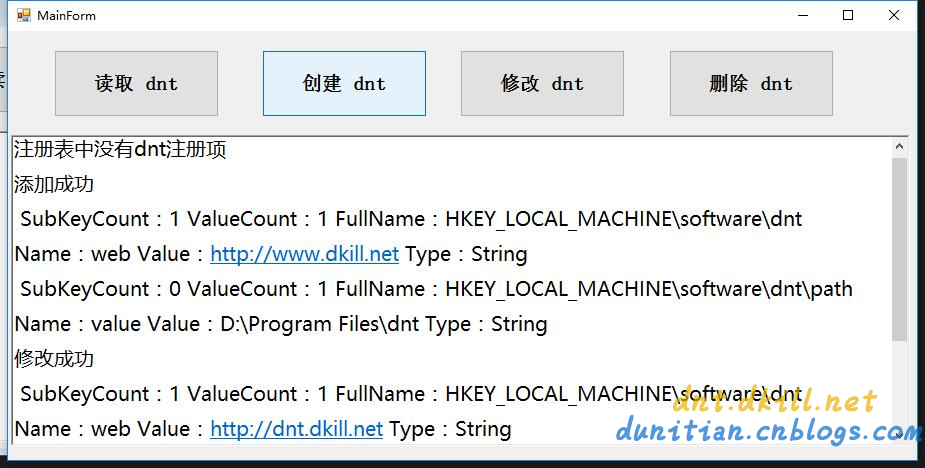
代码如下:
|
1
2
3
4
5
6
7
8
9
10
11
12
13
14
15
16
17
18
19
20
21
22
23
24
25
26
27
28
29
30
31
32
33
34
35
36
37
38
39
40
41
42
43
44
45
46
47
48
49
50
51
52
53
54
55
56
57
58
59
60
61
62
63
64
65
66
67
68
69
70
71
72
73
74
75
76
77
78
79
80
81
82
83
84
85
86
87
88
89
90
91
92
93
94
95
96
97
|
public partial class MainForm : Form { public RegistryKey Reg { get; set; } public MainForm() { InitializeComponent(); //初始化 var rootReg = Registry.LocalMachine; Reg = rootReg.OpenSubKey("software", true);//开权限 } #region 公用方法 /// <summary> /// 检验是否为空 /// </summary> /// <param name="dntReg"></param> private bool KeyIsNull(RegistryKey dntReg) { if (dntReg == null) { rtxt.AppendText("注册表中没有dnt注册项\n"); return true; } return false; } /// <summary> /// 遍历Key的Value /// </summary> /// <param name="reg"></param> private void ForeachRegKeys(RegistryKey reg) { rtxt.AppendText(string.Format("\n SubKeyCount:{0} ValueCount:{1} FullName:{2}\n", reg.SubKeyCount, reg.ValueCount, reg.Name)); foreach (var name in reg.GetValueNames()) { rtxt.AppendText(string.Format("Name:{0} Value:{1} Type:{2}\n", name, reg.GetValue(name), reg.GetValueKind(name))); } } #endregion //查 private void btn1_Click(object sender, EventArgs e) { var dntReg = Reg.OpenSubKey("dnt"); if (KeyIsNull(dntReg)) return; ForeachRegKeys(dntReg); foreach (var item in dntReg.GetSubKeyNames()) { //以只读方式检索子项 RegistryKey sonKey = dntReg.OpenSubKey(item); ForeachRegKeys(sonKey); } } //增 private void btn2_Click(object sender, EventArgs e) { var dntReg = Reg.CreateSubKey("dnt"); var sonReg = dntReg.CreateSubKey("path"); sonReg.SetValue("value", "D:\\Program Files\\dnt"); rtxt.AppendText("添加成功\n"); } //改 private void btn3_Click(object sender, EventArgs e) { var dntReg = Reg.OpenSubKey("dnt", true); if (KeyIsNull(dntReg)) return; rtxt.AppendText("修改成功\n"); } //删 private void btn4_Click(object sender, EventArgs e) { try { #region 删除某个值 //var dntReg = Reg.OpenSubKey("dnt", true); //if (KeyIsNull(dntReg)) return; //dntReg.DeleteValue("web", false); #endregion Reg.DeleteSubKeyTree("dnt", false); rtxt.AppendText("删除成功\n"); } catch (ArgumentException ex) { rtxt.AppendText(ex.ToString()); } } private void clearlog_Click(object sender, EventArgs e) { rtxt.Clear(); } } |
Helper类综合实战:(有其他演示,有的电脑会出现权限问题)

|
1
2
3
4
5
6
7
8
9
10
11
12
13
14
15
16
17
18
19
20
21
22
23
24
25
26
27
28
29
30
31
32
33
34
35
36
37
38
39
40
41
42
43
44
45
46
47
48
49
50
51
52
53
54
55
56
57
58
59
60
61
62
63
64
65
66
67
68
69
70
71
72
73
74
75
76
77
78
79
80
81
82
83
84
85
86
87
88
89
90
91
92
93
94
95
96
97
98
99
100
101
102
103
104
105
106
107
108
109
110
111
112
113
114
115
116
117
118
119
120
121
122
123
124
125
126
127
128
129
130
131
132
133
134
135
136
137
138
139
140
141
142
143
144
145
146
147
148
149
|
using Microsoft.Win32;using System.Collections.Generic;public static partial class RegistryHelper{ #region 节点 /// <summary> /// HKEY_LOCAL_MACHINE 节点 /// </summary> public static RegistryKey RootReg = Registry.LocalMachine; /// <summary> /// HKEY_LOCAL_MACHINE 下 Software 节点 /// </summary> public static RegistryKey SoftReg = Registry.LocalMachine.OpenSubKey("software", true); /// <summary> /// 包含有关当前用户首选项的信息。该字段读取 Windows 注册表基项 HKEY_CURRENT_USER /// </summary> public static RegistryKey CurrentUser = Registry.CurrentUser; /// <summary> /// HKEY_CURRENT_USER 下 Software 节点 /// </summary> public static RegistryKey UserSoftReg = Registry.CurrentUser.OpenSubKey("software", true); #endregion #region 查询 /// <summary> /// 根据名称查找Key,有则返回RegistryKey对象,没有则返回null /// </summary> /// <param name="name">要打开的子项的名称或路径</param> /// <param name="b">如果不需要写入权限请选择false</param> /// <returns></returns> public static RegistryKey FindKey(this RegistryKey reg, string name, bool b = true) { return reg.OpenSubKey(name, b); } /// <summary> /// 获取(name,value)字典,没有则返回null /// </summary> /// <param name="reg">当前RegistryKey</param> /// <returns></returns> public static IDictionary<string, object> GetKeyValueDic(this RegistryKey reg) { var dic = new Dictionary<string, object>(); if (reg.ValueCount == 0) { return null; } ForeachRegKeys(reg, ref dic); return dic; } /// <summary> /// 获取子项(name,value)字典,没有则返回null /// </summary> /// <param name="reg">当前RegistryKey</param> /// <returns></returns> public static IDictionary<string, object> GetSubKeyValueDic(this RegistryKey reg) { var dic = new Dictionary<string, object>(); if (reg.SubKeyCount == 0) { return null; } foreach (var item in reg.GetSubKeyNames()) { //以只读方式检索子项 var sonKey = reg.OpenSubKey(item); ForeachRegKeys(sonKey, ref dic); } return dic; } /// <summary> /// 遍历RegistryKey /// </summary> /// <param name="reg"></param> /// <param name="dic"></param> private static void ForeachRegKeys(RegistryKey reg, ref Dictionary<string, object> dic) { foreach (var name in reg.GetValueNames()) { dic.Add(name, reg.GetValue(name)); } } #endregion #region 添加 /// <summary> /// 添加一个子项 /// </summary> /// <param name="name"></param> /// <returns></returns> public static RegistryKey AddSubItem(this RegistryKey reg, string name) { return reg.CreateSubKey(name); } /// <summary> /// 添加key-value,异常则RegistryKey对象返回null /// </summary> /// <param name="reg"></param> /// <param name="key"></param> /// <param name="value"></param> /// <returns></returns> public static RegistryKey AddKeyValue(this RegistryKey reg, string key, object value) { reg.SetValue(key, value); return reg; } #endregion #region 修改 /// <summary> /// 修改key-value,异常则RegistryKey对象返回null /// </summary> /// <param name="reg"></param> /// <param name="key"></param> /// <param name="value"></param> /// <returns></returns> public static RegistryKey UpdateKeyValue(this RegistryKey reg, string key, object value) { return reg.AddKeyValue(key, value); } #endregion #region 删除 /// <summary> /// 根据Key删除项 /// </summary> /// <param name="reg"></param> /// <param name="key"></param> /// <returns></returns> public static RegistryKey DeleteKeyValue(this RegistryKey reg, string key) { reg.DeleteValue(key, false); return reg; } /// <summary> /// 删除子项所有内容 /// </summary> /// <param name="reg"></param> /// <param name="key"></param> /// <returns></returns> public static RegistryKey ClearSubAll(this RegistryKey reg, string key) { reg.DeleteSubKeyTree(key, false); return reg; } #endregion} |
C#注册表的更多相关文章
- Win.ini和注册表的读取写入
最近在做打包的工作,应用程序的配置信息可以放在注册表文件中,但是在以前的16位操作系统下,配置信息放在Win.ini文件中.下面介绍一下Win.ini文件的读写方法和注册表的编程. 先介绍下Win.i ...
- 卸载oracle之后,如何清除注册表
之前卸载了oracle,今天偶然间发现,在服务和应用程序里面,还残存着之前的oracle服务.原来,还需要去清理下注册表. 在开始菜单的这个框里面 输入regedit,进入注册表.找到这个目录 HKE ...
- 利用注册表在右键添加VS15的快捷方式打开文件夹
1.简介 最近安装VS15 Preview 5,本版本可以打开"文件夹" 是否可以向Visual Studio Code一样在文件夹或文件右键菜单添加"Open with ...
- 修改策略组/注册表 屏蔽Win10升级解决方法
一.Windows非家庭版 第1步:按Win+R键调出运行对话框,输入命令“gpedit.msc”,按回车键启动组策略编辑器. 第2步:依次定位到“计算机配置→管理模板→Windows组件→Windo ...
- Windows 7安装软件时无法将注册值写入注册表的处理方法
1. 我们来确认一下,有没有安装什么软件把注册表给封了.如杀毒软件,防火墙等.把这些软件关了之后,再安装软件试试:如果不行,就把杀毒软件卸载了,再安装软件试试. 2. 更改组策略设置 步骤: 开始-运 ...
- MFC操作注册表
1.创建和修改注册表 BOOL CTestToolCtr::GetHkey(CString strHkey, HKEY& hkey) { == strHkey.CompareNoCase(_T ...
- Win 通过修改注册表把CapsLock映射为Rshift
成品: REGEDIT4 [HKEY_LOCAL_MACHINE\SYSTEM\CurrentControlSet\Control\Keyboard Layout] "Scancod ...
- js通过注册表找到本地软件安装路径并且执行
场景:用js执行本地的安装软件,如果不存在就执行安装 操作步骤: 1.前台js代码 <script type="text/javascript"> function e ...
- 修改注册表 去除Windows快捷方式图标小箭头
一些朋友不喜欢Windows系统中快捷方式图标上面的小箭头,下面介绍如何修改注册表去除快捷方式图标上的小箭头. 1.开始->运行->输入regedit,启动注册表编辑器,然后; 2.依次展 ...
- 弥补学生时代的遗憾~C#注册表情缘
记得当时刚接触C#的时候,喜欢编写各种小软件,而注册表系列和网络系列被当时的我认为大牛的必备技能.直到我研究注册表前一天我都感觉他是那么的高深. 今天正好有空,于是就研究了下注册表系列的操作,也随手封 ...
随机推荐
- Loadrunner11点击录制脚本无响应,IE页面弹不出——解决方案汇总
以前用Loadrunner的时候都没有遇到过这个问题,后来将服务器重装系统(win7)后,重新安装Loadrunner11,浏览器版本刚开始为IE11,后来降为IE8,IE访问部署在虚拟机里的平台能正 ...
- linq to entity asp.net mvc 多字段排序
字段1 降序 字段2 降序 var str = db.xxx.OrderByDescending(p=>p.字段1).ThenByDescending(p=>p.字段2) ThenBy - ...
- 手动修改VisualStudio IISExpress的配置
<VisualStudio> <FlavorProperties GUID="{349c5851-65df-11da-9384-00065b846f21}"> ...
- 拿出来分享了!VIP珍藏!!!全网最齐全的 DEDECMS模板 全盘下载地址列表!没有你找不到的!
拿出来分享了!VIP珍藏!!!全网最齐全的 DEDECMS模板 网盘地址!没有你找不到的! 模板类型最齐全: ----------------------优美的走起!------------ 一:DE ...
- 安卓入门学习之Hello,world!
第二章 Hello,world! 本文同时发表至简书,不为什么,用他的MarkDown在线编辑爽得要哭. 注意:本章节所使用的开发工具为Eclipse 以Android编程权威指南作为学习书物 第一节 ...
- MBProgressHUD简单使用
使用HUD最多的情形用于请求等待提示 例如做登录的时候在确认登陆的时候可以用HUD提示正在登陆. 最基本的使用 初始化 //self.view代表在哪个view中显示hud MBProgressHUD ...
- XAlign - Xcode插件 - 对齐代码
链接地址:http://my.oschina.net/u/2473136/blog/520620 一款十分强大的自定义对齐模式插件 开源地址:https://github.com/qfish/XAli ...
- PHPExcel 生成图形报表
db.php为数据库操作类, $config为数据库配置,PHPExcel版本为PHPExcel_1.8.0, PHP代码: $dir = dirname(__FILE__); require $d ...
- [LeetCode]题解(python):063-Unique Paths II
题目来源: https://leetcode.com/problems/unique-paths-ii/ 题意分析: 这题的规则和上一题一样.给一个m×n的矩阵0,1矩阵.0代表可以经过,1代表不可以 ...
- sql差异
类别 MS SQL Server My SQL PG SQL Oracle Access 自增 identity(1,1) auto_increment ALTER TABLE 'tableNam ...