
弥补学生时代的遗憾~C#注册表情缘
记得当时刚接触C#的时候,喜欢编写各种小软件,而注册表系列和网络系列被当时的我认为大牛的必备技能。直到我研究注册表前一天我都感觉他是那么的高深。
今天正好有空,于是就研究了下注册表系列的操作,也随手封装了一个注册表帮助类。简单记一下,当饭后娱乐
完整Demo研究:https://github.com/dunitian/LoTCodeBase/tree/master/NetCode/0.知识拓展/02.注册表系
这个是一些常用的方法和属性(不全,只是列出了比较常用的一些)【OpenSubKey(string name,bool b)当b为true则表示开了可写权限】

//RegistryKey
//属性:
// ValueCount 检索项中值的计数
// SubKeyCount 获取子项个数//方法:
// OpenSubKey(string name,bool b) 获取子项 RegistryKey,b为true时代表可写
// GetSubKeyNames() 获取所有子项名称的字符串数组
// GetValueNames() 检索包含与此项关联的所有值名称的字符串数组
// GetValue(string name) 获取指定名称,不存在名称/值对,则返回 null
// CreateSubKey(string subkey) 创建或者打开子项的名称或路径
// SetValue(string name,object value) 创建或者打开子项的名称或路径
// DeleteSubKeyTree(string subkey) 递归删除指定目录,不存在则抛异常
// DeleteSubKey(string subkey,bool b) 删除子项,b为false则当子项不存在时不抛异常
// DeleteValue(string name,bool b) 删除指定的键值,b为false则当子项不存在时不抛异常
先举个简单的案例:

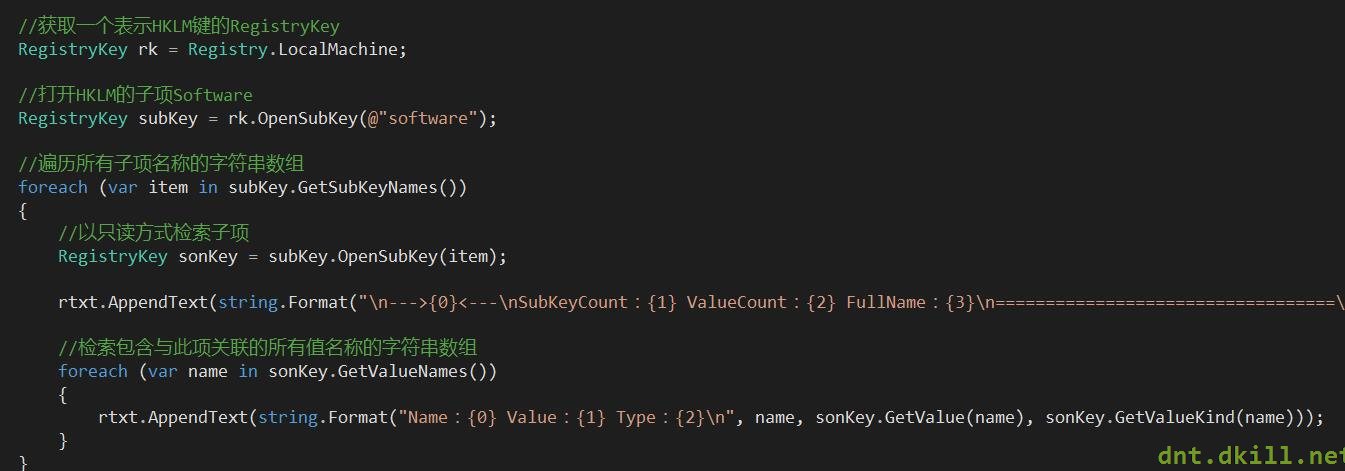
代码如下:
//获取一个表示HKLM键的RegistryKey

            RegistryKey rk = Registry.LocalMachine;

            //打开HKLM的子项Software

            RegistryKey subKey = rk.OpenSubKey(@"software");

            //遍历所有子项名称的字符串数组

            foreach (var item in subKey.GetSubKeyNames())

            {

                //以只读方式检索子项

                RegistryKey sonKey = subKey.OpenSubKey(item);

                rtxt.AppendText(string.Format("\n--->{0}<---\nSubKeyCount:{1} ValueCount:{2} FullName:{3}\n==================================\n", item, sonKey.SubKeyCount, sonKey.ValueCount, sonKey.Name));

                //检索包含与此项关联的所有值名称的字符串数组

                foreach (var name in sonKey.GetValueNames())

                {

                    rtxt.AppendText(string.Format("Name:{0} Value:{1} Type:{2}\n", name, sonKey.GetValue(name), sonKey.GetValueKind(name)));

                }

            }
做个综合的案例:
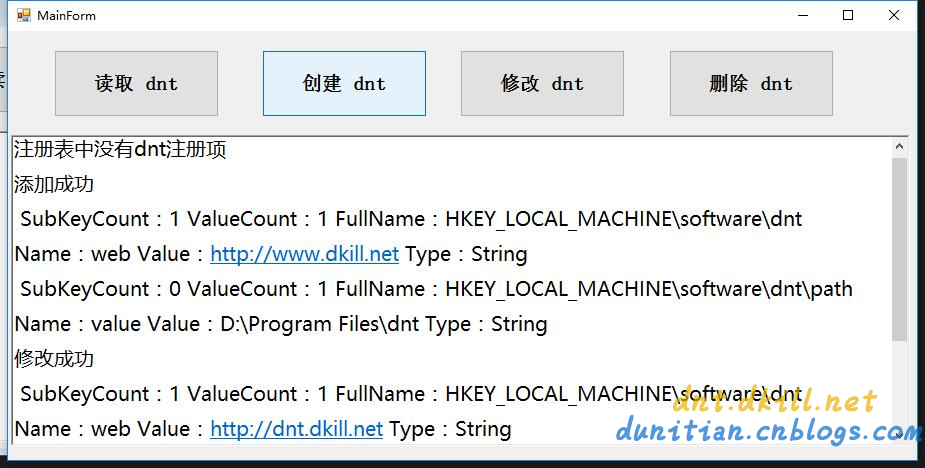
代码如下:
public partial class MainForm : Form

    {

        public RegistryKey Reg { get; set; }

        public MainForm()

        {

            InitializeComponent();

            //初始化

            var rootReg = Registry.LocalMachine;

            Reg = rootReg.OpenSubKey("software", true);//开权限

        }

        #region 公用方法

        /// <summary>

        /// 检验是否为空

        /// </summary>

        /// <param name="dntReg"></param>

        private bool KeyIsNull(RegistryKey dntReg)

        {

            if (dntReg == null)

            {

                rtxt.AppendText("注册表中没有dnt注册项\n");

                return true;

            }

            return false;

        }

        /// <summary>

        /// 遍历Key的Value

        /// </summary>

        /// <param name="reg"></param>

        private void ForeachRegKeys(RegistryKey reg)

        {

            rtxt.AppendText(string.Format("\n SubKeyCount:{0} ValueCount:{1} FullName:{2}\n", reg.SubKeyCount, reg.ValueCount, reg.Name));

            foreach (var name in reg.GetValueNames())

            {

                rtxt.AppendText(string.Format("Name:{0} Value:{1} Type:{2}\n", name, reg.GetValue(name), reg.GetValueKind(name)));

            }

        }

        #endregion

        //查

        private void btn1_Click(object sender, EventArgs e)

        {

            var dntReg = Reg.OpenSubKey("dnt");

            if (KeyIsNull(dntReg)) return;

            ForeachRegKeys(dntReg);

            foreach (var item in dntReg.GetSubKeyNames())

            {

                //以只读方式检索子项

                RegistryKey sonKey = dntReg.OpenSubKey(item);

                ForeachRegKeys(sonKey);

            }

        }

        //增

        private void btn2_Click(object sender, EventArgs e)

        {

            var dntReg = Reg.CreateSubKey("dnt");

            dntReg.SetValue("web", "http://www.dkill.net");

            var sonReg = dntReg.CreateSubKey("path");

            sonReg.SetValue("value", "D:\\Program Files\\dnt");

            rtxt.AppendText("添加成功\n");

        }

        //改

        private void btn3_Click(object sender, EventArgs e)

        {

            var dntReg = Reg.OpenSubKey("dnt", true);

            if (KeyIsNull(dntReg)) return;

            dntReg.SetValue("web", "http://dnt.dkill.net");

            rtxt.AppendText("修改成功\n");

        }

        //删

        private void btn4_Click(object sender, EventArgs e)

        {

            try

            {

                #region 删除某个值

                //var dntReg = Reg.OpenSubKey("dnt", true);

                //if (KeyIsNull(dntReg)) return;

                //dntReg.DeleteValue("web", false);

                #endregion

                Reg.DeleteSubKeyTree("dnt", false);

                rtxt.AppendText("删除成功\n");

            }

            catch (ArgumentException ex)

            {

                rtxt.AppendText(ex.ToString());

            }

        }

        private void clearlog_Click(object sender, EventArgs e)

        {

            rtxt.Clear();

        }

    }
Helper类综合实战:(有其他演示,有的电脑会出现权限问题)

using Microsoft.Win32;

using System.Collections.Generic;

public static partial class RegistryHelper

{

    #region 节点

    /// <summary>

    /// HKEY_LOCAL_MACHINE 节点

    /// </summary>

    public static RegistryKey RootReg = Registry.LocalMachine;

    /// <summary>

    /// HKEY_LOCAL_MACHINE 下 Software 节点

    /// </summary>

    public static RegistryKey SoftReg = Registry.LocalMachine.OpenSubKey("software", true);

    /// <summary>

    /// 包含有关当前用户首选项的信息。该字段读取 Windows 注册表基项 HKEY_CURRENT_USER

    /// </summary>

    public static RegistryKey CurrentUser = Registry.CurrentUser;

    /// <summary>

    /// HKEY_CURRENT_USER 下 Software 节点

    /// </summary>

    public static RegistryKey UserSoftReg = Registry.CurrentUser.OpenSubKey("software", true);

    #endregion

    #region 查询

    /// <summary>

    /// 根据名称查找Key,有则返回RegistryKey对象,没有则返回null

    /// </summary>

    /// <param name="name">要打开的子项的名称或路径</param>

    /// <param name="b">如果不需要写入权限请选择false</param>

    /// <returns></returns>

    public static RegistryKey FindKey(this RegistryKey reg, string name, bool b = true)

    {

        return reg.OpenSubKey(name, b);

    }

    /// <summary>

    /// 获取(name,value)字典,没有则返回null

    /// </summary>

    /// <param name="reg">当前RegistryKey</param>

    /// <returns></returns>

    public static IDictionary<string, object> GetKeyValueDic(this RegistryKey reg)

    {

        var dic = new Dictionary<string, object>();

        if (reg.ValueCount == 0) { return null; }

        ForeachRegKeys(reg, ref dic);

        return dic;

    }

    /// <summary>

    /// 获取子项(name,value)字典,没有则返回null

    /// </summary>

    /// <param name="reg">当前RegistryKey</param>

    /// <returns></returns>

    public static IDictionary<string, object> GetSubKeyValueDic(this RegistryKey reg)

    {

        var dic = new Dictionary<string, object>();

        if (reg.SubKeyCount == 0) { return null; }

        foreach (var item in reg.GetSubKeyNames())

        {

            //以只读方式检索子项

            var sonKey = reg.OpenSubKey(item);

            ForeachRegKeys(sonKey, ref dic);

        }

        return dic;

    }

    /// <summary>

    /// 遍历RegistryKey

    /// </summary>

    /// <param name="reg"></param>

    /// <param name="dic"></param>

    private static void ForeachRegKeys(RegistryKey reg, ref Dictionary<string, object> dic)

    {

        foreach (var name in reg.GetValueNames())

        {

            dic.Add(name, reg.GetValue(name));

        }

    }

    #endregion

    #region 添加

    /// <summary>

    /// 添加一个子项

    /// </summary>

    /// <param name="name"></param>

    /// <returns></returns>

    public static RegistryKey AddSubItem(this RegistryKey reg, string name)

    {

        return reg.CreateSubKey(name);

    }

    /// <summary>

    /// 添加key-value,异常则RegistryKey对象返回null

    /// </summary>

    /// <param name="reg"></param>

    /// <param name="key"></param>

    /// <param name="value"></param>

    /// <returns></returns>

    public static RegistryKey AddKeyValue(this RegistryKey reg, string key, object value)

    {

        reg.SetValue(key, value);

        return reg;

    }

    #endregion

    #region 修改

    /// <summary>

    /// 修改key-value,异常则RegistryKey对象返回null

    /// </summary>

    /// <param name="reg"></param>

    /// <param name="key"></param>

    /// <param name="value"></param>

    /// <returns></returns>

    public static RegistryKey UpdateKeyValue(this RegistryKey reg, string key, object value)

    {

        return reg.AddKeyValue(key, value);

    }

    #endregion

    #region 删除

    /// <summary>

    /// 根据Key删除项

    /// </summary>

    /// <param name="reg"></param>

    /// <param name="key"></param>

    /// <returns></returns>

    public static RegistryKey DeleteKeyValue(this RegistryKey reg, string key)

    {

        reg.DeleteValue(key, false);

        return reg;

    }

    /// <summary>

    /// 删除子项所有内容

    /// </summary>

    /// <param name="reg"></param>

    /// <param name="key"></param>

    /// <returns></returns>

    public static RegistryKey ClearSubAll(this RegistryKey reg, string key)

    {

        reg.DeleteSubKeyTree(key, false);

        return reg;

    }

    #endregion

}
弥补学生时代的遗憾~C#注册表情缘的更多相关文章
- 10#Windows注册表的那些事儿
引言 用了多年的Windows系统,其实并没有对Windows系统进行过深入的了解,也正是由于Windows系统不用深入了解就可以简单上手所以才有这么多人去使用.笔者是做软件开发的,使用的基本都是Wi ...
- C#注册表
C#注册表情缘 记得当时刚接触C#的时候,喜欢编写各种小软件,而注册表系列和网络系列被当时的我认为大牛的必备技能.直到我研究注册表前一天我都感觉他是那么的高深. 今天正好有空,于是就研究了下注册表 ...
- [转]Windows系统注册表知识完全揭密
来源:http://www.jb51.net/article/3328.htm Windows注册表是帮助Windows控制硬件.软件.用户环境和Windows界面的一套数据文件,注册表包含在Wind ...
- 注册表与盘符(转victor888文章 )
转自: http://blog.csdn.net/loulou_ff/article/details/3769479 写点东西,把这阶段的研究内容记录下来,同时也给研究相关内容的同志提供参考, ...
- 64位WINDOWS系统环境下应用软件开发的兼容性问题(CPU 注册表 目录)
应用软件开发的64 位WINDOWS 系统环境兼容性 1. 64 位CPU 硬件 目前的64位CPU分为两类:x64和IA64.x64的全称是x86-64,从名字上也可以看出来它和 x86是兼容的,原 ...
- 【转】如何打开注册表编辑器中存储用户信息的SAM文件?
sam文件怎么打开 (Security Accounts Manager安全帐户管理器)负责SAM数据库的控制和维护.SAM数据库位于注册表HKLM\SAM\SAM下,受到ACL保护,可以使用rege ...
- python测试开发django-35.xadmin注册表信息
前言 xadmin后台如果要对表的内容增删改查,跟之前的admin.py文件里面写注册表信息一样,需在admin.py同一级目录新建一个adminx.py的文件. 然后在adminx.py文件控制页面 ...
- Dll注入技术之注册表注入
DLL注入技术之REG注入 DLL注入技术指的是将一个DLL文件强行加载到EXE文件中,并成为EXE文件中的一部分,这样做的目的在于方便我们通过这个DLL读写EXE文件内存数据,(例如 HOOK EX ...
- cmd中删除、添加、修改注册表命令
转自:http://www.jb51.net/article/30586.htm regedit的运行参数 REGEDIT [/L:system] [/R:user] filename1 REGEDI ...
随机推荐
- CodeIgniter 3.0问题集锦
1.由于ci 3.0的session采用文件存储,在配置好session存储的目录后,在使用时如果遇到如下session错误. 此处 fc 目录为我设置的session目录. 解决将fc目录权限设为7 ...
- PHP浮点数精度问题
这一段时间维护一个类似团购的系统,需要处理订单,也就难免会处理金额 所以有很多PHP的坑 被我狠狠的踩了~~ 首先我们要知道浮点数的表示(IEEE 754): 简言之 就是 埋下了一个大坑 等着你跳 ...
- I/O Techie 社区 --欢迎您的加入
I/O Techie 社区 上线了,希望能聚集更多的软件开发者,提供给处于各个阶段的新鸟,老鸟更多的帮助和更好的服务. 链接:http://www.iotechie.info/ Google +:ht ...
- c和oc小知识
1.const const 修饰了*p1 / *p2 const int * p1=&age; int const * p2=&age;//和上面的意义一样 ,换句话说就是 在 “ * ...
- HDU 2492 Ping pong (树状数组)
题目链接:http://acm.hdu.edu.cn/showproblem.php?pid=2492 Ping pong Problem Description N(3<=N<=2000 ...
- BeautifulSoup Some characters could not be decoded, and were replaced with REPLACEMENT CHARACTER.
BeautifulSoup很赞的东西 最近出现一个问题:Python 3.3 soup=BeautifulSoup(urllib.request.urlopen(url_path),"htm ...
- WIN32 窗口类封装 框架实现部分
上面已经讲了窗口封装部分,内容可点击:http://www.cnblogs.com/mengdejun/p/4010320.html,下面分享框架部分内容,完成WINDOWS消息迭代 CQFrameW ...
- Smart3D系列教程6之 《案例实战演练3——倾斜数据正射影像及DSM的生产》
一.前言 Wish3D出品的系列教程中,前面两讲分别讲述说明了小物件的照片三维重建.大区域地形的三维重建,从照片的直接导入至软件到通过Excel表格将区块导入处理,从不同的模型类别.不同的导入方式演示 ...
- JSP页面以及JSP九大隐式对象
JSP全称是Java Server Pages,它和servle技术一样,都是SUN公司定义的一种用于开发动态web资源的技术. JSP这门技术的最大的特点在于,写jsp就像在写html,但它相比 ...
- nginx config
from : http://www.ha97.com/5194.html 更详细的模块参数请参考:http://wiki.nginx.org/Main #定义Nginx运行的用户和用户组user ww ...