
C#注册表
C#注册表情缘
记得当时刚接触C#的时候,喜欢编写各种小软件,而注册表系列和网络系列被当时的我认为大牛的必备技能。直到我研究注册表前一天我都感觉他是那么的高深。
今天正好有空,于是就研究了下注册表系列的操作,也随手封装了一个注册表帮助类。简单记一下,当饭后娱乐
完整Demo研究:https://github.com/dunitian/LoTCodeBase/tree/master/NetCode/0.知识拓展/02.注册表系
这个是一些常用的方法和属性(不全,只是列出了比较常用的一些)【OpenSubKey(string name,bool b)当b为true则表示开了可写权限】

//RegistryKey
//属性:
// ValueCount 检索项中值的计数
// SubKeyCount 获取子项个数//方法:
// OpenSubKey(string name,bool b) 获取子项 RegistryKey,b为true时代表可写
// GetSubKeyNames() 获取所有子项名称的字符串数组
// GetValueNames() 检索包含与此项关联的所有值名称的字符串数组
// GetValue(string name) 获取指定名称,不存在名称/值对,则返回 null
// CreateSubKey(string subkey) 创建或者打开子项的名称或路径
// SetValue(string name,object value) 创建或者打开子项的名称或路径
// DeleteSubKeyTree(string subkey) 递归删除指定目录,不存在则抛异常
// DeleteSubKey(string subkey,bool b) 删除子项,b为false则当子项不存在时不抛异常
// DeleteValue(string name,bool b) 删除指定的键值,b为false则当子项不存在时不抛异常
先举个简单的案例:

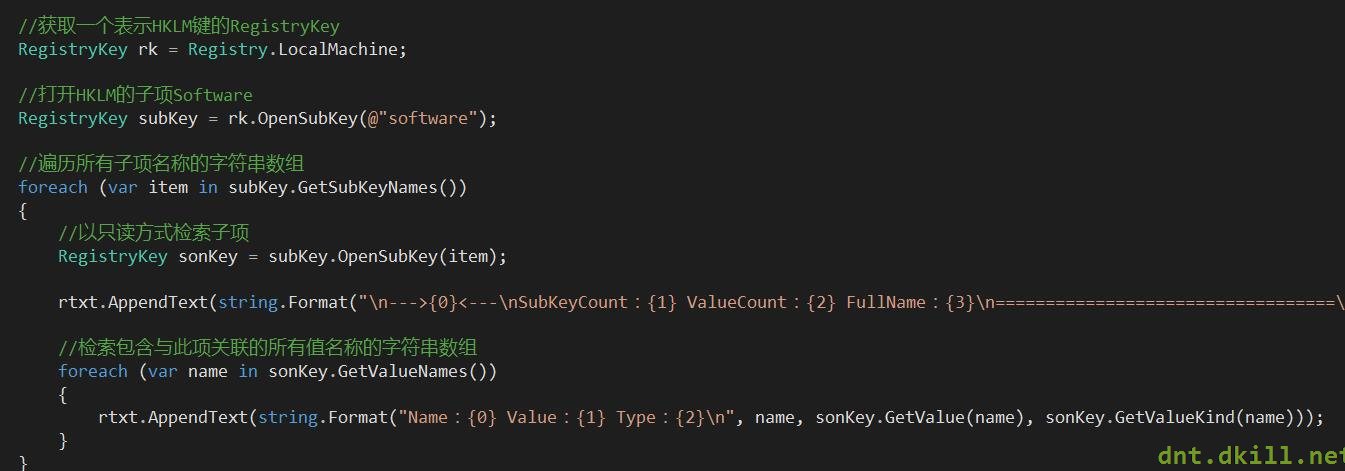
代码如下:
|
1
2
3
4
5
6
7
8
9
10
11
12
13
14
15
16
17
18
19
20
|
//获取一个表示HKLM键的RegistryKey RegistryKey rk = Registry.LocalMachine; //打开HKLM的子项Software RegistryKey subKey = rk.OpenSubKey(@"software"); //遍历所有子项名称的字符串数组 foreach (var item in subKey.GetSubKeyNames()) { //以只读方式检索子项 RegistryKey sonKey = subKey.OpenSubKey(item); rtxt.AppendText(string.Format("\n--->{0}<---\nSubKeyCount:{1} ValueCount:{2} FullName:{3}\n==================================\n", item, sonKey.SubKeyCount, sonKey.ValueCount, sonKey.Name)); //检索包含与此项关联的所有值名称的字符串数组 foreach (var name in sonKey.GetValueNames()) { rtxt.AppendText(string.Format("Name:{0} Value:{1} Type:{2}\n", name, sonKey.GetValue(name), sonKey.GetValueKind(name))); } } |
做个综合的案例:
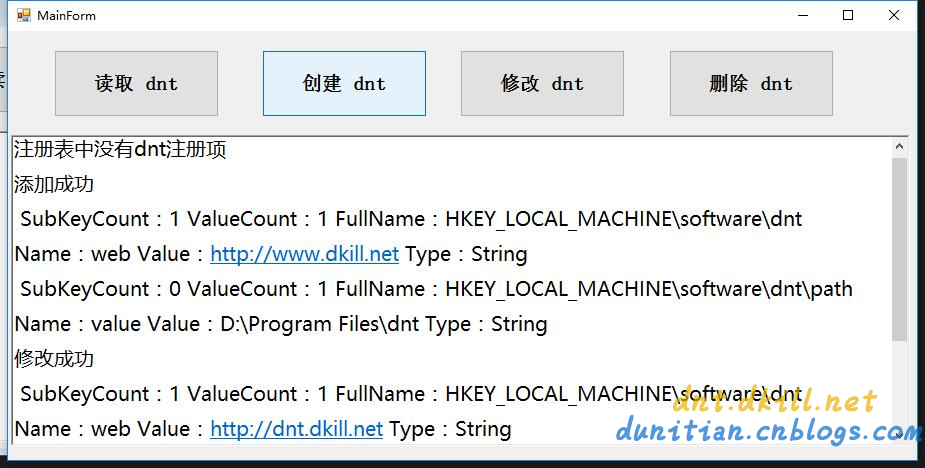
代码如下:
|
1
2
3
4
5
6
7
8
9
10
11
12
13
14
15
16
17
18
19
20
21
22
23
24
25
26
27
28
29
30
31
32
33
34
35
36
37
38
39
40
41
42
43
44
45
46
47
48
49
50
51
52
53
54
55
56
57
58
59
60
61
62
63
64
65
66
67
68
69
70
71
72
73
74
75
76
77
78
79
80
81
82
83
84
85
86
87
88
89
90
91
92
93
94
95
96
97
|
public partial class MainForm : Form { public RegistryKey Reg { get; set; } public MainForm() { InitializeComponent(); //初始化 var rootReg = Registry.LocalMachine; Reg = rootReg.OpenSubKey("software", true);//开权限 } #region 公用方法 /// <summary> /// 检验是否为空 /// </summary> /// <param name="dntReg"></param> private bool KeyIsNull(RegistryKey dntReg) { if (dntReg == null) { rtxt.AppendText("注册表中没有dnt注册项\n"); return true; } return false; } /// <summary> /// 遍历Key的Value /// </summary> /// <param name="reg"></param> private void ForeachRegKeys(RegistryKey reg) { rtxt.AppendText(string.Format("\n SubKeyCount:{0} ValueCount:{1} FullName:{2}\n", reg.SubKeyCount, reg.ValueCount, reg.Name)); foreach (var name in reg.GetValueNames()) { rtxt.AppendText(string.Format("Name:{0} Value:{1} Type:{2}\n", name, reg.GetValue(name), reg.GetValueKind(name))); } } #endregion //查 private void btn1_Click(object sender, EventArgs e) { var dntReg = Reg.OpenSubKey("dnt"); if (KeyIsNull(dntReg)) return; ForeachRegKeys(dntReg); foreach (var item in dntReg.GetSubKeyNames()) { //以只读方式检索子项 RegistryKey sonKey = dntReg.OpenSubKey(item); ForeachRegKeys(sonKey); } } //增 private void btn2_Click(object sender, EventArgs e) { var dntReg = Reg.CreateSubKey("dnt"); var sonReg = dntReg.CreateSubKey("path"); sonReg.SetValue("value", "D:\\Program Files\\dnt"); rtxt.AppendText("添加成功\n"); } //改 private void btn3_Click(object sender, EventArgs e) { var dntReg = Reg.OpenSubKey("dnt", true); if (KeyIsNull(dntReg)) return; rtxt.AppendText("修改成功\n"); } //删 private void btn4_Click(object sender, EventArgs e) { try { #region 删除某个值 //var dntReg = Reg.OpenSubKey("dnt", true); //if (KeyIsNull(dntReg)) return; //dntReg.DeleteValue("web", false); #endregion Reg.DeleteSubKeyTree("dnt", false); rtxt.AppendText("删除成功\n"); } catch (ArgumentException ex) { rtxt.AppendText(ex.ToString()); } } private void clearlog_Click(object sender, EventArgs e) { rtxt.Clear(); } } |
Helper类综合实战:(有其他演示,有的电脑会出现权限问题)

|
1
2
3
4
5
6
7
8
9
10
11
12
13
14
15
16
17
18
19
20
21
22
23
24
25
26
27
28
29
30
31
32
33
34
35
36
37
38
39
40
41
42
43
44
45
46
47
48
49
50
51
52
53
54
55
56
57
58
59
60
61
62
63
64
65
66
67
68
69
70
71
72
73
74
75
76
77
78
79
80
81
82
83
84
85
86
87
88
89
90
91
92
93
94
95
96
97
98
99
100
101
102
103
104
105
106
107
108
109
110
111
112
113
114
115
116
117
118
119
120
121
122
123
124
125
126
127
128
129
130
131
132
133
134
135
136
137
138
139
140
141
142
143
144
145
146
147
148
149
|
using Microsoft.Win32;using System.Collections.Generic;public static partial class RegistryHelper{ #region 节点 /// <summary> /// HKEY_LOCAL_MACHINE 节点 /// </summary> public static RegistryKey RootReg = Registry.LocalMachine; /// <summary> /// HKEY_LOCAL_MACHINE 下 Software 节点 /// </summary> public static RegistryKey SoftReg = Registry.LocalMachine.OpenSubKey("software", true); /// <summary> /// 包含有关当前用户首选项的信息。该字段读取 Windows 注册表基项 HKEY_CURRENT_USER /// </summary> public static RegistryKey CurrentUser = Registry.CurrentUser; /// <summary> /// HKEY_CURRENT_USER 下 Software 节点 /// </summary> public static RegistryKey UserSoftReg = Registry.CurrentUser.OpenSubKey("software", true); #endregion #region 查询 /// <summary> /// 根据名称查找Key,有则返回RegistryKey对象,没有则返回null /// </summary> /// <param name="name">要打开的子项的名称或路径</param> /// <param name="b">如果不需要写入权限请选择false</param> /// <returns></returns> public static RegistryKey FindKey(this RegistryKey reg, string name, bool b = true) { return reg.OpenSubKey(name, b); } /// <summary> /// 获取(name,value)字典,没有则返回null /// </summary> /// <param name="reg">当前RegistryKey</param> /// <returns></returns> public static IDictionary<string, object> GetKeyValueDic(this RegistryKey reg) { var dic = new Dictionary<string, object>(); if (reg.ValueCount == 0) { return null; } ForeachRegKeys(reg, ref dic); return dic; } /// <summary> /// 获取子项(name,value)字典,没有则返回null /// </summary> /// <param name="reg">当前RegistryKey</param> /// <returns></returns> public static IDictionary<string, object> GetSubKeyValueDic(this RegistryKey reg) { var dic = new Dictionary<string, object>(); if (reg.SubKeyCount == 0) { return null; } foreach (var item in reg.GetSubKeyNames()) { //以只读方式检索子项 var sonKey = reg.OpenSubKey(item); ForeachRegKeys(sonKey, ref dic); } return dic; } /// <summary> /// 遍历RegistryKey /// </summary> /// <param name="reg"></param> /// <param name="dic"></param> private static void ForeachRegKeys(RegistryKey reg, ref Dictionary<string, object> dic) { foreach (var name in reg.GetValueNames()) { dic.Add(name, reg.GetValue(name)); } } #endregion #region 添加 /// <summary> /// 添加一个子项 /// </summary> /// <param name="name"></param> /// <returns></returns> public static RegistryKey AddSubItem(this RegistryKey reg, string name) { return reg.CreateSubKey(name); } /// <summary> /// 添加key-value,异常则RegistryKey对象返回null /// </summary> /// <param name="reg"></param> /// <param name="key"></param> /// <param name="value"></param> /// <returns></returns> public static RegistryKey AddKeyValue(this RegistryKey reg, string key, object value) { reg.SetValue(key, value); return reg; } #endregion #region 修改 /// <summary> /// 修改key-value,异常则RegistryKey对象返回null /// </summary> /// <param name="reg"></param> /// <param name="key"></param> /// <param name="value"></param> /// <returns></returns> public static RegistryKey UpdateKeyValue(this RegistryKey reg, string key, object value) { return reg.AddKeyValue(key, value); } #endregion #region 删除 /// <summary> /// 根据Key删除项 /// </summary> /// <param name="reg"></param> /// <param name="key"></param> /// <returns></returns> public static RegistryKey DeleteKeyValue(this RegistryKey reg, string key) { reg.DeleteValue(key, false); return reg; } /// <summary> /// 删除子项所有内容 /// </summary> /// <param name="reg"></param> /// <param name="key"></param> /// <returns></returns> public static RegistryKey ClearSubAll(this RegistryKey reg, string key) { reg.DeleteSubKeyTree(key, false); return reg; } #endregion} |
C#注册表的更多相关文章
- Win.ini和注册表的读取写入
最近在做打包的工作,应用程序的配置信息可以放在注册表文件中,但是在以前的16位操作系统下,配置信息放在Win.ini文件中.下面介绍一下Win.ini文件的读写方法和注册表的编程. 先介绍下Win.i ...
- 卸载oracle之后,如何清除注册表
之前卸载了oracle,今天偶然间发现,在服务和应用程序里面,还残存着之前的oracle服务.原来,还需要去清理下注册表. 在开始菜单的这个框里面 输入regedit,进入注册表.找到这个目录 HKE ...
- 利用注册表在右键添加VS15的快捷方式打开文件夹
1.简介 最近安装VS15 Preview 5,本版本可以打开"文件夹" 是否可以向Visual Studio Code一样在文件夹或文件右键菜单添加"Open with ...
- 修改策略组/注册表 屏蔽Win10升级解决方法
一.Windows非家庭版 第1步:按Win+R键调出运行对话框,输入命令“gpedit.msc”,按回车键启动组策略编辑器. 第2步:依次定位到“计算机配置→管理模板→Windows组件→Windo ...
- Windows 7安装软件时无法将注册值写入注册表的处理方法
1. 我们来确认一下,有没有安装什么软件把注册表给封了.如杀毒软件,防火墙等.把这些软件关了之后,再安装软件试试:如果不行,就把杀毒软件卸载了,再安装软件试试. 2. 更改组策略设置 步骤: 开始-运 ...
- MFC操作注册表
1.创建和修改注册表 BOOL CTestToolCtr::GetHkey(CString strHkey, HKEY& hkey) { == strHkey.CompareNoCase(_T ...
- Win 通过修改注册表把CapsLock映射为Rshift
成品: REGEDIT4 [HKEY_LOCAL_MACHINE\SYSTEM\CurrentControlSet\Control\Keyboard Layout] "Scancod ...
- js通过注册表找到本地软件安装路径并且执行
场景:用js执行本地的安装软件,如果不存在就执行安装 操作步骤: 1.前台js代码 <script type="text/javascript"> function e ...
- 修改注册表 去除Windows快捷方式图标小箭头
一些朋友不喜欢Windows系统中快捷方式图标上面的小箭头,下面介绍如何修改注册表去除快捷方式图标上的小箭头. 1.开始->运行->输入regedit,启动注册表编辑器,然后; 2.依次展 ...
- 弥补学生时代的遗憾~C#注册表情缘
记得当时刚接触C#的时候,喜欢编写各种小软件,而注册表系列和网络系列被当时的我认为大牛的必备技能.直到我研究注册表前一天我都感觉他是那么的高深. 今天正好有空,于是就研究了下注册表系列的操作,也随手封 ...
随机推荐
- DataList嵌套绑定例子
<%@ Page Language="C#" AutoEventWireup="true" CodeBehind="DataList控件.asp ...
- 启动及重新启动nginx,重启nginx后丢失nginx.pid问题解决
停止操作 停止操作是通过向nginx进程发送信号(什么是信号请参阅linux文 章)来进行的 步骤1:查询nginx主进程号 ps -ef | grep nginx 在进程列表里 面找master进程 ...
- 关于CDC在非控件类中的使用
在非CStatic的派生类中,由于进行图形的绘制的话,我们需要对该类传入一个CDC以便于绘画.这是因为非CStatic等控件类无法自己产生onPaint这类的消息,因此需要借传入的CDC进行回执,然后 ...
- Effective C++ 条款39
我从本条款中学到了下面内容: 1.private继承不同于另外两种继承,派生类对象不能隐式转换为基类对象. 例如以下代码: class Bird//鸟 { }; class ostrich:priva ...
- uva311 - Packets(贪心)
题目:311 - Packets 题目大意:给出1*1, 2*2,3 *3, 4*4, 5*5, 6*6的箱子的个数,如今有若干个6*6的箱子,问最少用多少个箱子能够将给定的箱子都装进去. 解题思路: ...
- URL中含有+号,出现错误“请求筛选模块被配置为拒绝包含双重转义序列的请求”的解决方法
搜索关键词中含空格,提交后被自动转成了“+”号,报如下错误: HTTP 错误 404.11 - Not Found 请求筛选模块被配置为拒绝包含双重转义序列的请求. 解决方法: 在web.config ...
- Java学习01
Java学习01 第一章 1.JRE与JDK JDK(JAVA Develop Kit,JAVA开发工具包)提供了Java的开发环境和运行环境,主要用于开发JAVA程序,面向Java程序的开发者; J ...
- OD调试篇3-小软件破解1
OD调试篇3-小软件破解1 要求如下图该软件需要改5个地方,其中1.2是软件未注册而设定限定的添加个数,3.4.5是软件显示的一些未注册的信息. 一. 1.按1运行程序,添加用户添加第五个时出现提示, ...
- CSS——图片替换方法比较
图片替换主要是指将文字替换成图片的技术,即在html语句中使用文字,浏览器显示时用对应的图片显示.其意义在于便于做网站优化(SEO),文字才是搜索引擎寻找的主要对象. 经典的替换方法: Fahrner ...
- 类似jquery的一个demo
通过以下的demo,可以大体知道jquery的一些组织结构以及一些实现方法. 实际上jquery就是一个全局变量,只是在这个变量上添加了各种属性和方法. 首先我们要理解什么是匿名函数自执行,简单点就是 ...