
android_demo之自动生成动态表格
今天我们学习了如何更好的利用Android 的 layout 布局。
接下来是个简单的栗子去了解这个自动生成的动态的控件(自动生成表格)
这是我们的layout 页面
<?xml version="1.0" encoding="utf-8"?>

<LinearLayout xmlns:android="http://schemas.android.com/apk/res/android"

    android:layout_width="match_parent"

    android:layout_height="match_parent"

    android:orientation="vertical" >

    <LinearLayout

        android:layout_width="match_parent"

        android:layout_height="match_parent"

        android:layout_weight="6">

        <TableLayout

            android:layout_width="match_parent"

            android:layout_height="match_parent"

            android:layout_gravity="center_vertical">

            <TextView

                android:layout_width="wrap_content"

                android:layout_height="wrap_content"

                android:text="请输入要生成表格的行号列"

                android:textSize="15sp"/>

            <TableRow

                android:gravity="center"

                android:layout_marginTop="5dp"

                >

                 <TextView

                    android:id="@+id/tv1"

                    android:layout_width="wrap_content"

                    android:layout_height="wrap_content"

                    android:text="行"

                    android:textSize="15sp"/>

            <EditText

                android:id="@+id/et1"

                android:layout_width="100dp"

                android:layout_height="wrap_content"/>

            </TableRow>

            <TableRow

                android:gravity="center"

                android:layout_marginTop="5dp"

                >

                <TextView

                    android:id="@+id/tv2"

                    android:layout_width="wrap_content"

                    android:layout_height="wrap_content"

                    android:text="列"

                    android:textSize="15sp" />

            <EditText

                android:id="@+id/et2"

                android:layout_width="100dp"

                android:layout_height="wrap_content"

                android:numeric="decimal"/>

            <!-- decimal 只能输入数字,大于0的数字-->

            </TableRow>

            <TableRow

                android:gravity="center"

                >

                <Button

                    android:id="@+id/btnadd"

                    android:layout_width="wrap_content"

                    android:layout_height="wrap_content"

                    android:layout_span="2"

                    android:text="确定"

                    />

            </TableRow>

        </TableLayout>

     </LinearLayout>

    <TableLayout

        android:id="@+id/table"

        android:layout_width="match_parent"

        android:layout_height="match_parent"

        android:layout_weight="3"

        android:stretchColumns="*"

        android:shrinkColumns="*">

    </TableLayout>

</LinearLayout>
再看下我们的 mainActivity.class
package com.example.counter;

import android.app.Activity;

import android.os.Bundle;

import android.view.View;

import android.view.View.OnClickListener;

import android.widget.Button;

import android.widget.EditText;

import android.widget.TableLayout;

import android.widget.TableRow;

public class MainActivity extends Activity implements OnClickListener {

    private Button submit;

    private EditText row;

    private EditText cloumn;

    private TableLayout table;

    @Override

    protected void onCreate(Bundle savedInstanceState) {

        super.onCreate(savedInstanceState);

        setContentView(R.layout.canchange);

        submit = (Button) findViewById(R.id.btnadd);

        row = (EditText) findViewById(R.id.et1);

        cloumn = (EditText) findViewById(R.id.et2);

        table = (TableLayout) findViewById(R.id.table);

        submit.setOnClickListener(this);

    }

    @Override

    public void onClick(View v) {

        int c = Integer.parseInt(row.getText() + "");

        int r = Integer.parseInt(cloumn.getText() + "");

        table.removeAllViews();

        for (int i = 0; i < c; i++) {

            TableRow tr = new TableRow(this);

            for (int j = 0; j < r; j++) {

                Button b = new Button(this);

                tr.addView(b);

            }

            table.addView(tr);

        }

    }

}
运行结果:
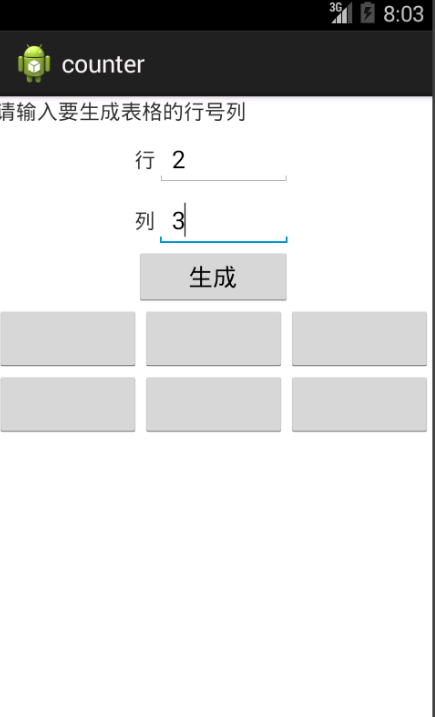
可以根据自己的需求去动态生成表格,在这里我们要了解这个动态的概念。
大家可以将代码拷贝去自行实现一番。(调皮~)
android_demo之自动生成动态表格的更多相关文章
- ANDROID 自动生成动态表格for
简单的栗子去了解这个自动生成的动态的控件(自动生成表格) /cs-Layout/res/layout/activity_main.xml <LinearLayout xmlns:android= ...
- poi自动生成Ecxel表格和Chart图表
最近因为业务需求,需要做poi自动导出Ecxel表格和Chart折线图的功能. 所以我在网上找到了一篇关于poi生成Chart图表的博客,代码很详细,但是缺少相关注释说明. 想要将它改造成自己需要的样 ...
- 自己写的自动生成动态边框的jquery小插件
思路就是在元素四周添加<ul>列表,然后周期性地改变它的颜色,实现动态的效果,不支持ie7.ie8 预览链接http://gorey.sinaapp.com/myBorder/border ...
- jmeter自动生成报告
从JMeter 3.0开始已支持自动生成动态报告,我们可以更容易根据生成的报告来完成我们的性能测试报告. 如何生成html测试报告 如果未生成结果文件(.jtl),可运行如下命令生成报告: jmete ...
- Jmeter系列-自动生成html报告
从JMeter 3.0开始已支持自动生成动态报告,我们可以更容易根据生成的报告来完成我们的性能测试报告. 如何生成html测试报告 如果未生成结果文件(.jtl),可运行如下命令生成报告: jmete ...
- 自动把动态的jsp页面(或静态html)生成PDF文档,并且上传至服务器
置顶2017年11月06日 14:41:04 阅读数:2311 这几天,任务中有一个难点是把一个打印页面自动给生成PDF文档,并且上传至服务器,然而公司框架只有手动上传文档,打印时可以保存为PDF在本 ...
- Java利用poi生成word(包含插入图片,动态表格,行合并)
转(小改): Java利用poi生成word(包含插入图片,动态表格,行合并) 2018年12月20日 09:06:51 wjw_11093010 阅读数:70 Java利用poi生成word(包含插 ...
- Vue+Element的动态表单,动态表格(后端发送配置,前端动态生成)
Vue+Element的动态表单,动态表格(后端发送配置,前端动态生成) 动态表单生成 ElementUI官网引导 Element表单生成 Element动态增减表单,在线代码 关键配置 templa ...
- java web(七): mybatis的动态sql和mybatis generator自动生成pojo类和映射文件
前言: MyBatis 的强大特性之一便是它的动态 SQL.如果你有使用 JDBC 或其它类似框架的经验,你就能体会到根据 不同条件拼接 SQL 语句的痛苦.例如拼接时要确保不能忘记添加必要的空格,还 ...
随机推荐
- 作品-系统-[原生开发]新蓝景CRM管理系统
基于ThinkPHP开发 项目网址:http://www.xljchina.com.cn:8839/Admin/Login/login.html 开发性质:原生开发 系统类型:CRM
- linux备份mysq脚本
filename=`date +%Y%m%d_%H%M%S`database=finebwservername=officialcreatefilename=${servername}_${datab ...
- ArcGIS Engine中数据的加载 (转)
1.加载Shapefile数据 1 IWorkspaceFactory pWorkspaceFactory; 2 IFeatureWorkspace pFeatureWorkspace; 3 IFea ...
- 第二周:If判断语句程序当中的作用简介
1.If语句的作用: 在我们编写程序时经常会遇到内容判断的问题,比如判断内容的真假或者值的大小分别输出内容的问题 这时就会用到我们的If判断语句了,顾名思义,if在英文单词中意思为如果,在Java中他 ...
- SparkSQL DataFrames操作
Hive中已经存在emp和dept表: select * from emp; +--------+---------+------------+-------+-------------+------ ...
- 通过Spark SQL关联查询两个HDFS上的文件操作
order_created.txt 订单编号 订单创建时间 -- :: -- :: -- :: -- :: -- :: order_picked.txt 订单编号 订单提取时间 -- :: ...
- linux svn hooks代码自动更新至项目
由于开发移动端web,ui需要及时看到样式变化,所以通过svn hooks(钩子)来提交文件,然后再把文件同步到测试服务器项目目录,步骤如下: 1.进入 /home/svn/cmall/hooks ( ...
- Android工作学习第5天之TabHost实现菜单栏底部显示
TabHost是一个装载选项卡窗口的容器,实现分模块显示的效果.像新浪微博客户端.微信客户端都是使用tabehost组件来开发的. TabHost的组成: |---TabWidget:实现标签栏,可供 ...
- Sublime Text 3 引用插件
汉化插件 点击 View> Show Console 输入import urllib.request,os,hashlib; h = '2915d1851351e5ee549c20394736b ...
- .vimrc vim 配置大全
map <F9> :call SaveInputData()<CR>func! SaveInputData() exec "tabnew" exec 'no ...