
ANDROID 自动生成动态表格for
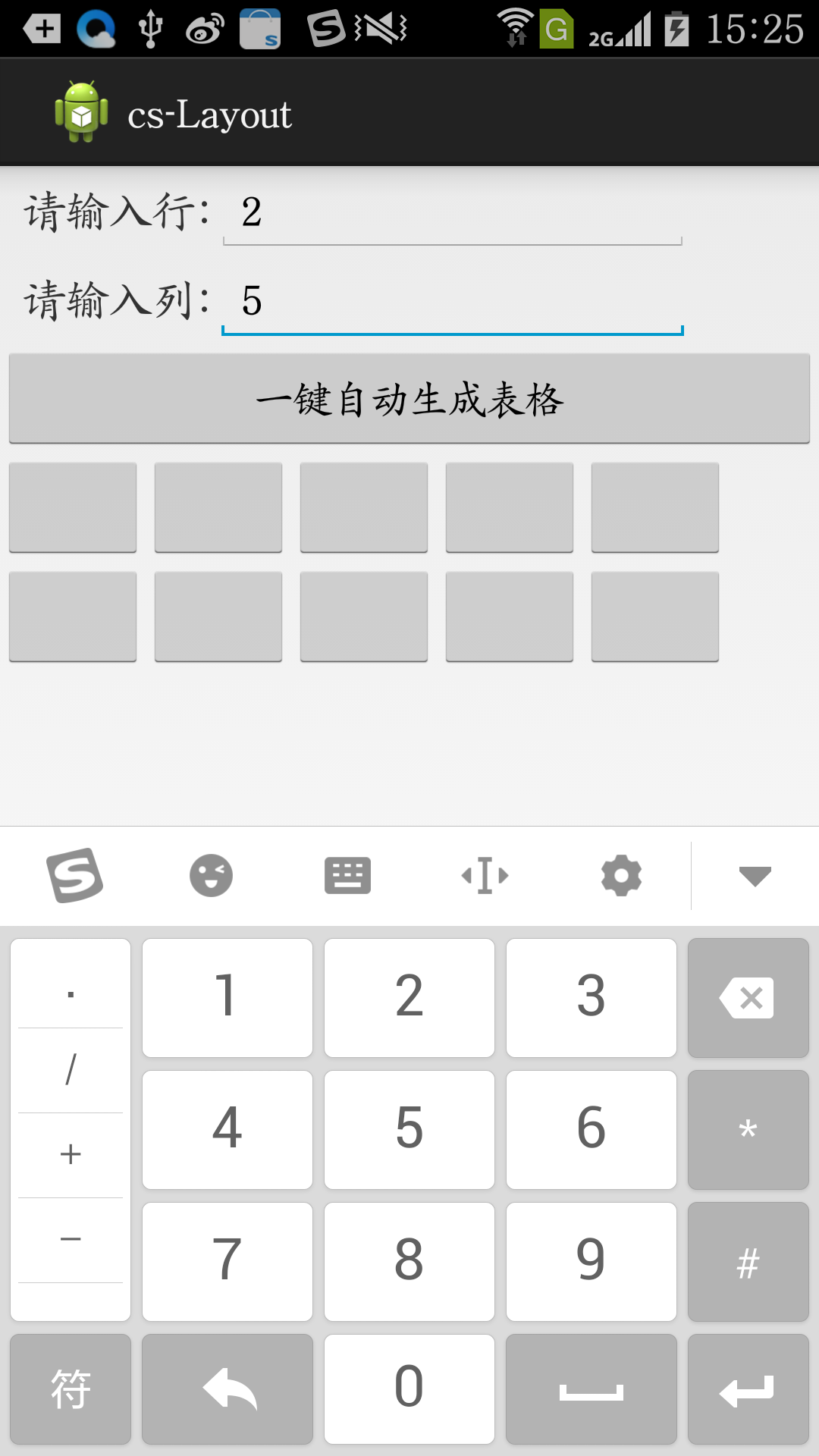
简单的栗子去了解这个自动生成的动态的控件(自动生成表格)
/cs-Layout/res/layout/activity_main.xml
<LinearLayout xmlns:android="http://schemas.android.com/apk/res/android"

    xmlns:tools="http://schemas.android.com/tools"

    android:layout_width="match_parent"

    android:layout_height="match_parent"

    android:orientation="vertical" >

    <LinearLayout

        android:layout_width="match_parent"

        android:layout_height="wrap_content"

        android:orientation="vertical" >

        <LinearLayout

            android:layout_width="match_parent"

            android:layout_height="wrap_content"

            android:layout_weight="1"

            android:orientation="horizontal" >

            <TextView

                android:layout_width="wrap_content"

                android:layout_height="match_parent"

                android:layout_marginLeft="10dp"

                android:gravity="center_vertical"

                android:text="请输入行:"

                android:textSize="20sp" />

            <EditText

                android:id="@+id/editText1"

                android:layout_width="wrap_content"

                android:layout_height="wrap_content"

                android:ems="10"

                android:hint="请输入数字!"

                android:numeric="decimal" />

        </LinearLayout>

        <LinearLayout

            android:layout_width="match_parent"

            android:layout_height="wrap_content"

            android:layout_weight="1"

            android:orientation="horizontal" >

            <TextView

                android:layout_width="wrap_content"

                android:layout_height="match_parent"

                android:layout_marginLeft="10dp"

                android:gravity="center_vertical"

                android:text="请输入列:"

                android:textSize="20sp" />

            <EditText

                android:id="@+id/editText2"

                android:layout_width="wrap_content"

                android:layout_height="wrap_content"

                android:ems="10"

                android:hint="请输入数字!"

                android:numeric="decimal" >

                <requestFocus />

            </EditText>

        </LinearLayout>

        <LinearLayout

            android:layout_width="match_parent"

            android:layout_height="wrap_content"

            android:orientation="horizontal" >

            <Button

                android:id="@+id/button1"

                android:layout_width="match_parent"

                android:layout_height="wrap_content"

                android:text="一键自动生成表格" />

        </LinearLayout>

    </LinearLayout>

    <TableLayout

        android:id="@+id/flout"

        android:layout_width="match_parent"

        android:layout_height="match_parent" >

    </TableLayout>

</LinearLayout>
activity_main.xml
/cs-Layout/src/com/example/cs_layout/MainActivity.java
package com.example.cs_layout;

import android.app.Activity;

import android.os.Bundle;

import android.view.View;

import android.view.View.OnClickListener;

import android.widget.Button;

import android.widget.EditText;

import android.widget.TableLayout;

import android.widget.TableRow;

public class MainActivity extends Activity {

    private Button submit;

    private EditText cloumn;

    private EditText run;

    private TableLayout flout;

    @Override

    protected void onCreate(Bundle savedInstanceState) {

        super.onCreate(savedInstanceState);

        setContentView(R.layout.activity_main);

        // cloumn = ;

        submit = (Button) findViewById(R.id.button1);

        cloumn = (EditText) findViewById(R.id.editText1);

        run = (EditText) findViewById(R.id.editText2);

        flout = (TableLayout) findViewById(R.id.flout);

        submit.setOnClickListener(new OnClickListener() {

            @Override

            public void onClick(View v) {

                flout.removeAllViews();

                new MainActivity().shows(cloumn, run, flout, MainActivity.this);

            }

        });

    }

    public void shows(EditText cloumn, EditText run, TableLayout flout,

            Activity a) {

        int c = Integer.parseInt(cloumn.getText() + ""); // 将输入进来的数转整数

        int r = Integer.parseInt(run.getText() + "");

        TableLayout table = new TableLayout(a); // 表格布局

        table.setWeightSum(1); // 权重

        // table.setColumnStretchable(0, false);

        for (int i = 0; i < c; i++) {

            TableRow tr = new TableRow(a);

            for (int j = 0; j < r; j++) {

                Button b = new Button(a);

                // b.setText(j);

                tr.addView(b);

            }

            table.addView(tr);

        }

        flout.addView(table);

    }

    public void color() {

    }

}
MainActivity.java

ANDROID 自动生成动态表格for的更多相关文章
- android_demo之自动生成动态表格
今天我们学习了如何更好的利用Android 的 layout 布局. 接下来是个简单的栗子去了解这个自动生成的动态的控件(自动生成表格) 这是我们的layout 页面 <?xml version ...
- poi自动生成Ecxel表格和Chart图表
最近因为业务需求,需要做poi自动导出Ecxel表格和Chart折线图的功能. 所以我在网上找到了一篇关于poi生成Chart图表的博客,代码很详细,但是缺少相关注释说明. 想要将它改造成自己需要的样 ...
- Android 自动生成的R类
资源文件的使用分为在代码中使用和在其他资源文件中引用该资源文件.在我们编译一个Android应用时,Android会自动生成一个R类,在该类中根据不同的资源类型又生成了相应的内部类,该类包含了系统中使 ...
- 结队编程第二次作业:Android自动生成算式应用
一.题目要求 本次作业要求两个人合作完成,驾驶员和导航员角色自定,鼓励大家在工作期间角色随时互换,这里会布置两个题目,请各组成员根据自己的爱好任选一题. 这次我和我的小伙伴选择了题目一. 题目1: 实 ...
- Android 自动生成表格
Layout.xml <?xml version="1.0" encoding="utf-8"?> <LinearLayout xmlns:a ...
- 自己写的自动生成动态边框的jquery小插件
思路就是在元素四周添加<ul>列表,然后周期性地改变它的颜色,实现动态的效果,不支持ie7.ie8 预览链接http://gorey.sinaapp.com/myBorder/border ...
- android 自动生成jni C语言头文件
1. 在类里面申明 public native xxx(); 函数接口2. 在安卓工程src目录下 使用命令 javah 包名.类名 生成该类所申明的c语言接口
- jmeter自动生成报告
从JMeter 3.0开始已支持自动生成动态报告,我们可以更容易根据生成的报告来完成我们的性能测试报告. 如何生成html测试报告 如果未生成结果文件(.jtl),可运行如下命令生成报告: jmete ...
- Jmeter系列-自动生成html报告
从JMeter 3.0开始已支持自动生成动态报告,我们可以更容易根据生成的报告来完成我们的性能测试报告. 如何生成html测试报告 如果未生成结果文件(.jtl),可运行如下命令生成报告: jmete ...
随机推荐
- jquery 异步请求Demo【转载】
$(document).ready(function() { $.ajax({ url : "/AjaxAction/LoginArea.ashx", data : {userna ...
- 最受欢迎linux命令
1. 以 root 帐户执行上一条命令 sudo !! 2. 利用 Python 搭建一个简单的 Web 服务器,可通过 http://$HOSTNAME:8000访问 python -m ...
- linux关闭防火墙及selinux
RHEL6.5 查看linux防护墙状态: service iptables status 关闭linux防火墙: 1)永久关闭,重启后生效 开启: chkconfig iptables on 关闭: ...
- [LeetCode]Container With Most Water, 解题报告
前言 难怪LeetCode OJ在找工作时被很多人推荐,发现了这道最大蓄水题目就是美团的笔试最后一道题,当时我霸笔只有着一道题目没有答出来,因此也就没有获得面试机会,可惜了 题目 Given n no ...
- MVC三层架构编程(Dao、service、servlet 之间的关系)
木哈哈~先开心一会儿,人生的第一篇博客aaa.我一定好好写.不过之前也没怎么看别人写过,还是有点小激动呢,加油.好好总结,会总结的宝宝才会有提高! 今天想总结一下mvc三层架构模型编程,宝宝学习不怎么 ...
- Sublime Text 2.0.2 注册码
Sublime Text 2.0.2 注册码 直接输入注册码就可以了----- BEGIN LICENSE -----Andrew WeberSingle User LicenseEA7E-85560 ...
- Linux设备驱动——内核定时器
内核定时器使用 内核定时器是内核用来控制在未来某个时间点(基于jiffies)调度执行某个函数的一种机制,其实现位于 <Linux/timer.h> 和 kernel/timer.c 文件 ...
- [HAOI2006]聪明的猴子
/* 找出能连通所有点的一棵树 是的最大的边最小 很显然就是最小生成树. 堆优化prim. */ #include<iostream> #include<cstring> #i ...
- Oracle 学习笔记(一)Oracle的基本介绍与语法
1.1 Oracle基础知识 1.1.1 介绍 Oracle数据库的主要特点: 支持多用户.大事务量的事务处理 在保持数据安全性和完整性方面性能优越 支持分布式数据处理 具有可移植性 1.1.2 Or ...
- 12、第十二节课,css伪类 (转)
一.特殊选择器 1.* 用于匹配任何的标记 2.> 用于指定父子节点关系 3.E + F 毗邻元素选择器,匹配所有紧随E元素之后的同级元素F 4.E ~ F 匹配所有E元素之后的同级元素F 5. ...