
使用HttpClient对ASP.NET Web API服务实现增删改查
本篇体验使用HttpClient对ASP.NET Web API服务实现增删改查。
创建ASP.NET Web API项目
新建项目,选择"ASP.NET MVC 4 Web应用程序"。
选择"Web API"。
在Models文件夹下创建Product类。
public class Product{public int Id { get; set; }public string Name { get; set; }public string Category { get; set; }public decimal Price { get; set; }}
在Models文件夹下创建IProductRepository接口。
public interface IProductRepository{IEnumerable<Product> GetAll();Product Get(int id);Product Add(Product item);void Remove(int id);bool Update(Product item);}
在Models文件夹下创建ProductRepository类,实现IProductRepository接口。
public class ProductRepository : IProductRepository{private List<Product> products = new List<Product>();private int _nextId = 1;public ProductRepository(){Add(new Product() {Name = "product1", Category = "sports", Price = 88M});Add(new Product() { Name = "product2", Category = "sports", Price = 98M });Add(new Product() { Name = "product3", Category = "toys", Price = 58M });}public IEnumerable<Product> GetAll(){return products;}public Product Get(int id){return products.Find(p => p.Id == id);}public Product Add(Product item){if (item == null){throw new ArgumentNullException("item");}item.Id = _nextId++;products.Add(item);return item;}public bool Update(Product item){if (item == null){throw new ArgumentNullException("item");}int index = products.FindIndex(p => p.Id == item.Id);if (index == -1){return false;}products.RemoveAt(index);products.Add(item);return true;}public void Remove(int id){products.RemoveAll(p => p.Id == id);}}
在Controllers文件夹下创建空的ProductController。
public class ProductController : ApiController{static readonly IProductRepository repository = new ProductRepository();//获取所有public IEnumerable<Product> GetAllProducts(){return repository.GetAll();}//根据id获取public Product GetProduct(int id){Product item = repository.Get(id);if (item == null){throw new HttpResponseException(HttpStatusCode.NotFound);}return item;}//根据类别查找所有产品public IEnumerable<Product> GetProductsByCategory(string category){returnrepository.GetAll().Where(p => string.Equals(p.Category, category, StringComparison.OrdinalIgnoreCase));}//创建产品public HttpResponseMessage PostProduct(Product item){item = repository.Add(item);var response = Request.CreateResponse(HttpStatusCode.Created, item);string uri = Url.Link("DefaultApi", new {id = item.Id});response.Headers.Location = new Uri(uri);return response;}//更新产品public void PutProduct(int id, Product product){product.Id = id;if (!repository.Update(product)){throw new HttpResponseException(HttpStatusCode.NotFound);}}//删除产品public void DeleteProduct(int id){Product item = repository.Get(id);if (item == null){throw new HttpResponseException(HttpStatusCode.NotFound);}repository.Remove(id);}}
在浏览器中输入:
http://localhost:1310/api/Product 获取到所有产品
http://localhost:1310/api/Product/1 获取编号为1的产品
使用HttpClient查询某个产品
在同一个解决方案下创建一个控制台程序。
依次点击"工具","库程序包管理器","程序包管理器控制台",输入如下:
Install-Package Microsoft.AspNet.WebApi.Client

在控制台程序下添加Product类,与ASP.NET Web API中的对应。
public class Product{public string Name { get; set; }public double Price { get; set; }public string Category { get; set; }}
编写如下:
static void Main(string[] args){RunAsync().Wait();Console.ReadKey();}static async Task RunAsync(){using (var client = new HttpClient()){//设置client.BaseAddress = new Uri("http://localhost:1310/");client.DefaultRequestHeaders.Accept.Clear();client.DefaultRequestHeaders.Accept.Add(new MediaTypeWithQualityHeaderValue("application/json"));//异步获取数据HttpResponseMessage response = await client.GetAsync("/api/Product/1");if (response.IsSuccessStatusCode){Product product = await response.Content.ReadAsAsync<Product>();Console.WriteLine("{0}\t{1}元\t{2}",product.Name, product.Price, product.Category);}}}
把控制台项目设置为启动项目。

HttpResponseMessage的IsSuccessStatusCode只能返回true或false,如果想让响应抛出异常,需要使用EnsureSuccessStatusCode方法。
try{HttpResponseMessage response = await client.GetAsync("/api/Product/1");response.EnsureSuccessStatusCode();//此方法确保响应失败抛出异常}catch(HttpRequestException ex){//处理异常}
另外,ReadAsAsync方法,默认接收MediaTypeFormatter类型的参数,支持 JSON, XML, 和Form-url-encoded格式,如果想自定义MediaTypeFormatter格式,参照如下:
var formatters = new List<MediaTypeFormatter>() {new MyCustomFormatter(),new JsonMediaTypeFormatter(),new XmlMediaTypeFormatter()};resp.Content.ReadAsAsync<IEnumerable<Product>>(formatters);
使用HttpClient查询所有产品
static void Main(string[] args){RunAsync().Wait();Console.ReadKey();}static async Task RunAsync(){using (var client = new HttpClient()){//设置client.BaseAddress = new Uri("http://localhost:1310/");client.DefaultRequestHeaders.Accept.Clear();client.DefaultRequestHeaders.Accept.Add(new MediaTypeWithQualityHeaderValue("application/json"));//异步获取数据HttpResponseMessage response = await client.GetAsync("/api/Product");if (response.IsSuccessStatusCode){IEnumerable<Product> products = await response.Content.ReadAsAsync<IEnumerable<Product>>();foreach (var item in products){Console.WriteLine("{0}\t{1}元\t{2}", item.Name, item.Price, item.Category);}}}}

使用HttpClient添加
static void Main(string[] args){RunAsync().Wait();Console.ReadKey();}static async Task RunAsync(){using (var client = new HttpClient()){//设置client.BaseAddress = new Uri("http://localhost:1310/");client.DefaultRequestHeaders.Accept.Clear();client.DefaultRequestHeaders.Accept.Add(new MediaTypeWithQualityHeaderValue("application/json"));//添加var myProduct = new Product() { Name = "myproduct", Price = 88, Category = "other" };HttpResponseMessage response = await client.PostAsJsonAsync("api/Product", myProduct);//异步获取数据response = await client.GetAsync("/api/Product");if (response.IsSuccessStatusCode){IEnumerable<Product> products = await response.Content.ReadAsAsync<IEnumerable<Product>>();foreach (var item in products){Console.WriteLine("{0}\t{1}元\t{2}", item.Name, item.Price, item.Category);}}}}
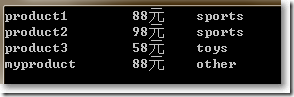
使用HttpClient修改
static void Main(string[] args){RunAsync().Wait();Console.ReadKey();}static async Task RunAsync(){using (var client = new HttpClient()){//设置client.BaseAddress = new Uri("http://localhost:1310/");client.DefaultRequestHeaders.Accept.Clear();client.DefaultRequestHeaders.Accept.Add(new MediaTypeWithQualityHeaderValue("application/json"));//添加 HTTP POSTvar myProduct = new Product() { Name = "myproduct", Price = 100, Category = "other" };HttpResponseMessage response = await client.PostAsJsonAsync("api/product", myProduct);if (response.IsSuccessStatusCode){Uri pUrl = response.Headers.Location;//修改 HTTP PUTmyProduct.Price = 80; // Update priceresponse = await client.PutAsJsonAsync(pUrl, myProduct);}//异步获取数据response = await client.GetAsync("/api/Product");if (response.IsSuccessStatusCode){IEnumerable<Product> products = await response.Content.ReadAsAsync<IEnumerable<Product>>();foreach (var item in products){Console.WriteLine("{0}\t{1}元\t{2}", item.Name, item.Price, item.Category);}}}}
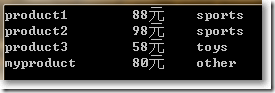
使用HttpClient删除
static void Main(string[] args){RunAsync().Wait();Console.ReadKey();}static async Task RunAsync(){using (var client = new HttpClient()){//设置client.BaseAddress = new Uri("http://localhost:1310/");client.DefaultRequestHeaders.Accept.Clear();client.DefaultRequestHeaders.Accept.Add(new MediaTypeWithQualityHeaderValue("application/json"));//添加 HTTP POSTvar myProduct = new Product() { Name = "myproduct", Price = 100, Category = "other" };HttpResponseMessage response = await client.PostAsJsonAsync("api/product", myProduct);if (response.IsSuccessStatusCode){Uri pUrl = response.Headers.Location;//修改 HTTP PUTmyProduct.Price = 80; // Update priceresponse = await client.PutAsJsonAsync(pUrl, myProduct);//删除 HTTP DELETEresponse = await client.DeleteAsync(pUrl);}//异步获取数据response = await client.GetAsync("/api/Product");if (response.IsSuccessStatusCode){IEnumerable<Product> products = await response.Content.ReadAsAsync<IEnumerable<Product>>();foreach (var item in products){Console.WriteLine("{0}\t{1}元\t{2}", item.Name, item.Price, item.Category);}}}}
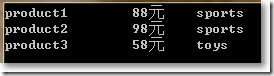
完。
使用HttpClient对ASP.NET Web API服务实现增删改查的更多相关文章
- 使用HttpClient操作ASP.NET Web API 2.1增删改查
使用NuGet包安装Microsoft ASP.NET Web API 2.1 Client Libraries, 调用方式代码如下: HttpClient client = new HttpClie ...
- 前端使用AngularJS的$resource,后端ASP.NET Web API,实现增删改查
AngularJS中的$resource服务相比$http服务更适合与RESTful服务进行交互.本篇后端使用ASP.NET Web API, 前端使用$resource,实现增删改查. 本系列包括: ...
- 使用HttpClient消费ASP.NET Web API服务
本篇体验使用HttpClient消费ASP.NET Web API服务,例子比较简单. 依次点击"文件","新建","项目". 选择&quo ...
- ASP.NET从零开始学习EF的增删改查
ASP.NET从零开始学习EF的增删改查 最近辞职了,但是离真正的离职还有一段时间,趁着这段空档期,总想着写些东西,想来想去,也不是很明确到底想写个啥,但是闲着也是够 ...
- 基于gin的golang web开发:mysql增删改查
Go语言访问mysql数据库需要用到标准库database/sql和mysql的驱动.标准库的Api使用比较繁琐这里再引入另一个库github.com/jmoiron/sqlx. go get git ...
- Android(java)学习笔记193:利用谷歌API对数据库增删改查(推荐使用)
接下来我们通过项目案例来介绍:这个利用谷歌API对数据库增删改查 1.首先项目图: 2.这里的布局文件activity_main.xml: <LinearLayout xmlns:android ...
- 通过flask实现web页面简单的增删改查bootstrap美化版
通过flask实现web页面简单的增删改查bootstrap美化版 项目目录结构 [root@node1 python]# tree -L 2 . ├── animate.css ├── fileut ...
- 通过flask实现web页面简单的增删改查
通过flask实现web页面简单的增删改查 # 1.后台程序falsk_web01.py #coding:utf-8 from flask import Flask,render_template,r ...
- Android(java)学习笔记136:利用谷歌API对数据库增删改查(推荐使用)
接下来我们通过项目案例来介绍:这个利用谷歌API对数据库增删改查 1. 首先项目图: 2. 这里的布局文件activity_main.xml: <LinearLayout xmlns:andro ...
随机推荐
- MySQL V5.6.37升级到V5.6.38
简单!万事先备份 cp /usr/my.cnf /home/xx/ cp -r /var/lib/mysql/dbname /home/xx/ mysqldump -u root -ppasswd - ...
- 巧用PHP双$功能兼容线上线下配置文件
2014年2月8日 19:27:05 情景: 开发过程中线上和线下的配置文件中的值是不一样的 例如:线上生产环境的样式域名为ie.style.abc.com,而开发环境为ie.style.abc.ne ...
- MySql 新建用户与数据库的实际操作步骤
以下的文章主要讲述的是MySql 新建用户的创建.新建数据库的实际操作步骤以及用户如何进行授权和删除用户的实际操作方案.还有对修改密码的实际操作,以下就是正文的主要内容的创建. 1.MySql 新建用 ...
- logback.xml 模板
ssm模板 <?xml version="1.0" encoding="UTF-8"?> <!--configuration 根节点,包含下 ...
- sonarLint--强大的代码审查工具(插件)
idea也有的一个插件 贴上一个eclipse的sonarlint用法 http://blog.csdn.net/limm33/article/details/51166840 不过听说从2015年1 ...
- Coursera台大机器学习技法课程笔记09-Decision Tree
这是我们已经学到的(除Decision Tree外) 下面是一个典型的decision tree算法,有四个地方需要我们选择: 接着介绍了一个CART算法:通过decision stump分成两类,衡 ...
- Android Service总结06 之AIDL
Android Service总结06 之AIDL 版本 版本说明 发布时间 发布人 V1.0 初始版本 2013-04-03 Skywang 1 AIDL介绍 AIDL,即And ...
- Pomelo分布式游戏服务器框架
Pomelo介绍&入门 目录 前言&介绍 安装Pomelo 创建项目并启动 创建项目 项目结构说明 启动 测试连接 聊天服务器 新建gate和chat服务器 配置master.json ...
- Qt5编译oracle驱动教程
我们都知道oracle数据库的强大,并且好多企业或者教学用到数据库时都会推荐使用.但是Qt因为版权问题没有封装oracle数据库专用驱动,网上也有一大堆说法和教程,但是或多或少的都有问题.下面废话不多 ...
- IntellijIDEA快速入门(Windows版)
跟随公司变更技术堆栈的步伐,开始学习相应工具IntelliJ的使用,之前一个大神同时也提到,最近该IDE的市场份额已然超越了免费的Eclipse,因此该工具已经到了必须会的程度了. 新年快乐,鸡年大吉 ...