
WPF圆角按钮与触发颜色变化
<Button x:Name="button1" Content="按钮1" Margin="10,10,0,0" Cursor="Pen">

            <Button.Template>

                <ControlTemplate>

                    <Border CornerRadius="15,15,15,15">

                        <Border.Background>

                            <SolidColorBrush x:Name="color2"></SolidColorBrush>

                        </Border.Background>

                        <Border.Triggers>

                            <EventTrigger RoutedEvent="Border.Loaded">

                                <BeginStoryboard>

                                    <Storyboard>

                                        <ColorAnimation Storyboard.TargetName="color2" Storyboard.TargetProperty="(SolidColorBrush.Color)" From="AliceBlue" To="AntiqueWhite" Duration="0:0:1" AutoReverse="True" RepeatBehavior="Forever"></ColorAnimation>

                                    </Storyboard>

                                </BeginStoryboard>

                            </EventTrigger>

                        </Border.Triggers>

                    </Border>

                </ControlTemplate>

            </Button.Template>

        </Button>

        <Button x:Name="button2" Content="按钮2" Margin="106,10,0,0" Opacity="0.5" BorderThickness="3" IsDefault="True" Click="button2_Click" Cursor="Wait" ToolTip="点击啊" HorizontalAlignment="Left"/>

        <Button x:Name="button3" Content="开始分析" Margin="10,77,0,0" Click="button3_Click">

            <Button.Template>

                <ControlTemplate>

                    <Border BorderThickness="1" CornerRadius="16,16,16,16" >

                        <Border.Background>

                            <SolidColorBrush x:Name="ColorQ"/>

                        </Border.Background>

                        <Border.Triggers>

                            <EventTrigger RoutedEvent="Button.Loaded">

                                <BeginStoryboard>

                                    <Storyboard>

                                        <ColorAnimation Storyboard.TargetName="ColorQ"

                                            Storyboard.TargetProperty="(SolidColorBrush.Color)"

                                            From="Red" To="Green" Duration="0:0:5"

                                            AutoReverse="True" RepeatBehavior="Forever"/>

                                    </Storyboard>

                                </BeginStoryboard>

                            </EventTrigger>

                        </Border.Triggers>

                    </Border>

                </ControlTemplate>

            </Button.Template>

        </Button>
加上字体也变化:
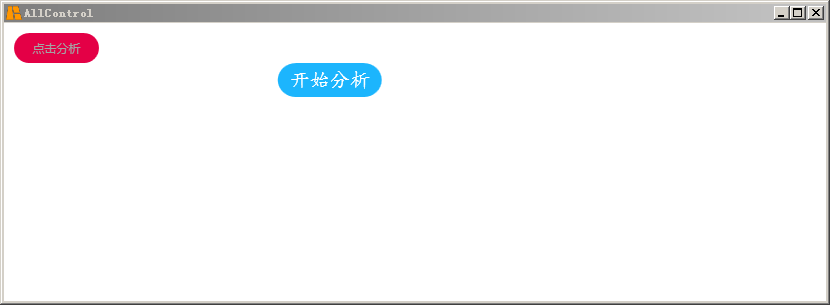
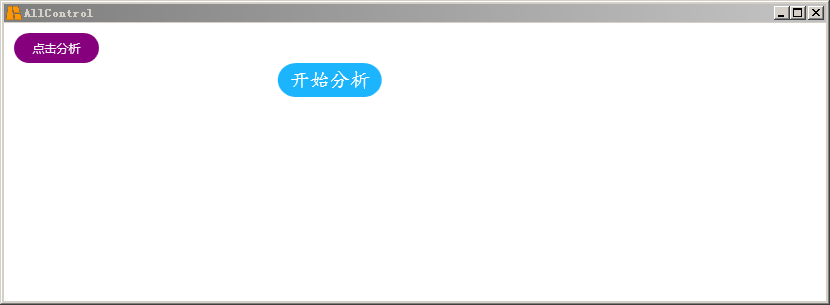
        <Button x:Name="button1" Margin="10,10,0,0" Cursor="Pen" ToolTip="点击按钮" Click="button1_Click" Background="White">

            <Button.Template>

                <ControlTemplate>

                    <Border CornerRadius="15,15,15,15">

                        <Label Content="点击分析" FontFamily="微软雅黑" HorizontalAlignment="Center" VerticalAlignment="Center" FontSize="12">

                            <Label.Foreground>

                                <SolidColorBrush x:Name="FontColor"></SolidColorBrush>

                            </Label.Foreground>

                            <Label.Triggers>

                                <EventTrigger RoutedEvent="Border.Loaded">

                                    <BeginStoryboard>

                                        <Storyboard>

                                            <ColorAnimation Storyboard.TargetName="FontColor" Storyboard.TargetProperty="(SolidColorBrush.Color)" From="#000000" To="#ffffff" Duration="0:0:10" AutoReverse="True" RepeatBehavior="Forever"></ColorAnimation>

                                        </Storyboard>

                                    </BeginStoryboard>

                                </EventTrigger>

                            </Label.Triggers>

                        </Label>

                        <Border.Background>

                            <SolidColorBrush x:Name="color2"></SolidColorBrush>

                        </Border.Background>

                        <Border.Triggers>

                            <EventTrigger RoutedEvent="Border.Loaded">

                                <BeginStoryboard>

                                    <Storyboard>

                                        <ColorAnimation Storyboard.TargetName="color2" Storyboard.TargetProperty="(SolidColorBrush.Color)" From="Red" To="purple" Duration="0:0:1" AutoReverse="True" RepeatBehavior="Forever"></ColorAnimation>

                                    </Storyboard>

                                </BeginStoryboard>

                            </EventTrigger>

                        </Border.Triggers>

                    </Border>

                </ControlTemplate>

            </Button.Template>

        </Button>
看效果:
WPF圆角按钮与触发颜色变化的更多相关文章
- WPF圆角按钮例程
<Window x:Class="WpfApp3.MainWindow" xmlns="http://schemas.microsoft.com/winfx/200 ...
- WPF圆角按钮
<ControlTemplate x:Key="CornerButton" TargetType="{x:Type Button}"> <Bo ...
- android 圆角按钮和按钮颜色
1. android 设置圆角按钮后,按下按钮后,还能改变按钮的颜色 <?xml version="1.0" encoding="UTF-8"?> ...
- UI设计篇·入门篇·绘制简单自定义矩形图/设置按钮按下弹起颜色变化/设置图形旋转
Android的基本控件和图形有限,难以满足所有的实际需要和设计需求,好在Android给出了相对完善的图形绘制和自定义控件的API,利用这些API,可以基本满足设计的需求. 自定义图像和控件的方法: ...
- android按钮被点击文字颜色变化效果
有的时候做应用需要点击按钮时文字颜色也跟着变,松开后又还原,目前发现两种解决方案:第一用图片,如果出现的地方比较多,那么图片的量就相当可观:第二,也就是本文讲到的.废话少说,先贴图片,再上代码. 正常 ...
- Qt 圆角按钮,面版自动布局
一.前言 在部分界面开发中,有时需要动态添加控件或按钮到面板中,在不需要时又需要删除该控件,故模仿视频开发中的设置屏蔽词,通过自己绘制的按钮与排布面板控件实现. 实现效果如下: 说明: 1.输入框可设 ...
- win10 uwp 圆角按钮
本文讲的是如何做圆角按钮,我们在UWP本来的按钮都是矩形,圆角Radius没有,所以本文就用简单方法去做圆角按钮. 我们按钮需要圆角,而自带没有,其实做一个很简单,把原来的按钮变为背景透明,然后使用矩 ...
- iOS中创建自定义的圆角按钮
iOS中很多时候都需要用到指定风格的圆角按钮,尽管UIButton提供了一个方式创建圆角按钮: + (id)buttonWithType:(UIButtonType)buttonType;//指定bu ...
- WPF 精修篇 获取系统颜色和字体样式
原文:WPF 精修篇 获取系统颜色和字体样式 看效果 <Grid> <Rectangle Fill="{DynamicResource {x:Static SystemCo ...
随机推荐
- [c/c++]可变参数的使用
一.可变参数简介 当一个函数需要传递未知个数的参数时,就需要用到可变参数, 比如常见的printf()函数,输出多个变量: printf("print para1:%d ,para2 :%d ...
- spring-IOC容器(三)
一.通过工厂方法配置Bean: .xml <!-- class属性:指向静态工厂方法的全类名 factory-method:指向静态工厂方法的名字 constructor-arg:如果工厂方法需 ...
- Jmeter ----Bean shell使用
一.什么是Bean Shell BeanShell是一种完全符合Java语法规范的脚本语言,并且又拥有自己的一些语法和方法; BeanShell是一种松散类型的脚本语言(这点和JS类似); BeanS ...
- C# 集合、字典、栈和队列
using System; using System.Collections.Generic; using System.Linq; using System.Text; using System.T ...
- ASP.NET AJAX入门系列(6):UpdateProgress控件简单介绍
在ASP.NET AJAX Beta2中,UpdateProgress控件已经从“增值”CTP中移到了ASP.NET AJAX核心中.以下两篇关于UpdateProgress的文章基本翻译自ASP.N ...
- 总线读写---verilog代码
总线读写---verilog代码 `timescale 1ns / 1ps ////////////////////////////////////////////////////////////// ...
- TStrings与Memo.Lines赋值的问题
//想实现在函数中生成Memo1的内容,而后赋给Memo.Lines //方法1: var s: TStrings; begin s := TStringList.Create; AddMemoDat ...
- Delphi中如何进行BASE64解码
//方法1: uses EncdDecd; Memo2.Text:=UTF8Decode( DecodeString(Memo1.Text)); //方法2: // 使用控件 Memo2.Text:= ...
- 黄聪:Pjax 无刷新开发web,更好用户体验
什么Ajax.Pjax.Njax...神马玩意? 有Njax吗? 木有...不过真有Pjax!! 其实pjax就是用到了html5的新history api: pushState和replaceSta ...
- Svn过滤
http://blog.csdn.net/hemingwang0902/article/details/6904205