
BadgeValueView
BadgeValueView
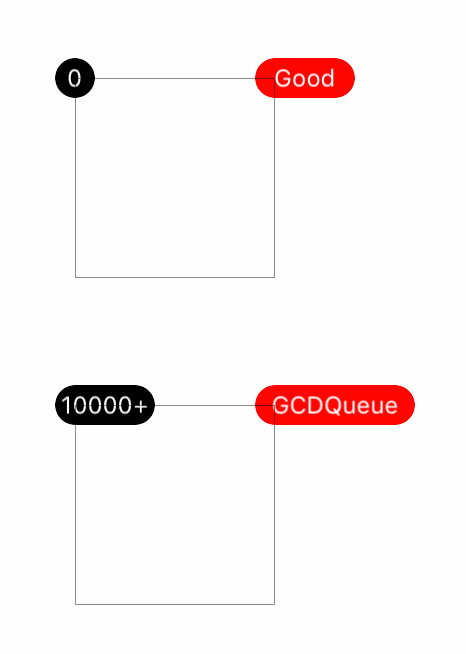
效果
源码
https://github.com/YouXianMing/UI-Component-Collection 中的 BadgeValueView
//

//  BadgeValueView.h

//  BadgeView

//

//  Created by YouXianMing on 16/5/17.

//  Copyright © 2016年 YouXianMing. All rights reserved.

//

#import <UIKit/UIKit.h>

typedef NS_ENUM(NSUInteger, BadgePosition) {

    BadgePositionCenterLeft,

    BadgePositionCenterRight,

    BadgePositionTopLeft,

    BadgePositionTopRight,

    BadgePositionBottomLeft,

    BadgePositionBottomRight,

};

@interface BadgeValueView : UIView

/**

 *  bedge值

 */

@property (nonatomic, strong) NSString  *badgeValue;

/**

 *  被附着的view

 */

@property (nonatomic, weak)   UIView    *contentView;

/**

 *  敏感字符增长宽度,默认值为4

 */

@property (nonatomic)  CGFloat        sensitiveTextWidth;

/**

 *  敏感增长宽度,默认为10

 */

@property (nonatomic)  CGFloat        sensitiveWidth;

/**

 *  固定高度,默认为20

 */

@property (nonatomic)  CGFloat        fixedHeight;

/**

 *  位置信息,默认为BadgePositionTopRight

 */

@property (nonatomic)  BadgePosition  position;

/**

 *  字体,默认为12

 */

@property (nonatomic, strong) UIFont    *font;

/**

 *  字体颜色,默认为白色

 */

@property (nonatomic, strong) UIColor   *textColor;

/**

 *  bedge颜色,默认为红色

 */

@property (nonatomic, strong) UIColor   *badgeColor;

/**

 *  开始生效

 */

- (void)makeEffect;

/**

 *  设置BadgeValue

 *

 *  @param value    BadgeValue

 *  @param animated 是否执行动画

 */

- (void)setBadgeValue:(NSString *)value animated:(BOOL)animated;

@end
//

//  BadgeValueView.m

//  BadgeView

//

//  Created by YouXianMing on 16/5/17.

//  Copyright © 2016年 YouXianMing. All rights reserved.

//

#import "BadgeValueView.h"

#import "UIView+SetRect.h"

@interface BadgeValueView ()

@property (nonatomic, strong) UILabel *label;

@end

@implementation BadgeValueView

- (instancetype)init {

    if (self = [super init]) {

        self.sensitiveWidth     = ;

        self.fixedHeight        = ;

        self.sensitiveTextWidth = ;

        self.position           = BadgePositionTopRight;

        self.font               = [UIFont systemFontOfSize:.f];

        self.textColor          = [UIColor whiteColor];

        self.badgeColor         = [UIColor redColor];

    }

    return self;

}

- (void)makeEffect {

    // 标签

    self.label               = [[UILabel alloc] init];

    self.label.textColor     = self.textColor;

    self.label.textAlignment = NSTextAlignmentCenter;

    self.label.font          = self.font;

    [self addSubview:self.label];

    // 背景色

    self.backgroundColor     = self.badgeColor;

    self.width               = self.fixedHeight;

    self.height              = self.fixedHeight;

    self.layer.cornerRadius  = self.fixedHeight / .f;

    self.layer.masksToBounds = YES;

    [_contentView addSubview:self];

}

- (void)setBadgeValue:(NSString *)badgeValue animated:(BOOL)animated {

    _badgeValue = badgeValue;

    // 是否执行动画

    if (animated) {

        [UIView animateWithDuration:0.15f animations:^{

            self.alpha = badgeValue.length ==  ?  : ;

        }];

    } else {

        self.alpha = badgeValue.length ==  ?  : ;

    }

    // 如果值为空,则不执行后续操作

    if (badgeValue.length <= ) {

        return;

    }

    // 设置文本

    self.label.text = badgeValue;

    [self.label sizeToFit];

    // 更新尺寸

    if (self.label.width + self.sensitiveTextWidth > self.width) {

        self.width += self.sensitiveWidth;

    } else {

        self.width = self.fixedHeight;

    }

    // 更新文本尺寸

    self.label.center = self.middlePoint;

    // 根据位置更新尺寸

    CGFloat offset = self.fixedHeight / .f;

    self.position == BadgePositionCenterLeft  ? self.left = -offset, self.centerY = self.contentView.middleY : ;

    self.position == BadgePositionCenterRight ? self.left = self.contentView.width - offset, self.centerY = self.contentView.middleY : ;

    self.position == BadgePositionTopLeft     ? self.left = -offset, self.y    = -offset : ;

    self.position == BadgePositionTopRight    ? self.top  = -offset, self.left = self.contentView.width - offset : ;

    self.position == BadgePositionBottomLeft  ? self.left = -offset, self.top = self.contentView.height - offset : ;

    self.position == BadgePositionBottomRight ? self.left = self.contentView.width - offset, self.top = self.contentView.height - offset : ;

}

- (void)setBadgeValue:(NSString *)badgeValue {

    [self setBadgeValue:badgeValue animated:NO];

}

@end
BadgeValueView的更多相关文章
- 自定义按钮设置BadgeNumber
TabbarButton.h @interface TabbarButton : UIButton @property (nonatomic, strong) UIButton *badgeValue ...
随机推荐
- 细说MySQL备份的基本原理(系列一 ) 备份与锁
数据库作为一个系统中唯一或者主要的持久化组件,对服务的可用性和数据的可靠性要求极高. 作为能够有效应对因为系统软硬件故障.人工误操作导致数据丢失的预防手段,备份是目前最为常见的数据库运维操作. 考虑到 ...
- java 异常说明
异常说明使用了附加的关键字 throws ,后面接一个所有潜在异常类型的列表,方便客户端程序员查看. public static void main(String[] args) throws Nul ...
- /dev/null和/dev/zero的区别
/dev/null,外号叫无底洞,你可以向它输出任何数据,它通吃,并且不会撑着!/dev/zero,是一个输入设备,你可你用它来初始化文件. /dev/null------它是空设备,也称为位桶(bi ...
- Windows xp下安装sql server2005所碰到的一些问题及解决方法
之前提到的帮老板做的一个中船重工的项目,其中的一个子模块:windows下获取特定进程网络流量 一开始是用VS2010做的,后来老板把项目书拿给我看后,明确要求开发环境为VS2005和Sql serv ...
- 【LOJ】#2531. 「CQOI2018」破解 D-H 协议
题解 BSGS直接解出a和b来即可 代码 #include <bits/stdc++.h> #define fi first #define se second #define pii p ...
- Python3 决策树ID3算法实现
# -*- coding: utf-8 -*- """ Created on Wed Jan 24 19:01:40 2018 @author: markli 采用信息增 ...
- Android-Drawable(三)
Android-Drawable(三) 前两两篇文章已经学习了6个Drawable,接下来我们继续学习剩下的一些Drawable. Android系统的Drawable(一) Android系统的Dr ...
- 【BZOJ-3681】Arietta 网络流 + 线段树合并
3681: Arietta Time Limit: 20 Sec Memory Limit: 64 MBSubmit: 182 Solved: 70[Submit][Status][Discuss ...
- spring-boot 速成(7) 集成dubbo
github上有一个开源项目spring-boot-starter-dubbo 提供了spring-boot与dubbo的集成功能,直接拿来用即可.(记得给作者点赞,以示感谢!) 下面是使用步骤,先看 ...
- RabbitMQ消息交换模式简介
RabbitMQ是AMQP的一个典型实现,它消息发布者的消息发布到Exchange上,同时需要制定routingkey,可以通过指定交换机的不同模式实现不同的行为. RabbitMQ提供了四种Exch ...