
菜鸟入门【ASP.NET Core】14:MVC开发:UI、 EF + Identity实现、注册实现、登陆实现
前言
之前我们进行了MVC的web页面的Cookie-based认证实现,接下来的开发我们要基于之前的MvcCookieAuthSample项目做修改。
MvcCookieAuthSample项目地址:http://www.cnblogs.com/wyt007/p/8128186.html
UI
我们首先在AccountController中添加两个Action

        public IActionResult Register()
     {

        return View();
        }

        public IActionResult Login()

        {

            return View();

        }
然后在Views文件夹下新增Account文件夹并新增Register.cshtml与Login.cshtml视图,样式我们尽量从上一节的Identity视图中拷贝过来。
我们还需要新建一个ViewModels,在ViewModels中新建RegisterViewModel.cs来接收表单提交的值以及来进行强类型视图
namespace MvcCookieAuthSample.ViewModels

{

    public class RegisterViewModel

    {

        //邮箱

        public string Email { get; set; }

        //密码

        public string Password { get; set; }

        //确认密码

        public string ConfirmedPassword { get; set; }

    }

}
Register.cshtml代码(只保留部分拷贝过来的内容,并加入强类型视图引用):
@{
ViewData["Title"] = "Register";
}
@using MvcCookieAuthSample.ViewModels;
@model RegisterViewModel;
<h2>@ViewData["Title"]</h2>
<h3>@ViewData["Message"]</h3>
<div class="row">
<div class="col-md-4">
<form method="post">
<h4>Create a new account.</h4>
<hr />
<div class="form-group">
<label asp-for="Email"></label>
<input asp-for="Email" class="form-control" />
</div>
<div class="form-group">
<label asp-for="Password"></label>
<input asp-for="Password" class="form-control" />
</div>
<div class="form-group">
<label asp-for="ConfirmedPassword"></label>
<input asp-for="ConfirmedPassword" class="form-control" />
</div>
<button type="submit" class="btn btn-default">Register</button>
</form>
</div>
</div>
Login.cshtml代码(只保留部分拷贝过来的内容,并加入强类型视图引用):
@{
ViewData["Title"] = "Login";
}
@using MvcCookieAuthSample.ViewModels;
@model RegisterViewModel;
<div class="row">
<div class="col-md-4">
<section>
<form method="post">
<h4>Use a local account to log in.</h4>
<hr />
<div class="form-group">
<label asp-for="Email"></label>
<input asp-for="Email" class="form-control" />
</div>
<div class="form-group">
<label asp-for="Password"></label>
<input asp-for="Password" type="password" class="form-control" />
</div>
<div class="form-group">
<button type="submit" class="btn btn-default">Log in</button>
</div>
</form>
</section>
</div>
</div>
然后在_Layout.cshtml中添加导航代码:
<ul class="nav navbar-nav navbar-right">

    <li><a asp-area="" asp-controller="Account" asp-action="Register">Register</a></li>

    <li><a asp-area="" asp-controller="Account" asp-action="Login">Log in</a></li>

</ul>
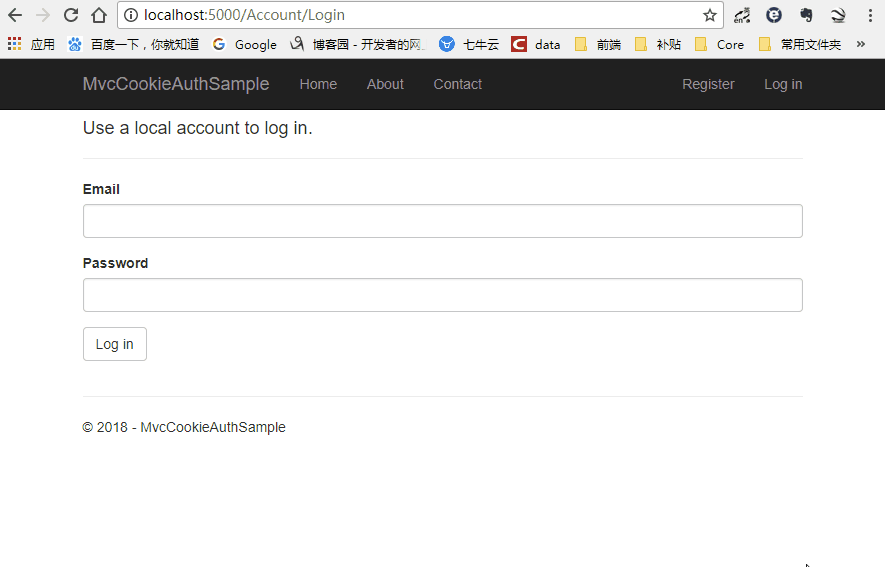
然后运行网站,UI已经实现
EF + Identity实现
EF实现
首先我们添加一个Data文件夹,由于VSCode的代码提示不是很好,接下来我们用VS2017开发。
我们首先在Models文件夹下面新建ApplicationUser.cs与ApplicationUserRole.cs
ApplicationUser.cs代码:
using Microsoft.AspNetCore.Identity;

namespace MvcCookieAuthSample.Models

{

    public class ApplicationUser:IdentityUser<int>//不加int的话是默认主键为guid

    {

    }

}
ApplicationUserRole.cs代码:
using Microsoft.AspNetCore.Identity;

namespace MvcCookieAuthSample.Models

{

    public class ApplicationUserRole: IdentityRole<int>//不加int的话是默认主键为guid

    {

    }

}
然后在Data文件夹下新建一个ApplicationDbContext.cs类,使它继承IdentityDbContext
using Microsoft.AspNetCore.Identity.EntityFrameworkCore;

using Microsoft.EntityFrameworkCore;

using MvcCookieAuthSample.Models;

namespace MvcCookieAuthSample.Data

{

    public class ApplicationDbContext:IdentityDbContext<ApplicationUser, ApplicationUserRole,int>

    {

        public ApplicationDbContext(DbContextOptions<ApplicationDbContext> options):base(options)

        {

        }

    }

}
然后我们需要在Startup.cs添加EF的注册进来
//使用配置ApplicationDbContext使用sqlserver数据库,并配置数据库连接字符串

services.AddDbContext<ApplicationDbContext>(options=> {

    options.UseSqlServer(Configuration.GetConnectionString("DefaultConnection"));

});
然后我们需要在appsettings.json中配置数据库连接字符串
"ConnectionStrings": {

  "DefaultConnection": "Server=192.168.1.184;Database=aspnet-IdentitySample-9A22BB3E-8D53-4F44-B533-2EF927C959DE;Trusted_Connection=True;MultipleActiveResultSets=true;uid=sa;pwd=123456"

}
EF实现结束
Identity实现
我们需要在Startup.cs添加Identity的注册进来
//配置Identity

services.AddIdentity<ApplicationUser, ApplicationUserRole>()

    .AddEntityFrameworkStores<ApplicationDbContext>()

    .AddDefaultTokenProviders();
由于默认的Identity在密码上限制比较严格,我们把它改的宽松简单一点(不设置也行)
//修改Identity配置

services.Configure<IdentityOptions>(options =>

{

    options.Password.RequireLowercase = false;//需要小写

    options.Password.RequireNonAlphanumeric = false;//需要字母

    options.Password.RequireUppercase = false;//需要大写

});
然后我们把认证的地址改成/Account/Login

然后我们修改AccountController,加入以下代码
private UserManager<ApplicationUser> _userManager;//创建用户的

private SignInManager<ApplicationUser> _signInManager;//用来登录的

//依赖注入

public AccountController(UserManager<ApplicationUser> userManager, SignInManager<ApplicationUser> signInManager)

{

    _userManager = userManager;

    _signInManager = signInManager;

}

[HttpPost]

public async Task<IActionResult> Register(RegisterViewModel registerViewModel)

{

    var identityUser = new ApplicationUser

    {

        Email = registerViewModel.Email,

        UserName = registerViewModel.Email,

        NormalizedUserName = registerViewModel.Email

    };

    var identityResult=await _userManager.CreateAsync(identityUser, registerViewModel.Password);

    if (identityResult.Succeeded)

    {

        return RedirectToAction("Index", "Home");

    }

    return View();

}
完整的AccountController
using System;
using System.Collections.Generic;
using System.Diagnostics;
using System.Linq;
using System.Threading.Tasks;
using Microsoft.AspNetCore.Mvc;
using MvcCookieAuthSample.Models;
using Microsoft.AspNetCore.Authorization;
using Microsoft.AspNetCore.Authentication;
using Microsoft.AspNetCore.Authentication.Cookies;
using System.Security.Claims;
using MvcCookieAuthSample.ViewModels;
using Microsoft.AspNetCore.Identity;
namespace MvcCookieAuthSample.Controllers
{
public class AccountController : Controller
{
private UserManager<ApplicationUser> _userManager;//创建用户的
private SignInManager<ApplicationUser> _signInManager;//用来登录的
//依赖注入
public AccountController(UserManager<ApplicationUser> userManager, SignInManager<ApplicationUser> signInManager)
{
_userManager = userManager;
_signInManager = signInManager;
}
public IActionResult Register()
{
return View();
}
[HttpPost]
public async Task<IActionResult> Register(RegisterViewModel registerViewModel)
{
var identityUser = new ApplicationUser
{
Email = registerViewModel.Email,
UserName = registerViewModel.Email,
NormalizedUserName = registerViewModel.Email
};
var identityResult=await _userManager.CreateAsync(identityUser, registerViewModel.Password);
if (identityResult.Succeeded)
{
return RedirectToAction("Index", "Home");
}
return View();
}
public IActionResult Login()
{
return View();
}
//登陆
public IActionResult MakeLogin()
{
var claims=new List<Claim>(){
new Claim(ClaimTypes.Name,"wyt"),
new Claim(ClaimTypes.Role,"admin")
};
var claimIdentity= new ClaimsIdentity(claims,CookieAuthenticationDefaults.AuthenticationScheme);
HttpContext.SignInAsync(CookieAuthenticationDefaults.AuthenticationScheme,new ClaimsPrincipal(claimIdentity));
return Ok();
}
//登出
public IActionResult Logout()
{
HttpContext.SignOutAsync(CookieAuthenticationDefaults.AuthenticationScheme);
return Ok();
}
}
}
接下来我们重新生成一下,我们需要执行shell命令生成一下数据库,只有添加 Microsoft.EntityFrameworkCore.Tools 才会生成成功,否则会报以下错误

执行命令总是提示 未找到与命令“dotnet-ef”匹配的可执行文件,根据网上的解决办法引用 Microsoft.EntityFrameworkCore.Tools 问题依旧不能得到解决。
解决办法:
右击项目弹出菜单点击编辑***.csprog,增加如下配置。
<ItemGroup>

    <DotNetCliToolReference Include="Microsoft.EntityFrameworkCore.Tools.DotNet" Version="2.0.0" />

</ItemGroup>
执行增加配置命令后

这时候Data文件夹下已经有新增的数据库更新配置文件了
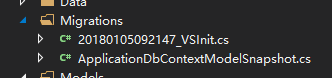
然后我们执行更新命令,执行成功后我们就可以看到数据库表已经生成了
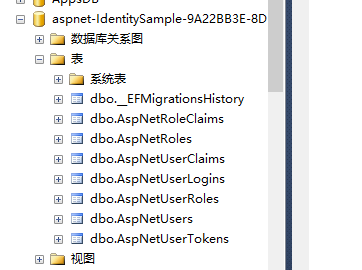
接下来我们运行一下网站进行注册,注册成功,已经存储进数据库

注册实现
前面虽然可以注册了,但是我们注册完成后并没有生成Cookies信息。所以我们要在Register方法中进行登陆生成Cookies
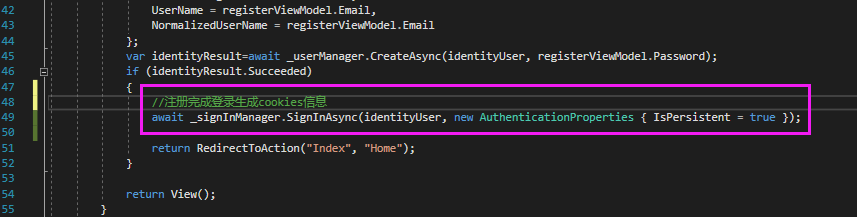
完整的注册方法如下:
[HttpPost]
public async Task<IActionResult> Register(RegisterViewModel registerViewModel)
{
var identityUser = new ApplicationUser
{
Email = registerViewModel.Email,
UserName = registerViewModel.Email,
NormalizedUserName = registerViewModel.Email
};
var identityResult=await _userManager.CreateAsync(identityUser, registerViewModel.Password);
if (identityResult.Succeeded)
{
//注册完成登录生成cookies信息
await _signInManager.SignInAsync(identityUser, new AuthenticationProperties { IsPersistent = true });
return RedirectToAction("Index", "Home");
}
return View();
}
一般来说,如果用户已经注册或者登陆了,注册和登陆按钮是要隐藏的,所以我们接下来要修改_Layout.cshtml视图页面判断注册/登陆按钮是否应该隐藏
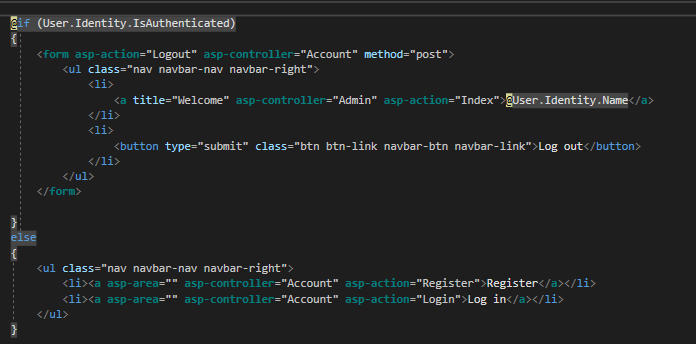
完整的_Layout.cshtml代码:
<!DOCTYPE html>
<html>
<head>
<meta charset="utf-8" />
<meta name="viewport" content="width=device-width, initial-scale=1.0" />
<title>@ViewData["Title"] - MvcCookieAuthSample</title>
<environment include="Development">
<link rel="stylesheet" href="~/lib/bootstrap/dist/css/bootstrap.css" />
<link rel="stylesheet" href="~/css/site.css" />
</environment>
<environment exclude="Development">
<link rel="stylesheet" href="https://ajax.aspnetcdn.com/ajax/bootstrap/3.3.7/css/bootstrap.min.css"
asp-fallback-href="~/lib/bootstrap/dist/css/bootstrap.min.css"
asp-fallback-test-class="sr-only" asp-fallback-test-property="position" asp-fallback-test-value="absolute" />
<link rel="stylesheet" href="~/css/site.min.css" asp-append-version="true" />
</environment>
</head>
<body>
<nav class="navbar navbar-inverse navbar-fixed-top">
<div class="container">
<div class="navbar-header">
<button type="button" class="navbar-toggle" data-toggle="collapse" data-target=".navbar-collapse">
<span class="sr-only">Toggle navigation</span>
<span class="icon-bar"></span>
<span class="icon-bar"></span>
<span class="icon-bar"></span>
</button>
<a asp-area="" asp-controller="Home" asp-action="Index" class="navbar-brand">MvcCookieAuthSample</a>
</div>
<div class="navbar-collapse collapse">
<ul class="nav navbar-nav">
<li><a asp-area="" asp-controller="Home" asp-action="Index">Home</a></li>
<li><a asp-area="" asp-controller="Home" asp-action="About">About</a></li>
<li><a asp-area="" asp-controller="Home" asp-action="Contact">Contact</a></li>
</ul>
@if (User.Identity.IsAuthenticated)
{
<form asp-action="Logout" asp-controller="Account" method="post">
<ul class="nav navbar-nav navbar-right">
<li>
<a title="Welcome" asp-controller="Admin" asp-action="Index">@User.Identity.Name</a>
</li>
<li>
<button type="submit" class="btn btn-link navbar-btn navbar-link">Log out</button>
</li>
</ul>
</form>
}
else
{
<ul class="nav navbar-nav navbar-right">
<li><a asp-area="" asp-controller="Account" asp-action="Register">Register</a></li>
<li><a asp-area="" asp-controller="Account" asp-action="Login">Log in</a></li>
</ul>
}
</div>
</div>
</nav>
<div class="container body-content">
@RenderBody()
<hr />
<footer>
<p>© 2018 - MvcCookieAuthSample</p>
</footer>
</div>
<environment include="Development">
<script src="~/lib/jquery/dist/jquery.js"></script>
<script src="~/lib/bootstrap/dist/js/bootstrap.js"></script>
<script src="~/js/site.js" asp-append-version="true"></script>
</environment>
<environment exclude="Development">
<script src="https://ajax.aspnetcdn.com/ajax/jquery/jquery-2.2.0.min.js"
asp-fallback-src="~/lib/jquery/dist/jquery.min.js"
asp-fallback-test="window.jQuery"
crossorigin="anonymous"
integrity="sha384-K+ctZQ+LL8q6tP7I94W+qzQsfRV2a+AfHIi9k8z8l9ggpc8X+Ytst4yBo/hH+8Fk">
</script>
<script src="https://ajax.aspnetcdn.com/ajax/bootstrap/3.3.7/bootstrap.min.js"
asp-fallback-src="~/lib/bootstrap/dist/js/bootstrap.min.js"
asp-fallback-test="window.jQuery && window.jQuery.fn && window.jQuery.fn.modal"
crossorigin="anonymous"
integrity="sha384-Tc5IQib027qvyjSMfHjOMaLkfuWVxZxUPnCJA7l2mCWNIpG9mGCD8wGNIcPD7Txa">
</script>
<script src="~/js/site.min.js" asp-append-version="true"></script>
</environment>
@RenderSection("Scripts", required: false)
</body>
</html>
这时候登陆的之后的导航栏信息就有了
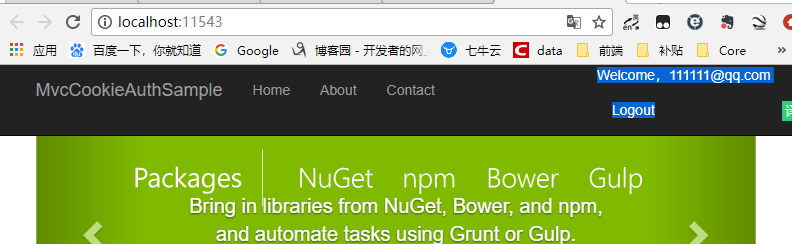
登陆实现
我们接下来实现一下登陆逻辑,我们首先新建一个HttpPost的Login的Action
[HttpPost]

public async Task<IActionResult> Login(RegisterViewModel loginViewModel)

{

    var user= await _userManager.FindByEmailAsync(loginViewModel.Email);

    if (user==null)

    {

        //异常先不写,后期统一收集

    }

    //账号密码先不做验证,需要可以自己写

    await _signInManager.SignInAsync(user, new AuthenticationProperties { IsPersistent = true });

    return RedirectToAction("Index", "Home");

}
然后我们把原来的Logout也顺便修改一下,不能是return OK();而要跳转到首页
//登出

public async Task<IActionResult> Logout()

{

    //HttpContext.SignOutAsync(CookieAuthenticationDefaults.AuthenticationScheme);

    //return Ok();

    await _signInManager.SignOutAsync();

    return RedirectToAction("Index", "Home");

}
接下来我们修改一下Login.cshtml页面
@{
ViewData["Title"] = "Login";
}
@using MvcCookieAuthSample.ViewModels;
@model RegisterViewModel;
<div class="row">
<div class="col-md-4">
<section>
<form method="post" asp-controller="Account" asp-action="Login">
<h4>Use a local account to log in.</h4>
<hr />
<div class="form-group">
<label asp-for="Email"></label>
<input asp-for="Email" class="form-control" />
</div>
<div class="form-group">
<label asp-for="Password"></label>
<input asp-for="Password" type="password" class="form-control" />
</div>
<div class="form-group">
<button type="submit" class="btn btn-default">Log in</button>
</div>
</form>
</section>
</div>
</div>
接下来我们可以运行一下登陆注册,即可成功登陆后跳转到首页,注册后跳转倒是首页
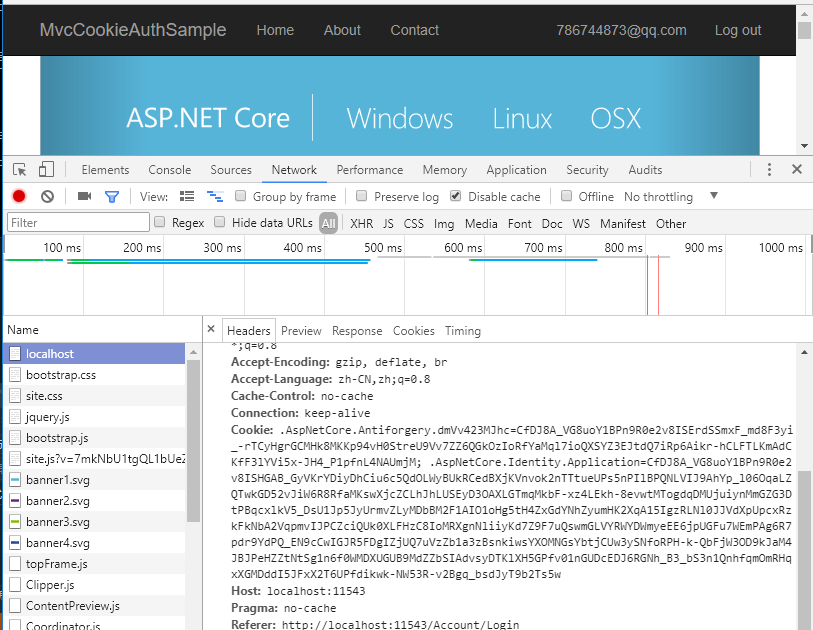
菜鸟入门【ASP.NET Core】14:MVC开发:UI、 EF + Identity实现、注册实现、登陆实现的更多相关文章
- 基于ASP.NET core的MVC站点开发笔记 0x01
基于ASP.NET core的MVC站点开发笔记 0x01 我的环境 OS type:mac Software:vscode Dotnet core version:2.0/3.1 dotnet sd ...
- Asp.net Core基于MVC框架实现PostgreSQL操作
简单介绍 Asp.net Core最大的价值在于跨平台.跨平台.跨平台.重要的事情说三遍.但是目前毕竟是在开发初期,虽然推出了1.0.0 正式版,但是其实好多功能还没有完善.比方说编译时的一些文件编码 ...
- .NET Core实战项目之CMS 第二章 入门篇-快速入门ASP.NET Core看这篇就够了
作者:依乐祝 原文链接:https://www.cnblogs.com/yilezhu/p/9985451.html 本来这篇只是想简单介绍下ASP.NET Core MVC项目的(毕竟要照顾到很多新 ...
- 基于 Vue.js 之 iView UI 框架非工程化实践记要 使用 Newtonsoft.Json 操作 JSON 字符串 基于.net core实现项目自动编译、并生成nuget包 webpack + vue 在dev和production模式下的小小区别 这样入门asp.net core 之 静态文件 这样入门asp.net core,如何
基于 Vue.js 之 iView UI 框架非工程化实践记要 像我们平日里做惯了 Java 或者 .NET 这种后端程序员,对于前端的认识还常常停留在 jQuery 时代,包括其插件在需要时就引 ...
- net core体系-web应用程序-4asp.net core2.0 项目实战(CMS)-第二章 入门篇-快速入门ASP.NET Core看这篇就够了
.NET Core实战项目之CMS 第二章 入门篇-快速入门ASP.NET Core看这篇就够了 原文链接:https://www.cnblogs.com/yilezhu/p/9985451.ht ...
- ASP.NET Core 1.0 开发记录
官方资料: https://github.com/dotnet/core https://docs.microsoft.com/en-us/aspnet/core https://docs.micro ...
- 解析ASP.NET WebForm和Mvc开发的区别 分类: ASP.NET 2013-12-29 01:59 11738人阅读 评论(5) 收藏
因为以前主要是做WebFrom开发,对MVC开发并没有太深入的了解.自从来到创新工场的新团队后,用的技术都是自己以前没有接触过的,比如:MVC 和EF还有就是WCF,压力一直很大.在很多问题都是不清楚 ...
- ASP.NET Core 配置 MVC - ASP.NET Core 基础教程 - 简单教程,简单编程
原文:ASP.NET Core 配置 MVC - ASP.NET Core 基础教程 - 简单教程,简单编程 ASP.NET Core 配置 MVC 前面几章节中,我们都是基于 ASP.NET 空项目 ...
- ASP.NET Core Web API 开发-RESTful API实现
ASP.NET Core Web API 开发-RESTful API实现 REST 介绍: 符合REST设计风格的Web API称为RESTful API. 具象状态传输(英文:Representa ...
- 解析ASP.NET WebForm和Mvc开发的区别
因为以前主要是做WebFrom开发,对MVC开发并没有太深入的了解.自从来到创新工场的新团队后,用的技术都是自己以前没有接触过的,比如:MVC 和EF还有就是WCF,压力一直很大.在很多问题都是不清楚 ...
随机推荐
- shell中的常用条件判断
-e :该“文件名”是否存在.exit-d :该文件名是否为目录.dir-f :该文件名是否为普通文件.file -b:该文件是否为块文件.block -r :该文件是否具有可读属性 read-w ...
- window7 32位部署django
window7 32位安装环境,所有的软件都用32位的,如果你想要用64位的软件需要操作系统和下面的相关软件都换成64位,我是在虚拟机上装了win7 32版做的测试. 软件下载地址: python2. ...
- HDU1262-寻找素数对
//#include<bits/stdc++.h> #include<map> #include<cstdio> #include<string> #i ...
- HARD FAULT
程序陷在while(1)里面 解决办法 定点到发生死循环的位置 打开stack windows逐层查找发生死循环之前运行过的函数 导致原因 1 内存溢出或者访问越界,通常为数组或结构体访问越界.这个需 ...
- 判断是否为AVL树
时间复杂度:O(n) // 判断是否为AVL树 public int isAVL(TreeNode node) { if (node == null) { return 0; } int left = ...
- Docker应用:Kubernetes(容器集群)
阅读目录: Docker应用:Hello World Docker应用:Docker-compose(容器编排) Docker应用:Kubernetes(容器集群) 前言: 终于出第三篇了,上个月就已 ...
- 感悟优化——Netty对JDK缓冲区的内存池零拷贝改造
NIO中缓冲区是数据传输的基础,JDK通过ByteBuffer实现,Netty框架中并未采用JDK原生的ByteBuffer,而是构造了ByteBuf. ByteBuf对ByteBuffer做了大量的 ...
- 「ZJOI2019」&「十二省联考 2019」题解索引
「ZJOI2019」&「十二省联考 2019」题解索引 「ZJOI2019」 「ZJOI2019」线段树 「ZJOI2019」Minimax 搜索 「十二省联考 2019」 「十二省联考 20 ...
- Java常用的经典排序算法:冒泡排序与选择排序
一.冒泡排序 冒泡排序(Bubble Sort)是一种交换排序,它的基本思想是:两两比较相邻记录的关键字,如果反序则交换,直到没有反序的记录为 ...
- npm安装webpack失败(mac和window都可能会遇到这样的情况,以下问题主要以mac为例)
问题描述:我想查看一下webpack的版本,于是输入了命令webpack -v, 结果如下图所示: 注:这里提示我们要安装webpack-cli,是因为到了webpack4, webpack 已经将 ...