
海龟绘图turtle库之二级基础编程题
一、画一个太极图

import turtle as t

t.pensize(2)#设置笔画宽度

t.circle(100)#以100为半径的圆

t.circle(50, 180)

t.circle(-50, 180)

t.penup()#抬起画笔

t.goto(0, 40)#移动到绝对位置

t.pendown()#放下画笔

t.circle(10)

t.penup()

t.goto(0, 140)

t.pendown()

t.circle(10)
t.hideturtle()#隐藏画笔

t.done()
二、画一个同心圆

import turtle as t

def drawcircle(n):

    t.pensize(3)

    t.penup()

    t.goto(0, -n)

    t.pendown()

    t.circle(n)

for i in range(20,80,20):

    drawcircle(i)

    t.hideturtle()

t.done()
三、画一个同心切
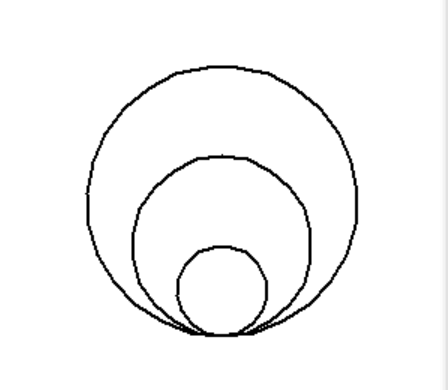
import turtle as t

for i in range(20,80,20):

    t.circle(i)
四、画一个五角星

import turtle as t

t.color('red', 'red')

t.begin_fill()

for i in range(5):

    t.fd(200)

    t.rt(144)

    t.hideturtle()

t.end_fill()

t.done()
六、画一个花瓣

import turtle as t

t.penup()

t.goto(-40,-90)

t.pendown()

t.colormode(255)

t.screensize(800,600,'white')

t.pensize(2)

t.color((255,155,192),(144,218,253))

t.begin_fill()

for i in range(4):

    t.seth(90*(i+1))

    t.rt(45)

    t.circle(150, 90)

    t.seth(-90 + i * 90

    t.circle(150, 90)

t.end_fill()

t.done()
七、画一个菱形(要求根据题意使用适当函数)

import turtle as t

t.rt(30)

for i in range(2):

    t.color('red')

    t.fd(100)

    t.rt(-60*(i+1))

for j in range(2):

    t.fd(100)

    t.rt(-60*(j+1))

    t.hideturtle()

t.done()#使用rt函数
八、画一个多彩圆

import turtle

colors = ['red', 'orange', 'yellow', 'green', 'blue', 'indigo', 'purple']

for i in range(7):

    c = colors[i]

    turtle.color(c, c)

    turtle.begin_fill()

    turtle.lt(360/7)

    turtle.circle(50)

    turtle.end_fill()

turtle.done()
九、后续未完...
一、佩奇(课外...)

import turtle as t

t.pensize(4)

t.colormode(255) #取色范围

t.color((255,155,192),"pink")

t.setup(840,500)

t.speed(3) #时速

t.pu()

t.goto(-100,100) #绝对位置

t.pd()

t.seth(-30)

t.begin_fill()

a=0.4

for i in range(120):

    if 0<=i<30 or 60<=i<90:

        a=a+0.08

        t.lt(3)

        t.fd(a)

    else:

        a=a-0.08

        t.lt(3)

        t.fd(a)

t.end_fill()

t.pu()

t.seth(90)

t.fd(25)

t.seth(0)

t.fd(10)

t.pd()

t.pencolor(255,155,192)

t.seth(10)

t.begin_fill()

t.circle(5)

t.color(160,82,45)

t.end_fill()

t.pu()

t.seth(0)

t.fd(20)

t.pd()

t.pencolor(255,155,192)

t.seth(10)

t.begin_fill()

t.circle(5)

t.color(160,82,45)

t.end_fill() #头

t.color((255,155,192),"pink")

t.pu()

t.seth(90)

t.fd(41)

t.seth(0)

t.fd(0)

t.pd()

t.begin_fill()

t.seth(180)

t.circle(300,-30)

t.circle(100,-60)

t.circle(80,-100)

t.circle(150,-20)

t.circle(60,-95)

t.seth(161)

t.circle(-300,15)

t.pu()

        # t.goto(-100,100)

t.goto(-100, 100)

t.pd()

t.seth(-30)

a=0.4

for i in range(60):

    if 0<=i<30 or 60<=i<90:

        a=a+0.08

        t.lt(3)

        t.fd(a)

    else:

        a=a-0.08

        t.lt(3)

        t.fd(a)

t.end_fill()

t.color((255,155,192),"pink")

t.pu()

t.seth(90)

t.fd(-7)

t.seth(0)

t.fd(70)

t.pd()

t.begin_fill()

t.seth(100)

t.circle(-50,50)

t.circle(-10,120)

t.circle(-50,54)

t.end_fill()

t.pu()

t.seth(90)

t.fd(-12)

t.seth(0)

t.fd(30)

t.pd()

t.begin_fill()

t.seth(100)

t.circle(-50,50)

t.circle(-10,120)

t.circle(-50,56)

t.end_fill() #眼睛

t.color((255,155,192),"white")

t.pu()

t.seth(90)

t.fd(-20)

t.seth(0)

t.fd(-95)

t.pd()

t.begin_fill()

t.circle(15)

t.end_fill()

t.color("black")

t.pu()

t.seth(90)

t.fd(12)

t.seth(0)

t.fd(-3)

t.pd()

t.begin_fill()

t.circle(3)

t.end_fill()

t.color((255,155,192),"white")

t.pu()

t.seth(90)

t.fd(-25)

t.seth(0)

t.fd(40)

t.pd()

t.begin_fill()

t.circle(15)

t.end_fill()

t.color("black")

t.pu()

t.seth(90)

t.fd(12)

t.seth(0)

t.fd(-3)

t.pd()

t.begin_fill()

t.circle(3)

t.end_fill() #腮

t.color((255,155,192))

t.pu()

t.seth(90)

t.fd(-95)

t.seth(0)

t.fd(65)

t.pd()

t.begin_fill()

t.circle(30)

t.end_fill() #嘴

t.color(239,69,19)

t.pu()

t.seth(90)

t.fd(15)

t.seth(0)

t.fd(-100)

t.pd()

t.seth(-80)

t.circle(30,40)

t.circle(40,80) #身体

t.color("red",(255,99,71))

t.pu()

t.seth(90)

t.fd(-20)

t.seth(0)

t.fd(-78)

t.pd()

t.begin_fill()

t.seth(-130)

t.circle(100,10)

t.circle(300,30)

t.seth(0)

t.fd(230)

t.seth(90)

t.circle(300,30)

t.circle(100,3)

t.color((255,155,192),(255,100,100))

t.seth(-135)

t.circle(-80,63)

t.circle(-150,24)

t.end_fill() #手

t.color((255,155,192))

t.pu()

t.seth(90)

t.fd(-40)

t.seth(0)

t.fd(-27)

t.pd()

t.seth(-160)

t.circle(300,15)

t.pu()

t.seth(90)

t.fd(15)

t.seth(0)

t.fd(0)

t.pd()

t.seth(-10)

t.circle(-20,90)

t.pu()

t.seth(90)

t.fd(30)

t.seth(0)

t.fd(237)

t.pd()

t.seth(-20)

t.circle(-300,15)

t.pu()

t.seth(90)

t.fd(20)

t.seth(0)

t.fd(0)

t.pd()

t.seth(-170)

t.circle(20,90) #脚

t.pensize(10)

t.color((240,128,128))

t.pu()

t.seth(90)

t.fd(-75)

t.seth(0)

t.fd(-180)

t.pd()

t.seth(-90)

t.fd(40)

t.seth(-180)

t.color("black")

t.pensize(15)

t.fd(20)

t.pensize(10)

t.color((240,128,128))

t.pu()#penup提笔

t.seth(90)

t.fd(40)

t.seth(0)

t.fd(90)#=forward

t.pd()#=pendown

t.seth(-90)

t.fd(40)

t.seth(-180)

t.color("black")

t.pensize(15)

t.fd(20) #尾巴

t.pensize(4)

t.color((255,155,192))

t.pu()

t.seth(90)

t.fd(70)

t.seth(0)

t.fd(95)

t.pd()

t.seth(0)

t.circle(70,20)

t.circle(10,330)

t.circle(70,30)
t.hideturtle()
t.done()
海龟绘图turtle库之二级基础编程题的更多相关文章
- Python 零基础 快速入门 趣味教程 (咪博士 海龟绘图 turtle) 3. 循环
在前面的教程中,咪博士留了一道练习题给大家—-画正方形,相信聪明的你应该已经画出来了. 下面是咪博士实现的代码. 是不是跟你的代码很像呢? import turtle turtle.forward(2 ...
- Python 零基础 快速入门 趣味教程 (咪博士 海龟绘图 turtle) 7. 条件循环
条件循环能够让程序在条件成立时(即为真时)重复执行循环体中的语句.如果条件一直成立(即永远不会为假),则循环会一直进行下去,不会停止.如果初始时,条件不成立,则循环 1 次也不会执行.Python 中 ...
- Python 零基础 快速入门 趣味教程 (咪博士 海龟绘图 turtle) 6. 条件
前面的教程中,我们已经可以让小海龟绘制出各种图形了.但是,所有绘图的代码都是预先编好的,程序一旦运行起来,运行结果(绘制的图形)就是固定不变的.这一节中,咪博士将教大家如何让海龟响应用户的输入. im ...
- Python 零基础 快速入门 趣味教程 (咪博士 海龟绘图 turtle) 5. 参数
上一个教程中,咪博士带大家学习了函数的使用.例如,line_without_moving 函数,可以让海龟先画出一条线段,然后再回来起点. def line_without_moving(): tur ...
- Python 零基础 快速入门 趣味教程 (咪博士 海龟绘图 turtle) 4. 函数
什么样的程序员才是优秀的程序员?咪博士认为“慵懒”的程序员才是真正优秀的程序员.听起来不合逻辑?真正优秀的程序员知道如何高效地工作,而不是用不止境的加班来完成工作任务.函数便是程序员高效工作的利器之一 ...
- Python 零基础 快速入门 趣味教程 (咪博士 海龟绘图 turtle) 2. 变量
大家在中学就已经学过变量的概念了.例如:我们令 x = 100,则可以推出 x*2 = 200 试试下面这段 Python 代码 import turtle turtle.shape("tu ...
- Python 零基础 快速入门 趣味教程 (咪博士 海龟绘图 turtle) 1. 神秘朋友
Python (Windows 下) 自带了一个非常有趣的 海龟绘图程序 (turtle),它是本系列课程的主角. 在 PyCharm 中,新建一个项目,然后在代码编辑器中输入 import turt ...
- Python 零基础 快速入门 趣味教程 (咪博士 海龟绘图 turtle) 0. 准备工作
一.关于 Python Python 是全球使用人数增长最快的编程语言!它易于入门.功能强大,从 Web 后端 到 数据分析.人工智能,到处都能看到 Python 的身影. Python 有两个主要的 ...
- 海龟绘图turtle模块的使用
在本章中,我们将编写简短的.简单的程序来创建漂亮的.复杂的视觉效果.为了做到这一点,我们可以使用海龟作图软件.在海龟作图中,我们可以编写指令让一个虚拟的(想象中的)海龟在屏幕上来回移动.这个海龟带着一 ...
随机推荐
- C#串口数据收发数据
using System;using System.Collections.Generic;using System.ComponentModel;using System.Data;using Sy ...
- NABCD-课程表开发
N:需求 1.学生录入课程需求. 2.学生对于空教室使用需求(自习或活动占用). 3.学生对于具体课程的查询需求. A:做法 基于安卓课程查询,录入系统. B:好处 1.满足课程表的基本需求 2.便于 ...
- linux下压力测试工具ab的使用
一.安装 [root@node2 logs]# yum install httpd-tools 已加载插件:fastestmirror Loading mirror speeds from cache ...
- vue项目结构搭建
1安装node.js,已集成npm 2.临时使用淘宝镜像 npm --registry https://registry.npm.taobao.org install express 3.instal ...
- 常用vi命令
i 在当前光标处插入字符,并进入编辑模式 o 在当前光标插入下一行 x 从当前光标处向后删除一个字符. dd 删除当前光标处所在行 :q! 强制退出不保存 :q 退出(文本有改动则警告) :w 保存 ...
- HTTP 错误码
HTTP 400 – 请求无效 HTTP 401.1 – 未授权:登录失败 HTTP 401.2 – 未授权:服务器配置问题导致登录失败 HTTP 401.3 – ACL 禁止访问资源 HTTP 40 ...
- linux之egrep命令
1.介绍 egrep工具是grep工具的扩展,相当于grep -E 2.用法 查找1个或1个以上前面的字符为例 查找0个或1个前面字符 egrep 'o?' 1.txt 匹配roo或者body egr ...
- angular如何引入公共JS
一.现象 在项目的开发中,总会用到一些公司的脚本方法,同时,不希望在每个页面用到时又得需要引用,有点麻烦. 二.解决 1.在src文件夹下新建文件夹 utils: 2.在utils下新建文件 comm ...
- jQuery的1.x版本的$(element).css()设置元素字体颜色时出现的问题(在IE8以下)
最近赶项目,自己写了个基于jQuery的弹出层插件,中间遇到一个问题,怎么也找不到解决方法,最后发现就是空格的问题...欲哭无泪啊... 在给函数传参时,因为写css代码时习惯在:后面加个空格在写样式 ...
- todolist---插入和删除----vue
<!DOCTYPE html> <html lang="en"> <head> <meta charset="UTF-8&quo ...