
Kbengine游戏引擎-【5】用Dockerfile打包镜像kbengine
本文是以docker为例,以ubuntu 16.04做基础镜像
kengine 1.0.0 用supervisor来管理启动
先放下目录结构图:
kb--里面放的是kbengine的编译后的引擎以及demo

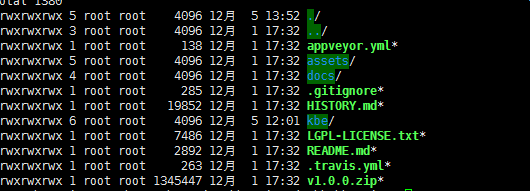
参考案例:https://github.com/Yenole/kbengine-docker/blob/master/Dockerfile
不过他这个写的我没实现成功
一、Dockerfile文件
FROM ubuntu:16.04

LABEL maintainer="116.com"

# 设置工作目录

WORKDIR /

# 更新并安装环境

RUN apt update

RUN apt install libmysqlclient-dev -y           #数据库管理器(DBMgr)会用到,不然这个进程起不了,无法连接数据库

RUN apt install mysql-client -y

#解压安装引擎

COPY kb /

# 添加demo
RUN useradd kbe

#安装supervisord                  #让supervisord启动在前端,这样不会down掉

RUN apt install supervisor -y

RUN chmod  /etc/supervisor/supervisord.conf

COPY supervisord.conf /etc/supervisor/supervisord.conf

# 映射端口

EXPOSE

EXPOSE

EXPOSE

CMD ["/usr/bin/supervisord","-n","-c","/etc/supervisor/supervisord.conf"]
二.supervisord.conf文件
; supervisor config file

[unix_http_server]

file=/var/run/supervisor.sock   ; (the path to the socket file)

chmod=                       ; sockef file mode (default )

[supervisord]

logfile=/var/log/supervisor/supervisord.log ; (main log file;default $CWD/supervisord.log)

pidfile=/var/run/supervisord.pid ; (supervisord pidfile;default supervisord.pid)

childlogdir=/var/log/supervisor            ; ('AUTO' child log dir, default $TEMP)

; the below section must remain in the config file for RPC

; (supervisorctl/web interface) to work, additional interfaces may be

; added by defining them in separate rpcinterface: sections

[rpcinterface:supervisor]

supervisor.rpcinterface_factory = supervisor.rpcinterface:make_main_rpcinterface

[supervisorctl]

serverurl=unix:///var/run/supervisor.sock ; use a unix:// URL  for a unix socket

; The [include] section can just contain the "files" setting.  This

; setting can list multiple files (separated by whitespace or

; newlines).  It can also contain wildcards.  The filenames are

; interpreted as relative to this file.  Included files *cannot*

; include files themselves.

[include]

files = /etc/supervisor/conf.d/*.conf

[program:kbe2]

user=kbe

environment=uid="1000",KBE_ROOT="/kbengine",KBE_RES_PATH="$KBE_ROOT/assets/:$KBE_ROOT/assets/scripts/:$KBE_ROOT/assets/res/",KBE_BIN_PATH="$KBE_ROOT/kbe/bin/server"

directory=/kbengine/assets/

command=/bin/sh start_server.sh

autostart=true

autorestart=true

[program:django]

directory=/kbengine/kbe/tools/server/webconsole/

command=/bin/sh run_server.sh

autostart=true

autorestart=true
三、构建镜像
docker build -t kbengine:v1 .
四、注意事项
1.提先要把数据库准备好,建好库已经用户密码。
2.环境变量问题
Kbengine游戏引擎-【5】用Dockerfile打包镜像kbengine的更多相关文章
- # 通过 DockerFile 打包镜像
在介绍 Docker 具体的操作前,先简要复习下 Docker 的架构,这样可以更好地帮助我们理解 Docker 中的各个命令. 首先我们一直对 Docker 这个叫法就有些误解,Docker 其实指 ...
- Kbengine游戏引擎-【4】demo-kbengine_unity3d_demo 在容器docker上安装测试
git地址:https://github.com/kbengine/kbengine_unity3d_demo Demo中文地址:https://github.com/kbengine/kbengin ...
- Kbengine游戏引擎-【2】kbengine引擎服务端目录结构分析
|- kbengine (KBE_ROOT 根目录) |- demo (游戏例子工程的根目录) |- res (工程的所有资源) |- spaces (通常存放游戏场景相关的资源,例如Navmesh) ...
- Kbengine游戏引擎-【1】kbengine安装
本文主要介绍如何在Linux上安装 官网环境要求:Centos >= 5.x, Debian >= 5.x GCC版本: >= 4.4.x 官网链接 本文的安装环境介绍:Centos ...
- Docker Dockerfile 定制镜像(转)
转自: https://yeasy.gitbooks.io/docker_practice/ 及 https://blog.csdn.net/wo18237095579/article/details ...
- 【2D游戏引擎】WIP反思
WIP(Working In Progress)是我初学游戏引擎开发时候开发的一个2D游戏引擎,当时计划为它实现类似Unity一样的编辑器,具有和Unity相似的工作流,但是由于水平不够,走了很多弯路 ...
- Docker Dockerfile 定制镜像
使用 Dockerfile 定制镜像 镜像的定制实际上就是定制每一层所添加的配置.文件.如果我们可以把每一层修改.安装.构建.操作的命令都写入一个脚本,用这个脚本来构建.定制镜像,那么无法重复的问题 ...
- Docker用Dockerfile定制镜像
用Dockerfile定制镜像 镜像的定制实际上就是定制每一层所添加的配置.文件.如果我们可以把每一层修改.安装.构建.操作的命令都写入一个脚本,用这个脚本来构建.定制镜像,那之前提示的无法重复的问题 ...
- 开源免费的HTML5游戏引擎
青瓷引擎的成长 青瓷引擎自2015年4月项目启动开始,7月首次亮相2015年ChinaJoy,便得到业界的极大关注,随后开启限量测试,收到数百个开发者团队的试用申请及反馈,期间经历了18个内测版本,完 ...
随机推荐
- 第一章、接口规范之Restful规范
阅读目录 2.1 数据的安全保障 2.2 接口特征表现 2.3 多数据版本共存 2.4 数据即是资源 2.5 资源操作由请求方式决定 3.1 正常响应 3.2 重定向响应 3.3 客户端异常 3.4 ...
- Makefile中代码写在同一行和分开几行写有什么区别?
在Makefile中,写在同一行的代码就相当于是在Linux中的同一行命令行写的代码一样,是一次性执行的:如程序中如下编写Makefile代码(请注意,两个命令之间应该使用分号“:”来进行分隔): a ...
- 微信小程序开发(九)获取手机连接的wifi信息
// succ.wxml <view>WIFI ssid:{{wifissid}}</view> <view>WIFI bssid:{{wifiBssid}}< ...
- 2.02_Python网络爬虫分类及其原理
一:通用爬虫和聚焦爬虫 根据使用场景,网络爬虫可分为 通用爬虫 和 聚焦爬虫 两种. 通用爬虫 通用网络爬虫是捜索引擎抓取系统(Baidu.Google.Yahoo等)的重要组成部分.主要目的是将互联 ...
- LoadRunner(2)
一.性能测试的基本概念 1.并发和在线的区别:并发的压力是一种瞬时压力,一般针对同一类型业务:在线的压力是一段时间的压力,没有并发那么集中. 规律:一般20用户并发产生的压力相当于200用户在线的压力 ...
- 【转】GO语言map类型interface{}转换踩坑小记
原文:https://www.az1314.cn/art/69 ------------------------------------------ mapA := make([string]inte ...
- Redis长短链接的区别
本文介绍了phpredis中与redis建立连接的两种方式:connect(短连接)和pconnect(长连接)的区别. 问题背景: 项目采用LNMP架构,考虑到数据访问性能问题,因此使用redis来 ...
- Codeforces Round #590 (Div. 3) C. Pipes
链接: https://codeforces.com/contest/1234/problem/C 题意: You are given a system of pipes. It consists o ...
- php实现浏览器大文件分片上传
PHP用超级全局变量数组$_FILES来记录文件上传相关信息的. 1.file_uploads=on/off 是否允许通过http方式上传文件 2.max_execution_time=30 允许脚本 ...
- Word:自动编号超过9后缩进太大
造冰箱的大熊猫,本文适用于Microsoft Office 2007@cnblogs 2019/7/30 文中图片可通过点击鼠标右键查看大图 1.场景 如下图所示,使用Word的自动编号功能时,当编 ...