
jQuery EasyUI 数据网格
jQuery EasyUI 数据网格 - 转换 HTML 表格为数据网格
本节将介绍jQuery EasyUI数据网格的运用,主要内容为如何将HTML表格转换为数据网格。
本实例演示如何转换表格(table)为数据网格(datagrid)。
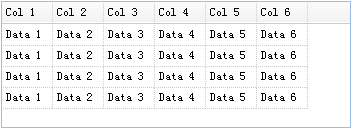
数据网格(datagrid)的列信息是定义在<thead>标记中,数据是定义在<tbody>标记中。确保为所有的数据列设置field名称,请看下面的实例:
<table id="tt" class="easyui-datagrid" style="width:400px;height:auto;">

        <thead>

            <tr>

                <th field="name1" width="50">Col 1</th>

                <th field="name2" width="50">Col 2</th>

                <th field="name3" width="50">Col 3</th>

                <th field="name4" width="50">Col 4</th>

                <th field="name5" width="50">Col 5</th>

                <th field="name6" width="50">Col 6</th>

            </tr>

        </thead>

        <tbody>

            <tr>

                <td>Data 1</td>

                <td>Data 2</td>

                <td>Data 3</td>

                <td>Data 4</td>

                <td>Data 5</td>

                <td>Data 6</td>

            </tr>

            <tr>

                <td>Data 1</td>

                <td>Data 2</td>

                <td>Data 3</td>

                <td>Data 4</td>

                <td>Data 5</td>

                <td>Data 6</td>

            </tr>

            <tr>

                <td>Data 1</td>

                <td>Data 2</td>

                <td>Data 3</td>

                <td>Data 4</td>

                <td>Data 5</td>

                <td>Data 6</td>

            </tr>

            <tr>

                <td>Data 1</td>

                <td>Data 2</td>

                <td>Data 3</td>

                <td>Data 4</td>

                <td>Data 5</td>

                <td>Data 6</td>

            </tr>

        </tbody>

    </table>
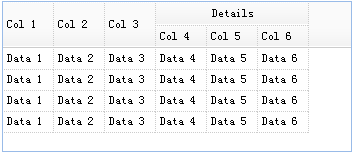
然后,您可以定义一个复杂的表头,例如:
<thead>

        <tr>

            <th field="name1" width="50" rowspan="2">Col 1</th>

            <th field="name2" width="50" rowspan="2">Col 2</th>

            <th field="name3" width="50" rowspan="2">Col 3</th>

            <th colspan="3">Details</th>

        </tr>

        <tr>

            <th field="name4" width="50">Col 4</th>

            <th field="name5" width="50">Col 5</th>

            <th field="name6" width="50">Col 6</th>

        </tr>

    </thead>
现在您可以看见,复杂表头已经创建。
下载 jQuery EasyUI 实例
jeasyui-datagrid-datagrid1.zip
jQuery EasyUI 数据网格 - 取得选中行数据
本节的内容为如何获取jQuery EasyUI数据网格中的选中行数据。
下述实例演示了如何取得选中行数据的操作。
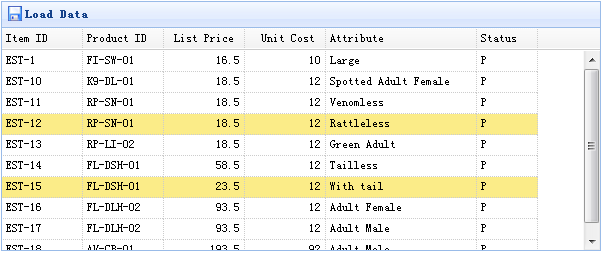
<table id="tt" class="easyui-datagrid" style="width:600px;height:250px"  url="data/datagrid_data.json"     title="Load Data" iconCls="icon-save">

        <thead>

            <tr>

                <th field="itemid" width="80">Item ID</th>

                <th field="productid" width="80">Product ID</th>

                <th field="listprice" width="80" align="right">List Price</th>

                <th field="unitcost" width="80" align="right">Unit Cost</th>

                <th field="attr1" width="150">Attribute</th>

                <th field="status" width="60" align="center">Stauts</th>

            </tr>

        </thead>

    </table>
<table id="tt" class="easyui-datagrid" style="width:600px;height:250px" url="data/datagrid_data.json" title="Load Data" iconCls="icon-save">

        <thead>

            <tr>

                <th field="itemid" width="80">Item ID</th>

                <th field="productid" width="80">Product ID</th>

                <th field="listprice" width="80" align="right">List Price</th>

                <th field="unitcost" width="80" align="right">Unit Cost</th>

                <th field="attr1" width="150">Attribute</th>

                <th field="status" width="60" align="center">Stauts</th>

            </tr>

        </thead>

    </table>
数据网格(datagrid)组件包含两种方法来检索选中行数据:
- getSelected:取得第一个选中行数据,如果没有选中行,则返回null,否则返回记录。
- getSelections:取得所有选中行数据,返回元素记录的数组数据。
创建数据网格(DataGrid)
使用演示
取得选中行数据:
var row = $('#tt').datagrid('getSelected');

    if (row){

        alert('Item ID:'+row.itemid+"\nPrice:"+row.listprice);

    }
取得所有选中行的 itemid:
var ids = [];

    var rows = $('#tt').datagrid('getSelections');

    for(var i=0; i<rows.length; i++){

            ids.push(rows[i].itemid);

        }

        alert(ids.join('\n'));
下载 jQuery EasyUI 实例
jeasyui-datagrid-datagrid3.zip
jQuery EasyUI 数据网格的更多相关文章
- 雷林鹏分享:jQuery EasyUI 数据网格 - 设置冻结列
jQuery EasyUI 数据网格 - 设置冻结列 本实例演示如何冻结一些列,当用户在网格上移动水平滚动条时,冻结列不能滚动到视图的外部. 为了冻结列,您需要定义 frozenColumns 属性. ...
- 雷林鹏分享:jQuery EasyUI 数据网格 - 创建复杂工具栏
jQuery EasyUI 数据网格 - 创建复杂工具栏 数据网格(datagrid)的工具栏(toolbar)可以包含按钮及其他组件. 您可以通个一个已存在的 DIV 标签来简单地定义工具栏布局,该 ...
- 雷林鹏分享:jQuery EasyUI 数据网格 - 动态改变列
jQuery EasyUI 数据网格 - 动态改变列 数据网格(DataGrid)列可以使用 'columns' 属性简单地定义.如果您想动态地改变列,那根本没有问题.为了改变列,您可以重新调用dat ...
- 雷林鹏分享:jQuery EasyUI 数据网格 - 格式化列
jQuery EasyUI 数据网格 - 格式化列 以下实例格式化在 easyui DataGrid 里的列数据,并使用自定义列的 formatter,如果价格小于 20 就将文本变为红色. 为了格式 ...
- 雷林鹏分享:jQuery EasyUI 数据网格 - 设置排序
jQuery EasyUI 数据网格 - 设置排序 本实例演示如何通过点击列表头来排序数据网格(DataGrid). 数据网格(DataGrid)的所有列可以通过点击列表头来排序.您可以定义哪列可以排 ...
- 雷林鹏分享:jQuery EasyUI 数据网格 - 创建列组合
jQuery EasyUI 数据网格 - 创建列组合 easyui 的数据网格(DataGrid)可以创建列组合,如下所示: 在本实例中,我们使用平面数据来填充数据网格(DataGrid)的数据,并把 ...
- 雷林鹏分享:jQuery EasyUI 数据网格 - 自定义排序
jQuery EasyUI 数据网格 - 自定义排序 如果默认的排序行为不满足您的需求,您可以自定义数据网格(datagrid)的排序行为. 最基础的,用户可以在列上定义一个排序函数,函数名是 sor ...
- 雷林鹏分享:jQuery EasyUI 数据网格 - 自定义分页
jQuery EasyUI 数据网格 - 自定义分页 数据网格(datagrid)内置一个很好特性的分页功能,自定义也相当简单.在本教程中,我们将创建一个数据网格(datagrid),并在分页工具栏上 ...
- 雷林鹏分享:jQuery EasyUI 数据网格 - 添加复选框
jQuery EasyUI 数据网格 - 添加复选框 本实例演示如何放置一个复选框列到数据网格(DataGrid).通过复选框,用户将可以选择 选中/取消选中 网格行数据. 为了添加一个复选框列,我们 ...
- 雷林鹏分享:jQuery EasyUI 数据网格 - 启用行内编辑
jQuery EasyUI 数据网格 - 启用行内编辑 可编辑的功能是最近添加到数据网格(datagrid)的.它可以使用户添加一个新行到数据网格(datagrid).用户也可以更新一个或多个行. 本 ...
随机推荐
- 请求路径@PathVariable注释中有点.英文句号的问题(忽略英文句号后面的后缀)
前端页面请求地址 <video id=example-video width=960 height=540 class="video-js vjs-default-skin" ...
- array_splice 在数组某位置插入数据
$arr=array('a','b','c','d','e','f','g');//目标数组 $i_arr=array(');//要插入的数组 $n=;//插入的位置 array_splice($ar ...
- python多线程使用场景
python多线程使用场景 如果程序时cpu密集型的,使用python的多线程是无法提升效率的,如果程序时IO密集型的,使用python多线程可以提高程序的整体效率 CPU密集型(CPU-bound) ...
- 神经网络手写数字识别numpy实现
本文摘自Michael Nielsen的Neural Network and Deep Learning,该书的github网址为:https://github.com/mnielsen/neural ...
- 双端队列 【deque】
题目链接:https://ac.nowcoder.com/acm/contest/1071/D 还是第一次简单运用双端队列.顾名思义:队列的头尾都可以进行插入跟删除操作. 存在于头文件 deque 中 ...
- [Agc028A]Two Abbreviations_数学
Two Abbreviations 题目链接:https://atcoder.jp/contests/agc028/tasks/agc028_a 数据范围:略. 题解: 题目中的位置非常不利于思考,我 ...
- [转帖]电源ac和dc有什么区别_dc ac分别代表什么
电源ac和dc有什么区别_dc ac分别代表什么 发表于 2017-10-28 17:18:58 电源设计应用 +关注 http://m.elecfans.com/article/571712.htm ...
- spring-data-redis 2.0 的使用
在使用Spring Boot2.x运行Redis时,发现百度不到顺手的文档,搞通后发现其实这个过程非常简单和简洁,觉得有必要拿出来分享一下. Spring Boot2.x 不再使用Jedis,换成了L ...
- PowerShell 反弹渗透技巧
Windows PowerShell 是一种命令行外壳程序和脚本环境,使命令行用户和脚本编写者可以利用 .NET Framework的强大功能,并且与现有的WSH保持向后兼容,因此它的脚本程序不仅能访 ...
- MySQL 聚合函数(三)MySQL对GROUP BY的处理
原文来自MySQL 5.7 官方手册:12.20.3 MySQL Handling of GROUP BY SQL-92和更早版本不允许SELECT列表,HAVING条件或ORDER BY列表引用未在 ...