
javaIO——概述
以前看java书,都将IO作为一个大的章节甚至模块来编写,可见IO在java语言中的重要性。
java的流按功能和处理的目标数据不同可以分为字节流和字符流。字符流处理的基本数据单元是字符;字节流处理的基本数据单元是字节。类关系结构图如下:
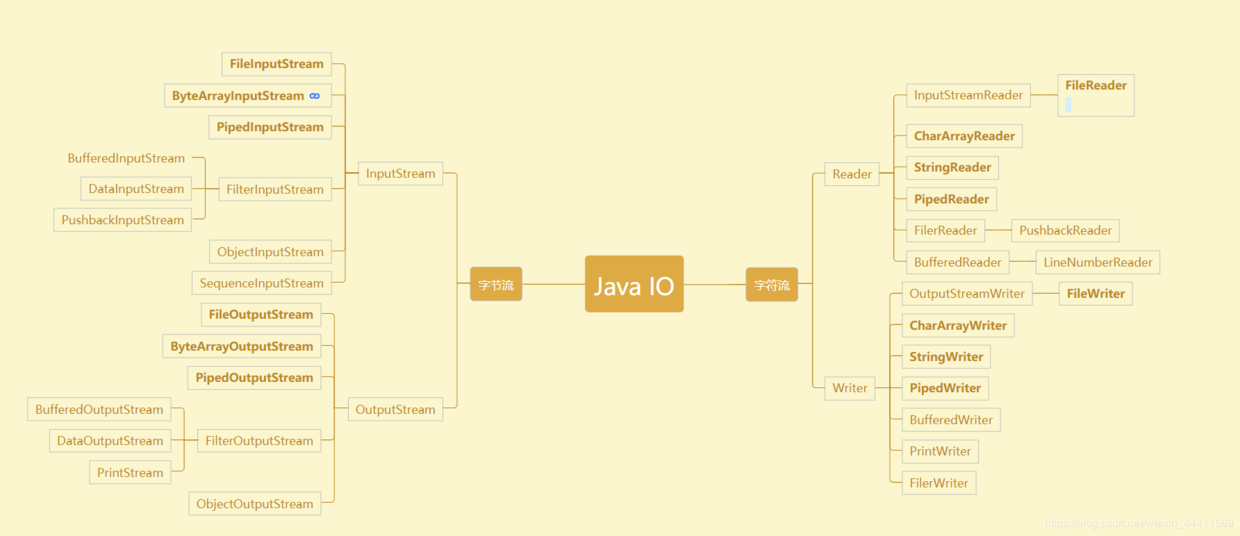
图片转自:https://blog.csdn.net/weixin_44411569/article/details/88788085
IO本身就是输入输出的意思,从上图可以看出,无论字符还是字节流,都是分为输入和输出两大块。
并且不管是输入还是输出流、字符流还是字节流,都实现了接口 java.io.Closeable ,该接口只有一个 close 方法。官方文档是这样说的:A {@code Closeable} is a source or destination of data that can be closed.The close method is invoked to release resources that the object is holding (such as open files).意思是说:
一个Closeable对象是一个可以关闭的数据源或者数据目标地,可以通过调用close方法来释放该对象所占用的资源(比如打开的文件)。显然,所谓数据源就是对应输入流,而数据目标代表输出流。
值得注意的是,从jdk1.7开始,Closeable 接口新增了一个 java.lang.AutoCloseable 父类接口,该接口也是只有一个 close 方法。看接口命名就知道,这个 close 方法是可以自动调用的。官方文档:The {@link #close()} method of an {@code AutoCloseable} object is called automatically when exiting a {@code try}-with-resources block for which the object has been declared in the resource specification header.意思是在退出 try 代码块的时候自动调用 AutoCloseable.close 方法,这些AutoCloseable对象在try-with-resources代码块中声明。也就是说以后在使用 Closeable 对象的时候,不用再使用 finally 调用 close 方法了,只需要把声明资源的代码写进try代码块。
具体使用请看 AutoCloseable 小试:https://www.cnblogs.com/coding-one/p/11368653.html
1. 字符输入流:
字符输入流的基类是 java.io.Reader,这是一个抽象类,除了 Closeable 接口还继承了 java.lang.Readable,该接口只有一个 public int read(java.nio.CharBuffer cb)throws IOException; 方法,Reader实现了该方法。Reader有4个read重载方法:
public int read(java.nio.CharBuffer target) throws IOException {

        int len = target.remaining();

        char[] cbuf = new char[len];

        int n = read(cbuf, 0, len);

        if (n > 0)

            target.put(cbuf, 0, n);

        return n;

    }

public int read() throws IOException {

        char cb[] = new char[1];

        if (read(cb, 0, 1) == -1)

            return -1;

        else

            return cb[0];

    }

public int read(char cbuf[]) throws IOException {

        return read(cbuf, 0, cbuf.length);

    }

abstract public int read(char cbuf[], int off, int len) throws IOException;
可以看出,第4个为核心方法,其它3个都调用它,它也是抽象方法,需要子类实现。不过几种已知子类都做了各自的重写。带参数的read方法作用是把内容读入参数指定的字符数组或者CharBuffer对象。
2. 字符输出流:
字符输出流的基类是 java.io.Writer,也是抽象类,除了 Closeable 接口还继承了 java.lang.Appendable 和 java.io.Flushable,分别提供 append() 和 flush() 方法,其中 append 方法是重载的。
2.1. 既然集成了 Flushable,当然是需要设计缓存的,Writer 中预置了 private char[] writeBuffer; 来作为缓存空间,并且设置了 private static final int WRITE_BUFFER_SIZE = 1024; 作为默认缓存大小。
2.2. Writer重载了5个 write() 方法分别针对单字符、字符数组或字符串的参数场景,以及3个 append() 方法:
/**

     * Writes a single character.  The character to be written is contained in

     * the 16 low-order bits of the given integer value; the 16 high-order bits

     * are ignored.

     *

     * <p> Subclasses that intend to support efficient single-character output

     * should override this method.

     *

     * @param  c

     *         int specifying a character to be written

     *

     * @throws  IOException

     *          If an I/O error occurs

     */

    public void write(int c) throws IOException {

        synchronized (lock) {

            if (writeBuffer == null){

                writeBuffer = new char[WRITE_BUFFER_SIZE];

            }

            writeBuffer[0] = (char) c;

            write(writeBuffer, 0, 1);

        }

    }

    /**

     * Writes an array of characters.

     *

     * @param  cbuf

     *         Array of characters to be written

     *

     * @throws  IOException

     *          If an I/O error occurs

     */

    public void write(char cbuf[]) throws IOException {

        write(cbuf, 0, cbuf.length);

    }

    /**

     * Writes a portion of an array of characters.

     *

     * @param  cbuf

     *         Array of characters

     *

     * @param  off

     *         Offset from which to start writing characters

     *

     * @param  len

     *         Number of characters to write

     *

     * @throws  IOException

     *          If an I/O error occurs

     */

    abstract public void write(char cbuf[], int off, int len) throws IOException;

    /**

     * Writes a string.

     *

     * @param  str

     *         String to be written

     *

     * @throws  IOException

     *          If an I/O error occurs

     */

    public void write(String str) throws IOException {

        write(str, 0, str.length());

    }

    /**

     * Writes a portion of a string.

     *

     * @param  str

     *         A String

     *

     * @param  off

     *         Offset from which to start writing characters

     *

     * @param  len

     *         Number of characters to write

     *

     * @throws  IndexOutOfBoundsException

     *          If <tt>off</tt> is negative, or <tt>len</tt> is negative,

     *          or <tt>off+len</tt> is negative or greater than the length

     *          of the given string

     *

     * @throws  IOException

     *          If an I/O error occurs

     */

    public void write(String str, int off, int len) throws IOException {

        synchronized (lock) {

            char cbuf[];

            if (len <= WRITE_BUFFER_SIZE) {

                if (writeBuffer == null) {

                    writeBuffer = new char[WRITE_BUFFER_SIZE];

                }

                cbuf = writeBuffer;

            } else {    // Don't permanently allocate very large buffers.

                cbuf = new char[len];

            }

            str.getChars(off, (off + len), cbuf, 0);

            write(cbuf, 0, len);

        }

    }

    /**

     * Appends the specified character sequence to this writer.

     *

     * <p> An invocation of this method of the form <tt>out.append(csq)</tt>

     * behaves in exactly the same way as the invocation

     *

     * <pre>

     *     out.write(csq.toString()) </pre>

     *

     * <p> Depending on the specification of <tt>toString</tt> for the

     * character sequence <tt>csq</tt>, the entire sequence may not be

     * appended. For instance, invoking the <tt>toString</tt> method of a

     * character buffer will return a subsequence whose content depends upon

     * the buffer's position and limit.

     *

     * @param  csq

     *         The character sequence to append.  If <tt>csq</tt> is

     *         <tt>null</tt>, then the four characters <tt>"null"</tt> are

     *         appended to this writer.

     *

     * @return  This writer

     *

     * @throws  IOException

     *          If an I/O error occurs

     *

     * @since  1.5

     */

    public Writer append(CharSequence csq) throws IOException {

        if (csq == null)

            write("null");

        else

            write(csq.toString());

        return this;

    }

    /**

     * Appends a subsequence of the specified character sequence to this writer.

     * <tt>Appendable</tt>.

     *

     * <p> An invocation of this method of the form <tt>out.append(csq, start,

     * end)</tt> when <tt>csq</tt> is not <tt>null</tt> behaves in exactly the

     * same way as the invocation

     *

     * <pre>

     *     out.write(csq.subSequence(start, end).toString()) </pre>

     *

     * @param  csq

     *         The character sequence from which a subsequence will be

     *         appended.  If <tt>csq</tt> is <tt>null</tt>, then characters

     *         will be appended as if <tt>csq</tt> contained the four

     *         characters <tt>"null"</tt>.

     *

     * @param  start

     *         The index of the first character in the subsequence

     *

     * @param  end

     *         The index of the character following the last character in the

     *         subsequence

     *

     * @return  This writer

     *

     * @throws  IndexOutOfBoundsException

     *          If <tt>start</tt> or <tt>end</tt> are negative, <tt>start</tt>

     *          is greater than <tt>end</tt>, or <tt>end</tt> is greater than

     *          <tt>csq.length()</tt>

     *

     * @throws  IOException

     *          If an I/O error occurs

     *

     * @since  1.5

     */

    public Writer append(CharSequence csq, int start, int end) throws IOException {

        CharSequence cs = (csq == null ? "null" : csq);

        write(cs.subSequence(start, end).toString());

        return this;

    }

    /**

     * Appends the specified character to this writer.

     *

     * <p> An invocation of this method of the form <tt>out.append(c)</tt>

     * behaves in exactly the same way as the invocation

     *

     * <pre>

     *     out.write(c) </pre>

     *

     * @param  c

     *         The 16-bit character to append

     *

     * @return  This writer

     *

     * @throws  IOException

     *          If an I/O error occurs

     *

     * @since 1.5

     */

    public Writer append(char c) throws IOException {

        write(c);

        return this;

    }
3. 字节输入流:
字节输入流的基类是 java.io.InputStream,抽象类,继承 java.io.Closeable。InputStream 有3个重载的 read 方法,其中不带参的是抽象方法,供其它两个调用。此外,该类还提供了 skip(跳过)、mark(标记)、reset(重置位置)等实用方法。
/**

     * Reads the next byte of data from the input stream. The value byte is

     * returned as an <code>int</code> in the range <code>0</code> to

     * <code>255</code>. If no byte is available because the end of the stream

     * has been reached, the value <code>-1</code> is returned. This method

     * blocks until input data is available, the end of the stream is detected,

     * or an exception is thrown.

     *

     * <p> A subclass must provide an implementation of this method.

     *

     * @return     the next byte of data, or <code>-1</code> if the end of the

     *             stream is reached.

     * @exception  IOException  if an I/O error occurs.

     */

    public abstract int read() throws IOException;

    /**

     * Reads some number of bytes from the input stream and stores them into

     * the buffer array <code>b</code>. The number of bytes actually read is

     * returned as an integer.  This method blocks until input data is

     * available, end of file is detected, or an exception is thrown.

     *

     * <p> If the length of <code>b</code> is zero, then no bytes are read and

     * <code>0</code> is returned; otherwise, there is an attempt to read at

     * least one byte. If no byte is available because the stream is at the

     * end of the file, the value <code>-1</code> is returned; otherwise, at

     * least one byte is read and stored into <code>b</code>.

     *

     * <p> The first byte read is stored into element <code>b[0]</code>, the

     * next one into <code>b[1]</code>, and so on. The number of bytes read is,

     * at most, equal to the length of <code>b</code>. Let <i>k</i> be the

     * number of bytes actually read; these bytes will be stored in elements

     * <code>b[0]</code> through <code>b[</code><i>k</i><code>-1]</code>,

     * leaving elements <code>b[</code><i>k</i><code>]</code> through

     * <code>b[b.length-1]</code> unaffected.

     *

     * <p> The <code>read(b)</code> method for class <code>InputStream</code>

     * has the same effect as: <pre><code> read(b, 0, b.length) </code></pre>

     *

     * @param      b   the buffer into which the data is read.

     * @return     the total number of bytes read into the buffer, or

     *             <code>-1</code> if there is no more data because the end of

     *             the stream has been reached.

     * @exception  IOException  If the first byte cannot be read for any reason

     * other than the end of the file, if the input stream has been closed, or

     * if some other I/O error occurs.

     * @exception  NullPointerException  if <code>b</code> is <code>null</code>.

     * @see        java.io.InputStream#read(byte[], int, int)

     */

    public int read(byte b[]) throws IOException {

        return read(b, 0, b.length);

    }

    /**

     * Reads up to <code>len</code> bytes of data from the input stream into

     * an array of bytes.  An attempt is made to read as many as

     * <code>len</code> bytes, but a smaller number may be read.

     * The number of bytes actually read is returned as an integer.

     *

     * <p> This method blocks until input data is available, end of file is

     * detected, or an exception is thrown.

     *

     * <p> If <code>len</code> is zero, then no bytes are read and

     * <code>0</code> is returned; otherwise, there is an attempt to read at

     * least one byte. If no byte is available because the stream is at end of

     * file, the value <code>-1</code> is returned; otherwise, at least one

     * byte is read and stored into <code>b</code>.

     *

     * <p> The first byte read is stored into element <code>b[off]</code>, the

     * next one into <code>b[off+1]</code>, and so on. The number of bytes read

     * is, at most, equal to <code>len</code>. Let <i>k</i> be the number of

     * bytes actually read; these bytes will be stored in elements

     * <code>b[off]</code> through <code>b[off+</code><i>k</i><code>-1]</code>,

     * leaving elements <code>b[off+</code><i>k</i><code>]</code> through

     * <code>b[off+len-1]</code> unaffected.

     *

     * <p> In every case, elements <code>b[0]</code> through

     * <code>b[off]</code> and elements <code>b[off+len]</code> through

     * <code>b[b.length-1]</code> are unaffected.

     *

     * <p> The <code>read(b,</code> <code>off,</code> <code>len)</code> method

     * for class <code>InputStream</code> simply calls the method

     * <code>read()</code> repeatedly. If the first such call results in an

     * <code>IOException</code>, that exception is returned from the call to

     * the <code>read(b,</code> <code>off,</code> <code>len)</code> method.  If

     * any subsequent call to <code>read()</code> results in a

     * <code>IOException</code>, the exception is caught and treated as if it

     * were end of file; the bytes read up to that point are stored into

     * <code>b</code> and the number of bytes read before the exception

     * occurred is returned. The default implementation of this method blocks

     * until the requested amount of input data <code>len</code> has been read,

     * end of file is detected, or an exception is thrown. Subclasses are encouraged

     * to provide a more efficient implementation of this method.

     *

     * @param      b     the buffer into which the data is read.

     * @param      off   the start offset in array <code>b</code>

     *                   at which the data is written.

     * @param      len   the maximum number of bytes to read.

     * @return     the total number of bytes read into the buffer, or

     *             <code>-1</code> if there is no more data because the end of

     *             the stream has been reached.

     * @exception  IOException If the first byte cannot be read for any reason

     * other than end of file, or if the input stream has been closed, or if

     * some other I/O error occurs.

     * @exception  NullPointerException If <code>b</code> is <code>null</code>.

     * @exception  IndexOutOfBoundsException If <code>off</code> is negative,

     * <code>len</code> is negative, or <code>len</code> is greater than

     * <code>b.length - off</code>

     * @see        java.io.InputStream#read()

     */

    public int read(byte b[], int off, int len) throws IOException {

        if (b == null) {

            throw new NullPointerException();

        } else if (off < 0 || len < 0 || len > b.length - off) {

            throw new IndexOutOfBoundsException();

        } else if (len == 0) {

            return 0;

        }

        int c = read();

        if (c == -1) {

            return -1;

        }

        b[off] = (byte)c;

        int i = 1;

        try {

            for (; i < len ; i++) {

                c = read();

                if (c == -1) {

                    break;

                }

                b[off + i] = (byte)c;

            }

        } catch (IOException ee) {

        }

        return i;

    }
4. 字节输出流:
字节输出流的基类是 java.io.OutputStream,抽象类,继承 java.io,Closeable 和 java.io.Flushable接口。OutputStream 有3个重载的 write 方法,其中不带参的为抽象方法。
/**

     * Writes the specified byte to this output stream. The general

     * contract for <code>write</code> is that one byte is written

     * to the output stream. The byte to be written is the eight

     * low-order bits of the argument <code>b</code>. The 24

     * high-order bits of <code>b</code> are ignored.

     * <p>

     * Subclasses of <code>OutputStream</code> must provide an

     * implementation for this method.

     *

     * @param      b   the <code>byte</code>.

     * @exception  IOException  if an I/O error occurs. In particular,

     *             an <code>IOException</code> may be thrown if the

     *             output stream has been closed.

     */

    public abstract void write(int b) throws IOException;

    /**

     * Writes <code>b.length</code> bytes from the specified byte array

     * to this output stream. The general contract for <code>write(b)</code>

     * is that it should have exactly the same effect as the call

     * <code>write(b, 0, b.length)</code>.

     *

     * @param      b   the data.

     * @exception  IOException  if an I/O error occurs.

     * @see        java.io.OutputStream#write(byte[], int, int)

     */

    public void write(byte b[]) throws IOException {

        write(b, 0, b.length);

    }

    /**

     * Writes <code>len</code> bytes from the specified byte array

     * starting at offset <code>off</code> to this output stream.

     * The general contract for <code>write(b, off, len)</code> is that

     * some of the bytes in the array <code>b</code> are written to the

     * output stream in order; element <code>b[off]</code> is the first

     * byte written and <code>b[off+len-1]</code> is the last byte written

     * by this operation.

     * <p>

     * The <code>write</code> method of <code>OutputStream</code> calls

     * the write method of one argument on each of the bytes to be

     * written out. Subclasses are encouraged to override this method and

     * provide a more efficient implementation.

     * <p>

     * If <code>b</code> is <code>null</code>, a

     * <code>NullPointerException</code> is thrown.

     * <p>

     * If <code>off</code> is negative, or <code>len</code> is negative, or

     * <code>off+len</code> is greater than the length of the array

     * <code>b</code>, then an <tt>IndexOutOfBoundsException</tt> is thrown.

     *

     * @param      b     the data.

     * @param      off   the start offset in the data.

     * @param      len   the number of bytes to write.

     * @exception  IOException  if an I/O error occurs. In particular,

     *             an <code>IOException</code> is thrown if the output

     *             stream is closed.

     */

    public void write(byte b[], int off, int len) throws IOException {

        if (b == null) {

            throw new NullPointerException();

        } else if ((off < 0) || (off > b.length) || (len < 0) ||

                   ((off + len) > b.length) || ((off + len) < 0)) {

            throw new IndexOutOfBoundsException();

        } else if (len == 0) {

            return;

        }

        for (int i = 0 ; i < len ; i++) {

            write(b[off + i]);

        }

    }
javaIO——概述的更多相关文章
- java-IO流-字节流-概述及分类、FileInputStream、FileOutputStream、available()方法、定义小数组、BufferedInputStream、BufferedOutputStream、flush和close方法的区别、流的标准处理异常代码
1.IO流概述及其分类 * 1.概念 * IO流用来处理设备之间的数据传输 * Java对数据的操作是通过流的方式 * Java用于操作流的类都在IO包中 * ...
- [三]JavaIO之IO体系类整体设计思路 流的概念以及四大基础分类
从本文开始,将正式进入JavaIO的简介 在继续javaIO系列的文章之前 可以过去看一下 本人博客上的设计模式中的 适配器模式和装饰器模式 这会对接下来的阅读大有帮助 本文是从逻辑上介绍整个的J ...
- Java io概述
内容来源:http://ifeve.com/java-io/ Java IO 概述 输入流可以理解为向内存输入,输出流可以理解为从内存输出 Java的IO包主要关注的是从原始数据源的读取以及输出原始数 ...
- Java I/O(一)流和文件类File的概述、FileInputStream和FileInputStream
一.流概述 & InputStream.OutputStream 流包括输入流和输出流,即I/O(Input和Output),具体结构如下: I/O类都被放在java.io包中,所有的输入流类 ...
- 【AR实验室】ARToolKit之概述篇
0x00 - 前言 我从去年就开始对AR(Augmented Reality)技术比较关注,但是去年AR行业一直处于偶尔发声的状态,丝毫没有其"异姓同名"的兄弟VR(Virtual ...
- Recurrent Neural Network系列1--RNN(循环神经网络)概述
作者:zhbzz2007 出处:http://www.cnblogs.com/zhbzz2007 欢迎转载,也请保留这段声明.谢谢! 本文翻译自 RECURRENT NEURAL NETWORKS T ...
- Swift3.0服务端开发(一) 完整示例概述及Perfect环境搭建与配置(服务端+iOS端)
本篇博客算是一个开头,接下来会持续更新使用Swift3.0开发服务端相关的博客.当然,我们使用目前使用Swift开发服务端较为成熟的框架Perfect来实现.Perfect框架是加拿大一个创业团队开发 ...
- .Net 大型分布式基础服务架构横向演变概述
一. 业务背景 构建具备高可用,高扩展性,高性能,能承载高并发,大流量的分布式电子商务平台,支持用户,订单,采购,物流,配送,财务等多个项目的协作,便于后续运营报表,分析,便于运维及监控. 二. 基础 ...
- [C#] 进阶 - LINQ 标准查询操作概述
LINQ 标准查询操作概述 序 “标准查询运算符”是组成语言集成查询 (LINQ) 模式的方法.大多数这些方法都在序列上运行,其中的序列是一个对象,其类型实现了IEnumerable<T> ...
随机推荐
- error:Cannot pull with rebase
原文文链接:https://blog.csdn.net/u012385190/article/details/70670213git 执行git pull –rebase报错误如下: error: C ...
- ERS:百科
ylbtech-ERS:百科 ERS=(Enterprises Run System)企业运行系统 企业运行系统-ERS,是继ERP系统之后的企业管理控制软件系统的终极形式,有着非常美好的市场前景,尤 ...
- Servlet的三种实现方式
A: 实现Servlet接口 B: 继承GenericServlet C: 继承HttpServlet,它是对Http协议进行了封装
- 阶段5 3.微服务项目【学成在线】_day02 CMS前端开发_08-vuejs研究-vuejs基础-v-if和v-for指令
1.2.4 v-if和v-for <!DOCTYPE html> <html lang="en"> <head> <meta charse ...
- uni-app 使用 iconfont 图标 自定义图标
uni-app 的uni-ui 的 Icon 图标组件,裡面的图标只是移动端常见的图标,对于一些其他需求所要显示的图标,这个是完全不够用.那么怎么办?模仿它的组件,用阿里巴巴图标矢量库的图标,自己定义 ...
- Java NIO学习笔记八 DatagramChannel
Java NIO DatagramChannel Java NIO DatagramChannel是可以发送和接收UDP数据包的通道.由于UDP是一种无连接网络协议,因此您不能默认读取和写入Datag ...
- Equals和GetHashCode
Q:2个方法同时被重写的场景? A:Dictionary或HashTable的key使用时,必须重写这两个方法; 因为:根据key取值的时候也是把key转换成HashCode并且验证Equals后再取 ...
- word内存不足 解决办法
word2013内存不足 解决办法具体操作如下: 尝试了很多方法和经验表示都没有效果,最后找到个有效果的分享给大家: 点击“文件”——选项——加载项“ 点左下的”管理“-” 转到“ 把加载项前面的 ...
- json转换成dart类 JSON to Dart
json_to_dart的使用 如果我们得到一个特别复杂的JSON,有时候会无从下手开始写Model,这时候就可以使用一些辅助工具.我认为json_to_dart是比较好用的一个.它可以直接把json ...
- 热更新之lua框架设计
目前中大型游戏项目包含部分VR与AR项目,都需要热更新与在线修改Bug等功能实现,虽然Xlua等插件已经给出了关于C#与Lua语言之间的双向无缝调用实现,但是就热更新的架构却没有提出,这需要广大游戏公 ...