
Swagger保姆级教学
Swagger保姆级教学
Swagger 简介
Swagger 是一个规范和完整的框架,用于生成、描述、调用和可视化 RESTful 风格的 Web 服务。总体目标是使客户端和文件系统作为服务器以同样的速度来更新。文件的方法,参数和模型紧密集成到服务器端的代码,允许API来始终保持同步。
快速上手
1.新建一个springboot项目
2.导入maven依赖(swagger2和swagger UI)
<!-- https://mvnrepository.com/artifact/io.springfox/springfox-swagger2 -->

<dependency>

    <groupId>io.springfox</groupId>

    <artifactId>springfox-swagger2</artifactId>

    <version>2.9.2</version>

</dependency>

<!-- https://mvnrepository.com/artifact/io.springfox/springfox-swagger-ui -->

<dependency>

    <groupId>io.springfox</groupId>

    <artifactId>springfox-swagger-ui</artifactId>

    <version>2.9.2</version>

</dependency>
3.启动项目,访问http://localhost:端口/swagger-ui.html
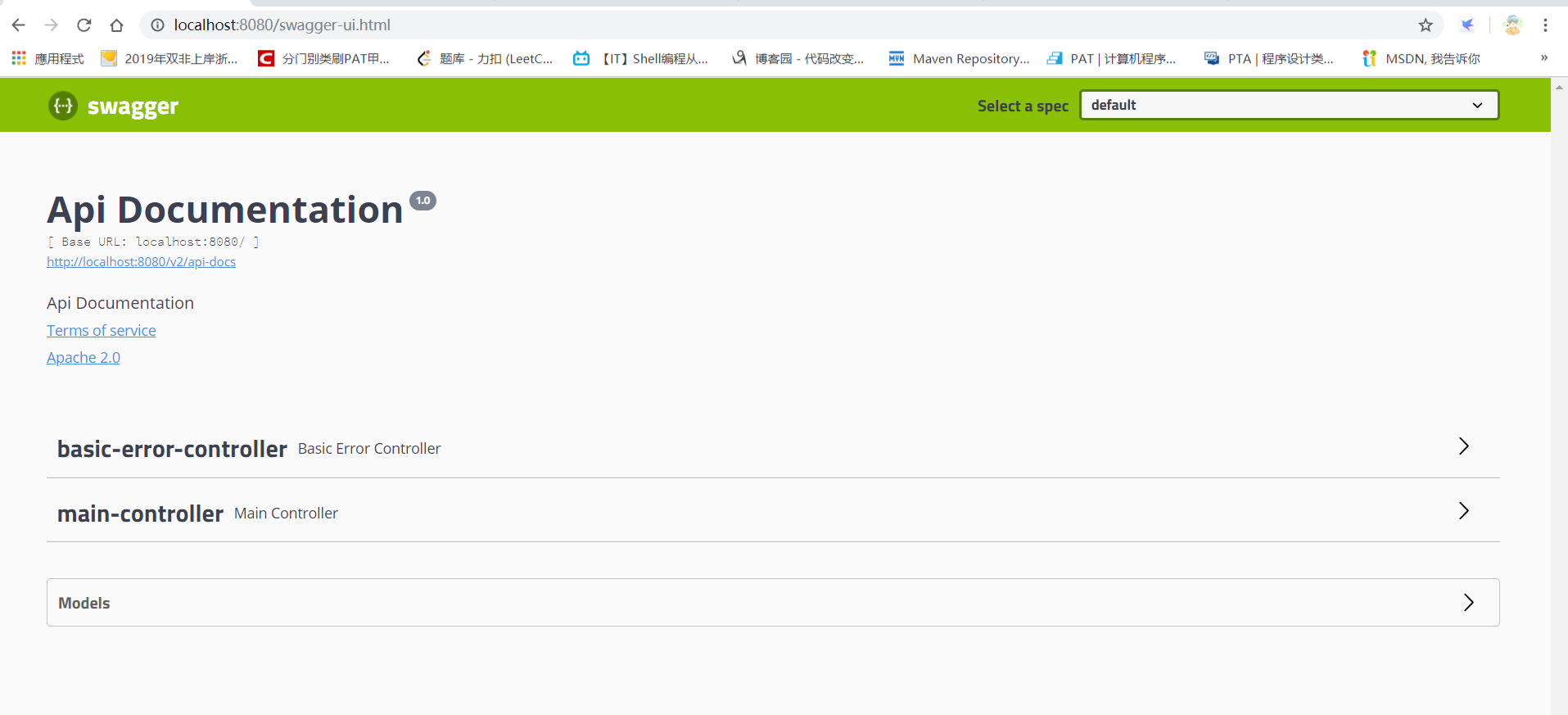
4.新建一个SwaggerConfig.java
package com.littlepage.config;

import java.util.ArrayList;

import org.springframework.context.annotation.Bean;

import org.springframework.context.annotation.Configuration;

import springfox.documentation.service.ApiInfo;

import springfox.documentation.service.Contact;

import springfox.documentation.spi.DocumentationType;

import springfox.documentation.spring.web.plugins.Docket;

import springfox.documentation.swagger2.annotations.EnableSwagger2;

@Configuration

@EnableSwagger2

public class SwaggerConfig {

	/**

	 * 配置swagger bean实例

	 * @return

	 */

	@Bean

	public Docket docket() {

		return new Docket(DocumentationType.SWAGGER_2).apiInfo(apiInfo());

	}

	/**

	 * 配置swagger信息

	 * @return

	 */

	private ApiInfo apiInfo() {

		return new ApiInfo("steve yu's API document",

				"for quick start swagger", "1.0",

				"https://www.cnblogs.com/littlepage/",

				new Contact("steve yu", "https://www.cnblogs.com/littlepage/", "littlepageprogram@outlook.com"),

				"Apache 2.0","http://www.apache.org/licenses/LICENSE-2.0",new ArrayList<>());

	}

}
启动页面
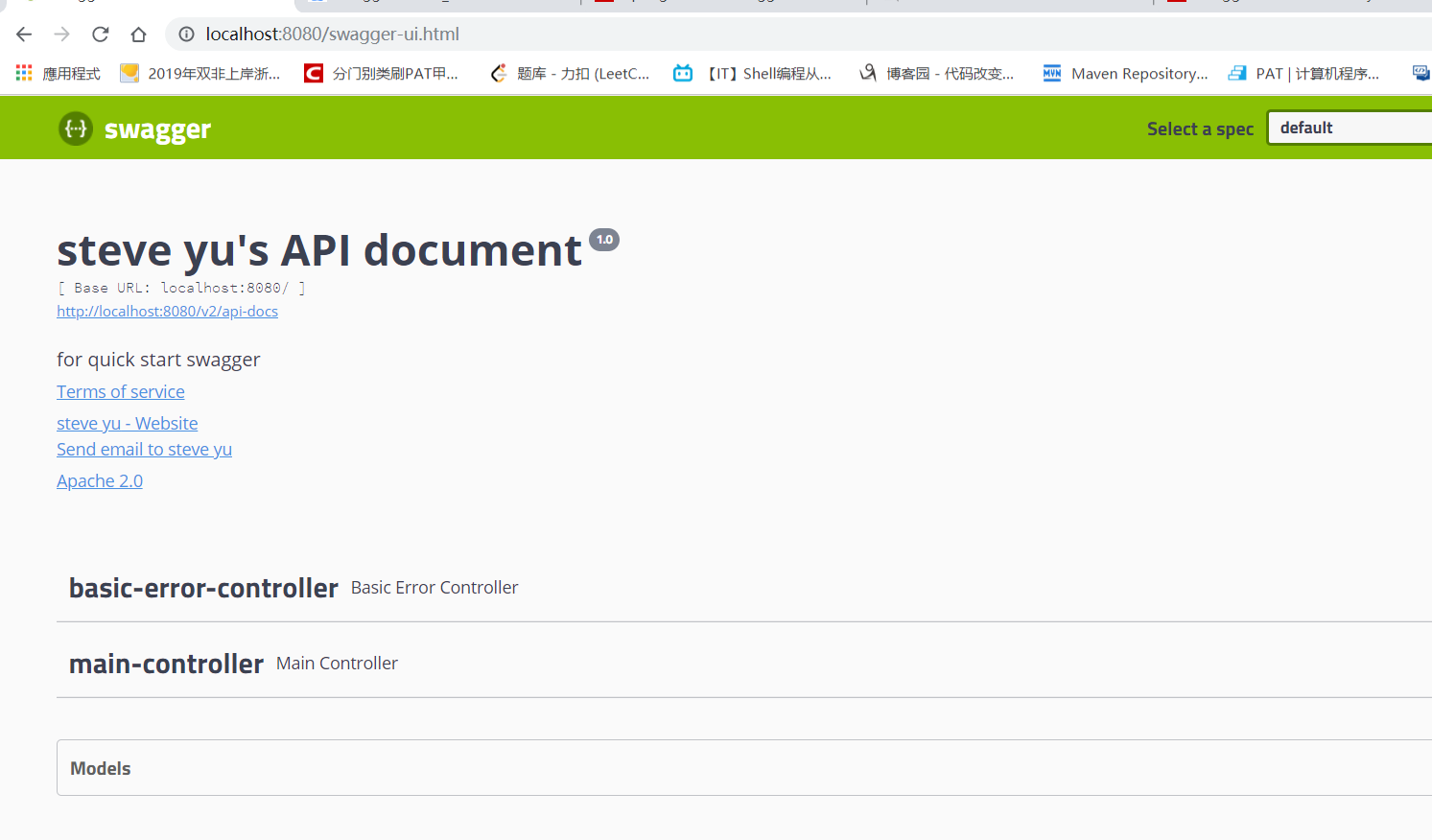
5.配置扫描接口(修改Bean)
@Bean

public Docket docket() {

	return new Docket(DocumentationType.SWAGGER_2).

			apiInfo(apiInfo()).select().apis(RequestHandlerSelectors.basePackage("com.littlepage.controller")).build();

}
6.在环境中进行配置(工程扫描接口开关)
@Bean

public Docket docket(Environment environment){

	Profiles profiles=Profiles.of("dev","test");//假设有dev和test环境变量

	boolean flag=environment.acceptsProfiles(profiles);

	return new Docket(DocuemtatuionType.SWAGGER_2).enable(flag);//如果环境配置了,则生效,否则不生效

}
7.API文档的分组。
new Docket().group(String s)

//这个String s可以规定分组
8.单API样例(参考https://www.jianshu.com/p/349e130e40d5)
#####Controller代码

@Override

    @ApiOperation(value = "post请求调用示例", notes = "invokePost说明", httpMethod = "POST")

    public FFResponseModel<DemoOutputDto> invokePost(@ApiParam(name="传入对象",value="传入json格式",required=true) @RequestBody @Valid DemoDto input) {

        log.info("/testPost is called. input=" + input.toString());

        return new FFResponseModel(Errcode.SUCCESS_CODE, Errcode.SUCCESS_MSG);

    }

#####接口请求入参对象

@Data

@ApiModel(value="演示类",description="请求参数类" )

public class DemoDto implements Serializable {

    private static final long serialVersionUID = 1L;

    @NotNull

    @ApiModelProperty(value = "defaultStr",example="mockStrValue")

    private String strDemo;

    @NotNull

    @ApiModelProperty(example="1234343523",required = true)

    private Long longNum;

    @NotNull

    @ApiModelProperty(example="111111.111")

    private Double doubleNum;

    @NotNull

    @ApiModelProperty(example="2018-12-04T13:46:56.711Z")

    private Date date;

}

#####接口请求出参公共类

@ApiModel(value="基础返回类",description="基础返回类")

public class FFResponseModel<T> implements Serializable {

    private static final long serialVersionUID = -2215304260629038881L;

    // 状态码

    @ApiModelProperty(example="成功")

    private String code;

    // 业务提示语

    @ApiModelProperty(example="000000")

    private String msg;

    // 数据对象

    private T data;

...

}

#####接口请求出参实际数据对象

@Data

public class DemoOutputDto {

    private String res;

    @NotNull

    @ApiModelProperty(value = "defaultOutputStr",example="mockOutputStrValue")

    private String outputStrDemo;

    @NotNull

    @ApiModelProperty(example="6666666",required = true)

    private Long outputLongNum;

    @NotNull

    @ApiModelProperty(example="88888.888")

    private Double outputDoubleNum;

    @NotNull

    @ApiModelProperty(example="2018-12-12T11:11:11.111Z")

    private Date outputDate;

}
Swagger保姆级教学的更多相关文章
- RabbitMQ从概念到使用、从Docker安装到RabbitMQ整合Springboot【1.5w字保姆级教学】
@ 目录 一.前言 二.RabbitMQ作用 1. 异步处理 2. 应用解耦 3. 流量控制 三.RabbitMQ概念 1. RabbitMQ简介 2. 核心概念 四.JMS与AMQP比较 五.Rab ...
- 【保姆级教学】新手第一次搭建vue项目和初始化
前端项目初始化步骤 安装vue脚手架 通过vue脚手架创建项目 配置vue路由 配置Element-UI组件库 配置axios库 初始化git远程仓库 将本地项目托管到github或者码云上 通过vu ...
- 保姆级别的RabbitMQ教程!一看就懂!(有安装教程,送安装需要的依赖包,送Java、Golang两种客户端教学Case)
保姆级别的RabbitMQ教程!一看就懂!(有安装教程,送安装需要的依赖包,送Java.Golang两种客户端教学Case) 目录 什么是AMQP 和 JMS? 常见的MQ产品 安装RabbitM ...
- 保姆级教程——Ubuntu16.04 Server下深度学习环境搭建:安装CUDA8.0,cuDNN6.0,Bazel0.5.4,源码编译安装TensorFlow1.4.0(GPU版)
写在前面 本文叙述了在Ubuntu16.04 Server下安装CUDA8.0,cuDNN6.0以及源码编译安装TensorFlow1.4.0(GPU版)的亲身经历,包括遇到的问题及解决办法,也有一些 ...
- 自建本地服务器,自建Web服务器——保姆级教程!
搭建本地服务器,Web服务器--保姆级教程! 本文首发于https://blog.chens.life/How-to-build-your-own-server.html. 先上图!大致思路就是如此. ...
- 重磅:保姆级Java技术图谱发布!够学到元宵节了,赶紧收藏!
最近因为参与社群交流的时间比较多,除了唠唠白酒的嗑之外,很大一部分时间都是看到群里问到一些关于Spring Boot和Spring Cloud应用过程中碰到的问题以及一些开发过程中的报错信息.在这些帮 ...
- 【保姆级】利用Github搭建自己的个人博客,看完就会
大家好,我是辰哥~ 作为一名喜欢技术的爱好者,平时喜欢把自己学习技术的心得或者一些踩坑.易错的过程记录下来,首选的是技术平台(博客),今天辰哥来教大家如何利用Github来搭建一个自己的个人博客平台. ...
- Mysql读写锁保姆级图文教程
摘要:读锁会阻塞写,但是不会阻塞读,而写锁会把杜希俄都阻塞. 本文分享自华为云社区<Mysql保姆级读写锁图文教程丨[绽放吧!数据库]>,作者:Code皮皮虾 . 准备 创建mylock表 ...
- JavaWeb和WebGIS学习笔记(七)——MapGuide Open Source安装、配置以及MapGuide Maestro发布地图——超详细!目前最保姆级的MapGuide上手指南!
JavaWeb和WebGIS学习笔记(七)--MapGuide Open Source安装.配置以及MapGuide Maestro发布地图 超详细!目前最保姆级的MapGuide上手指南! 系列链接 ...
随机推荐
- 在Ubuntu上安装Intellij IDEA并创建桌面快捷方式
环境信息 版本号 Ubuntu 18.04 LTS Intellij IDEA 2019.1.3 1.首先从官网获取安装包 官方下载地址传送门 然后我就在下载目录下得到了tar.gz的包 2.接下来开 ...
- Java学习笔记-基础语法
Java基础包含关键字,标识符,注释,常量和变量,运算符 关键字 关键字的定义和特点 定义:被Java语言赋予了特殊含义的单词 特点:关键字中所有字母都为小写 Java的关键字 用于定义数据类型的关键 ...
- Java 中 try、catch、finally 语句块的执行顺序
假设代码顺序书写如下:try → catch → finally → 其他代码 则: 1.正常执行顺序:try → catch → finally → 其他代码 2.try,catch和finally ...
- 同一个ip,不同端口号,cookie会被覆盖
参考资料:https://blog.csdn.net/czh500/article/details/80420459
- 幻数浅析(Magic Number)
在源代码编写中,有这么一种情况:编码者在写源代码的时候,使用了一个数字,比如0x2123,0.021f等,他当时是明白这个数字的意思的,但是别的程序员看他的代码,可能很难理解,甚至,过了一段时间,代码 ...
- Http请求头和响应头(Get和Post)
HTTP简介 HTTP协议是Hyper Text Transfer Protocol(超文本传输协议)的缩写,是用于从万维网(WWW:World Wide Web )服务器传输超文本到本地浏览器的传送 ...
- RAMSPEED的简单测试数据 x86虚拟机 龙芯 飞腾
1. ramspeed 简介 http://alasir.com/software/ramspeed/ 官网为 2. 进行简单安装测试的步骤 . 下载 wget http://alasir.com/s ...
- curl使用举例
我在银行工作时,一个具体的用例:shell脚本中使用的 sendAddr=`echo http:192.168.1.100:8080/cloud-monitor/perfaddperf` SendDa ...
- Oracle参数文件修改
初始化参数文件有两种,文本初始化参数文件 pfile 和二进制初始化参数文件 spfile. 动态参数文件spfile 这是Oracle推荐的初始化参数文件类型.这是一个可以写入和读取的二进制文件 ...
- 关于Linux操作系统中的一些易忘记的命令与作用
1.改变文件或文件夹的权限,例如:chmod options mode file :[ugoa...] [+-=] [rwxXstugo],其中字符的含义如下: 第一组[ugoa...]:文件(夹)权 ...