
【Alpha版本】冲刺阶段——Day5
【Alpha版本】冲刺阶段——Day5
阅读目录
* [今日进展](#1)
* [问题困难](#2)
* [明日任务](#3)
* [今日贡献量](#4)
* [站立式会议](#5)
* [TODOlist](#6)
【今日进展】
- 完成登录类代码
public void LOGIN() {

        con = GetDBConnection.connectDB("mysql","root","");

        if(con == null ) return;

        String select=" username Like '"+name+"'";

        String sqlStr ="select * from javablacktea where "+select;

        try {

            sql=con.createStatement();

            rs = sql.executeQuery(sqlStr);

            if(rs.next()) {

                salt=rs.getString(3);

                //System.out.println(salt);

                String cipherInTheInformation=rs.getString(2);

                //System.out.println(cipherInTheInformation);

                encrypt.setSalt(salt);

                this.cipher=encrypt.getpassword(cipher);

                //System.out.println(cipher);

                if(!cipherInTheInformation.equals(cipher)){

                    System.out.println("用户名或者密码错误!");

                }

                else{

                    System.out.println("登陆成功!");

                }

            }

            else{

                System.out.println("用户名或者密码错误!");

            }

            con.close();

        }

        catch(SQLException e) { }

    }
- 完成修改密码模块代码
 public void MODIFY() {

        con = GetDBConnection.connectDB("mysql","root","");

        if(con == null ) return;

        String select=" username Like '"+name+"'";

        String sqlStr ="select * from javablacktea where "+select;

        try {

            sql=con.createStatement();

            rs = sql.executeQuery(sqlStr);

            if(rs.next()) {

                salt=rs.getString(3);

                //System.out.println(salt);

                String cipherInTheInformation=rs.getString(2);

                //System.out.println(cipherInTheInformation);

                encrypt.setSalt(salt);

                this.cipher=encrypt.getpassword(cipher);

                //System.out.println(cipher);

                if(!cipherInTheInformation.equals(cipher)){

                    System.out.println("用户名或者密码错误!");

                    //如果两次输入的密码不一致,那么就提醒错误。但是不明确提示是哪个错误。

                }

                else{

                    if(!newCipher1.equals(newCipher2)){

                        System.out.println("两次输入的新密码不一致!");

                    }

                    else{

                        salt=encrypt.getsalt();

                        cipher=encrypt.getpassword(newCipher1);

                        try {

                            String sqlStr2 ="update javablacktea set hash = "+"'"+cipher+"'"+"where username = "+"'"+name+"'";

                            String sqlStr3 ="update javablacktea set salt = "+"'"+salt+"'"+"where username = "+"'"+name+"'";

                            sql.executeUpdate(sqlStr2);

                            sql.executeUpdate(sqlStr3);

                            System.out.println("更改密码成功。");

                        }

                        catch (SQLException e){

                            System.out.println("更改密码失败。");

                        }

                    }

                }

            }

            else{

                System.out.println("用户名或者密码错误!");

                //如果两次输入的账号不一致,那么就提醒错误。但是不明确提示是哪个错误。

            }

            con.close();

        }

        catch(SQLException e) { }

    }

}
- 完成注销类代码
public void CANCEL() {

        con = GetDBConnection.connectDB("mysql","root","");

        if(con == null ) return;

        String select=" username Like '"+name+"'";

        String sqlStr ="select * from javablacktea where "+select;

        try {

            sql=con.createStatement();

            rs = sql.executeQuery(sqlStr);

            if(rs.next()) {

                salt=rs.getString(3);

                //System.out.println(salt);

                String cipherInTheInformation=rs.getString(2);

                //System.out.println(cipherInTheInformation);

                encrypt.setSalt(salt);

                this.cipher=encrypt.getpassword(cipher);

                //System.out.println(cipher);

                if(!cipherInTheInformation.equals(cipher)){

                    System.out.println("用户名或者密码错误!");

                }

                else{

                    System.out.println("是否确定注销该账户?('Y'or'N')");

                    String flag = scanner.next();

                    ///接下来要删除数据库中的该项内容。

                    if(flag.equals("Y")){

                        try {

                            String sqlStr2 ="delete from javablacktea where username = "+"'"+name+"'";

                            sql.executeUpdate(sqlStr2);

                            System.out.println("注销成功。");

                        }

                        catch (SQLException e){

                            System.out.println("注销失败。");

                        }

                    }

                }

            }

            else{

                System.out.println("用户名或者密码错误!");

            }

            con.close();

        }

        catch(SQLException e) { }

    }

}
【问题困难】
- 原先设想的是页面布局类代码可以直接调用现有程序实现前端界面,但深入学习后发现,想要实现组件功能需要大幅度改动现有的模块代码,任务量骤然增加。
【明日任务】
韩啸: 完成注销用户模块页面设计
夏云霄: 完成程序主页面设计
陈思兵: 完成修改密码模块页面设计
朱文远:完成登录模块页面设计
张家佳:辅助其它队员完成任务,收集团队成员进展并且汇总,撰写博客
【今日贡献量】
| 韩啸 | 夏云霄 | 陈思兵 | 朱文远 | 张家佳 |
|---|---|---|---|---|
| 3 | 2.5 | 3 | 3.5 | 3 |
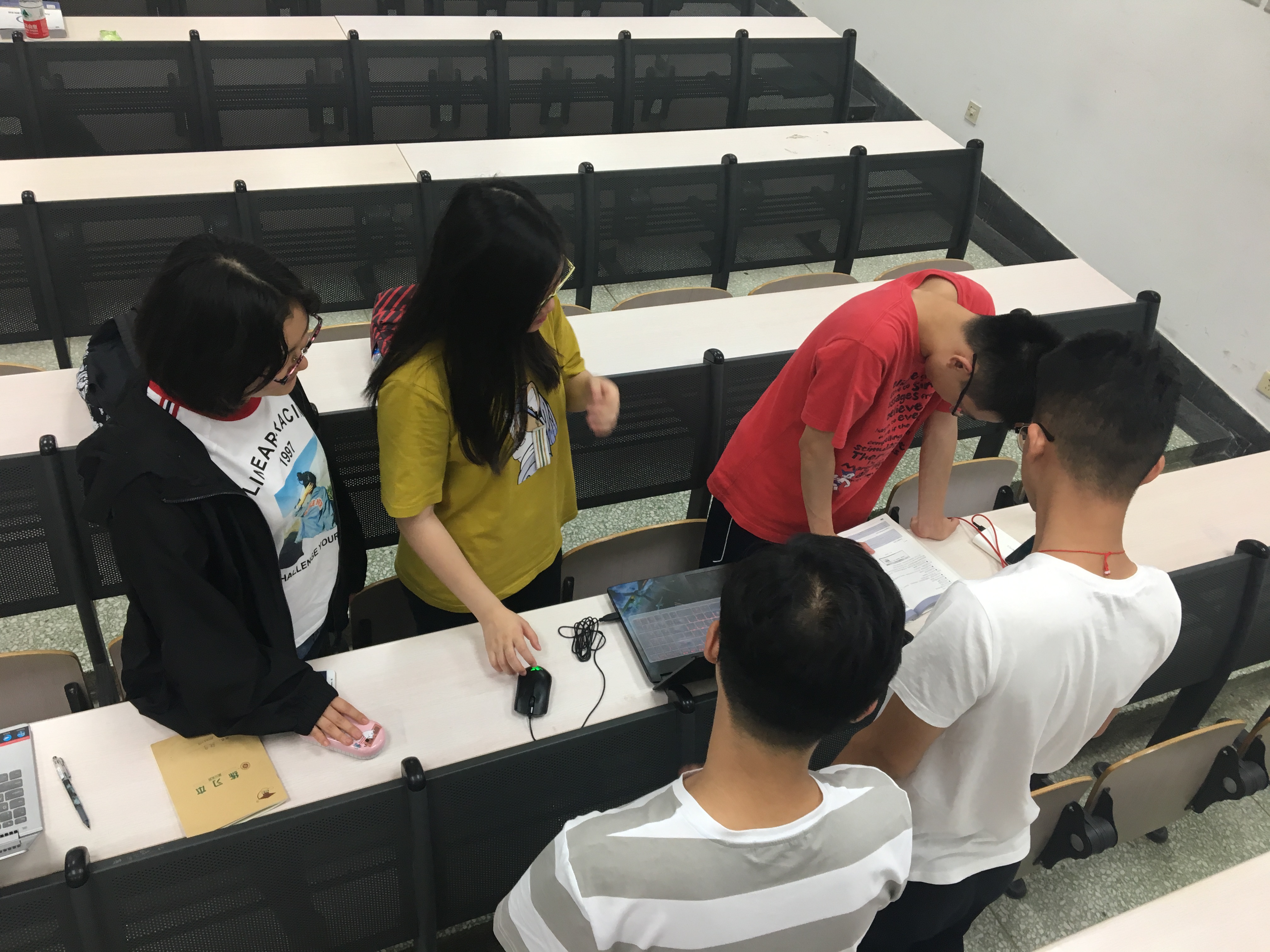
【站立式会议】
(上帝视角)
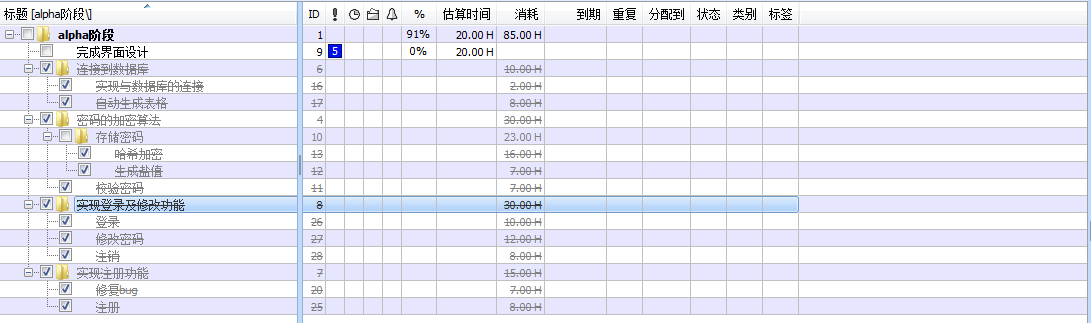
【TODOlist】
【Alpha版本】冲刺阶段——Day5的更多相关文章
- 作业七:团队项目——Alpha版本冲刺阶段
本次作业为期三周时间,要求各组结合所选项目并阅读教材<构建之法>第六章内容,完成项目的Alpha版本.本阶段的主要内容如下:(20分) 1. 每天组织一次站立会议,讨论每个成员的昨天进 ...
- 作业七:团队项目——Alpha版本冲刺阶段010
今日安排:组内成员讨论 今日进程:组内成员讨论结束,并有明确的解决办法,每个人准备实践
- 作业七:团队项目——Alpha版本冲刺阶段009
今日安排:组内成员讨论 今日进度:组内成员讨论分工细节以及可能遇到的问题,并提出解决方案
- 作业七:团队项目——Alpha版本冲刺阶段008
今日进度:组内成员讨论 今日安排:组内成员分工
- 作业七:团队项目——Alpha版本冲刺阶段007
今日进展:完善游戏主体代码. 今日安排:让游戏能运行起来.
- 作业七:团队项目——Alpha版本冲刺阶段006
今日进展:完成主体代码. 今日安排:对程序主体进行编写.
- 作业七:团队项目——Alpha版本冲刺阶段005
今日进展:编写代码. 今日安排:完成开始部分代码.
- 作业七:团队项目——Alpha版本冲刺阶段004
今日进展:我们的扫雷基本界面已经差不多了,准备开始编写内部代码. 今日安排:做好界面,准备开始代码编写.
- 作业七:团队项目——Alpha版本冲刺阶段003
今日进展:我们的目标是做一款扫雷游戏,所以我们先去玩了几款游戏,找到了扫雷游戏的一些特点. 今日安排:先进行了一些必要的游戏过程,进行了基本的扫雷界面规划.
- 作业七:团队项目——Alpha版本冲刺阶段002
今日进展:我们终于安装好了软件,今天开始进行作业设计. 今日安排:今天开始我们要开始我们的框架的设计.
随机推荐
- es调用脚本
1.内部脚本("script" : "ctx._source" 是内部定义好的获取_source数据的方式,不用改变)POST /index/type/id/_ ...
- tail命令 输出文件后n行,默认查看文件的后10行
默认查看文件的后10行 -n 3 数字 也可以忽略-n 直接加数字 tail 3 查看文件后3行 [root@localhost ~]# tail /etc/passwd // 默认查看文件的后十 ...
- OSError:[Errno 13] Permission denied:'my_library' 问题解决方法
出现问题: 执行 rosrun rosserial_windows make_libraries.py my_library 命令时出现OSError:[Errno 13] Permission de ...
- Python中使用SMTP发送邮件以及POP收取邮件
假设我们自己的电子邮件地址是from@163.com,对方的电子邮件地址是to@sina.com(这里的地址虚拟的),现在我们用Outlook或者Foxmail之类的软件写好邮件,填上对方的Email ...
- UniConnectDialog使用
对话框中文显示 设计视图 设置参数 取值结果 获取根据参数设置的值关键代码 UniConnection1.ConnectDialog := UniConnectDialog1; UniConnecti ...
- Golang--Hello World
//1)go语言以包作为管理单位 //2)每个文件必须先声明包 //3)程序必须有一个main包 package main import "fmt" //入口函数 func mai ...
- eclipse配置新约束
一.DTD格式的约束: 二.xsd格式的
- js贪心算法---背包问题
/* * @param {Object} capacity 背包容量 6 * @param {Object} weights 物品重量 [2,3,4] * @param {Object} values ...
- Groovy动态解析
A:前面需要说些什么吗? B:不需要吗? A:需要吗? 解析方式一:通过指定的paths来初始化GroovyScriptEngine //通过指定的paths来初始化GroovyScriptEngin ...
- numpy中np.c_和np.r_
np.r_:按列连接两个矩阵,就是把两矩阵上下相加,要求列数相等,类似于pandas中的concat() np.c_:按行连接两个矩阵,就是把两矩阵左右相加,要求行数相等,类似于pandas中的mer ...