
Qtxlsx的使用
上一遍讲述了基于Qt5.9.8下编译Xtxlsx,本遍讲述基于Qt5.9.8下使用Qtxlsx
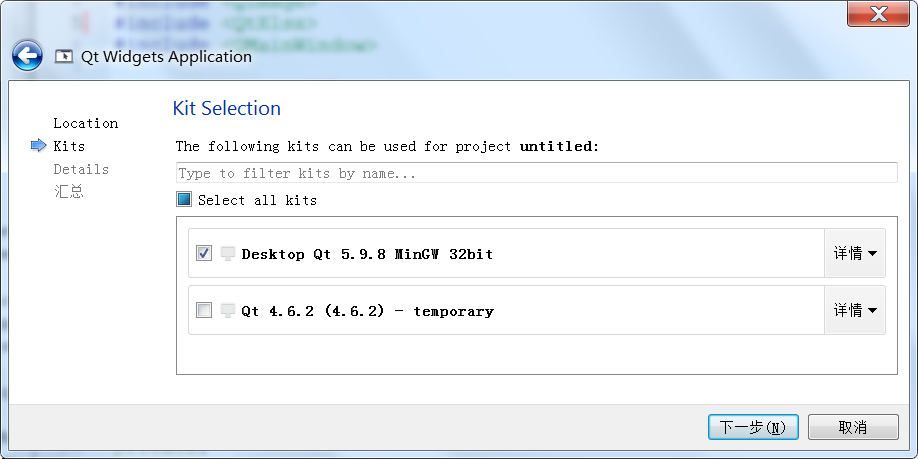
1、打开Qt Creator 4.8.2(Enterprise),创建工程,选择版本
2、在pro文件中添加QT += xlsx

3、在main.cpp中添加头文件

4、main函数添加如下代码
QFile::remove("D:/1.xlsx");
QXlsx::Document doc("D:/1.xlsx");
//报表标题(1-4行)
doc.setRowHeight(1,4,30);
Format title_format;
title_format.setFontSize(11);
title_format.setFontBold(true);
title_format.setFontColor(QColor(Qt::red));
title_format.setBorderStyle(Format::BorderThin);
title_format.setHorizontalAlignment(Format::AlignLeft);
title_format.setVerticalAlignment(Format::AlignVCenter);
doc.mergeCells("A1:H1",title_format);
doc.mergeCells("A2:H2",title_format);
doc.mergeCells("A3:H3",title_format);
doc.mergeCells("A4:H4",title_format);
doc.write("A1","巡视单位:高岐变");
doc.write("A2","巡视路线:安防巡视");
doc.write("A3","巡视时间:2019-08-28 14:47:30");
doc.write("A4","巡视人员:hs");
//巡视属性(5行)
doc.setColumnWidth(1,15);
doc.setColumnWidth(2,15);
doc.setColumnWidth(3,15);
doc.setColumnWidth(4,15);
doc.setColumnWidth(5,15);
doc.setColumnWidth(6,50);
doc.setColumnWidth(7,50);
doc.setColumnWidth(8,15);
doc.setRowHeight(5,20);
Format attr_format;
attr_format.setFontSize(11);
attr_format.setFontBold(true);
attr_format.setFontColor(QColor(Qt::black));
attr_format.setBorderStyle(Format::BorderThin);
attr_format.setHorizontalAlignment(Format::AlignHCenter);
attr_format.setVerticalAlignment(Format::AlignVCenter);
attr_format.setPatternBackgroundColor(QColor(Qt::gray));
doc.write("A5","变电站名称",attr_format);
doc.write("B5","巡视路线名",attr_format);
doc.write("C5","巡视点名",attr_format);
doc.write("D5","分析时间",attr_format);
doc.write("E5","分析结果",attr_format);
doc.write("F5","原始图片",attr_format);
doc.write("G5","分析图片",attr_format);
doc.write("H5","备注",attr_format);
//内容(从第6行开始)
for(int i=6;i<20;i++)
{
doc.setRowHeight(i,180);
Format cell_format;
cell_format.setFontSize(11);
cell_format.setFontColor(QColor(Qt::black));
cell_format.setBorderStyle(Format::BorderThin);
cell_format.setHorizontalAlignment(Format::AlignHCenter);
cell_format.setVerticalAlignment(Format::AlignVCenter);
doc.write(i,1,"测试变电站",cell_format);
doc.write(i,2,"测试路线",cell_format);
doc.write(i,3,"测试点",cell_format);
doc.write(i,4,"2019-11-11 00:00:00",cell_format);
doc.write(i,5,"无",cell_format);
QImage image1("D:/CPSB_test_2016.jpg");
QImage image2("D:/ZJFX_test_2016.jpg");
doc.insertImage(i-1,6-1,image1.scaled(360,240,Qt::IgnoreAspectRatio,Qt::SmoothTransformation));
doc.insertImage(i-1,7-1,image2.scaled(360,240,Qt::IgnoreAspectRatio,Qt::SmoothTransformation));
doc.write(i,8," ",cell_format);
}
doc.save();
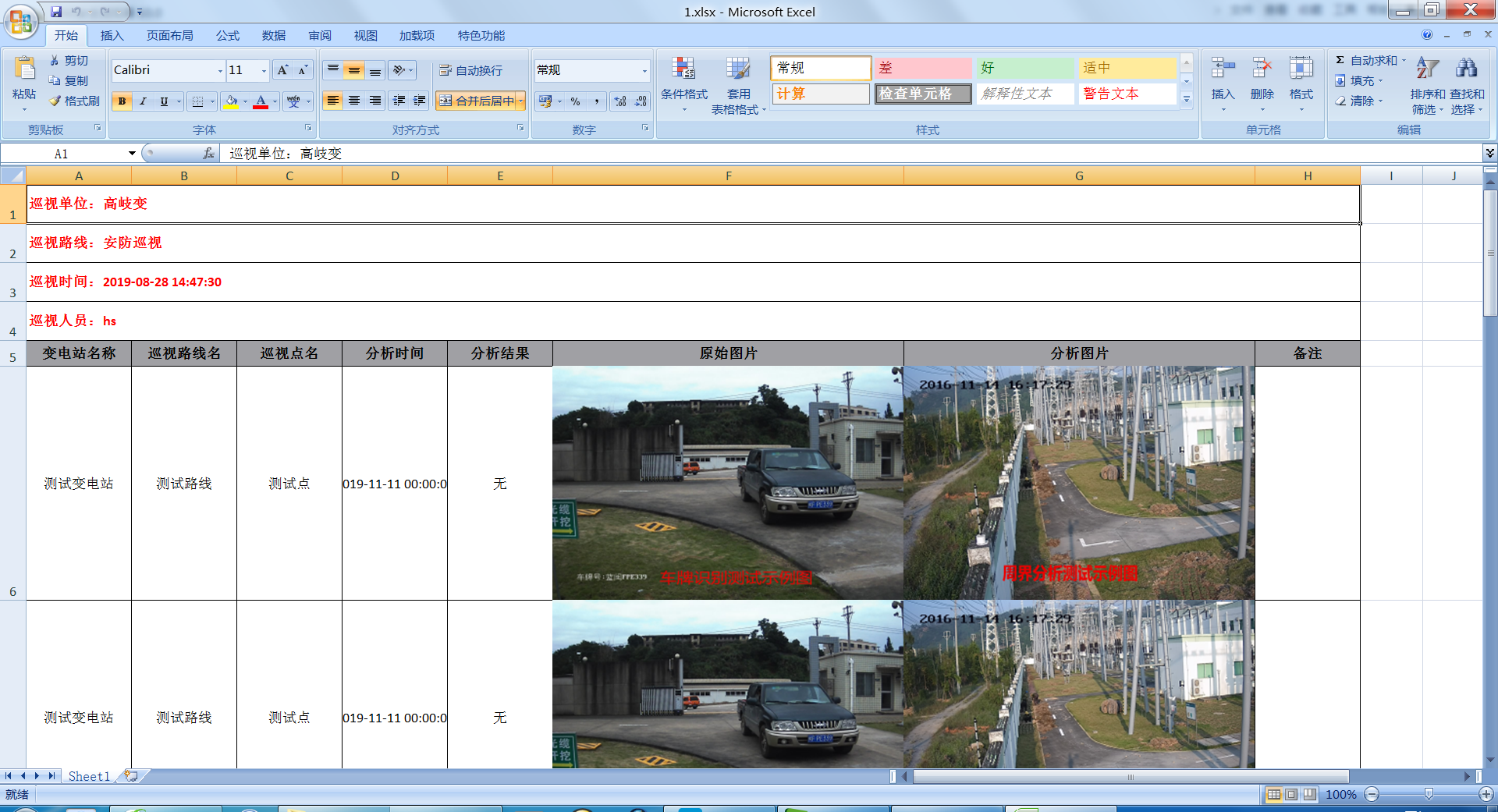
5、最后生成的报表如下
6、更多的使用可以参照E:/QtXlsxWriter-master/examples
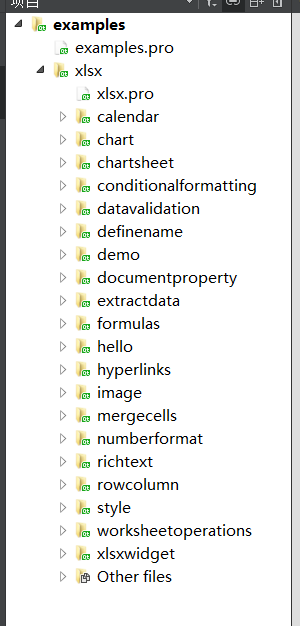
里面包含了Qtxlsx各种各样的使用。
Qtxlsx的使用的更多相关文章
- qt 使用qtxlsx 读写excel
https://github.com/dbzhang800/QtXlsxWriter 下载qtxlsx地址 QtXlsx is a library that can read and write Ex ...
- 使用QtXlsx来读写excel文件
概述:QtXlsx是功能非常强大和使用非常方便的操作excel类库.包括对excel数据读写.excel数据格式设置及在excel里面根据数据生成各种图表. 下面重点介绍如何安装和使用QtXlsx. ...
- windows下Qt编译Qtxlsx库和qtxlsx库的使用方法
最近接了个项目,合作的学长让用Qt写,而其中最重要的需求是将数据库的数据写入excel表格中和将excel的数据导入到数据库中,自己查阅了和多资料,最后决定使用qtxlsx开源库来操作excel,在编 ...
- 基于Qt 5.9.8,编译Qtxlsx
1.源码下载地址:https://github.com/dbzhang800/QtXlsxWriter 2.下载并安装编译时需要的工具 Perl:https://www.perl.org/get.ht ...
- Qtxlsx
https://blog.csdn.net/qq_40194498/article/details/80817264
- 【转贴】-- 基于QT的跨平台应用开发
原帖地址:http://www.cnblogs.com/R0b1n/p/4106613.html 1 Qt简介 Qt是1991年奇趣科技开发的一个跨平台的C++图形用户界面应用程序框架.它提供给应用程 ...
- QtXlsxWriter
Code Issues26 Pull requests2 Pulse Graphs HTTPS clone URL You can clone with HTTPS orSubversion. C ...
- vs2008中xlslib与libxls库的编译及使用
C++用来操作Excel的方法很多,但是涉及到跨平台,同时又要对Excel的读写操作兼顾,而且免费的库,那应该是要用xlslib和libxls了.由于技术比较菜,折腾这个折腾了一个星期了.最开始是使用 ...
- 39.QT-Qtxlsx库使用
之前参考博客https://blog.csdn.net/c3060911030/article/details/51560239下载Qtxlsx库,然后编译的时候,显示: error: invalid ...
随机推荐
- blg_统考,打印准考证 网页代码!
<html xmlns="http://www.w3.org/1999/xhtml"><head> <title>打印准考证</title ...
- ios端微信浏览器 音乐不自动播放问题
<audio id=''music src='' preload autoplay loop> <script src="http://res.wx.qq.com/open ...
- pandas库笔记
本笔记为自学笔记 1.pandas.DataFrame() 一种保存矩阵的数据格式 grades_df = pd.DataFrame( data={'exam1': [43, 81, 78, 75, ...
- CSS选择器效率问题
今天学习了CSS各类选择器,对其效率问题有些疑问,故总结了一些学习笔记 有很多人都忘记了,或在简单的说没有意识到,CSS在我们手中,既能很高效,也可以变得很低能.这很容易被忘记,尤其是当你意识到你会的 ...
- 浅析PHP页面局部刷新功能的实现小结(转)
转载地址 https://www.jb51.net/article/38901.htm 方法其实挺多的.以前比较常用的是iframe这样来做.现在多了个ajax,所以一般情况下都是用的ajax.第一种 ...
- 剑指offer系列——62.二叉搜索树的第k个结点
Q:给定一棵二叉搜索树,请找出其中的第k小的结点.例如, (5,3,7,2,4,6,8) 中,按结点数值大小顺序第三小结点的值为4. T: 中序遍历,递归: int count = 0; public ...
- Codeforces Round #618 E
题意: 给你一个n的数组,你可以进行无数次,选择区间使得区间内的值相加,然后区间的所有的值变成平均值. 使得最后数组的字典序最小 思路: 最后的数组一定是单调递增的,只要它比之前的平均值数大,就不会操 ...
- APP inventor 学习
中文教程:https://web.17coding.net/ 网页在线开发:http://app.gzjkw.net/#1 ai2.appinventor.mit.edu http://appinve ...
- Jenkins+Maven+Github+Springboot实现可持续自动部署(非常详细)
目前公司开发的项目已经部署到服务器上,部署项目的测试环境和生产环境,加上每个项目n个服务,于是我就 , 骚就是骚,但是就是太累了,于是花点时间研究了一下Jenkins. Jenkins的作用和它的lo ...
- P3368 (模板)树状数组2
借这个题学新姿势,这个题需要利用差分才能AC,普通树状树有3个点过不了. 差分原理(参考题解区大佬): 一个例子,一组数据 $ a[] = { 1, 5, 4, 2, 3 } $,差分后得到 $ b[ ...