
Python Download Image (python + requests + BeautifulSoup)
环境准备
1 python + requests + BeautifulSoup
页面准备
主页面:
http://www.netbian.com/dongman/
图片伪地址:
http://www.netbian.com/desk/22371.htm
图片真实地址:
http://img.netbian.com/file/2019/1221/36eb674ba0633d185da078804a3638e6.jpg
步骤
1 导入库
import requests

from bs4 import BeautifulSoup

import re
2 更改请求头
ua = "Mozilla/5.0 (Windows NT 10.0; Win64; x64; rv:72.0) Gecko/20100101 Firefox/72.0"

# "Mozilla/5.0 (X11; Ubuntu; Linux x86_64; rv:16.0) Gecko/20100101 Firefox/16.0",

# "Mozilla/5.0 (Windows NT 6.1; WOW64) AppleWebKit/537.11 (KHTML, like Gecko) Chrome/23.0.1271.64 Safari/537.11",

# "Mozilla/5.0 (X11; U; Linux x86_64; zh-CN; rv:1.9.2.10) Gecko/20100922 Ubuntu/10.10 (maverick) Firefox/3.6.10",

# "Mozilla/5.0 (Windows NT 10.0; Win64; x64) AppleWebKit/537.36 (KHTML, like Gecko) Chrome/58.0.3029.110 Safari/537.36",

# "Mozilla/5.0 (Windows NT 10.0; Win64; x64; rv:72.0) Gecko/20100101 Firefox/72.0",

# "Mozilla/5.0(Windows NT 10.0; Win64; x64) AppleWebKit / 537.36(KHTML, like Gecko) Chrome/74.0.3729.131 Safari/537.36"
3 获取主页面的内容
response = requests.get(url, headers={'User-Agent': ua})

html = response.text

soup = BeautifulSoup(html, 'html.parser')
4 我们要的是main里的list中的li标签中的a标签的href,而不是a标签里的img标签的src,若时获取img里的地址其大小为 800*450
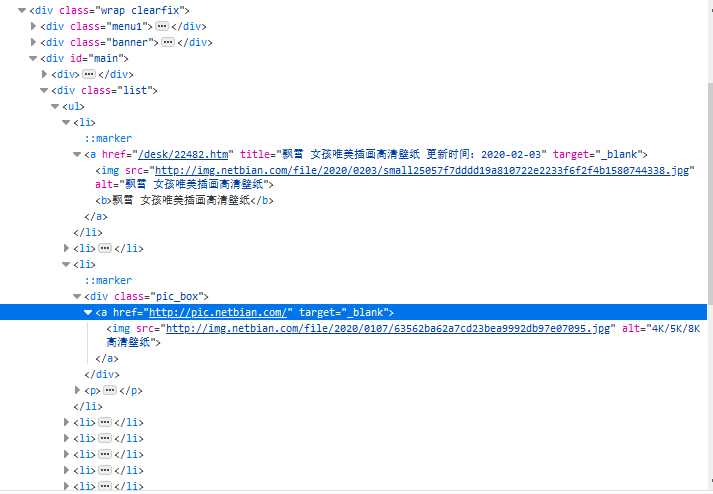
list = soup.find(name='div', attrs='list')

for li in list.find_all('li'):

    # print(img.attrs['src'])

    for a in li.children:

        if a.name == 'a':

            src = 'http://www.netbian.com' + a.attrs['href']
5 截取连接里的数字作为图片的名称(这里可以自己想怎么弄就怎么弄)
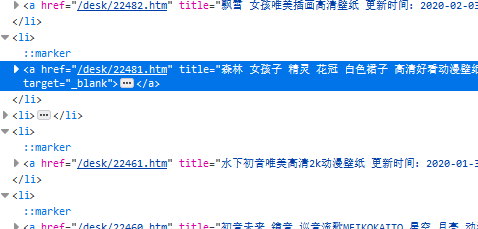
n = re.search(r'\d+', a.attrs['href'])[0] # 这里是\d+,而不是\d{5},是为了避免万一只出现4个数字,则会报错
6 到达真实图片地址
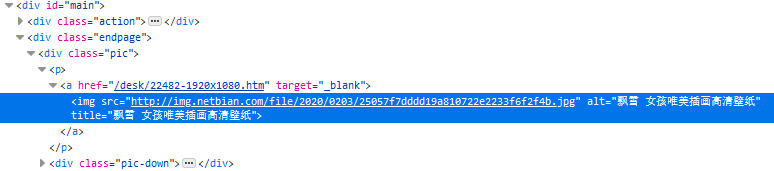
res = requests.get(src, headers={'User-Agent': ua})

s = BeautifulSoup(res.text, 'html.parser')

p = s.find(name='p')

# print(p)

img = p.img.attrs['src']

# print(img)

# 判断地址是否为空

if not img:

    continue
7 下载
with requests.get(img, headers={'User-Agent': ua}) as resp:

    # print(resp.status_code)

    resp.raise_for_status()

    resp.encoding = res.apparent_encoding

    # 将图片内容写入

    with open('E://paper//{}.jpg'.format(n), 'wb') as f:

        f.write(resp.content)

        f.close()
8 若要下载所有的图片

# 页数循环

for i in range(1, 139):

    if i == 1:

        url = 'http://www.netbian.com/dongman/index.htm'

    else:

        url = 'http://www.netbian.com/dongman/index_{}.htm'.format(i)

    # print(url)
9 结果

注:
若会Xpath的话,用Xpath会比BeautifulSoup要简单点,我自己是懒得改过去了。
Python Download Image (python + requests + BeautifulSoup)的更多相关文章
- Python爬虫学习三------requests+BeautifulSoup爬取简单网页
第一次第一次用MarkDown来写博客,先试试效果吧! 昨天2018俄罗斯世界杯拉开了大幕,作为一个伪球迷,当然也得为世界杯做出一点贡献啦. 于是今天就编写了一个爬虫程序将腾讯新闻下世界杯专题的相关新 ...
- 一个超实用的python爬虫功能使用 requests BeautifulSoup
一个简单的数据爬取的示例 import os,re import requests import random import time from bs4 import BeautifulSoup us ...
- Python 爬虫—— requests BeautifulSoup
本文记录下用来爬虫主要使用的两个库.第一个是requests,用这个库能很方便的下载网页,不用标准库里面各种urllib:第二个BeautifulSoup用来解析网页,不然自己用正则的话很烦. req ...
- python库:bs4,BeautifulSoup库、Requests库
Beautiful Soup https://www.crummy.com/software/BeautifulSoup/bs4/doc.zh/ Beautiful Soup 4.2.0 文档 htt ...
- 使用python抓取并分析数据—链家网(requests+BeautifulSoup)(转)
本篇文章是使用python抓取数据的第一篇,使用requests+BeautifulSoup的方法对页面进行抓取和数据提取.通过使用requests库对链家网二手房列表页进行抓取,通过Beautifu ...
- 【Python】在Pycharm中安装爬虫库requests , BeautifulSoup , lxml 的解决方法
BeautifulSoup在学习Python过程中可能需要用到一些爬虫库 例如:requests BeautifulSoup和lxml库 前面的两个库,用Pychram都可以通过 File--> ...
- Python使用urllib,urllib3,requests库+beautifulsoup爬取网页
Python使用urllib/urllib3/requests库+beautifulsoup爬取网页 urllib urllib3 requests 笔者在爬取时遇到的问题 1.结果不全 2.'抓取失 ...
- python 爬虫(一) requests+BeautifulSoup 爬取简单网页代码示例
以前搞偷偷摸摸的事,不对,是搞爬虫都是用urllib,不过真的是很麻烦,下面就使用requests + BeautifulSoup 爬爬简单的网页. 详细介绍都在代码中注释了,大家可以参阅. # -* ...
- [python] 网络数据采集 操作清单 BeautifulSoup、Selenium、Tesseract、CSV等
Python网络数据采集操作清单 BeautifulSoup.Selenium.Tesseract.CSV等 Python网络数据采集操作清单 BeautifulSoup.Selenium.Tesse ...
随机推荐
- 13. 为什么我们会需要 Pod?
13. 为什么我们会需要 Pod? 13.1 docker容器的本质 """ docker容器的本质 是进程. 主要通过 Namespace 做隔离,Cgroups 做限 ...
- 吴裕雄 python 神经网络——TensorFlow 图像预处理完整样例
import numpy as np import tensorflow as tf import matplotlib.pyplot as plt def distort_color(image, ...
- mqtt.mini.js 使用
html文件里直接调用 <!DOCTYPE html> <html lang="en"> <head> <meta charset=&qu ...
- ANSYS布尔运算APDL
目录 1.交运算 2.加运算 3.减运算 4.分割 5. 搭接 6. 互分 6.粘结 1.交运算 交运算的结果是由每个初始图元的共同部分,形成一个新的图元. 命令 功能 备注 LINL 线与线的交 A ...
- docker+hexo 搭建博客
前提 Linux服务器 保证自己服务器上的端口对外开放,即设置相应的防火墙规则 安装好hexo 安装:npm install hexo-cli -g 初始化搭建:npm init myBlog,myB ...
- 【SSM sql.xml】日志查询mapper.xml
LogInfoMapper.xml <?xml version="1.0" encoding="UTF-8"?> <!DOCTYPE mapp ...
- 判断ie8以下 或者ie9以下
1.各种浏览器下载 http://browsehappy.osfipin.com/ 2.ie8浏览器以下 if(![].map) { // IE8浏览器 alert('ie8浏览器') } 3.ie9 ...
- 【JavaWeb】导入Excel并进行校验
一.需要实现的目标 1.界面编写 2.导入表读取表名,进行校验,后台匹配(判断此表的名称是否能够模糊匹配上) 3.确定表存在,读取其中的数据,暂存 4.正则表达式数据校验(判断是否已存在,数据是否符合 ...
- Ubuntu将Python3软连接到Python
sudo ln -s /usr/bin/python3 /usr/bin/python
- Vue——解决报错 Computed property "****" was assigned to but it has no setter.
在最近的项目中遇到了如下的警告信息: [Vue warn]: Computed property " currentStep" was assigned to but it has ...