
吴裕雄 python 神经网络——TensorFlow 图像预处理完整样例
import numpy as np

import tensorflow as tf

import matplotlib.pyplot as plt

def distort_color(image, color_ordering=0):

    if color_ordering == 0:

        image = tf.image.random_brightness(image, max_delta=32./255.)

        image = tf.image.random_saturation(image, lower=0.5, upper=1.5)

        image = tf.image.random_hue(image, max_delta=0.2)

        image = tf.image.random_contrast(image, lower=0.5, upper=1.5)

    else:

        image = tf.image.random_saturation(image, lower=0.5, upper=1.5)

        image = tf.image.random_brightness(image, max_delta=32./255.)

        image = tf.image.random_contrast(image, lower=0.5, upper=1.5)

        image = tf.image.random_hue(image, max_delta=0.2)

    return tf.clip_by_value(image, 0.0, 1.0)

def preprocess_for_train(image, height, width, bbox):

    # 查看是否存在标注框。

    if bbox is None:

        bbox = tf.constant([0.0, 0.0, 1.0, 1.0], dtype=tf.float32, shape=[1, 1, 4])

    if image.dtype != tf.float32:

        image = tf.image.convert_image_dtype(image, dtype=tf.float32)

    # 随机的截取图片中一个块。

    bbox_begin, bbox_size, _ = tf.image.sample_distorted_bounding_box(tf.shape(image), bounding_boxes=bbox, min_object_covered=0.4)

    bbox_begin, bbox_size, _ = tf.image.sample_distorted_bounding_box(tf.shape(image), bounding_boxes=bbox, min_object_covered=0.4)

    distorted_image = tf.slice(image, bbox_begin, bbox_size)

    # 将随机截取的图片调整为神经网络输入层的大小。

    distorted_image = tf.image.resize_images(distorted_image, [height, width], method=np.random.randint(4))

    distorted_image = tf.image.random_flip_left_right(distorted_image)

    distorted_image = distort_color(distorted_image, np.random.randint(2))

    return distorted_image

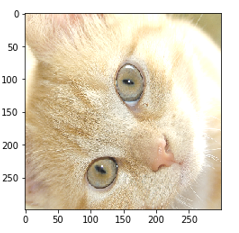
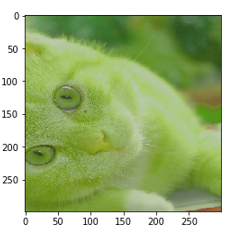
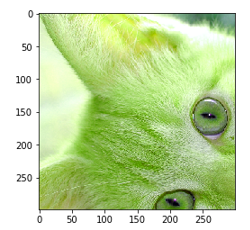
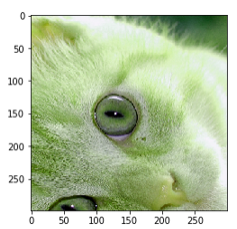
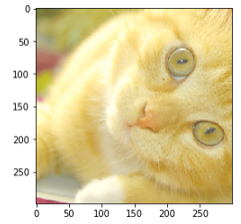
image_raw_data = tf.gfile.FastGFile("F:\\TensorFlowGoogle\\201806-github\\datasets\\cat.jpg", "rb").read()

with tf.Session() as sess:

    img_data = tf.image.decode_jpeg(image_raw_data)

    boxes = tf.constant([[[0.05, 0.05, 0.9, 0.7], [0.35, 0.47, 0.5, 0.56]]])

    for i in range(9):

        result = preprocess_for_train(img_data, 299, 299, boxes)

        plt.imshow(result.eval())

        plt.show()




吴裕雄 python 神经网络——TensorFlow 图像预处理完整样例的更多相关文章
- TensorFlow图像预处理完整样例
参考书 <TensorFlow:实战Google深度学习框架>(第2版) 以下TensorFlow程序完成了从图像片段截取,到图像大小调整再到图像翻转及色彩调整的整个图像预处理过程. #! ...
- 吴裕雄 python 神经网络——TensorFlow图片预处理
import numpy as np import tensorflow as tf import matplotlib.pyplot as plt # 使用'r'会出错,无法解码,只能以2进制形式读 ...
- 吴裕雄 python 神经网络——TensorFlow图片预处理调整图片
import numpy as np import tensorflow as tf import matplotlib.pyplot as plt def distort_color(image, ...
- 吴裕雄 python 神经网络TensorFlow实现LeNet模型处理手写数字识别MNIST数据集
import tensorflow as tf tf.reset_default_graph() # 配置神经网络的参数 INPUT_NODE = 784 OUTPUT_NODE = 10 IMAGE ...
- 吴裕雄 python 神经网络——TensorFlow 输入数据处理框架
import tensorflow as tf files = tf.train.match_filenames_once("E:\\MNIST_data\\output.tfrecords ...
- 吴裕雄 python 神经网络——TensorFlow 输入文件队列
import tensorflow as tf def _int64_feature(value): return tf.train.Feature(int64_list=tf.train.Int64 ...
- 吴裕雄 python 神经网络——TensorFlow TFRecord样例程序
import numpy as np import tensorflow as tf from tensorflow.examples.tutorials.mnist import input_dat ...
- 吴裕雄 python 神经网络——TensorFlow 完整神经网络样例程序
import tensorflow as tf from numpy.random import RandomState batch_size = 8 w1= tf.Variable(tf.rando ...
- 吴裕雄 python 神经网络——TensorFlow 数据集高层操作
import tempfile import tensorflow as tf train_files = tf.train.match_filenames_once("E:\\output ...
随机推荐
- 题解【Codeforces438D】The Child and Sequence
题目描述 At the children's day, the child came to Picks's house, and messed his house up. Picks was angr ...
- webpack4.41.0配置一(基础配置webpack文件,入口出口,实现打包)
1.查看node.js版本.npm版本和webpack版本(使用webpack4时,请确保node.js的版本>=8.9.4) 2.我先重新卸载了webpack和webpack-cli(全局) ...
- sqlserver数据库导入大批量数据
参考: https://www.cnblogs.com/zhangliangzlee/p/3585862.html
- 解决报错WARNING: IPv4 forwarding is disabled. Networking will not work.
报错: [root@localhost /]# docker run -it ubuntu /bin/bash WARNING: IPv4 forwarding is disabled. Networ ...
- Eqaulize Prices
There are n products in the shop. The price of the ii-th product is aiai. The owner of the shop want ...
- Oracle空表的分配segment
1.查询相关参数deferred_segment_creation select * from v$parameter where name='deferred_segment_creation' ...
- TCL create list from file
proc create_list {filename {prompt verbose} {opts "" }} { set list_return {} if {[file exi ...
- SQL Server 函数大全
本文链接:https://blog.csdn.net/qq_15028299/article/details/81330854SQL2008 表达式:是常量.变量.列或函数等与运算符的任意组合.htt ...
- 微信小程序中showToast 提示
icon可以none,也可以 success wx.showToast({ title: '已提交', icon: 'success', duration: 2000 })
- 优酷1080p的kux格式文件怎么转换为MP4格式?
直接使用优酷自己的FFMPEG解码! 格式为:"优酷ffmpeg.exe的安装地址" -y -i ".kux文件储存地址" -c:v copy -c:a cop ...