
optimizing Wi-Fi solution for International School
https://aweisoft.azurewebsites.net/Knowledge/Cisco/OptimizeWiFi/OptimizeWiFi.aspx
Connect me on Linkedin BruceWang@aweisoft.net
Write on April 16 2014
Some suggestions about optimizing Wi-Fi solution for International School
My understanding of the current Wi-Fi situation in those international school especially big one:
Problem A: Wi-Fi self interference of multipath, reflection, scattering, refraction
Problem B: Bottle-neck on the cabling network.
Problem C: Configuration with the Wlan Controller.
Problem D: IP pool jam while a large amount of teachers and students are moving from APs to APs.
Problem E: Bottle-neck of the individual clients of laptops, tablets.
Problem A: Wi-Fi self interference of multipath, reflection, scattering, refraction
Multipath
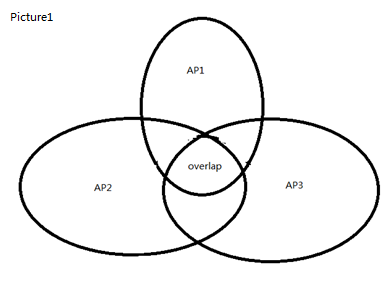
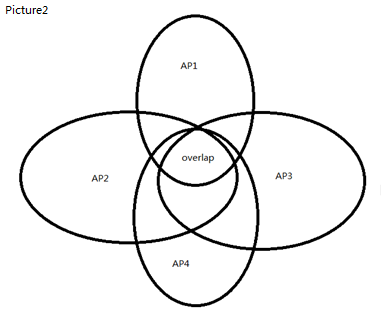
Following picture show the multipath topologic. There is 3 non-overlapping channel in 2.4G. They are channel 1, 6 and 11, In Japan, there is 4 non-overlapping channels(1,6,11,14) in 2.4G which are 1,6,11,14. Let’s just talk about regularly 2.4G with 3 non-overlapping channels. Ok, if the 3 APs runs in different channels, then there is no interference(Picture1). But if there is another AP(AP4) show up, then in the overlap of the 4 APs, a laptop will run into a confused situation because of the duplication of logic access point with 2 different physical APs. In the overlap area the wireless signal will shaking. In real world, this happens a lot.
Try to minimize the 4 APs overlap area.
Reflection, scattering, refraction
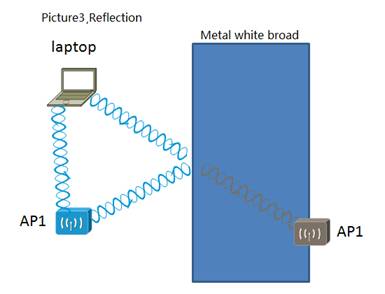
Most of the classroom, there is a big metal broad which it is a mirror for the laptop to ‘see’ the AP. Ok, the laptop, It sees two AP1 which runs in precisely the same channel. Guess what will happen, interference. So while you are doing the positing of APs, you should considering the metal white broad or some other metal things. Make sure the less reflection signals the laptops can receive.
As for scattering and refraction problems, it’s still the same reason: Laptops see one duplication signal by some way. But this two problem happens much less than reflection.
Problem B: Bottle-neck on the cabling network.
When the workers are doing the found-mental cabling, I saw many workers doing their work with kind of anxious attitude. With this attitude, they may not do the cabling with the compliance of the integrated cabling. Then this cable will be a bottle-neck on this route. As the manager of the first party, I care about the workers; I tell them where they can have a rest and have the water, tea, coca-cola and cookies. And I always drop by them and say hi to them, ask them how's going. Obviously, both XIS and I got returns: the found-mental network of the Wi-Fi projection was constructed perfectly, during the past 3 years I didn't have to worry about the found-mental network. It's been tested perfect.
Clear up the found-mental bottle-neck as much as possible, Of cause need to do many test job. Optimizing the inside routing. Add some more truck link between the Switches to increase more inside bandwidth and reliability.
Problem C: Configuration with the Wlan Controller.
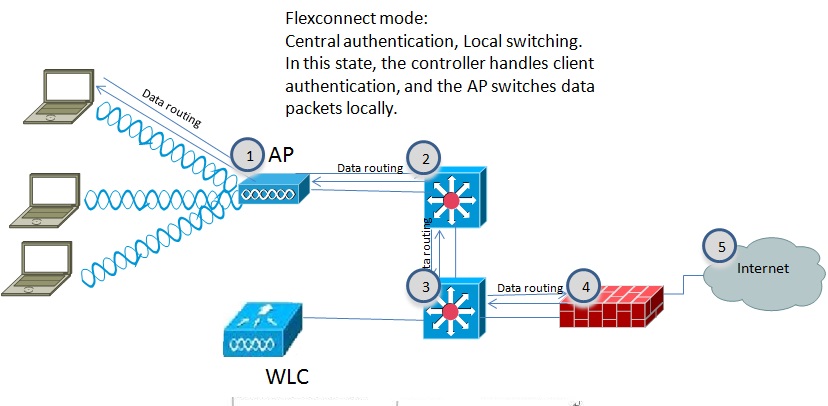
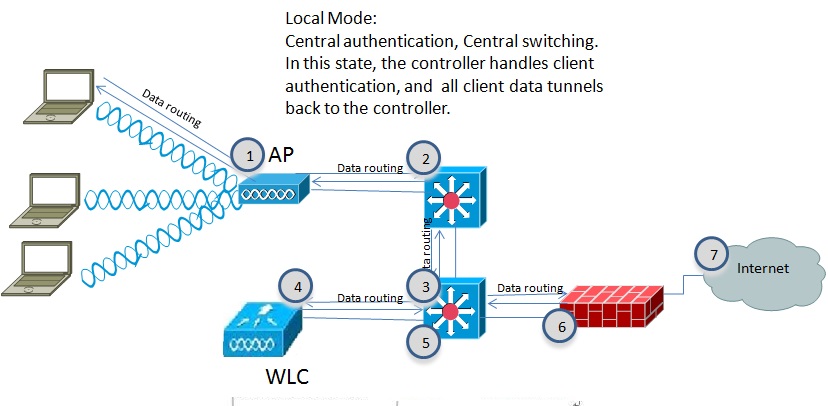
Right configuration with the Wlan Controller is one of the most important points. Update the Wlan Controller IOS. New IOS works much effective than old versions.
Suggest use the ‘FlexConnect Mode’ for Cisco APs, You can configure it in Wlan Controller. ‘FlexConnect Mode’ work 10% faster than ‘Local Mode’ as I tested in Cisco Wi-Fi solution.
Why Flexconnect mode is effective than Local mode? Following 2 picture shows how.
Problem D: IP pool jam while a large amount of teachers and students are moving from APs to APs.

For schools, especially big one, many teachers and students move from classroom to classroom, IP pool jam is also a concern. The issue tells like this: whatever the clients it is, Mac or PCs, tablet or cell phones, it’s just can’t successful associate with the SSID. But later you try it again, It works fine.
Following picture shows how to divide those APs into different Vlan and solve the Jam of IP pool.
Problem E: Bottle-neck of the individual clients of laptops, tablets.
I would like to show those test result first I take by ‘Fluke networks AIRCHECK Wi-Fi Tester’, It is a spectrum analyzer which can help to find the noise source.
Non-802.11signal(noise resource) is 26% in the whole channel 1 over 2.4GHz.

Non-802.11signal(noise resource) is 39% in the whole channel 3 over 2.4GHz.
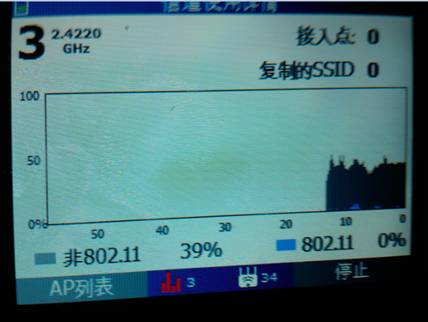
Non-802.11 interfernce on channel 1 would casue major performance issue for APs on that channel.
Non 802.11 signal(noise resource) is 0% in channel 157 over 5GHz. The signal is perfect.

As we all know that:
Max data rate of 802.11n over 2.4G is 144Mbps
Max data rate of 802.11n over 5G is 450Mbps(Year 2012 or 13, I heard that it can support 600Mbps now)
5G is like a high-way with dozens of channels, and 2.4GHz is like a country road just with a 3 non-overlapping channel(4 in Japan).
Most of the laptops Wi-Fi cards in our school have been upgraded to 5G Wi-Fi card. There are still some laptops which doesn’t support 5G Wi-Fi card.
The weak point for 5G channel is: Distance between the laptops and AP. The more distance the less speed. When you are out of the classroom, the signal is too weak to work.
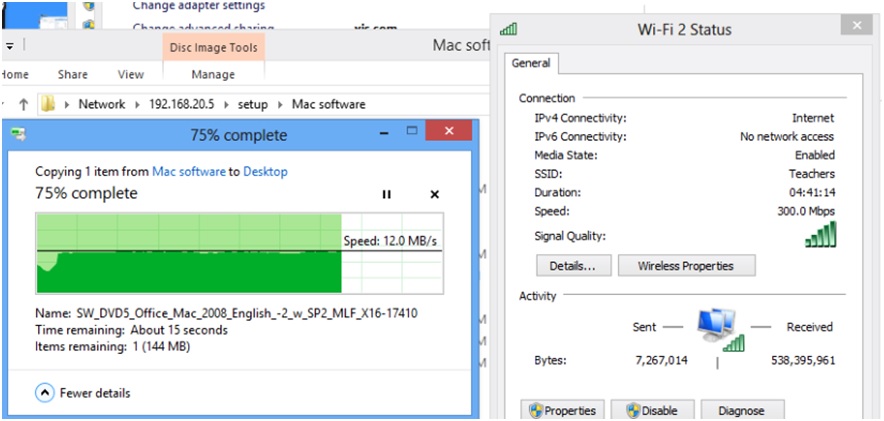
Real time speed of copying data by 5G Wi-Fi card.
optimizing Wi-Fi solution for International School的更多相关文章
- 严格次小生成树[BJWC2010] (树链剖分,倍增,最小生成树)
题目链接 Solution 有几点关键,首先,可以证明次小生成树一定是由最小生成树改变一条边而转化来. 所以需要枚举所有非最小生成树的边\((u,v)\).并且找到 \(u\) 到 \(v\) 的边中 ...
- 【Win10 应用开发】扫描和连接Wi-fi网络
老周今天带大家去“扫雷”了,别当真,是扫描并连接指定无线网络,时尚一点叫Wi-fi. 所以,今天的任务要求你的设备至少有1张无线网卡,目前老周没看到过有N张无线网卡的设备.像笔记本.平板等设备都可以, ...
- 全文检索引擎 Solr 部署与基本原理
全文检索引擎 Solr 部署与基本原理 搜索引擎Solr环境搭建实例 关于 solr , schema.xml 的配置说明 全文检索引擎Solr系列-–全文检索基本原理 一.搜索引擎Solr环境搭建实 ...
- Solr搭建大数据查询平台
参考文章:http://www.freebuf.com/articles/database/100423.html 对上面链接的补充: solr-5.5.0版本已被删除,新url:http://mir ...
- 我与solr(五)--关于schema.xml中的相关配置的详解
先把文件的代码贴上来: <?xml version="1.0" encoding="UTF-8" ?> <!-- 版权说明... --> ...
- Solr:文本分析
文本分析时搜索引擎的核心工作之一,对文本包含许多处理步骤,比如:分词.大写转小写.词干化.同义词转化等.简单的说,文本分析就说将一个文本字段的值转为一个一个的token,然后被保存到Lucene的索引 ...
- Solr:Schema设计
本文已挪至 http://www.zhoujingen.cn/blog/8546.html Solr将数据以结构化的方式存入系统中,存储的过程中可以对数据建立索引,这个结构的定义就是通过schema ...
- McAfee重返科技业 研制D-Central防政府监视
新闻链接:http://tech.qq.com/a/20131008/016127.htm 新闻时间: 10月8日编译 新闻正文:McAfee重返科技业 研制D-Central防政府监视 约翰·迈克菲 ...
- 【Android】 Android-wifi 直连 wifi direct wifi p2p
现在,Android的支持Wi -Fi的直接点对点点对点(P2P)Android系统的供电设备和其他类型的设备,没有一个热点或互联网连接之间的连接.Android框架提供了一套Wi - Fi的P2P的 ...
随机推荐
- android流式布局、待办事项应用、贝塞尔曲线、MVP+Rxjava+Retrofit、艺术图片应用等源码
Android精选源码 android模仿淘宝首页效果源码 一款艺术图片应用,采用T-MVVM打造 Android MVP + RxJava + Retrofit项目 android流式布局实现热门标 ...
- python学习笔记(5)数据类型-字典
字典是另一种可变容器模型,且可存储任意类型对象. 字典的每个键值 key=>value 对用冒号 : 分割,每个键值对之间用逗号 , 分割,整个字典包括在花括号 {} 中 ,格式如下所示: d ...
- python3下scrapy爬虫(第七卷:编辑器内执行scrapy)
之前我们都是在终端切入到scrapy的路境内执行爬虫的,你要多敲多少行的字节,所以这次我们谈谈如何在编辑器里执行,这个你可以用在爬虫中,当你使用PYTHONWEB开发时尽量不要在编辑器内启动端口服务那 ...
- deeplearning.ai 卷积神经网络 Week 1 卷积神经网络
1. 传统的边缘检测(比如Sobel)手工设计了3*3的filter(或者叫kernel)的9个权重,在深度学习中,这9个权重都是学习出来的参数,会比手工设计的filter更好,不但可以提取90度.0 ...
- Linux安装完后的调优(linux 6)
1:关闭 SELinux 方法一: #sed -i 's/SELINUX=enforcing/SELINUX=disabled/' /etc/selinux/config #替换文本参数 ...
- VSAN磁盘扩容与收缩(二)
- Holer一款局域网服务器代理到公网的内网映射工具
Holer简介 Holer是一个将局域网服务器代理到公网的内网映射工具,支持转发基于TCP协议的报文. 相关链接 开源地址:https://github.com/Wisdom-Projects/hol ...
- 两步解决maven plugins 插件下载慢 !下载报红的问题!
两步解决maven plugins 插件下载慢 !下载报红的问题! 1.找到你解压的maven安装路径下的conf 编辑settings 2.添加如下 使用阿里的 <mirror> ...
- Matplotlib绘图库入门(七):高效使用
原文地址: !()[http://www.bugingcode.com/blog/Matplotlib_7_Effectively_Using.html] 这是一篇关于如何高效的使用Matplotli ...
- 初识Mybatis之工程搭建
简介:MyBatis 是一款优秀的持久层框架,它支持定制化 SQL.存储过程以及高级映射.MyBatis 避免了几乎所有的 JDBC 代码和手动设置参数以及获取结果集.MyBatis 可以使用简单的 ...