
【Spring学习笔记-MVC-4】SpringMVC返回Json数据-方式2
- 【Spring学习笔记-MVC-3】SpringMVC返回Json数据-方式1:http://www.cnblogs.com/ssslinppp/p/4528892.html
- 【Spring学习笔记-MVC-4】返回Json数据-方式2:http://www.cnblogs.com/ssslinppp/p/4530002.html
- 【Spring学习笔记-MVC-3.1】SpringMVC返回Json数据-方式1-扩展:http://www.cnblogs.com/ssslinppp/p/4675495.html
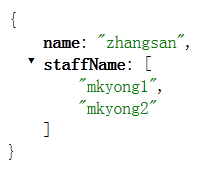
- 方式1:讲解如果返回单个对象的json;==>使用@ResponseBody来实现;注解方式
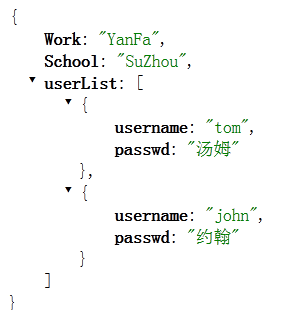
- 方式2:讲解如果返回多个对象的json;==>使用MappingJacksonJsonView来实现;xml配置方式
- 方式1-扩展:讲解如果返回多个对象的json;==>使用@ResponseBody来实现;注解方式
摘要
本文讲解另外一种利用spring MVC返回json数据的方法。
前文回顾
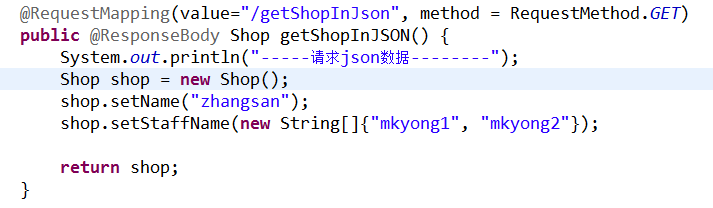
- @ResponseBody声明返回值;
- 配置<mvc:annotation-driven />;
 ==>
==> ,
,
spring mvc实现json数据返回
具体步骤:
- 引入额外jar包:
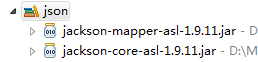 ;
; - 使用bean视图解析器:
org.springframework.web.servlet.view.BeanNameViewResolver;
- 使用
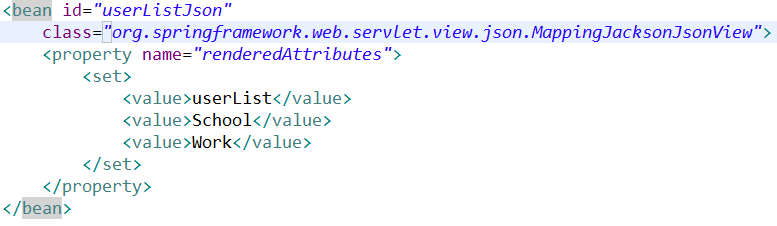
org.springframework.web.servlet.view.json.MappingJacksonJsonView配置需要返回的对象;
- 声明:<mvc:annotation-driven />; 经测试,不添加这个声明,将出错;


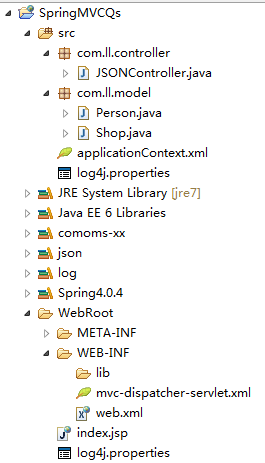

<web-app id="WebApp_ID" version="2.4"xmlns="http://java.sun.com/xml/ns/j2ee" xmlns:xsi="http://www.w3.org/2001/XMLSchema-instance"xsi:schemaLocation="http://java.sun.com/xml/ns/j2eehttp://java.sun.com/xml/ns/j2ee/web-app_2_4.xsd"><display-name>Spring Web MVC Application</display-name><context-param><param-name>contextConfigLocation</param-name><param-value>classpath:applicationContext.xml</param-value></context-param><listener><listener-class>org.springframework.web.context.ContextLoaderListener</listener-class></listener><servlet><servlet-name>mvc-dispatcher</servlet-name><servlet-class>org.springframework.web.servlet.DispatcherServlet</servlet-class><load-on-startup>1</load-on-startup></servlet><servlet-mapping><servlet-name>mvc-dispatcher</servlet-name><url-pattern>/rest/*</url-pattern></servlet-mapping></web-app>

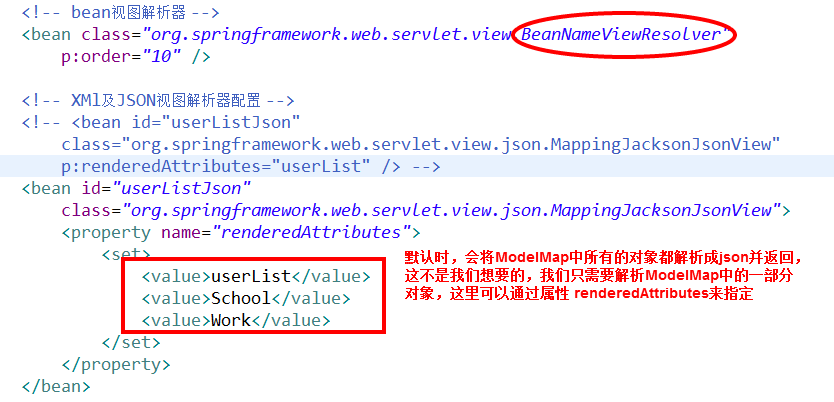


<beans xmlns="http://www.springframework.org/schema/beans"xmlns:context="http://www.springframework.org/schema/context"xmlns:p="http://www.springframework.org/schema/p"xmlns:mvc="http://www.springframework.org/schema/mvc" xmlns:xsi="http://www.w3.org/2001/XMLSchema-instance"xsi:schemaLocation="http://www.springframework.org/schema/beanshttp://www.springframework.org/schema/beans/spring-beans-3.0.xsdhttp://www.springframework.org/schema/contexthttp://www.springframework.org/schema/context/spring-context-3.0.xsdhttp://www.springframework.org/schema/mvchttp://www.springframework.org/schema/mvc/spring-mvc-3.0.xsd"><context:component-scan base-package="com.ll.controller" /><mvc:annotation-driven /><!-- bean视图解析器 --><bean class="org.springframework.web.servlet.view.BeanNameViewResolver"p:order="10" /><!-- XMl及JSON视图解析器配置 --><!-- <bean id="userListJson"class="org.springframework.web.servlet.view.json.MappingJacksonJsonView"p:renderedAttributes="userList" /> --><bean id="userListJson"class="org.springframework.web.servlet.view.json.MappingJacksonJsonView"><property name="renderedAttributes"><set><value>userList</value><value>School</value><value>Work</value></set></property></bean></beans>

 ,
, ;
;
浏览器: http://localhost:8080/SpringMVCQs/rest/kfc/brands/showUserListByJson
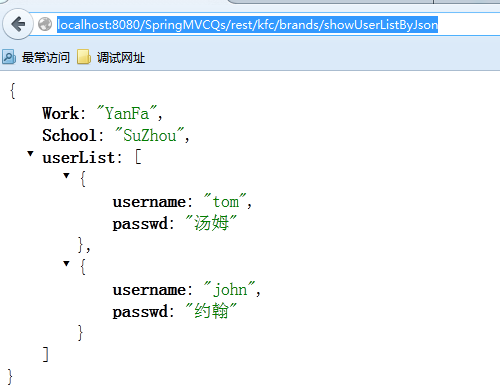
JSONController.java
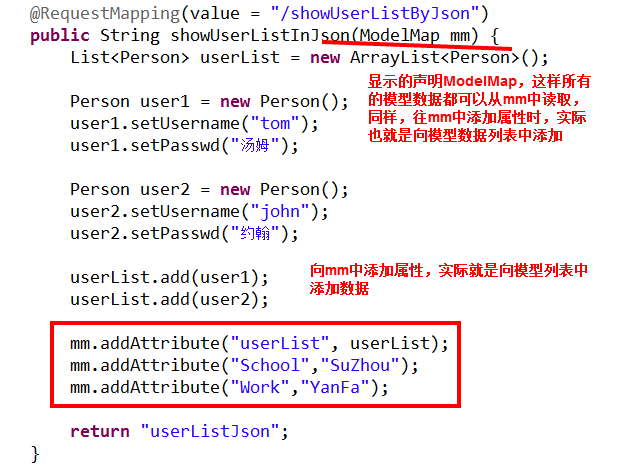
package com.ll.controller;import java.util.ArrayList;import java.util.List;import org.springframework.stereotype.Controller;import org.springframework.ui.ModelMap;import org.springframework.web.bind.annotation.RequestMapping;import org.springframework.web.bind.annotation.RequestMethod;import org.springframework.web.bind.annotation.ResponseBody;import com.ll.model.Person;import com.ll.model.Shop;@Controller@RequestMapping("/kfc/brands")public class JSONController {@RequestMapping(value="/getShopInJson", method = RequestMethod.GET)public @ResponseBody Shop getShopInJSON() {System.out.println("-----请求json数据--------");Shop shop = new Shop();shop.setName("zhangsan");shop.setStaffName(new String[]{"mkyong1", "mkyong2"});return shop;}@RequestMapping(value = "/showUserListByJson")public String showUserListInJson(ModelMap mm) {List<Person> userList = new ArrayList<Person>();Person user1 = new Person();user1.setUsername("tom");user1.setPasswd("汤姆");Person user2 = new Person();user2.setUsername("john");user2.setPasswd("约翰");userList.add(user1);userList.add(user2);mm.addAttribute("userList", userList);mm.addAttribute("School","SuZhou");mm.addAttribute("Work","YanFa");return "userListJson";}}
附件列表
【Spring学习笔记-MVC-4】SpringMVC返回Json数据-方式2的更多相关文章
- 【Spring学习笔记-MVC-3】SpringMVC返回Json数据-方式1
<Spring学习笔记-MVC>系列文章,讲解返回json数据的文章共有3篇,分别为: [Spring学习笔记-MVC-3]SpringMVC返回Json数据-方式1:http://www ...
- 【Spring学习笔记-MVC-3.1】SpringMVC返回Json数据-方式1-扩展
<Spring学习笔记-MVC>系列文章,讲解返回json数据的文章共有3篇,分别为: [Spring学习笔记-MVC-3]SpringMVC返回Json数据-方式1:http://www ...
- 3.《Spring学习笔记-MVC》系列文章,讲解返回json数据的文章共有3篇,分别为:
转自:https://www.cnblogs.com/ssslinppp/p/4528892.html 概述 在文章:<[Spring学习笔记-MVC-3]SpringMVC返回Json数据-方 ...
- 1.《Spring学习笔记-MVC》系列文章,讲解返回json数据的文章共有3篇,分别为:
转自:https://www.cnblogs.com/ssslinppp/p/4528892.html [Spring学习笔记-MVC-3]SpringMVC返回Json数据-方式1:http://w ...
- 2.《Spring学习笔记-MVC》系列文章,讲解返回json数据的文章共有3篇,分别为:
转自:https://www.cnblogs.com/ssslinppp/p/4528892.html 个人认为,使用@ResponseBody方式来实现json数据的返回比较方便,推荐使用. 摘要 ...
- 【Spring学习笔记-MVC-9】SpringMVC数据格式化之日期转换@DateTimeFormat
作者:ssslinppp 1. 摘要 本文主要讲解Spring mvc数据格式化的具体步骤: 并讲解前台日期格式如何转换为java对象: 在之前的文章<[Spring学习笔记-MVC ...
- Spring MVC 3.0 返回JSON数据的方法
Spring MVC 3.0 返回JSON数据的方法1. 直接 PrintWriter 输出2. 使用 JSP 视图3. 使用Spring内置的支持// Spring MVC 配置<bean c ...
- mvc使用JsonResult返回Json数据
mvc使用JsonResult返回Json数据 controller 中定义以下方法: public JsonResult UpdateSingle(int id, string actionNa ...
- SpringMVC返回JSON数据时日期格式化问题
https://dannywei.iteye.com/blog/2022929 SpringMVC返回JSON数据时日期格式化问题 博客分类: Spring 在运用SpringMVC框架开发时,可 ...
随机推荐
- 51nod1615
题解: 首先,当1+2+...+n=x时,答案就是n 如果1+2+...+n不会等于x,那么找一个最小的n,让1+2+....+n>x并且(1+2+.....+n-x)%2=0 代码: #inc ...
- [转载]JS浏览器兼容性问题
from:http://dada-fangfang.iteye.com/blog/811749 做BS开发就难免会用到javascript,而每个浏览器对javascript的支持有不同.这就需要我们 ...
- start with...connect by子句的浅用
start with的用法,其基本语法如下: select … from tablename start with 条件1connect by 条件2where 条件3; 但是我在pl/sql中写入以 ...
- 调用Nt函数内核模式切换问题
很久不写博客了,笔记大多记在电脑上在,以后整理好了再搬运上来吧. 今天记一下“进程内存管理器”这个小程序上遇到的一个问题——内核模式调用Nt*函数. 使用的是内核中的NtQueryVirtualMem ...
- MyEclipse持续性开发教程:用JPA和Spring管理数据(二)
MyEclipse红运年货节 在线购买低至69折!火爆开抢>> [MyEclipse最新版下载] 本教程介绍了MyEclipse中的一些基于JPA / Spring的功能.有关设置JPA项 ...
- L241
Parents, try to get enough sleep to role model good habits to children. Bessesen notes that some med ...
- jquery 实现内容的级联选取
- Bootstrap CustomBox 弹层
这个模态窗口插件使用原生javascript制作,它也可以和jQuery完美的结合.请注意:这些模态窗口动画仅仅工作在支持各自CSS3属性的浏览器上.Internet Explorer 8 和 9需要 ...
- 1.1.1 A+B for Input-Output Practice (I)
A+B for Input-Output Practice (I) Time Limit: 2000/1000 MS (Java/Others) Memory Limit: 65536/32768 K ...
- magento 如何制作模板
我个人认为Magento模板制作的难点在于不了解Magento的架构,不会调动block.Magento的block调动几乎都是靠xml.在下面的内容会提及如何操作. 制作Magento模板的前提是: ...