
【Spring学习笔记-MVC-3】SpringMVC返回Json数据-方式1
《Spring学习笔记-MVC》系列文章,讲解返回json数据的文章共有3篇,分别为:
- 【Spring学习笔记-MVC-3】SpringMVC返回Json数据-方式1:http://www.cnblogs.com/ssslinppp/p/4528892.html
- 【Spring学习笔记-MVC-4】返回Json数据-方式2:http://www.cnblogs.com/ssslinppp/p/4530002.html
- 【Spring学习笔记-MVC-3.1】SpringMVC返回Json数据-方式1-扩展:http://www.cnblogs.com/ssslinppp/p/4675495.html
文章的内容主要如下:
- 方式1:讲解如果返回单个对象的json;==>使用@ResponseBody来实现;注解方式
- 方式2:讲解如果返回多个对象的json;==>使用MappingJacksonJsonView来实现;xml配置方式
- 方式1-扩展:讲解如果返回多个对象的json;==>使用@ResponseBody来实现;注解方式
个人认为,使用@ResponseBody方式来实现json数据的返回比较方便,推荐使用。
- 【Spring学习笔记-MVC-3】SpringMVC返回Json数据-方式1:http://www.cnblogs.com/ssslinppp/p/4528892.html
- 【Spring学习笔记-MVC-4】返回Json数据-方式2:http://www.cnblogs.com/ssslinppp/p/4530002.html
- 【Spring学习笔记-MVC-3.1】SpringMVC返回Json数据-方式1-扩展:http://www.cnblogs.com/ssslinppp/p/4675495.html
- 方式1:讲解如果返回单个对象的json;==>使用@ResponseBody来实现;注解方式
- 方式2:讲解如果返回多个对象的json;==>使用MappingJacksonJsonView来实现;xml配置方式
- 方式1-扩展:讲解如果返回多个对象的json;==>使用@ResponseBody来实现;注解方式
摘要
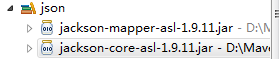
- 额外添加2个jar包;
- 使用 @ResponseBody声明返回值;
- 配置<mvc:annotation-driven />;==>需要引入:xmlns:mvc="http://www.springframework.org/schema/mvc";
@ResponseBody:
<mvc:annotation-driven /> :
- DefaultAnnotationHandlerMapping
- AnnotationMethodHandlerAdapter
需要的jar包

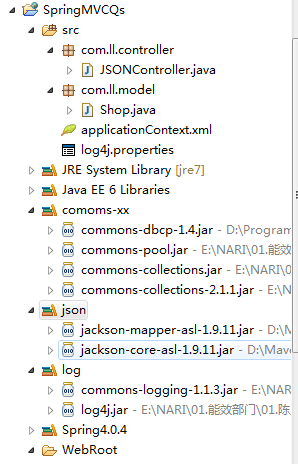
项目结构
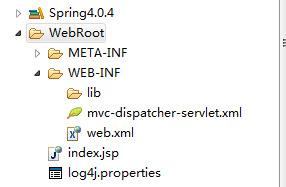
程序代码
Shop.java
package com.ll.model;public class Shop {String name;String staffName[];public String getName() {return name;}public void setName(String name) {this.name = name;}public String[] getStaffName() {return staffName;}public void setStaffName(String[] staffName) {this.staffName = staffName;}}
JSONController.java
package com.ll.controller;import org.springframework.stereotype.Controller;import org.springframework.web.bind.annotation.PathVariable;import org.springframework.web.bind.annotation.RequestMapping;import org.springframework.web.bind.annotation.RequestMethod;import org.springframework.web.bind.annotation.ResponseBody;import com.ll.model.Shop;@Controller@RequestMapping("/kfc/brands")public class JSONController {@RequestMapping(value="{name}", method = RequestMethod.GET)public @ResponseBody Shop getShopInJSON(@PathVariable String name) {System.out.println("-----请求json数据--------");Shop shop = new Shop();shop.setName(name);shop.setStaffName(new String[]{"mkyong1", "mkyong2"});return shop;}}
添加: @ResponseBody作为返回值。
<web-app id="WebApp_ID" version="2.4"xmlns="http://java.sun.com/xml/ns/j2ee" xmlns:xsi="http://www.w3.org/2001/XMLSchema-instance"xsi:schemaLocation="http://java.sun.com/xml/ns/j2eehttp://java.sun.com/xml/ns/j2ee/web-app_2_4.xsd"><display-name>Spring Web MVC Application</display-name><context-param><param-name>contextConfigLocation</param-name><param-value>classpath:applicationContext.xml</param-value></context-param><listener><listener-class>org.springframework.web.context.ContextLoaderListener</listener-class></listener><servlet><servlet-name>mvc-dispatcher</servlet-name><servlet-class>org.springframework.web.servlet.DispatcherServlet</servlet-class><load-on-startup>1</load-on-startup></servlet><servlet-mapping><servlet-name>mvc-dispatcher</servlet-name><url-pattern>/rest/*</url-pattern></servlet-mapping></web-app>
<beans xmlns="http://www.springframework.org/schema/beans"xmlns:context="http://www.springframework.org/schema/context"xmlns:mvc="http://www.springframework.org/schema/mvc" xmlns:xsi="http://www.w3.org/2001/XMLSchema-instance"xsi:schemaLocation="http://www.springframework.org/schema/beanshttp://www.springframework.org/schema/beans/spring-beans-3.0.xsdhttp://www.springframework.org/schema/contexthttp://www.springframework.org/schema/context/spring-context-3.0.xsdhttp://www.springframework.org/schema/mvchttp://www.springframework.org/schema/mvc/spring-mvc-3.0.xsd"><context:component-scan base-package="com.ll.controller" /><mvc:annotation-driven /></beans>
开启:<mvc:annotation-driven />
applicationContext.xml
<?xml version="1.0" encoding="UTF-8" ?><beans xmlns="http://www.springframework.org/schema/beans"xmlns:xsi="http://www.w3.org/2001/XMLSchema-instance" xmlns:p="http://www.springframework.org/schema/p"xmlns:context="http://www.springframework.org/schema/context"xmlns:aop="http://www.springframework.org/schema/aop" xmlns:tx="http://www.springframework.org/schema/tx"xsi:schemaLocation="http://www.springframework.org/schema/beanshttp://www.springframework.org/schema/beans/spring-beans-3.0.xsdhttp://www.springframework.org/schema/contexthttp://www.springframework.org/schema/context/spring-context-3.0.xsdhttp://www.springframework.org/schema/txhttp://www.springframework.org/schema/tx/spring-tx-3.0.xsdhttp://www.springframework.org/schema/aophttp://www.springframework.org/schema/aop/spring-aop-3.0.xsd"><!-- 扫描类包,将标注Spring注解的类自动转化Bean,同时完成Bean的注入 --><context:component-scan base-package="com.ll.model"/></beans>
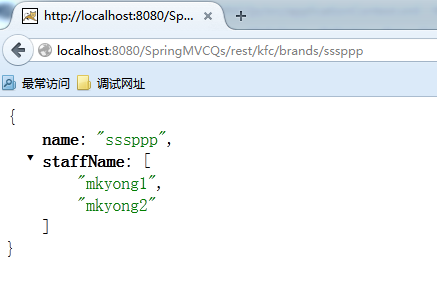
运行
参考网站
http://www.mkyong.com/spring-mvc/spring-3-mvc-and-json-example/
附件列表
【Spring学习笔记-MVC-3】SpringMVC返回Json数据-方式1的更多相关文章
- 【Spring学习笔记-MVC-4】SpringMVC返回Json数据-方式2
<Spring学习笔记-MVC>系列文章,讲解返回json数据的文章共有3篇,分别为: [Spring学习笔记-MVC-3]SpringMVC返回Json数据-方式1:http://www ...
- 【Spring学习笔记-MVC-3.1】SpringMVC返回Json数据-方式1-扩展
<Spring学习笔记-MVC>系列文章,讲解返回json数据的文章共有3篇,分别为: [Spring学习笔记-MVC-3]SpringMVC返回Json数据-方式1:http://www ...
- 3.《Spring学习笔记-MVC》系列文章,讲解返回json数据的文章共有3篇,分别为:
转自:https://www.cnblogs.com/ssslinppp/p/4528892.html 概述 在文章:<[Spring学习笔记-MVC-3]SpringMVC返回Json数据-方 ...
- 1.《Spring学习笔记-MVC》系列文章,讲解返回json数据的文章共有3篇,分别为:
转自:https://www.cnblogs.com/ssslinppp/p/4528892.html [Spring学习笔记-MVC-3]SpringMVC返回Json数据-方式1:http://w ...
- 2.《Spring学习笔记-MVC》系列文章,讲解返回json数据的文章共有3篇,分别为:
转自:https://www.cnblogs.com/ssslinppp/p/4528892.html 个人认为,使用@ResponseBody方式来实现json数据的返回比较方便,推荐使用. 摘要 ...
- 【Spring学习笔记-MVC-9】SpringMVC数据格式化之日期转换@DateTimeFormat
作者:ssslinppp 1. 摘要 本文主要讲解Spring mvc数据格式化的具体步骤: 并讲解前台日期格式如何转换为java对象: 在之前的文章<[Spring学习笔记-MVC ...
- Spring MVC 3.0 返回JSON数据的方法
Spring MVC 3.0 返回JSON数据的方法1. 直接 PrintWriter 输出2. 使用 JSP 视图3. 使用Spring内置的支持// Spring MVC 配置<bean c ...
- mvc使用JsonResult返回Json数据
mvc使用JsonResult返回Json数据 controller 中定义以下方法: public JsonResult UpdateSingle(int id, string actionNa ...
- SpringMVC返回JSON数据时日期格式化问题
https://dannywei.iteye.com/blog/2022929 SpringMVC返回JSON数据时日期格式化问题 博客分类: Spring 在运用SpringMVC框架开发时,可 ...
随机推荐
- iPad mini Retina越狱小结【2014年02月06日 - 初稿】
Update History 2014年02月06日 - 初稿 0.引言 本来一直都没有苹果的产品除了第一代的iPod(没怎么使用最后大学送人了 @李清纯(255270520) ,巧合的是老妈学校发了 ...
- <转>字符编码
转: 字符编码笔记:ASCII,Unicode和UTF-8 作者: 阮一峰 日期: 2007年10月28日 今天中午,我突然想搞清楚Unicode和UTF-8之间的关系,于是就开始在网上查资料. ...
- Boosting 简单介绍
前面介绍了Adaboost,知道了Adaboost是损失函数为指数函数的Boosting算法.那么Boosting还包括了以下几个: 损失函数名称 损失函数 算法 平方差(Squared error) ...
- golang多核的使用
实际上协程只是发生在单个进程内部的,要是想充分的发掘多核CPU的潜力,还是需要多进程的支持. 对于多核编程,go是天生支持,那么我们在什么情况下应该用多核心来加速程序,而在什么情况下用单核即可呢? 现 ...
- WebGL编程指南案例解析之平移和旋转的math库实现
这里说的math库实现,指的是,通过一般的加减乘除(角度计算)来更新坐标值. 因为涉及到坐标的变化,所以这里都是基于对顶点着色器的修改 平移: var vShader = ` attribute ve ...
- NBUT 1225 NEW RDSP MODE I 2010辽宁省赛
Time limit 1000 ms Memory limit 131072 kB Little A has became fascinated with the game Dota recent ...
- 接口测试之postman-简单使用
Postman功能(https://www.getpostman.com/features) 主要用于模拟网络请求包 快速创建请求 回放.管理请求 快速设置网络代理 安装 下载地址:https://w ...
- zoj 1108 FatMouse's Speed 基础dp
FatMouse's Speed Time Limit: 2 Seconds Memory Limit:65536 KB Special Judge FatMouse believe ...
- Sql语句中两个比较迷糊的概念:“连接查询” 与 “外键约束”
Sql语句中两个比较迷糊的概念:“连接查询” 与 “外键约束 Sql 中的连接查询:就是为了避免笛卡尔积,因为涉及到多表查询的化,不使用连接查询,会先将多个互相乘,求出笛卡尔积,然后在在里面查询符合的 ...
- 【vue】vue-cli 脚手架项目简介(一) - package.json
vue-cli是用来生成 vue项目的命令行工具,它的使用方法是这样的: vue init <template-name> <project-name>第二个参数 templa ...