
[hadoop读书笔记] 第十五章 sqoop1.4.6小实验 - 将mysq数据导入hive
安装hive
1、下载hive-2.1.1(搭配hadoop版本为2.7.3)
2、解压到文件夹下
/wdcloud/app/hive-2.1.1
3、配置环境变量


4、在mysql上创建元数据库hive_metastore编码选latin,并授权
grant all on hive_metastore.* to 'root'@'%' IDENTIFIED BY 'weidong' with grant option;

flush privileges;
5、新建hive-site.xml,内容如下:
<?xml version="1.0" encoding="UTF-8" standalone="no"?>
<?xml-stylesheet type="text/xsl" href="configuration.xsl"?><!--
Licensed to the Apache Software Foundation (ASF) under one or more
contributor license agreements. See the NOTICE file distributed with
this work for additional information regarding copyright ownership.
The ASF licenses this file to You under the Apache License, Version 2.0
(the "License"); you may not use this file except in compliance with
the License. You may obtain a copy of the License at
http://www.apache.org/licenses/LICENSE-2.0
Unless required by applicable law or agreed to in writing, software
distributed under the License is distributed on an "AS IS" BASIS,
WITHOUT WARRANTIES OR CONDITIONS OF ANY KIND, either express or implied.
See the License for the specific language governing permissions and
limitations under the License.
--><configuration>
<!-- WARNING!!! This file is auto generated for documentation purposes ONLY! -->
<!-- WARNING!!! Any changes you make to this file will be ignored by Hive. -->
<!-- WARNING!!! You must make your changes in hive-site.xml instead. -->
<!-- Hive Execution Parameters -->
<property>
<name>javax.jdo.option.ConnectionURL</name>
<value>jdbc:mysql://192.168.200.250:3306/hive_metastore?createDatabaseIfNotExist=true</value>
</property>
<property>
<name>javax.jdo.option.ConnectionDriverName</name>
<value>com.mysql.jdbc.Driver</value>
</property>
<property>
<name>javax.jdo.option.ConnectionUserName</name>
<value>root</value>
</property>
<property>
<name>javax.jdo.option.ConnectionPassword</name>
<value>weidong</value>
</property>
<property>
<name>datanucleus.schema.autoCreateTables</name>
<value>true</value>
</property>
<property>
<name>hive.metastore.warehouse.dir</name>
<value>/hive/warehouse</value>
</property>
<property>
<name>hive.exec.scratchdir</name>
<value>/hive/warehouse</value>
</property>
<property>
<name>hive.querylog.location</name>
<value>/wdcloud/app/hive-2.1.1/logs</value>
</property>
<property>
<name>hive.aux.jars.path</name>
<value>/wdcloud/app/hbase-1.1.6/lib</value>
</property>
<property>
<name>hive.metastore.uris</name>
<value>thrift://192.168.200.123:9083</value>
</property>
</configuration>
6、hive-env.sh

7、放开日志
cp hive-log4j2.properties. template  hive-log4j2.properties

cp hive-exec-log4j2.properties.template  hive-exec-log4j2.properties
8、导入mysql connector jar包


9、启动元数据库服务
hive --service metastore &
出错:


再次启动
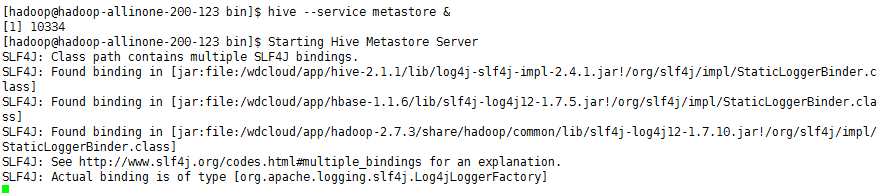
成功不报错
元数据库也生成了一些需要的表
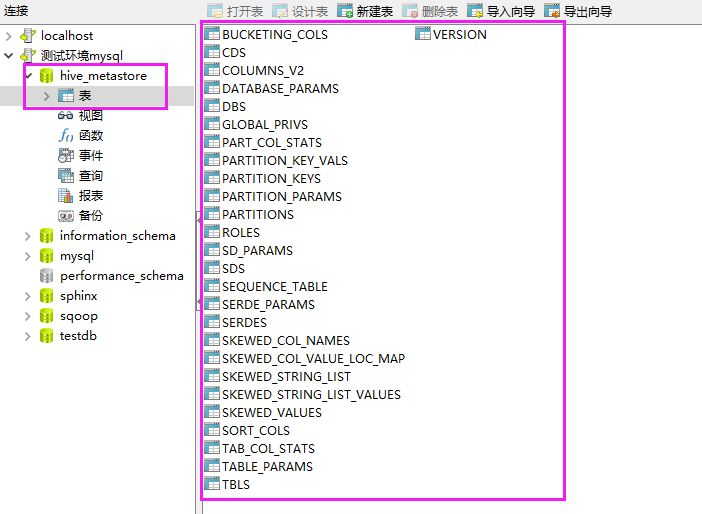
调试 模式命令 hive -hiveconf hive.root.logger=DEBUG,console
客户端连接
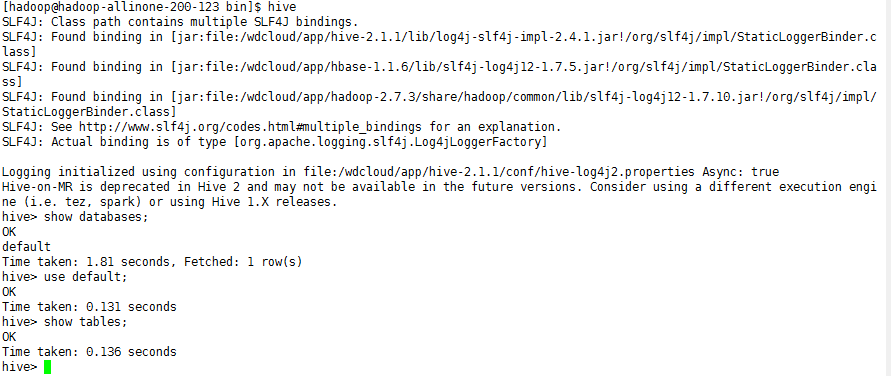
OK,现在hive就安装完毕了,让我们来执行下将mysql数据通过sqoop导入hive
sqoop import --connect jdbc:mysql://192.168.200.250:3306/sqoop --table widgets_copy -m 1 --hive-import --username root -P
出错

解决方法:

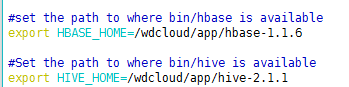
再次执行,导入成功,后台日志
[hadoop@hadoop-allinone-- conf]$ sqoop import --connect jdbc:mysql://192.168.200.250:3306/sqoop --table widgets_copy -m 1 --hive-import --username root -P

// :: INFO sqoop.Sqoop: Running Sqoop version: 1.4.

Enter password:

// :: INFO tool.BaseSqoopTool: Using Hive-specific delimiters for output. You can override

// :: INFO tool.BaseSqoopTool: delimiters with --fields-terminated-by, etc.

// :: INFO manager.MySQLManager: Preparing to use a MySQL streaming resultset.

// :: INFO tool.CodeGenTool: Beginning code generation

// :: INFO manager.SqlManager: Executing SQL statement: SELECT t.* FROM `widgets_copy` AS t LIMIT

// :: INFO manager.SqlManager: Executing SQL statement: SELECT t.* FROM `widgets_copy` AS t LIMIT

// :: INFO orm.CompilationManager: HADOOP_MAPRED_HOME is /wdcloud/app/hadoop-2.7.

Note: /tmp/sqoop-hadoop/compile/4a89a67225918969c1c0f4c7c13168e9/widgets_copy.java uses or overrides a deprecated API.

Note: Recompile with -Xlint:deprecation for details.

// :: INFO orm.CompilationManager: Writing jar file: /tmp/sqoop-hadoop/compile/4a89a67225918969c1c0f4c7c13168e9/widgets_copy.jar

// :: WARN manager.MySQLManager: It looks like you are importing from mysql.

// :: WARN manager.MySQLManager: This transfer can be faster! Use the --direct

// :: WARN manager.MySQLManager: option to exercise a MySQL-specific fast path.

// :: INFO manager.MySQLManager: Setting zero DATETIME behavior to convertToNull (mysql)

// :: INFO mapreduce.ImportJobBase: Beginning import of widgets_copy

// :: INFO Configuration.deprecation: mapred.job.tracker is deprecated. Instead, use mapreduce.jobtracker.address

SLF4J: Class path contains multiple SLF4J bindings.

SLF4J: Found binding in [jar:file:/wdcloud/app/hadoop-2.7./share/hadoop/common/lib/slf4j-log4j12-1.7..jar!/org/slf4j/impl/StaticLoggerBinder.class]

SLF4J: Found binding in [jar:file:/wdcloud/app/hbase-1.1./lib/slf4j-log4j12-1.7..jar!/org/slf4j/impl/StaticLoggerBinder.class]

SLF4J: See http://www.slf4j.org/codes.html#multiple_bindings for an explanation.

SLF4J: Actual binding is of type [org.slf4j.impl.Log4jLoggerFactory]

// :: INFO Configuration.deprecation: mapred.jar is deprecated. Instead, use mapreduce.job.jar

// :: INFO Configuration.deprecation: mapred.map.tasks is deprecated. Instead, use mapreduce.job.maps

// :: INFO client.RMProxy: Connecting to ResourceManager at hadoop-allinone-200-123.wdcloud.locl/192.168.200.123:8032

// :: INFO db.DBInputFormat: Using read commited transaction isolation

// :: INFO mapreduce.JobSubmitter: number of splits:

// :: INFO mapreduce.JobSubmitter: Submitting tokens for job: job_1485230213604_0011

// :: INFO impl.YarnClientImpl: Submitted application application_1485230213604_0011

// :: INFO mapreduce.Job: The url to track the job: http://hadoop-allinone-200-123.wdcloud.locl:8088/proxy/application_1485230213604_0011/

// :: INFO mapreduce.Job: Running job: job_1485230213604_0011

// :: INFO mapreduce.Job: Job job_1485230213604_0011 running in uber mode : false

// :: INFO mapreduce.Job:  map % reduce %

// :: INFO mapreduce.Job:  map % reduce %

// :: INFO mapreduce.Job: Job job_1485230213604_0011 completed successfully

// :: INFO mapreduce.Job: Counters:

    File System Counters

        FILE: Number of bytes read=

        FILE: Number of bytes written=

        FILE: Number of read operations=

        FILE: Number of large read operations=

        FILE: Number of write operations=

        HDFS: Number of bytes read=

        HDFS: Number of bytes written=

        HDFS: Number of read operations=

        HDFS: Number of large read operations=

        HDFS: Number of write operations=

    Job Counters

        Launched map tasks=

        Other local map tasks=

        Total time spent by all maps in occupied slots (ms)=

        Total time spent by all reduces in occupied slots (ms)=

        Total time spent by all map tasks (ms)=

        Total vcore-milliseconds taken by all map tasks=

        Total megabyte-milliseconds taken by all map tasks=

    Map-Reduce Framework

        Map input records=

        Map output records=

        Input split bytes=

        Spilled Records=

        Failed Shuffles=

        Merged Map outputs=

        GC time elapsed (ms)=

        CPU time spent (ms)=

        Physical memory (bytes) snapshot=

        Virtual memory (bytes) snapshot=

        Total committed heap usage (bytes)=

    File Input Format Counters

        Bytes Read=

    File Output Format Counters

        Bytes Written=

// :: INFO mapreduce.ImportJobBase: Transferred 169 bytes in 31.7543 seconds (5.3221 bytes/sec)

// :: INFO mapreduce.ImportJobBase: Retrieved 4 records.

// :: INFO manager.SqlManager: Executing SQL statement: SELECT t.* FROM `widgets_copy` AS t LIMIT

// :: WARN hive.TableDefWriter: Column price had to be cast to a less precise type in Hive

// :: WARN hive.TableDefWriter: Column design_date had to be cast to a less precise type in Hive

// :: INFO hive.HiveImport: Loading uploaded data into Hive(将生成在HDFS的数据加载到HIVE中)

// :: INFO hive.HiveImport: SLF4J: Class path contains multiple SLF4J bindings.

// :: INFO hive.HiveImport: SLF4J: Found binding in [jar:file:/wdcloud/app/hive-2.1./lib/log4j-slf4j-impl-2.4..jar!/org/slf4j/impl/StaticLoggerBinder.class]

// :: INFO hive.HiveImport: SLF4J: Found binding in [jar:file:/wdcloud/app/hbase-1.1./lib/slf4j-log4j12-1.7..jar!/org/slf4j/impl/StaticLoggerBinder.class]

// :: INFO hive.HiveImport: SLF4J: Found binding in [jar:file:/wdcloud/app/hadoop-2.7./share/hadoop/common/lib/slf4j-log4j12-1.7..jar!/org/slf4j/impl/StaticLoggerBinder.class]

// :: INFO hive.HiveImport: SLF4J: See http://www.slf4j.org/codes.html#multiple_bindings for an explanation.

// :: INFO hive.HiveImport: SLF4J: Actual binding is of type [org.apache.logging.slf4j.Log4jLoggerFactory]

// :: INFO hive.HiveImport:

// :: INFO hive.HiveImport: Logging initialized using configuration in file:/wdcloud/app/hive-2.1./conf/hive-log4j2.properties Async: true

// :: INFO hive.HiveImport: OK

// :: INFO hive.HiveImport: Time taken: 3.687 seconds

// :: INFO hive.HiveImport: Loading data to table default.widgets_copy

// :: INFO hive.HiveImport: OK

// :: INFO hive.HiveImport: Time taken: 1.92 seconds

// :: INFO hive.HiveImport: Hive import complete.

// :: INFO hive.HiveImport: Export directory is contains the _SUCCESS file only, removing the directory.(加载进Hive成功后将HDFS上的中间数据删除掉)
如果曾经执行失败过,那再执行的时候,会有错误提示:
ERROR tool.ImportTool: Encountered IOException running import job: org.apache.hadoop.mapred.FileAlreadyExistsException: Output directory xxx already exists
这时,执行hadoop fs -rmr xxx 即可
或者在命令行加上参数
--hive-overwrite : Overwrite existing data inthe Hive table
这个参数会自动覆盖掉曾经存在与hive表的数据
这样即使失败了也会自动去覆盖
查看导入数据

拓展: Sqoop-1.4.4工具import和export使用详解
http://blog.csdn.net/wangmuming/article/details/25303831
附上最后的配置文件hive-site.xml
<?xml version="1.0" encoding="UTF-8" standalone="no"?>

<?xml-stylesheet type="text/xsl" href="configuration.xsl"?><!--

   Licensed to the Apache Software Foundation (ASF) under one or more

   contributor license agreements.  See the NOTICE file distributed with

   this work for additional information regarding copyright ownership.

   The ASF licenses this file to You under the Apache License, Version 2.0

   (the "License"); you may not use this file except in compliance with

   the License.  You may obtain a copy of the License at

       http://www.apache.org/licenses/LICENSE-2.0

   Unless required by applicable law or agreed to in writing, software

   distributed under the License is distributed on an "AS IS" BASIS,

   WITHOUT WARRANTIES OR CONDITIONS OF ANY KIND, either express or implied.

   See the License for the specific language governing permissions and

   limitations under the License.

--><configuration>

  <!-- WARNING!!! This file is auto generated for documentation purposes ONLY! -->

  <!-- WARNING!!! Any changes you make to this file will be ignored by Hive.   -->

  <!-- WARNING!!! You must make your changes in hive-site.xml instead.         -->

  <!-- Hive Execution Parameters -->

          <property>

            <name>javax.jdo.option.ConnectionURL</name>

            <value>jdbc:mysql://192.168.200.250:3306/hive_metastore?createDatabaseIfNotExist=true</value>

         </property>

         <property>

                  <name>javax.jdo.option.ConnectionDriverName</name>

                  <value>com.mysql.jdbc.Driver</value>

         </property>

         <property>

                  <name>javax.jdo.option.ConnectionUserName</name>

                  <value>root</value>

         </property>

         <property>

                   <name>javax.jdo.option.ConnectionPassword</name>

                   <value>weidong</value>

         </property>

         <property>

                  <name>datanucleus.schema.autoCreateTables</name>

                  <value>true</value>

         </property>

         <property>

                   <name>hive.metastore.warehouse.dir</name>

                   <value>/hive/warehouse</value>

         </property>

         <property>

                   <name>hive.exec.scratchdir</name>

                   <value>/hive/warehouse</value>

         </property>

         <property>

                   <name>hive.querylog.location</name>

                   <value>/wdcloud/app/hive-2.1./logs</value>

         </property>

         <property>

                   <name>hive.aux.jars.path</name>

                  <value>/wdcloud/app/hbase-1.1./lib</value>

         </property>

         <property>

                   <name>hive.metastore.uris</name>

                   <value>thrift://192.168.200.123:9083</value>

         </property>

         <property>

                   <name>hive.metastore.schema.verification</name>

                   <value>false</value>

         </property>

</configuration>
下一步需要考虑如何定时去执行这些数据同步和增量同步任务
[hadoop读书笔记] 第十五章 sqoop1.4.6小实验 - 将mysq数据导入hive的更多相关文章
- [hadoop读书笔记] 第十五章 sqoop1.4.6小实验 - 将mysq数据导入HBASE
导入命令 sqoop import --connect jdbc:mysql://192.168.200.250:3306/sqoop --table widgets --hbase-create-t ...
- [hadoop读书笔记] 第十五章 sqoop1.4.6小实验 - 数据在mysq和hdfs之间的相互转换
P573 从mysql导入数据到hdfs 第一步:在mysql中创建待导入的数据 1.创建数据库并允许所有用户访问该数据库 mysql -h 192.168.200.250 -u root -p CR ...
- 《android开发艺术探索》读书笔记(十五)--Android性能优化
接上篇<android开发艺术探索>读书笔记(十四)--JNI和NDK编程 No1: 如果<include>制定了这个id属性,同时被包含的布局文件的根元素也制定了id属性,那 ...
- 《LINUX内核设计与实现》读书笔记之第五章
第五章——系统调用 5.1 与内核通信 1.为用户空间提供一种硬件的抽象接口 2.保证系统稳定和安全 3.除异常和陷入,是内核唯一的合法入口. API.POSIX和C库 关于Unix接口设计:提供机制 ...
- Linux内核分析 读书笔记 (第五章)
第五章 系统调用 5.1 与内核通信 1.调用在用户空间进程和硬件设备之间添加了一个中间层.该层主要作用有三个: 为用户空间提供了硬件的抽象接口. 系统调用保证了系统的稳定和安全. 实现多任务和虚拟内 ...
- 《深入理解java虚拟机》读书笔记四——第五章
第五章 调优案例分析与实战
- 《APUE》读书笔记第十二章-线程控制
本章中,主要是介绍控制线程行为方面的内容,同时介绍了在同一进程中的多个线程之间如何保持数据的私有性以及基于进程的系统调用如何与线程进行交互. 一.线程属性 我们在创建线程的时候可以通过修改pthrea ...
- Programming In Scala笔记-第十五章、Case Classes和模式匹配
本章主要分析case classes和模式匹配(pattern matching). 一.简单例子 接下来首先以一个包含case classes和模式匹配的例子来展开本章内容. 下面的例子中将模拟实现 ...
- C primer plus 读书笔记第十四章
这一章主要介绍C语言的结构和其他数据形式,是学习算法和数据结构的重点. 1.示例代码 /*book.c -- 仅包含一本书的图书目录*/ #include <stdio.h> #defin ...
随机推荐
- 呃,如何使 .NET 程序,在 64位 系统 中,以 32位 模式运行。
其实最简单的方法就是在解决方案中,把平台设为 x86 就好了哈~ 但是今天遇到一个第三方的软件,它调用的一个 dll 是 32位 的,可能它没有测试过在 64位 系统下运行的情况,它在编译时是按默 ...
- Python 构建方便的函数调用
CODE: #!/usr/bin/python # -*- coding: utf-8 -*- ''' Created on 2014-7-14 @author: guaguastd @name: c ...
- android:clipChildren 属性
这个属性默认为true: 两个用法: 1.设置为false ,使用ViewPager 的时候能够 实现一屏上显示多个Item 2.动画能越界
- Booleans
两个取值false和true.但要注意Lua中所有的值都可以作为条件.在控制结构的条件中除了false和nil为假,其他值都为真.所以Lua认为0和空串都是真.
- calcite 理论
https://blog.csdn.net/yunlong34574/article/details/46375733 https://cloud.tencent.com/developer/arti ...
- artificial%20intelligence%20a%20modern%20approach
http://stpk.cs.rtu.lv/sites/all/files/stpk/materiali/mi/artificial%20intelligence%20a%20modern%20app ...
- Spring Bean 的加载顺序
一,单一Bean 装载 1. 实例化; 2. 设置属性值; 3. 如果实现了BeanNameAware接口,调用setBeanName设置Bean的ID或者Name; 4. 如果实现BeanFacto ...
- glob 文件或目录查找
glob模块是最简单的模块之一,内容非常少.用它可以查找符合特定规则的文件或目录(含相对或绝对路径).跟使用windows下的文件搜索差不多. 在python中,glob模块是用来查找匹配的文件的 在 ...
- App store 应用审核由于 IPv6 网络问题被拒的一点分析
App store 应用审核由于 IPv6 网络问题被拒的一点分析 六月以后陆续有一些软件提交市场的时候被拒了,症状基本就是无法登陆啥的.我们公司的应用也未能幸免. 很多同学也想了不少办法,申诉. ...
- 组策略分发Adobe Reader 11教程
1, 实验环境 域控:Windows Server 2012 R2 客户端:Windows 7 Adobe Reader 版本:11.0.00 2, 获取分发 Adobe Reader 的许可协议 按 ...