
[hadoop读书笔记] 第十五章 sqoop1.4.6小实验 - 数据在mysq和hdfs之间的相互转换
P573 从mysql导入数据到hdfs
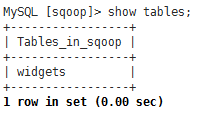
第一步:在mysql中创建待导入的数据
1、创建数据库并允许所有用户访问该数据库
mysql -h 192.168.200.250 -u root -p
CREATE DATABASE sqoop;

GRANT ALL PRIVILEGES ON *.* TO 'root'@'%';
或 GRANT SELECT, INSERT, DELETE,UPDATE ON *.* TO 'root'@'%';
FLUSH PRIVILEGES;
查看权限:select user,host,select_priv,insert_priv,update_priv,delete_priv from mysql.user;
2、创建表widgets
CREATE TABLE widgets(id INT NOT NULL PRIMARY KEY AUTO_INCREMENT,

widget_name VARCHAR() NOT NULL,

price DECIMAL(,),

design_date DATE,

version INT,

design_comment VARCHAR());
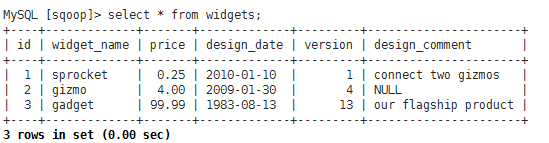
3、导入测试数据
INSERT INTO widgets VALUES(NULL,'sprocket',0.25,'2010-01-10',,'connect two gizmos');

INSERT INTO widgets VALUES(NULL,'gizmo',4.00,'2009-01-30',,NULL);

INSERT INTO widgets VALUES(NULL,'gadget',99.99,'1983-08-13',,'our flagship product');
第二步:执行sqoop导入命令
sqoop import --connect jdbc:mysql://192.168.200.250/sqoop --table widgets -m 1
缺少mysql连接器
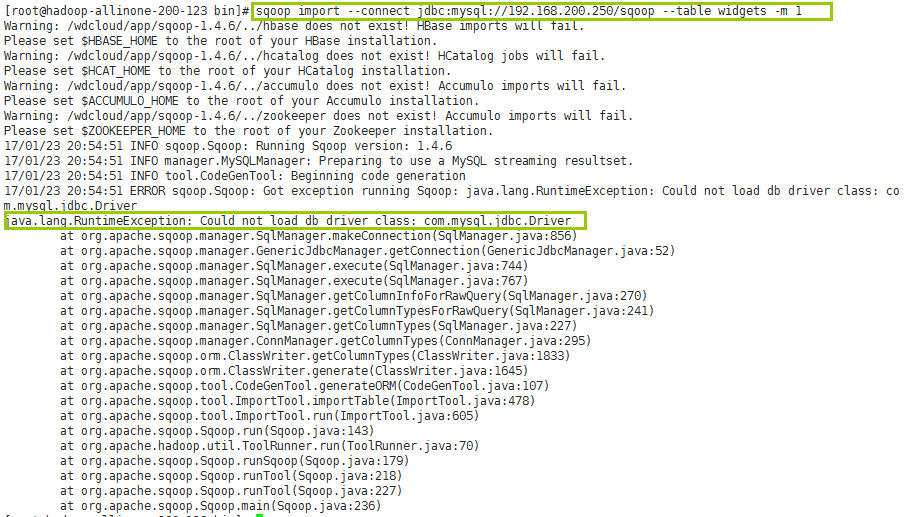
先导入mysql的连接器包

再来执行

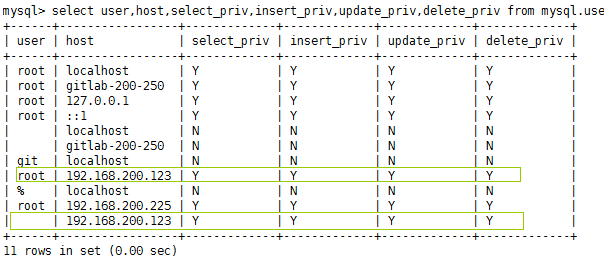
发现怎么也连接不上远程mysql数据库,需要授权如下:
GRANT ALL ON *.* TO ''@'192.168.200.123';
grant all privileges on *.* to ""@"192.168.200.123" identified by "密码";
FLUSH PRIVILEGES;
select user,host,select_priv,insert_priv,update_priv,delete_priv from mysql.user;
再来执行一下
还是不行的话,就只能是在sqoop命令中通过--username 和--password来显式的指定用户名和密码连接了
sqoop import --connect jdbc:mysql://192.168.200.250/sqoop --table widgets -m 1 -username root -password mysql密码
在yarn管理台查看到这个任务正在运行(RUNNING)http://hadoop-allinone-200-123.wdcloud.locl:8088/cluster

但是最终还是执行失败

失败原因:物理内存使用了156.8远小于分配的1GB,但是虚拟内存使用2.7超过了默认配置的2.1GB,解决方法:
在etc/hadoop/yarn-site.xml文件中,修改检查虚拟内存的属性为false,如下:
<property>

    <name>yarn.nodemanager.vmem-check-enabled</name>

    <value>false</value>

</property>
运行继续报错:

解决方法:这个目录没有权限
http://www.oschina.net/question/2288283_2134188?sort=time
保证使用hadoop用户启动集群(因为hadoop的集群的用户是hadoop),并为这个文件夹授权755
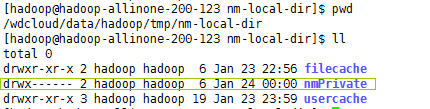
再来执行,姐们儿就不信了 。。。哒哒哒。。。终于成功了

后台日志:
[hadoop@hadoop-allinone-- sqoop-1.4.]$ sqoop import --connect jdbc:mysql://192.168.200.250/sqoop --tabgets -m 1 -username root -password weidong

Warning: /wdcloud/app/sqoop-1.4./../hbase does not exist! HBase imports will fail.

Please set $HBASE_HOME to the root of your HBase installation.

Warning: /wdcloud/app/sqoop-1.4./../hcatalog does not exist! HCatalog jobs will fail.

Please set $HCAT_HOME to the root of your HCatalog installation.

Warning: /wdcloud/app/sqoop-1.4./../accumulo does not exist! Accumulo imports will fail.

Please set $ACCUMULO_HOME to the root of your Accumulo installation.

Warning: /wdcloud/app/sqoop-1.4./../zookeeper does not exist! Accumulo imports will fail.

Please set $ZOOKEEPER_HOME to the root of your Zookeeper installation.

// :: INFO sqoop.Sqoop: Running Sqoop version: 1.4.

// :: WARN tool.BaseSqoopTool: Setting your password on the command-line is insecure. Consider us instead.

// :: INFO manager.MySQLManager: Preparing to use a MySQL streaming resultset.

// :: INFO tool.CodeGenTool: Beginning code generation

// :: INFO manager.SqlManager: Executing SQL statement: SELECT t.* FROM `widgets` AS t LIMIT

// :: INFO manager.SqlManager: Executing SQL statement: SELECT t.* FROM `widgets` AS t LIMIT

// :: INFO orm.CompilationManager: HADOOP_MAPRED_HOME is /wdcloud/app/hadoop-2.7.

Note: /tmp/sqoop-hadoop/compile/591fd797fbbe57ce38b4492a1c9a0300/widgets.java uses or overrides a deprecated

Note: Recompile with -Xlint:deprecation for details.

// :: INFO orm.CompilationManager: Writing jar file: /tmp/sqoop-hadoop/compile/591fd797fbbe57ce381c9a0300/widgets.jar

// :: WARN manager.MySQLManager: It looks like you are importing from mysql.

// :: WARN manager.MySQLManager: This transfer can be faster! Use the --direct

// :: WARN manager.MySQLManager: option to exercise a MySQL-specific fast path.

// :: INFO manager.MySQLManager: Setting zero DATETIME behavior to convertToNull (mysql)

// :: INFO mapreduce.ImportJobBase: Beginning import of widgets

// :: INFO Configuration.deprecation: mapred.job.tracker is deprecated. Instead, use mapreduce.joer.address

// :: INFO Configuration.deprecation: mapred.jar is deprecated. Instead, use mapreduce.job.jar

// :: INFO Configuration.deprecation: mapred.map.tasks is deprecated. Instead, use mapreduce.job.

// :: INFO client.RMProxy: Connecting to ResourceManager at hadoop-allinone-200-123.wdcloud.locl/8.200.123:8032

// :: INFO db.DBInputFormat: Using read commited transaction isolation

// :: INFO mapreduce.JobSubmitter: number of splits:

// :: INFO mapreduce.JobSubmitter: Submitting tokens for job: job_1485230213604_0001

// :: INFO impl.YarnClientImpl: Submitted application application_1485230213604_0001

// :: INFO mapreduce.Job: The url to track the job: http://hadoop-allinone-200-123.wdcloud.locl:80213604_0001/

// :: INFO mapreduce.Job: Running job: job_1485230213604_0001

// :: INFO mapreduce.Job: Job job_1485230213604_0001 running in uber mode : false

// :: INFO mapreduce.Job:  map % reduce %

// :: INFO mapreduce.Job:  map 100% reduce 0%

// :: INFO mapreduce.Job: Job job_1485230213604_0001 completed successfully

// :: INFO mapreduce.Job: Counters: 30

    File System Counters

        FILE: Number of bytes read=

        FILE: Number of bytes written=

        FILE: Number of read operations=

        FILE: Number of large read operations=

        FILE: Number of write operations=

        HDFS: Number of bytes read=

        HDFS: Number of bytes written=

        HDFS: Number of read operations=

        HDFS: Number of large read operations=

        HDFS: Number of write operations=

    Job Counters

        Launched map tasks=

        Other local map tasks=

        Total time spent by all maps in occupied slots (ms)=

        Total time spent by all reduces in occupied slots (ms)=

        Total time spent by all map tasks (ms)=

        Total vcore-milliseconds taken by all map tasks=

        Total megabyte-milliseconds taken by all map tasks=

    Map-Reduce Framework

        Map input records=

        Map output records=

        Input split bytes=

        Spilled Records=

        Failed Shuffles=

        Merged Map outputs=

        GC time elapsed (ms)=

        CPU time spent (ms)=

        Physical memory (bytes) snapshot=

        Virtual memory (bytes) snapshot=

        Total committed heap usage (bytes)=

    File Input Format Counters

        Bytes Read=

    File Output Format Counters

        Bytes Written=

// :: INFO mapreduce.ImportJobBase: Transferred 129 bytes in 38.2028 seconds (3.3767 bytes/sec)

// :: INFO mapreduce.ImportJobBase: Retrieved  records.
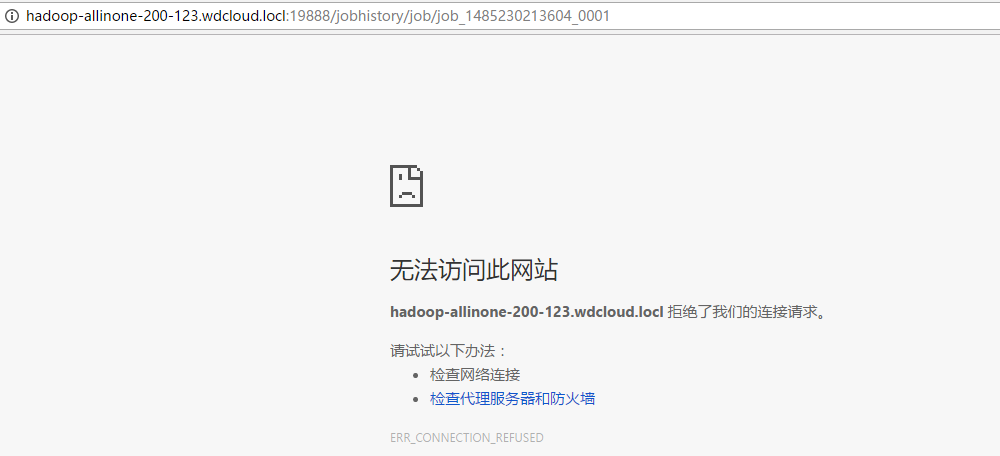
查看作业历史服务器以了解MR任务执行详情,发现查看不到,原因是因为没有启动作业历史服务器
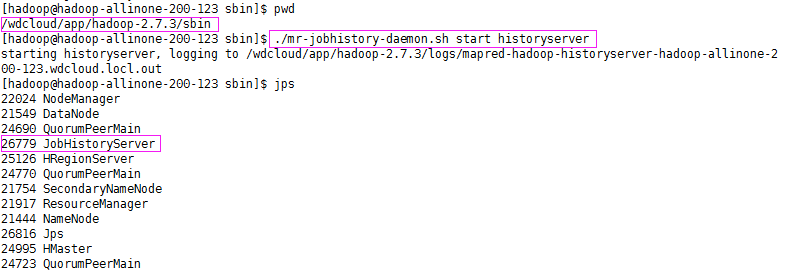
启动之:
再来查看下,就可以看到作业历史记录了
http://hadoop-allinone-200-123.wdcloud.locl:19888/jobhistory/job/job_1485230213604_0001
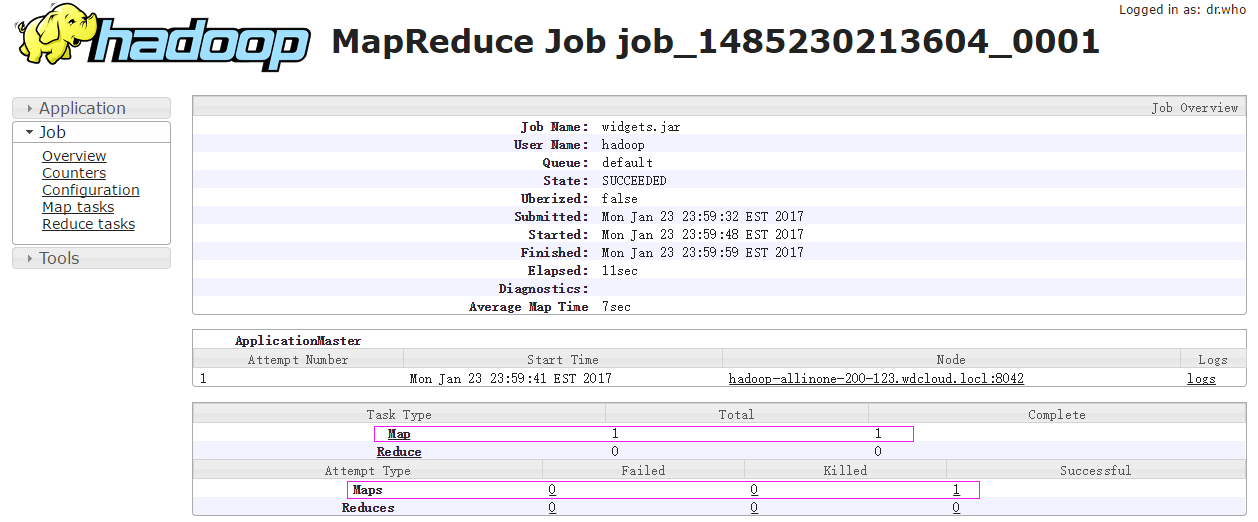
可以看到,sqoop导入数据到hdfs只有map任务而没有reduce任务,map任务数目为1,执行完成数目为1,成功数目为1 ,点击Map链接,查看详细

现在,看看是否真的已经导入了这个数据表
第三步:验证导入结果

可以看到 widgets 表的数据已经导入到了HDFS中
除了导入数据到HDFS中,sqoop在导入时还生成导入源代码.java .jar和.class文件
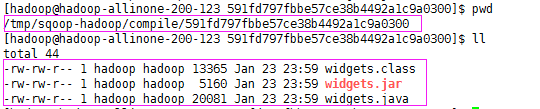
如果只想生成代码而不导入数据,执行以下命令:
sqoop codegen --connect uri --table 表 --class-name 生成的类名称
第四步:追加数据
--direct:能更快速的从表中读取数据,需要数据库支持,如mysql使用外部工具mysqldump
--append:使用追加数据模式来导入数据

现在,我们在mysql中新插入了一条数据
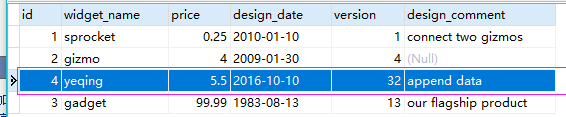
来执行追加命令
sqoop import --connect jdbc:mysql://192.168.200.250/sqoop --table widgets -m 1 -username root -password weidong --direct --append
执行成功

查看下HDFS中的数据
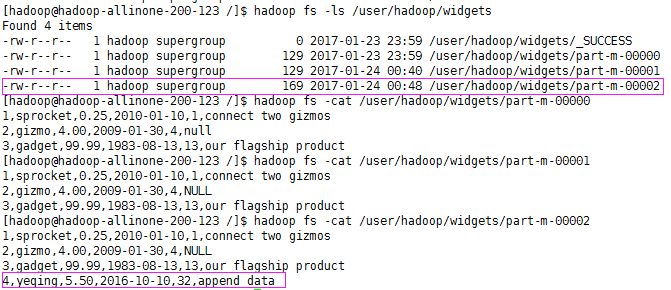
可以看到,已经追加成功
第五步:将HDFS中的数据导出到mysql
复制表widgets为widgets_copy并清空widgets_copy表数据
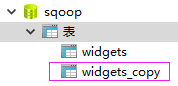
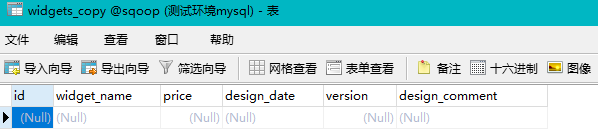
执行导出命令
当将密码写在命令行,会为安全造成影响,这时,可以使用参数-P取代 --password
在任务执行时动态的输入密码
Setting your password on the command-line is insecure. Consider using -P instead.
所以命令如下:
 sqoop export
--connect jdbc:mysql://192.168.200.250/sqoop
-m 1
--table widgets_copy
--export-dir widgets/part-m-00002
--username root
-P
Enter password:不会回显字符
成功执行日志信息
[hadoop@hadoop-allinone-- /]$ sqoop export --connect jdbc:mysql://192.168.200.250/sqoop -m 1 --table widgets_copy --export-dir widgets/part-m-00002  --username root -P// :: INFO sqoop.Sqoop: Running Sqoop version: 1.4.

Enter password:

// :: INFO manager.MySQLManager: Preparing to use a MySQL streaming resultset.

// :: INFO tool.CodeGenTool: Beginning code generation

// :: INFO manager.SqlManager: Executing SQL statement: SELECT t.* FROM `widgets_copy` AS t LIMIT

// :: INFO manager.SqlManager: Executing SQL statement: SELECT t.* FROM `widgets_copy` AS t LIMIT

// :: INFO orm.CompilationManager: HADOOP_MAPRED_HOME is /wdcloud/app/hadoop-2.7.

Note: /tmp/sqoop-hadoop/compile/c66df558e872801e493fbc78458e6914/widgets_copy.java uses or overrides a deprecated API.

Note: Recompile with -Xlint:deprecation for details.

// :: INFO orm.CompilationManager: Writing jar file: /tmp/sqoop-hadoop/compile/c66df558e872801e493fbc78458e6914/widgets_copy.jar

// :: INFO mapreduce.ExportJobBase: Beginning export of widgets_copy

// :: INFO Configuration.deprecation: mapred.job.tracker is deprecated. Instead, use mapreduce.jobtracker.address

// :: INFO Configuration.deprecation: mapred.jar is deprecated. Instead, use mapreduce.job.jar

// :: INFO Configuration.deprecation: mapred.reduce.tasks.speculative.execution is deprecated. Instead, use mapreduce.reduce.speculative

// :: INFO Configuration.deprecation: mapred.map.tasks.speculative.execution is deprecated. Instead, use mapreduce.map.speculative

// :: INFO Configuration.deprecation: mapred.map.tasks is deprecated. Instead, use mapreduce.job.maps

// :: INFO client.RMProxy: Connecting to ResourceManager at hadoop-allinone-200-123.wdcloud.locl/192.168.200.123:8032

// :: WARN hdfs.DFSClient: Caught exception

java.lang.InterruptedException

    at java.lang.Object.wait(Native Method)

    at java.lang.Thread.join(Thread.java:)

    at java.lang.Thread.join(Thread.java:)

    at org.apache.hadoop.hdfs.DFSOutputStream$DataStreamer.closeResponder(DFSOutputStream.java:)

    at org.apache.hadoop.hdfs.DFSOutputStream$DataStreamer.endBlock(DFSOutputStream.java:)

    at org.apache.hadoop.hdfs.DFSOutputStream$DataStreamer.run(DFSOutputStream.java:)

// :: INFO input.FileInputFormat: Total input paths to process : 1(仅处理一个路径的数据导出)

// :: INFO input.FileInputFormat: Total input paths to process :

// :: INFO mapreduce.JobSubmitter: number of splits:

// :: INFO Configuration.deprecation: mapred.map.tasks.speculative.execution is deprecated. Instead, use mapreduce.map.speculative

// :: INFO mapreduce.JobSubmitter: Submitting tokens for job: job_1485230213604_0005

// :: INFO impl.YarnClientImpl: Submitted application application_1485230213604_0005

// :: INFO mapreduce.Job: The url to track the job: http://hadoop-allinone-200-123.wdcloud.locl:8088/proxy/application_1485230213604_0005/

// :: INFO mapreduce.Job: Running job: job_1485230213604_0005

// :: INFO mapreduce.Job: Job job_1485230213604_0005 running in uber mode : false

// :: INFO mapreduce.Job:  map % reduce %

// :: INFO mapreduce.Job:  map 100% reduce 0%

// :: INFO mapreduce.Job: Job job_1485230213604_0005 completed successfully

// :: INFO mapreduce.Job: Counters: 30

    File System Counters

        FILE: Number of bytes read=

        FILE: Number of bytes written=

        FILE: Number of read operations=

        FILE: Number of large read operations=

        FILE: Number of write operations=

        HDFS: Number of bytes read=

        HDFS: Number of bytes written=

        HDFS: Number of read operations=

        HDFS: Number of large read operations=

        HDFS: Number of write operations=

    Job Counters

        Launched map tasks=

        Data-local map tasks=

        Total time spent by all maps in occupied slots (ms)=

        Total time spent by all reduces in occupied slots (ms)=

        Total time spent by all map tasks (ms)=

        Total vcore-milliseconds taken by all map tasks=

        Total megabyte-milliseconds taken by all map tasks=

    Map-Reduce Framework

        Map input records=

        Map output records=

        Input split bytes=

        Spilled Records=

        Failed Shuffles=

        Merged Map outputs=

        GC time elapsed (ms)=

        CPU time spent (ms)=

        Physical memory (bytes) snapshot=

        Virtual memory (bytes) snapshot=

        Total committed heap usage (bytes)=

    File Input Format Counters

        Bytes Read=

    File Output Format Counters

        Bytes Written=

// :: INFO mapreduce.ExportJobBase: Transferred 334 bytes in 30.6866 seconds (10.8842 bytes/sec)

// :: INFO mapreduce.ExportJobBase: Exported 4 records.(导出了4条记录)
可以看见,mysql表已导入数据

至此,mysql和hdfs相互的数据导入导出就完毕了
[hadoop读书笔记] 第十五章 sqoop1.4.6小实验 - 数据在mysq和hdfs之间的相互转换的更多相关文章
- [hadoop读书笔记] 第十五章 sqoop1.4.6小实验 - 将mysq数据导入HBASE
导入命令 sqoop import --connect jdbc:mysql://192.168.200.250:3306/sqoop --table widgets --hbase-create-t ...
- [hadoop读书笔记] 第十五章 sqoop1.4.6小实验 - 将mysq数据导入hive
安装hive 1.下载hive-2.1.1(搭配hadoop版本为2.7.3) 2.解压到文件夹下 /wdcloud/app/hive-2.1.1 3.配置环境变量 4.在mysql上创建元数据库hi ...
- 《android开发艺术探索》读书笔记(十五)--Android性能优化
接上篇<android开发艺术探索>读书笔记(十四)--JNI和NDK编程 No1: 如果<include>制定了这个id属性,同时被包含的布局文件的根元素也制定了id属性,那 ...
- 《LINUX内核设计与实现》读书笔记之第五章
第五章——系统调用 5.1 与内核通信 1.为用户空间提供一种硬件的抽象接口 2.保证系统稳定和安全 3.除异常和陷入,是内核唯一的合法入口. API.POSIX和C库 关于Unix接口设计:提供机制 ...
- Linux内核分析 读书笔记 (第五章)
第五章 系统调用 5.1 与内核通信 1.调用在用户空间进程和硬件设备之间添加了一个中间层.该层主要作用有三个: 为用户空间提供了硬件的抽象接口. 系统调用保证了系统的稳定和安全. 实现多任务和虚拟内 ...
- 《深入理解java虚拟机》读书笔记四——第五章
第五章 调优案例分析与实战
- 《APUE》读书笔记第十二章-线程控制
本章中,主要是介绍控制线程行为方面的内容,同时介绍了在同一进程中的多个线程之间如何保持数据的私有性以及基于进程的系统调用如何与线程进行交互. 一.线程属性 我们在创建线程的时候可以通过修改pthrea ...
- Programming In Scala笔记-第十五章、Case Classes和模式匹配
本章主要分析case classes和模式匹配(pattern matching). 一.简单例子 接下来首先以一个包含case classes和模式匹配的例子来展开本章内容. 下面的例子中将模拟实现 ...
- C primer plus 读书笔记第十四章
这一章主要介绍C语言的结构和其他数据形式,是学习算法和数据结构的重点. 1.示例代码 /*book.c -- 仅包含一本书的图书目录*/ #include <stdio.h> #defin ...
随机推荐
- win2016安装postgresql安装不了的问题
我在阿里云的win2016服务器上下载postgresql,结果怎么都装不上. 双击 Exe没有 任何 反映 .. ... 网上搜索不出..在N个群里问 ,终于碰到有人和我一样的问题了..原来是阿里云 ...
- 不存数据库生成验证码(totp算法)
以前做验证式的方法都是new Random().Next(10000,99999) 生成随机数了以后存到数据库中的用户表中,用户输入验证码了再查询用户表做比较的,网友说这种做法太LOW B了,应该用T ...
- 【React Native开发】React Native应用设备执行(Running)以及调试(Debugging)(3)
),React Native技术交流4群(458982758),请不要反复加群.欢迎各位大牛,React Native技术爱好者加入交流!同一时候博客左側欢迎微信扫描关注订阅号,移动技术干货,精彩文章 ...
- confluence数据库的配置文件
mysql> select u.id,u.user_name,u.active from cwd_user u join cwd_membership m on u.id=m.child_use ...
- angular中的表单数据自定义验证
之前说过了angular是如何给表单的数据进行基本的,常用的验证的:angular学习笔记(二十)-表单验证 但是在实际工作中,这些验证是远远不够的,很多时候我们需要自定义一些验证规则,以及一些异步, ...
- Sql Server 2000/2008 用Sql导出数据表结构(包括注释)到Excel
--Sql Server 2000 declare @id int, ), ) declare cur_1 cursor for select id,name from sysobjects wher ...
- [Windows Azure] How to use the Windows Azure Blob Storage Service in .NET
How to use the Windows Azure Blob Storage Service in .NET version 1.7 version 2.0 This guide will de ...
- linux系统卡解决方案
1.查看内存使用率 free -g 运行结果: 2.查看磁盘使用率 df -h 运行结果: 3.查看磁盘IO iostat -x 1 运行结果: 60表示60秒钟刷新一次 4.查看CPU使用情况 to ...
- Kafka:架构简介【转】
转:http://www.cnblogs.com/f1194361820/p/6026313.html Kafka 架构简介 Kafka是一个开源的.分布式的.可分区的.可复制的基于日志提交的发布订阅 ...
- electron 创建右键菜单
1.引入模块 const Electron = require('electron'); const remote = Electron.remote; const Menu = remote.Men ...