
利用Python玩微信跳一跳
创建python项目jump_weixin,新建python程序jump.py
需要4个辅助文件【adb.exe,AdbWinApi.dll,AdbWinUsbApi.dll,fastboot.exe】,放到项目根目录
辅助文件下载地址:链接:https://pan.baidu.com/s/1sljznFR 密码:gzeg
目录结构如下:

编辑jump.py:
import os
import numpy
import matplotlib.pyplot as plt
import PIL
from matplotlib.animation import FuncAnimation
import time

need_update = True

# 获取截图
def get_screen_image():
    os.system('adb shell screencap -p /sdcard/screen.png')  # 截取手机屏幕

    os.system('adb pull /sdcard/screen.png')  # 把手机上的截图拿到电脑上

    return numpy.array(PIL.Image.open('screen.png'))

def jump_to_next(point1, point2):  # 执行跳的操作
    x1, y1 = point1
    x2, y2 = point2  # 把两次点击的坐标取出来
    distance = ((x2 - x1) ** 2 + (y2 - y1) ** 2) ** 0.5
    os.system('adb shell input swipe 300 400 300 400 {}'.format(int((distance * 1.35))))  # 按下的坐标,抬起的坐标,按压的时间
    global need_update
    need_update = True
    # time.sleep(1)

def on_click(event, coor=[]):
    # 参数event是点击的位置
    x, y = event.xdata, event.ydata  # 刚刚点击的坐标
    coor.append((x, y))  # 把一次点击的坐标添加到列表
    if len(coor) == 2:  # 通过坐标的数量,判断当前是否点击了两次
        # jump_to_next(coor[0],coor[1])
        # coor=[]
        # 用列表的pop代替上面的方法
        jump_to_next(coor.pop(), coor.pop())

def update_screen(frames):
    global need_update
    if need_update:
        time.sleep(1)
        axes_image.set_array(get_screen_image())
        need_update = False
    return axes_image,

figure = plt.figure()  # 创建一张空白图片
axes_image = plt.imshow(get_screen_image(), animated=True)  # 把截图画到刚才的空白图片对象里面
figure.canvas.mpl_connect('button_press_event', on_click)  # 绑定鼠标事件
ani = FuncAnimation(figure, update_screen, interval=300, blit=True)
plt.show()  # 显示
执行时,需要将手机调成开启USB调试模式,打开微信跳一跳界面,用手机数据线连接电脑。
执行方式:打开命令行工具cmd,进入jump_weixin项目目录,执行python jump.py
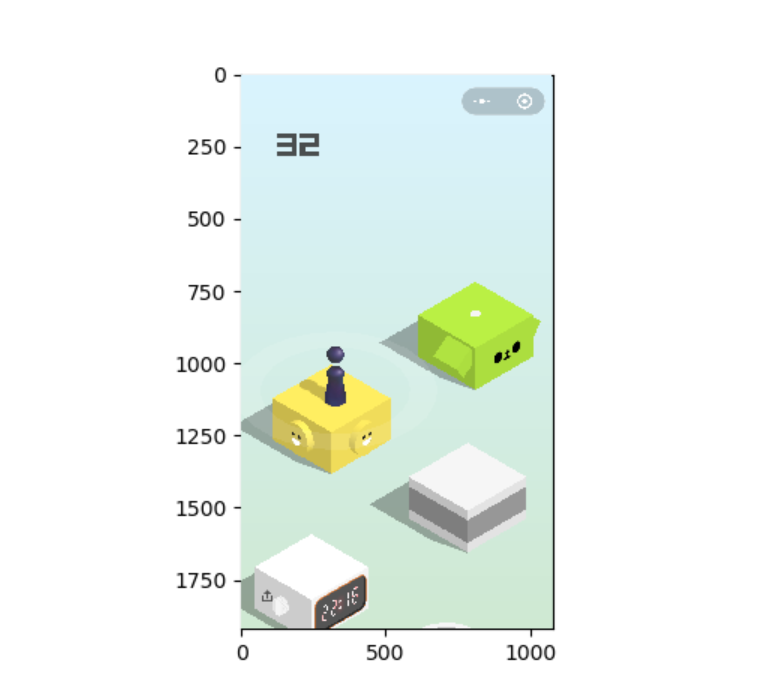
会弹出如下图形程序,用鼠标点击开始点与结束点,等待图片刷新后,再次点击开始点与结束点。
好了,大致就是这样了,
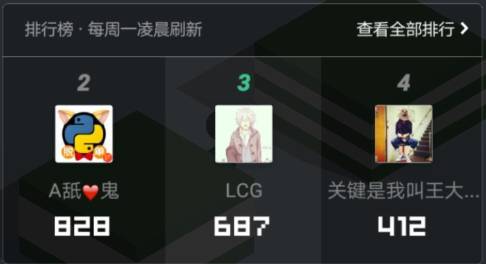
看看我刷的(第三的是我,我不是朋友圈里唯一刷分的,强中自有强中手):
是不是瞬间失去了游戏的乐趣?

补充:
C:\Users\lcg>pip install numpy
Collecting numpy
  Downloading numpy--cp36-none-win_amd64.whl (.4MB)
    % |████████████████████████████████| .4MB 75kB/s
Installing collected packages: numpy
Successfully installed numpy-

C:\Users\lcg>pip install matplotlib
Collecting matplotlib
  Downloading matplotlib--cp36-cp36m-win_amd64.whl (.7MB)
    % |████████████████████████████████| .7MB 55kB/s
Collecting six>=1.10 (from matplotlib)
  Downloading six--py2.py3-none-any.whl
Requirement already satisfied: numpy>= in c:\python36\lib\site-packages (from matplotlib)
Collecting pyparsing!=,!=,!=,>= (from matplotlib)
  Downloading pyparsing--py2.py3-none-any.whl (56kB)
    % |████████████████████████████████| 61kB 58kB/s
Collecting python-dateutil>=2.0 (from matplotlib)
  Downloading python_dateutil--py2.py3-none-any.whl (194kB)
    % |████████████████████████████████| 194kB 141kB/s
Requirement already satisfied: pytz in c:\python36\lib\site-packages (from matplotlib)
Collecting cycler>=0.10 (from matplotlib)
  Downloading cycler--py2.py3-none-any.whl
Installing collected packages: six, pyparsing, python-dateutil, cycler, matplotlib
Successfully installed cycler- matplotlib- pyparsing- python-dateutil- six-

C:\Users\lcg>pip install pillow
Collecting pillow
  Downloading Pillow--cp36-cp36m-win_amd64.whl (.6MB)
    % |████████████████████████████████| .6MB 199kB/s
Installing collected packages: pillow
Successfully installed pillow-
外部库的安装
利用Python玩微信跳一跳的更多相关文章
- Python 帮你玩微信跳一跳 GitHub Python脚本
前言想自己搞游戏小程序的 在github 有人已经利用 python程序, 通过adb 获取不同型号安卓手机的系统截图,然后通过计算小人与目标位置距离之后得到准确的触摸时间,再通过 开发者模式里的 a ...
- Python操作微信跳一跳
“跳一跳”这个东西还是今天刚接触到的,看到了python群中有人再问“微信跳一跳的外挂有人写了没”,“早就有了”,“github”,“等着出个更详细的教程教程没看懂,主要没有用过adb”. 不过没关系 ...
- Python版本微信跳一跳,软件配置
一.安装python3的环境: 直接从python官方网站下载python3的安装包,直接安装. 记得将python3放到PATH环境变量中,安装的过程中在该配置地方打钩就可以了. 如果安装的过程中出 ...
- 【辅助工具】Python实现微信跳一跳
最近迷上了微信跳一跳小游戏,正好也看到知乎上有大神分享了技术贴,我也参考了好多资料,原理就是通过abd命令截取图片,python计算两个点距离,然后转化按压时间,让电脑来完成游戏.我花了很长时间才把程 ...
- 教你用.Net来玩微信跳一跳
目前开发的所有代码都已经上传到了GitHub.欢迎大家来Star https://github.com/GiantLiu/AutoJump 目前程序分为“全自动版本”和“半自动版本” 全自动版本 We ...
- 用Python来玩微信跳一跳
微信2017年12月28日发布了新版本,在小程序里面有一个跳一跳小游戏,试着点一点玩了下.第二天刚好在一篇技术公众号中,看到有大神用Python代码计算出按压时间,向手机发送android adb命令 ...
- 使用python编写微信跳一跳的自动脚本
实现思路: 调用adb命令,截图 寻找小小人的底部中心点role(从下到上扫描,直到找到小小人相同像素的点,至于小小人像素点rgb是什么,可以使用photoshop查看) 寻找棋盘最高点top,然后寻 ...
- 微信跳一跳辅助自动跳Python
一.说明 此代码借鉴github一位大神所写,已经做了简化合并处理,如果能成功连上手机并运行,可以实现程序自动玩游戏,刷个1000+的分数轻轻松松 github源码地址 https://github. ...
- 微信跳一跳,Python辅助自动跳程序
一.说明 此代码借鉴一位大神提供在gitHub上的源码,已经做了简化合并处理,成功连上手机并运行后,可实现自动玩微信跳一跳游戏,刷个1000+的分数轻轻松松 github源码地址 https://gi ...
随机推荐
- VS2010创建动态链接库(DLL)的方法
1.第一步创建WIN32项目,选择DLL 2.第二步,创建你自己的DLL CPP文件和头文件,下面以两个简单的加减法函数为例子导出 然后编译生成即可.DLL文件在Debug或Release目录中 .d ...
- NETGEAR WNDR3800CH openwrt 不能用新版, Barrier Breaker 14.07
15系列主要是不能正常端口映射,这个很不方便了. 尽管80端口被封了,我们可以用别的端口啊. 刷完以后,不懂英文的,跟着下面的步骤就可以进入中文环境了. 记得先上网,再通过路由下载安装中文包,才可以. ...
- C++ bitset
itset存储二进制数位. bitset就像一个bool类型的数组一样,但是有空间优化——bitset中的一个元素一般只占1 bit,相当于一个char元素所占空间的八分之一. bitset中的每个元 ...
- spring核心容器
容器:用来包装或装载物品的储存器 web服务器与jsp.servlet的关系: 从程序文件存放的位置 程序文件要放到web服务器上 从程序执行的方式 程序的从初始化到消亡都是web服务器管理的 从以 ...
- PSP个人软件开发系统面向对象需求分析与设计文档
1.引言 1.1编写的目的 编写该文档的目的是,对产品进行定义,详尽说明该产品的软件需求,简述我们对 PSP个人软件开发系统的初步设想,及划分的各功能模块以及各模块的实体图和数据流图. 1.2预期的读 ...
- L228 the complicated issue of equality: non-disabled actors play disabled roles
Bryan Cranston’s defence of playing a wheelchair user in the new comedy-drama The Upside has underli ...
- IOS消息推送(转)
第一部分 首先第一步当然是介绍一下苹果的推送机制(APNS)咯(ps:其实每一篇教程都有),先来看一张苹果官方对其推送做出解释的概要图. Provider是给你手机应用发出推送消息的服务器,而APNS ...
- Redis学习第四课:Redis List类型及操作
list是一个链表结构,主要功能是push.pop.获取一个范围的所有值等,操作中key理解为链表的名字. Redis的list类型其实就是一个每个子元素都是string类型的双向链表.我们可以通过p ...
- antd中fomr中resetFields清空输入框
1.如果没有initValue的情况下,直接使用resetFields可以清空文本框的值 2.如果是有initValue的情况下,直接使用resetFields方法会直接重置为initValue的值 ...
- iOS-----使用NSOperation与NSOperationQueue实现多线程
使用NSOperation与NSOperationQueue实现多线程 NSOperation与NSOperationQueue的基本理论如下. NSOperationQueue 代表一个FIFO的队 ...