
spring 使用 maven profile
先看看 maven 定义 profile 的写法
	<!-- profiles -->

	<profiles>

		<profile>

			<activation>

				<activeByDefault>true</activeByDefault>

			</activation>

			<id>dev</id>

			<properties>

				<profile.env>dev</profile.env>

			</properties>

		</profile>

		<profile>

			<id>test</id>

			<properties>

				<profile.env>test</profile.env>

			</properties>

		</profile>

		<profile>

			<id>product</id>

			<properties>

				<profile.env>product</profile.env>

			</properties>

		</profile>

	</profiles>
然后在 spring.yml 里面这个么写

但是 spring 在运行的时候 已经和maven 没有关系了 这时候 ${ 变量名的写法 } 已经不生效了
备注: 这里 ${ 变量名 } 是maven 引用 变量的 写法。
比如:
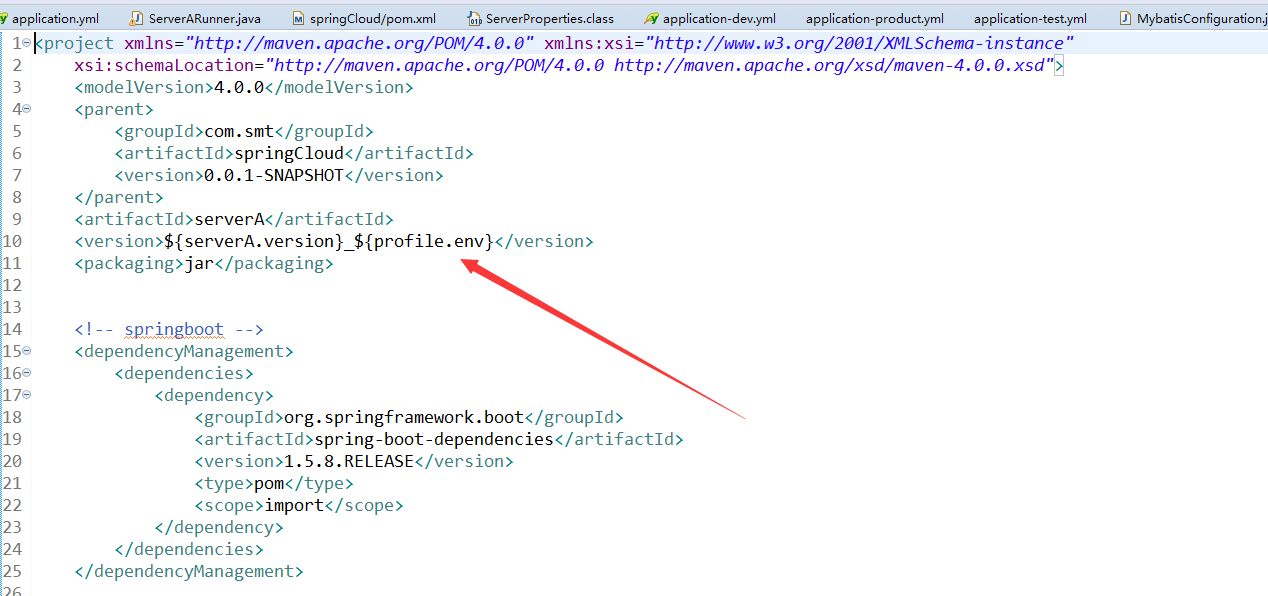
这里的 ${serverA.version}_${profile.env} 分别是引用自 前面配置文件 中定义的 maven 变量 ${serverA.version} 来自 <properties> ${profile.env} 来自 profile

怎么才能让 spring一识别 maven的 表达式呢?我们知道 spring运行在maven 打包以后,所以 不能可能spring运行的时候还能读取到 maven的 变量,所以只能是在maven打包的时候替换文件。 这就是核心思想了。加上下面的代码就可以打包的时候替换了spring.yml 中 maven的 变量了 。
    <resources>

			<resource>

				<directory>src/main/resources/</directory>

				<filtering>true</filtering>

			</resource>

		</resources>
这个 代码 加在 <build> 里面就可以了
	<!-- 指定jdk 的版本 -->

	<build>

		<resources>

			<resource>

				<directory>src/main/resources/</directory>

				<filtering>true</filtering>

			</resource>

		</resources>

		<plugins>

			<plugin>

				<groupId>org.apache.maven.plugins</groupId>

				<artifactId>maven-compiler-plugin</artifactId>

				<version>3.1</version>

				<configuration>

					<source>1.8</source>

					<target>1.8</target>

				</configuration>

			</plugin>

		</plugins>

	</build>
上面 多了一个 修改 jdk 版本的 配置,我的另一篇 博客里面写了 修改 jdk 版本的 maven的 2 中配置方式。
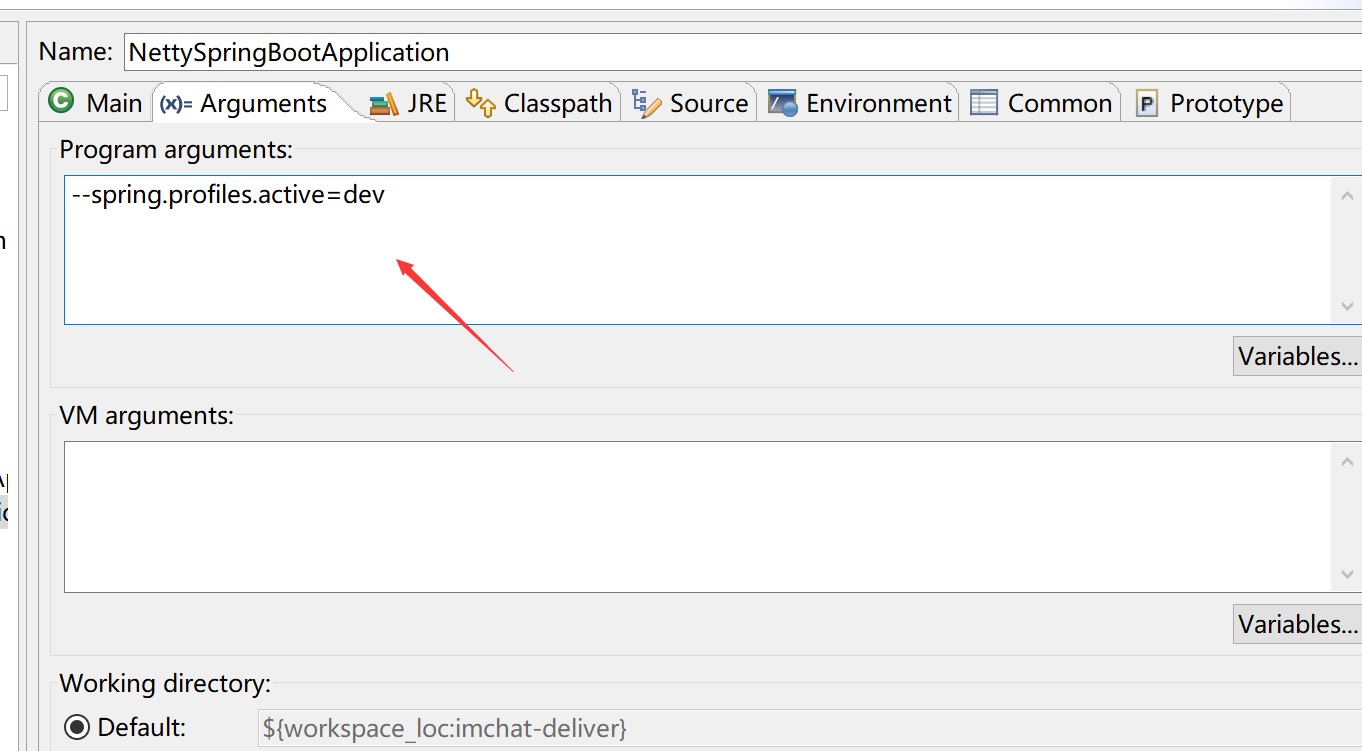
如果需要零时切换 profile 可以在 jar 后面 更上 --spring.profiles.active=dev
java -jar aaa.jar --spring.profiles.active=dev
在 eclipse 中 run 右键 运行配置中指定
spring 使用 maven profile的更多相关文章
- [Spring Boot 系列] 集成maven和Spring boot的profile功能
由于项目的需要, 今天给spirng boot项目添加了profile功能.再网上搜索了一圈,也没有找到满意的参考资料,其实配置并不难,就是没有一个one stop(一站式)讲解的地方,所以有了写这篇 ...
- 集成maven和Spring boot的profile功能
思路:maven支持profile功能,当使用maven profile打包时,可以打包指定目录和指定文件,且可以修改文件中的变量.spring boot也支持profile功能,只要在applica ...
- 集成maven和Spring boot的profile 专题
maven中配置profile节点: <project> .... <profiles> <profile> <!-- 生产环境 --> <id& ...
- 004-集成maven和Spring boot的profile功能打包
参考地址:https://blog.csdn.net/lihe2008125/article/details/50443491 一.主要目标 1.通过mvn在命令行中打包时,可以指定相应的profil ...
- [Spring Boot 系列] 集成maven和Spring boot的profile 专题
maven中配置profile节点: <project> .... <profiles> <profile> <!-- 生产环境 --> <id& ...
- 集成maven和Spring boot的profile
如果在配置中勾选了多套配置,则以pom.xml文件中 profiles中 配置 最后一个配置为准. maven中配置profile节点: <project> .... <profi ...
- Spring Boot Maven Plugin(二):run目标
简介 Spring Boot Maven Plugin插件提供spring boot在maven中的支持.允许你打包可运行的jar包或war包. 插件提供了几个maven目标和Spring Boot ...
- maven profile实现多环境配置
每次项目部署上线都需要手动去修改配置文件(比如数据库配置,或者一个自定义的配置)然后才能打包,很麻烦,网上找到 maven profile可以完成这个工作,记录如下: 环境:eclipse + spr ...
- Spring 快速开始 Profile 和 Bean
和maven profile类似,Spring bean definition profile 有两个组件:声明和激活. [栗子:开发测试环境使用HyperSQL 生产环境使用JNDI上下文根据配置查 ...
随机推荐
- POJ-2251 Dungeon Master (BFS模板题)
You are trapped in a 3D dungeon and need to find the quickest way out! The dungeon is composed of un ...
- HDU-3631 Shortest Path (floyd)
Description When YY was a boy and LMY was a girl, they trained for NOI (National Olympiad in Informa ...
- datafile相关(add、rename、drop)
--case 1 add14:25:04 FPYJ(150_9)@test> alter tablespace fpyj_data02 add datafile '/oradata02/test ...
- spi signal analyze using logic analyzer
logic analyzer device: Saleae Logic 16 Pc software gui: capture signal picture: send command 0x55 ...
- SQL Server 调优系列进阶篇 - 如何重建数据库索引
随着数据的数据量的急剧增加,数据库的性能也会明显的有些缓慢这个时候你可以考虑下重建索引或是重新组织索引了. DBCC SHOWCONTIG('表名') 可以查看当前表的索引碎情况. 重建索引 方法一: ...
- 【数据库】MFC ODBC(二)
三.CRecordset类 1.IsBOF与IsEOF (1)IsBOF 如果记录集没有记录,或已经向前游动到第一个记录之前,则返回非零:否则返回0.详细说明如下: 1)访问Open函数之后,如果记录 ...
- Python中字典的基本操作
字典(Dictionary)是一映射类型(Key-value):字典是可变的,可存储任意类型对象 字典的定义用大括号{ },每个值用 ”,“ 逗号隔开,key和value使用 ”:“ 冒号分隔 字典的 ...
- vim/vi用法总结
第一章:安装: 在命令行运行vim,如果找不到程序,需要自己安装. 1.1 下载 从官方网站ftp://ftp.vim.org/pub/vim/unix/中选择一个版本下载,我这里使用的是vim-7. ...
- Linux 系统信息查询
众所周知,Linux大部分操作是通过命令实现的,并不像windows那么直观.linux查看硬件信息也是需要通过linux查看硬件信息命令查询的,下面小编来分享一下linux查看硬件信息的方法和命令写 ...
- Java实现哈夫曼编码和解码
最近无意中想到关于api返回值加密的问题,譬如我们的api需要返回一些比较敏感或者重要不想让截获者得到的信息,像如果是做原创图文的,文章明文返回的话则有可能被抓包者窃取. 关于请求时加密的方式比较多, ...