
centos fastdfs 多服务器 多硬盘 多组 配置详解
说正文前,先感谢happy_fish100提供的fastdfs,轻量级的分布式文件服务器。
随着用户量的变大,图片,视频等的量会不断的增大,这个时候一个硬盘可能不够用了,就要加硬盘。硬盘加不了时,就要增加服务器了。同一组服务器,文件服务器的东西是一样,不同组的服务器,有不同的文件,不同的组之间,共同组建了文件服务器的所有内容。
下面说一下,安装配置的过程,这里配置的方法,根开发者提供的方法不一样,我没有用到fastdfs-nginx-module,通过配置nginx实现了fastdfs-nginx-module的功能。
一,Fastdfs的下载
地址:http://sourceforge.net/projects/fastdfs/files/FastDFS%20Server%20Source%20Code/
二,服务器,以及系统
我用的centos 6.5 x86_64 ,fastdfs v5.01架构如下:
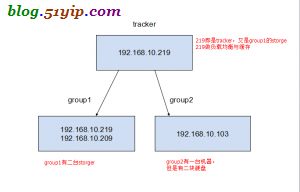
架构图
这里的tracker是单点的,如果出了故障就郁闷了,以前搞过一次多tracker,不过版本比较老了。请参考:fastdfs 多服务器 配置
三,安装fastdfs和nginx
1,安装nginx
- //安装,gcc,automake,autoconf等依赖包
- [root@localhost download]$ yum install gettext gettext-devel libXft libXft-devel libXpm libXpm-devel\
- automake autoconf libXtst-devel gtk+-devel gcc zlib-devel libpng-devel gtk2-devel glib-devel
- //安装FastDFS
- [root@localhost download]# tar zxf FastDFS_v5.01.tar.gz
- [root@localhost download]# cd FastDFS
- [root@localhost download]# ./make.sh
- [root@localhost download]# ./make.sh install
- //安装成功有以下内容
- [root@localhost fdfs]# ll /usr/local/bin/ |grep fdfs
- -rwxr-xr-x 1 root root 522870 7月 4 03:20 fdfs_appender_test
- -rwxr-xr-x 1 root root 522823 7月 4 03:20 fdfs_appender_test1
- -rwxr-xr-x 1 root root 513975 7月 4 03:20 fdfs_append_file
- -rwxr-xr-x 1 root root 513393 7月 4 03:20 fdfs_crc32
- -rwxr-xr-x 1 root root 513927 7月 4 03:20 fdfs_delete_file
- -rwxr-xr-x 1 root root 514329 7月 4 03:20 fdfs_download_file
- -rwxr-xr-x 1 root root 514093 7月 4 03:20 fdfs_file_info
- -rwxr-xr-x 1 root root 525024 7月 4 03:20 fdfs_monitor
- -rwxr-xr-x 1 root root 1179642 7月 4 03:20 fdfs_storaged
- -rwxr-xr-x 1 root root 529805 7月 4 03:20 fdfs_test
- -rwxr-xr-x 1 root root 527726 7月 4 03:20 fdfs_test1
- -rwxr-xr-x 1 root root 655761 7月 4 03:20 fdfs_trackerd
- -rwxr-xr-x 1 root root 514173 7月 4 03:20 fdfs_upload_appender
- -rwxr-xr-x 1 root root 514951 7月 4 03:20 fdfs_upload_file
2,安装nginx
- [root@localhost fdfs]# yum install nginx
所有机器的fastdfs和nginx安装方法都是一样。
四,配置192.168.10.219服务器
1,配置tracker和storage
- [root@localhost fdfs]# vim /etc/fdfs/tracker.conf
- port=22122 #设置tracker的端口号
- base_path=/var/www/fastdfs #设置tracker的数据文件和日志目录(需预先创建)
如果要调优,参考:http://bbs.chinaunix.net/forum.php?mod=viewthread&tid=1941456
- [root@localhost fdfs]# vim /etc/fdfs/storage.conf
- group_name=group1 #组名,根据实际情况修改
- port=23000 #设置storage的端口号
- base_path=/var/www/fastdfs #设置storage的日志目录(需预先创建)
- store_path_count=1 #存储路径个数,需要和store_path个数匹配
- store_path0=/var/www/fastdfs #存储路径
- tracker_server=192.168.10.219:22122 #tracker服务器的IP地址和端口号
2,tracker的nginx配置
- [root@localhost nginx]# cat /etc/nginx/nginx.conf #配置主配置文件
- user nginx;
- worker_processes 1;
- events {
- worker_connections 65535; #最大链接数
- use epoll; #新版本的Linux可使用epoll加快处理性能
- }
- error_log /var/log/nginx/error.log;
- pid /var/run/nginx.pid;
- http {
- server_names_hash_bucket_size 128;
- client_header_buffer_size 32k;
- large_client_header_buffers 4 32k;
- client_max_body_size 300m;
- sendfile on;
- tcp_nopush on;
- proxy_redirect off;
- proxy_set_header Host $http_host;
- proxy_set_header X-Real-IP $remote_addr;
- proxy_set_header X-Forwarded-For $proxy_add_x_forwarded_for;
- proxy_connect_timeout 90;
- proxy_send_timeout 90;
- proxy_read_timeout 90;
- proxy_buffer_size 16k;
- proxy_buffers 4 64k;
- proxy_busy_buffers_size 128k;
- proxy_temp_file_write_size 128k;
- log_format main '$remote_addr - $remote_user [$time_local] "$request" '
- '$status $body_bytes_sent "$http_referer" '
- '"$http_user_agent" "$http_x_forwarded_for"';
- access_log /var/log/nginx/access.log main;
- #设置缓存存储路径、存储方式、分配内存大小、磁盘最大空间、缓存期限
- proxy_cache_path /var/cache/nginx/proxy_cache levels=1:2 keys_zone=http-cache:500m max_size=10g inactive=30d;
- proxy_temp_path /var/cache/nginx/proxy_cache/tmp;
- upstream fdfs_group1 { #设置group1的服务器
- server 192.168.10.209:8080 weight=1 max_fails=2 fail_timeout=30s;
- server 192.168.10.219:8080 weight=1 max_fails=2 fail_timeout=30s;
- }
- upstream fdfs_group2 { #设置group2的服务器
- server 192.168.10.103:10000 weight=1 max_fails=2 fail_timeout=30s;
- }
- include /etc/nginx/conf.d/*.conf;
- }
- [root@localhost fdfs]# cat /etc/nginx/conf.d/tracker.conf #配置nginx的tracker
- server {
- listen 80; #设置服务器端口
- server_name 192.168.10.219;
- location /group1/M00 { #设置group1的负载均衡参数
- proxy_next_upstream http_502 http_504 error timeout invalid_header;
- proxy_cache http-cache;
- proxy_cache_valid 200 304 12h;
- proxy_cache_key $uri$is_args$args;
- proxy_pass http://fdfs_group1;
- expires 30d;
- }
- location ~* /group2/(M00|M01) { #设置group2的负载均衡参数
- proxy_next_upstream http_502 http_504 error timeout invalid_header;
- proxy_cache http-cache;
- proxy_cache_valid 200 304 12h;
- proxy_cache_key $uri$is_args$args;
- proxy_pass http://fdfs_group2;
- expires 30d;
- }
- }
- [root@localhost conf.d]# cat /etc/nginx/conf.d/storage.conf #配置nginx的storage
- server
- {
- listen 8080;
- server_name 192.168.10.219;
- location /group1/M00/ {
- root /var/www/fastdfs/data;
- rewrite ^/group1/M00/(.*) /$1 break;
- }
- }
3,启动tracker,storage和nginx
- //启动
- [root@localhost fdfs]# /usr/local/bin/fdfs_trackerd /etc/fdfs/tracker.conf restart
- [root@localhost fdfs]# /usr/local/bin/fdfs_storaged /etc/fdfs/storage.conf restart
- [root@localhost fdfs]# /etc/init.d/nginx start
在这里有一点要注意,就是要先启动tracker在启动storage,如果nginx报目录没有建,创建一下,在重新启动
五,配置192.168.10.209服务器
1,配置storage
- [root@localhost fdfs]# vim /etc/fdfs/storage.conf
- group_name=group1 #组名,根据实际情况修改
- port=23000 #设置storage的端口号
- base_path=/var/www/fastdfs #设置storage的日志目录(需预先创建)
- store_path_count=1 #存储路径个数,需要和store_path个数匹配
- store_path0=/var/www/fastdfs #存储路径
- tracker_server=192.168.10.219:22122 #tracker服务器的IP地址和端口号
2,nginx配置
- [root@localhost conf.d]# cat /etc/nginx/conf.d/storage.conf #配置storage
- server
- {
- listen 8080;
- server_name 192.168.10.209;
- location /group1/M00/ {
- root /var/www/fastdfs/data;
- rewrite ^/group1/M00/(.*) /$1 break;
- }
- }
3,启动
- //启动
- [root@localhost fdfs]# /usr/local/bin/fdfs_storaged /etc/fdfs/storage.conf restart
- [root@localhost fdfs]# /etc/init.d/nginx start
六,配置192.168.10.103服务器
1,配置storage
- [root@localhost fdfs]# vim /etc/fdfs/storage.conf
- group_name=group2 #组名,根据实际情况修改
- port=23000 #设置storage的端口号
- base_path=/var/www/fastdfs #设置storage的日志目录(需预先创建)
- store_path_count=2 #存储路径个数,需要和store_path个数匹配
- store_path0=/var/www/fastdfs #存储路径
- store_path1=/mnt/usb/fastdfs2 #硬盘2的存储路径
- tracker_server=192.168.10.219:22122 #tracker服务器的IP地址和端口号
在这里有一点要注意,就是有二块硬盘,存文件的目录也有二个
2,配置nginx
- [root@localhost conf.d]# cat /etc/nginx/conf.d/storage.conf #配置storage
- server
- {
- listen 10000;
- server_name 192.168.10.103;
- location /group2/M01/ {
- root /mnt/usb/fastdfs2/data;
- rewrite ^/group2/M01/(.*) /$1 break;
- }
- location /group2/M00/ {
- root /var/www/fastdfs/data;
- rewrite ^/group2/M00/(.*) /$1 break;
- }
- }
3,启动
- //启动
- [root@localhost fdfs]# /usr/local/bin/fdfs_storaged /etc/fdfs/storage.conf restart
- [root@localhost fdfs]# /etc/init.d/nginx start
到这儿就安装配置好了,有一点要注意:
就是访问文件服务器的文件时,地址要用tracker的地址,例如:
http://192.168.10.219/group2/M01/00/00/wKgKZ1PAEquAbLj1AAK4TxGeCvM649.jpg
centos fastdfs 多服务器 多硬盘 多组 配置详解的更多相关文章
- 最简单实用的MongoDB安装教程:在CentOS中使用 yum 安装MongoDB及服务器端配置详解
一.准备工作: 运行yum命令查看MongoDB的包信息 [root@vm ~]# yum info mongo-10gen (提示没有相关匹配的信息,) 说明你的centos系统中的yum源不包含M ...
- Linux服务器access_log日志分析及配置详解(二)
默认nginx / Linux日志在哪个文件夹? 一般在 xxx.xxx.xxxx.com/home/admin 路径下面的error.log文件和access.log文件error_log logs ...
- Linux服务器access_log日志分析及配置详解(一)
nginx的log日志分为access log 和 error log 其中access log 记录了哪些用户,哪些页面以及用户浏览器.ip和其他的访问信息 error log 则是记录服务器错误日 ...
- FastDFS学习总结(2)--Tracker与Storage配置详解
1.Tracker基本配置 # is this config file disabled # false for enabled # true for disabled disabled=false ...
- Linux NFS服务器的安装与配置详解
一.NFS服务简介 NFS是Network File System(网络文件系统).主要功能是通过网络让不同的服务器之间可以共享文件或者目录.NFS客户端一般是应用服务器(比如web,负载均衡等),可 ...
- Netsuite Formula > Oracle函数列表速查(PL/SQL单行函数和组函数详解).txt
PL/SQL单行函数和组函数详解 函数是一种有零个或多个参数并且有一个返回值的程序.在SQL中Oracle内建了一系列函数,这些函数都可被称为SQL或PL/SQL语句,函数主要分为两大类: 单行函数 ...
- Linux - CentOS6.5服务器搭建与初始化配置详解(上)
1.新建一个虚拟机 选择典型 单机下一步 p.MsoNormal,li.MsoNormal,div.MsoNormal { margin: 0cm 0cm 0.0001pt; text-align: ...
- ASP.NET Core Web服务器 Kestrel和Http.sys 特性详解
ASP.NET Core Web服务器 Kestrel和Http.sys 特性详解 1.1. 名词解释 1.2. Kestrel基本工作原理 1.2.1. Kestrel的基本架构 1.2.2. Ke ...
- Linux服务器,服务管理--systemctl命令详解,设置开机自启动
Linux服务器,服务管理--systemctl命令详解,设置开机自启动 syetemclt就是service和chkconfig这两个命令的整合,在CentOS 7就开始被使用了. 摘要: syst ...
随机推荐
- DFS:Red and Black(POJ 1979)
红与黑 题目大意:一个人在一个矩形的房子里,可以走黑色区域,不可以走红色区域,从某一个点出发,他最多能走到多少个房间? 不多说,DFS深搜即可,水题 注意一下不要把行和列搞错就好了,我就是那样弄错过一 ...
- poj 2421 Constructing Roads 解题报告
题目链接:http://poj.org/problem?id=2421 实际上又是考最小生成树的内容,也是用到kruskal算法.但稍稍有点不同的是,给出一些已连接的边,要在这些边存在的情况下,拓展出 ...
- 【python】继承时注意事项
1. __init__ 注意事项 如果父类有__init__函数,子类没有,则子类自动调用父类__init__函数 如果父类有__init__函数,子类也有,则子类必须主动调用父类__init__函数 ...
- hadoop命令备忘
hadoop dfsadmin -safemode get 查看namenode是否处于安全模式 hadoop dfsadmin -report 显示文件系统的统计信息,以及所连接的各个datanod ...
- python基础——递归函数
python基础——递归函数 递归函数 在函数内部,可以调用其他函数.如果一个函数在内部调用自身本身,这个函数就是递归函数.举个例子,我们来计算阶乘n! = 1 x 2 x 3 x ... x n,用 ...
- java单例,懒汉&饿汉
* 单例模式Singleton * 应用场合:有些对象只需要一个就足够了,如皇帝 * 作用: 保证整个应用程序中某个实例有且只有一个 * 区别: 饿汉模式的特点是加载类时比较慢,但运行是比较快 ...
- 一、HTML和CSS基础--网页布局--实践--导航条菜单的制作
案例一:导航菜单的制作 垂直菜单
- eclipse + Android Studio 集成 Genymotion 模拟器
Genymotion 官网 -- android 模拟器https://www.genymotion.com 虚拟机下载安装目录C:\Users\xxx\AppData\Local\Genymobil ...
- Java Hour 19 List
有句名言,叫做10000小时成为某一个领域的专家.姑且不辩论这句话是否正确,让我们到达10000小时的时候再回头来看吧. 本文作者Java 现经验约为19 Hour,请各位不吝赐教. List Arr ...
- phpcms分页使用
#pages { padding: 14px 10px; font-family: 宋体; } .text-c { text-align: center; } #pages span { displa ...