
Linux下使用fdisk扩展分区容量
| 导读 | 我们管理的服务器可能会随着业务量的不断增长造成磁盘空间不足的情况,比如:共享文件服务器硬盘空间不足,在这个时候我们就需要增加磁盘空间,来满足线上的业务;又或者我们在使用linux的过程中, 有时会因为安装系统时分区不当导致有的分区空间不足,而有的分区空间过剩的情况,都可以是使用fdisk分区工具来动态调整分区的大小; |
硬盘空间为20G,使用vSphere Client增加磁盘大小,需要再增加10G空间;
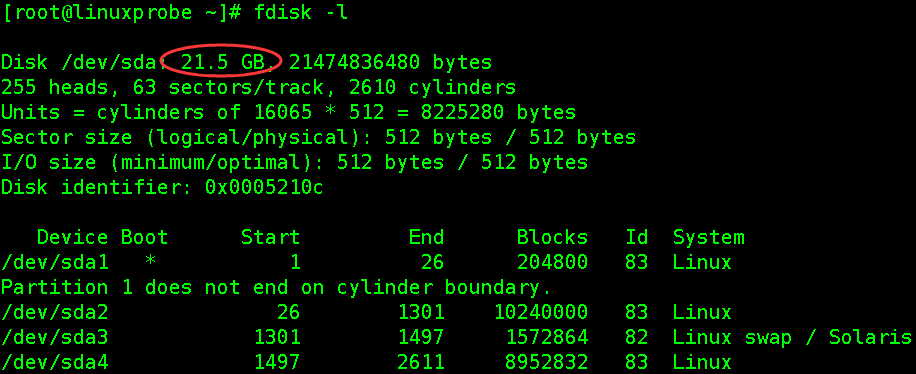
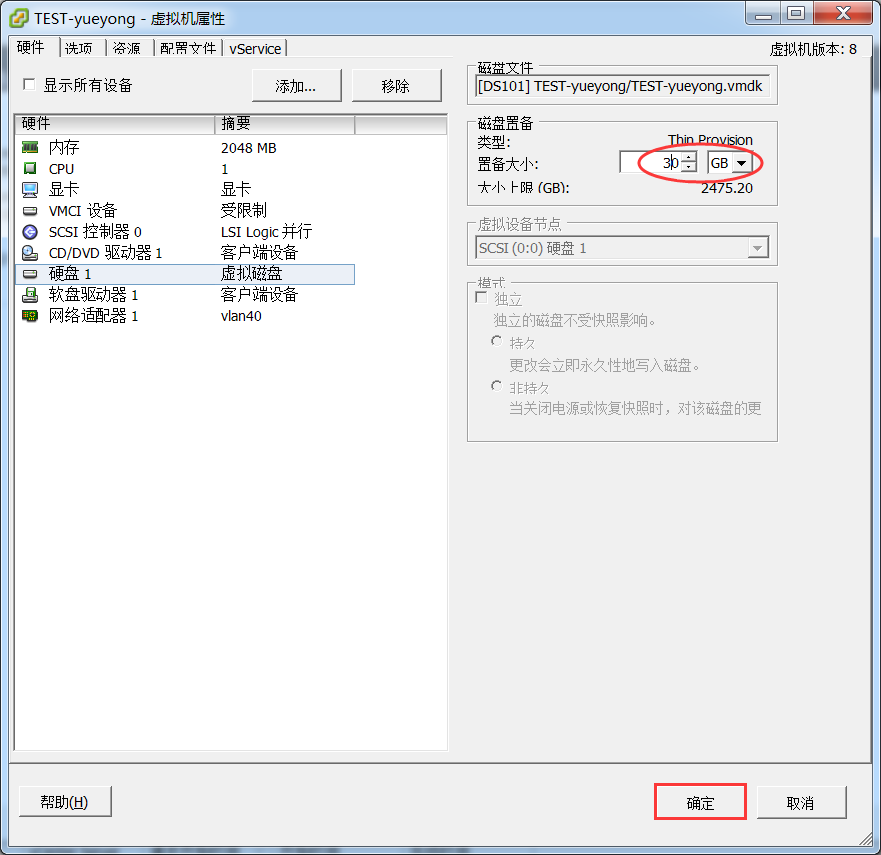
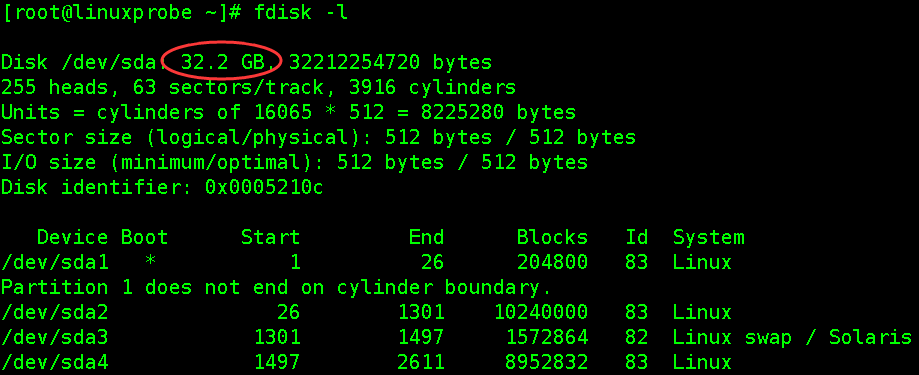
扩展完后,重启系统,再次使用fdisk -l查看,会发现硬盘空间变大了;
[root@linuxprobe ~]# fdisk -l

Disk /dev/sda: 32.2 GB, 32212254720 bytes

255 heads, 63 sectors/track, 3916 cylinders

Units = cylinders of 16065 * 512 = 8225280 bytes

Sector size (logical/physical): 512 bytes / 512 bytes

I/O size (minimum/optimal): 512 bytes / 512 bytes

Disk identifier: 0x0005210c

   Device Boot      Start         End      Blocks   Id  System

/dev/sda1   *           1          26      204800   83  Linux

Partition 1 does not end on cylinder boundary.

/dev/sda2              26        1301    10240000   83  Linux

/dev/sda3            1301        1497     1572864   82  Linux swap / Solaris

/dev/sda4            1497        2611     8952832   83  Linux

[root@linuxprobe ~]# df -hT

Filesystem     Type   Size  Used Avail Use% Mounted on

/dev/sda2      ext4   9.7G  1.5G  7.7G  16% /

tmpfs          tmpfs  939M     0  939M   0% /dev/shm

/dev/sda1      ext4   194M   34M  151M  19% /boot

/dev/sda4      ext4   8.5G  148M  7.9G   2% /data
本次实验主要对/dev/sda4这个分区扩展,如果是生产环境,请提前做好备份保存到其他分区,虽然扩展分区大小不会导致数据丢失,安全起见,请提前做好备份;
首先模拟出一些数据:
[root@linuxprobe data]# mkdir test

[root@linuxprobe data]# echo "we are Linuxer" > linuxprobe

[root@linuxprobe data]# ll

total 24

-rw-r--r--. 1 root root    15 May 23 21:59 linuxprobe

drwx------. 2 root root 16384 May 23 15:07 lost+found

drwxr-xr-x. 2 root root  4096 May 23 21:51 test

[root@linuxprobe ~]# umount /dev/sda4          #卸载磁盘分区
若提示磁盘忙,使用fuser找出将正在使用磁盘的程序并结束掉;
fuser -m -v /data

fuser -m -v -i -k /data
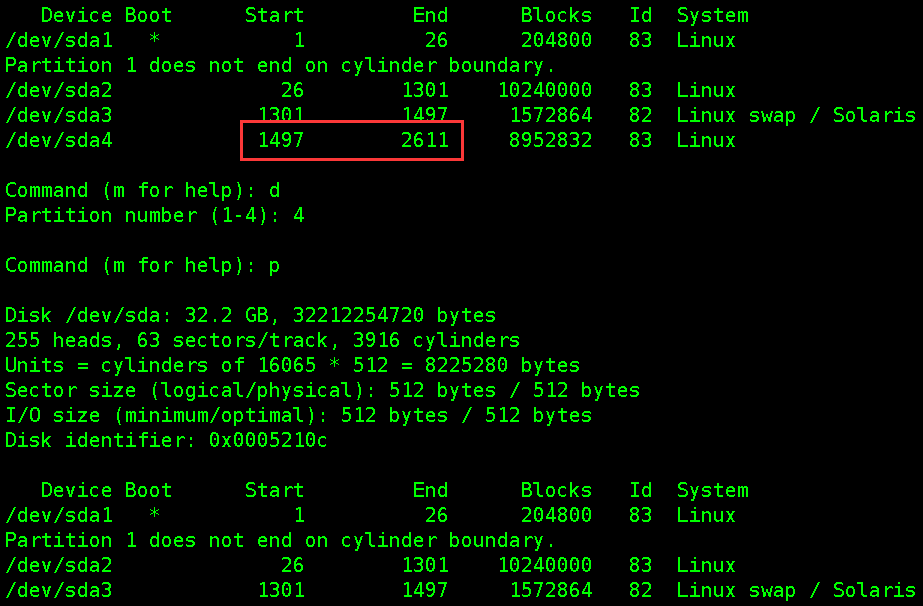
使用fdisk工具先删除/dev/sda4分区,然后创建新分区,注意开始的磁柱号要和原来的一致(是保证数据不丢失的关键步骤),结束的磁柱号默认回车使用全部磁盘。
[root@linuxprobe ~]# fdisk /dev/sda

WARNING: DOS-compatible mode is deprecated. It's strongly recommended to

         switch off the mode (command 'c') and change display units to

         sectors (command 'u').

Command (m for help): p        #查看分区表信息

Disk /dev/sda: 32.2 GB, 32212254720 bytes

255 heads, 63 sectors/track, 3916 cylinders

Units = cylinders of 16065 * 512 = 8225280 bytes

Sector size (logical/physical): 512 bytes / 512 bytes

I/O size (minimum/optimal): 512 bytes / 512 bytes

Disk identifier: 0x0005210c

   Device Boot      Start         End      Blocks   Id  System

/dev/sda1   *           1          26      204800   83  Linux

Partition 1 does not end on cylinder boundary.

/dev/sda2              26        1301    10240000   83  Linux

/dev/sda3            1301        1497     1572864   82  Linux swap / Solaris

/dev/sda4            1497        2611     8952832   83  Linux

Command (m for help): d           #删除分区

Partition number (1-4): 4         #删除第四个

Command (m for help): p       #再次查看分区信息,/dev/sda4已被删除

Disk /dev/sda: 32.2 GB, 32212254720 bytes

255 heads, 63 sectors/track, 3916 cylinders

Units = cylinders of 16065 * 512 = 8225280 bytes

Sector size (logical/physical): 512 bytes / 512 bytes

I/O size (minimum/optimal): 512 bytes / 512 bytes

Disk identifier: 0x0005210c

   Device Boot      Start         End      Blocks   Id  System

/dev/sda1   *           1          26      204800   83  Linux

Partition 1 does not end on cylinder boundary.

/dev/sda2              26        1301    10240000   83  Linux

/dev/sda3            1301        1497     1572864   82  Linux swap / Solaris

Command (m for help): n      #创建新的分区

Command action

   e   extended

   p   primary partition (1-4)

p             #创建为主分区

Selected partition 4

First cylinder (1497-3916, default 1497):          #经对比,正好和上一个磁盘柱一致,默认即可

Using default value 1497

Last cylinder, +cylinders or +size{K,M,G} (1497-3916, default 3916):

Using default value 3916              #直接默认就可以

Command (m for help): p               #查看分区表信息

Disk /dev/sda: 32.2 GB, 32212254720 bytes

255 heads, 63 sectors/track, 3916 cylinders

Units = cylinders of 16065 * 512 = 8225280 bytes

Sector size (logical/physical): 512 bytes / 512 bytes

I/O size (minimum/optimal): 512 bytes / 512 bytes

Disk identifier: 0x0005210c

   Device Boot      Start         End      Blocks   Id  System

/dev/sda1   *           1          26      204800   83  Linux

Partition 1 does not end on cylinder boundary.

/dev/sda2              26        1301    10240000   83  Linux

/dev/sda3            1301        1497     1572864   82  Linux swap / Solaris

/dev/sda4            1497        3916    19436582   83  Linux

Command (m for help): wp       #保存并退出,如果创建有误,直接退出不要保存即可

The partition table has been altered!

Calling ioctl() to re-read partition table.

WARNING: Re-reading the partition table failed with error 16: Device or resource busy.

The kernel still uses the old table. The new table will be used at

the next reboot or after you run partprobe(8) or kpartx(8)

Syncing disks.
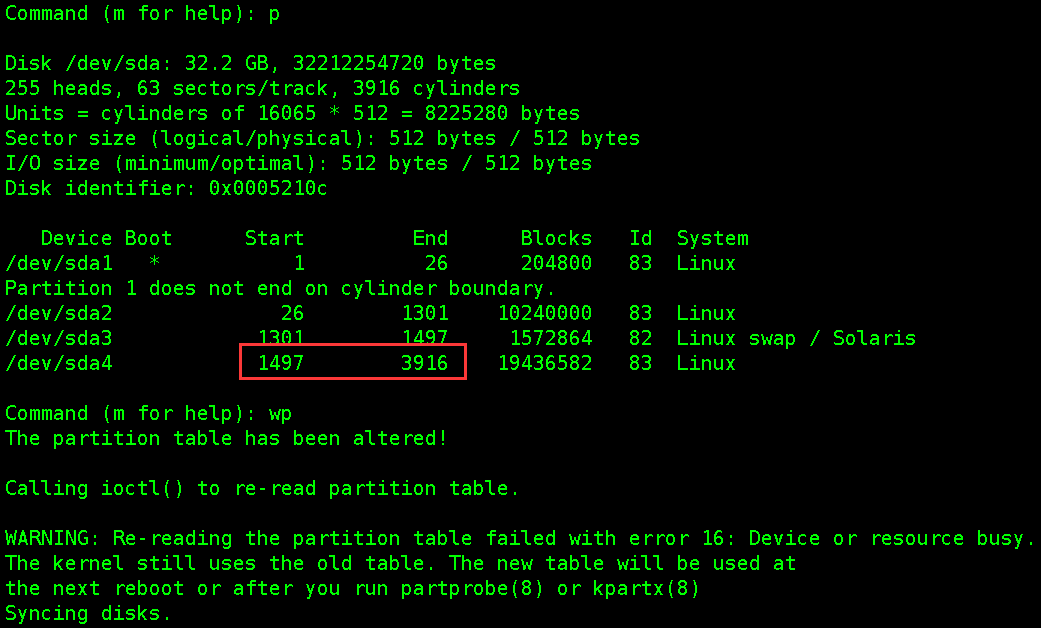
重新创建分区后,需要重启一下;
[root@linuxprobe ~]# init 6

[root@linuxprobe ~]# e2fsck -f /dev/sda4                #检查分区信息

[root@linuxprobe ~]# resize2fs -p /dev/sda4             #调整分区大小
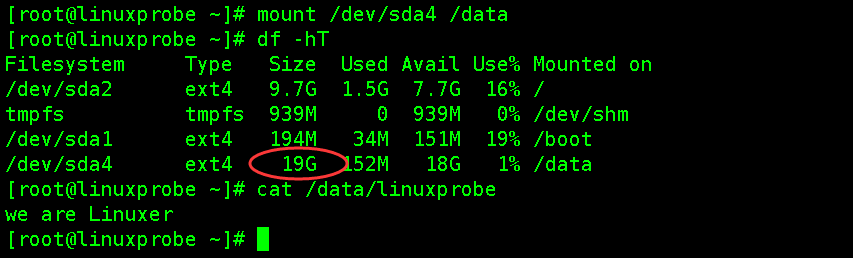
[root@linuxprobe ~]# mount /dev/sda4 /data

[root@linuxprobe ~]# df -hT

[root@linuxprobe ~]# cat /data/linuxprobe

we are  Linuxer
Linux下使用fdisk扩展分区容量的更多相关文章
- centos下使用fdisk扩展分区容量大小
硬盘空间为20G,VMware增加磁盘大小,需要再增加10G空间 扩展完后,重启系统,再次使用fdisk -l查看,会发现硬盘空间变大了: 重新创建分区,调整分区信息 本次实验主要对/dev/sda4 ...
- 在Linux下用fdisk创建分区
一.输入 fdisk -l /dev/sda ,观察硬盘之实体使用情形.二.输入 fdisk /dev/sda,可进入分割硬盘模式. 1. 输入 m 显示所有命令列示. 2. 输入 p 显示硬盘分割情 ...
- Linux下基于LVM调整分区容量大小的方法
Linux下调整分区容量大小的方法(适用于centos6-7) 说明:以下方法均使用centos6.9和centos7.4进行测试. Centos6分区容量调整方法 1.web分区空间不足,新添加一块 ...
- linux下安装opcache扩展
linux下安装opcache扩展 参考:http://www.php.net/manual/zh/opcache.installation.php 1 2 3 4 5 6 7 wget http ...
- 总结 Linux 下安装 PHP 扩展步骤
总结一下 Linux 下安装 PHP 扩展步骤,这里以安装 PHP 的 redis 扩展为例. 一.拿到扩展包下载地址,下载扩展包 pecl 上搜索 redis wget http://pecl.ph ...
- linux 下安装php扩展
linux下安装php扩展 步骤: 1.在扩展解压包目录执行 phpize 2.执行 ./configure --with-php-config=/usr/local/php/bin/php-conf ...
- linux下(fdisk,gdisk,parted)三种分区工具比较
1 2种分区结构简介 MBR分区 硬盘主引导记录MBR由4个部分组成 主引导程序(偏移地址0000H--0088H),它负责从活动分区中装载,并运行系统引导程序. 出错信息数据区,偏移地址0089H- ...
- linux下磁盘查看和分区
4.1 df命令 4.2 du命令 4.3/4.4 磁盘分区 df命令df输出磁盘文件系统使用情况: [root@centos ~]# df文件系统 1K-块 已用 可用 已用% 挂载点 /dev/s ...
- Linux磁盘及文件系统(二)Linux下磁盘命名和分区
在为主机添加硬盘之前,首先需要了解Linux系统下对硬盘和分区的命令方法 一.磁盘命名 Linux下对SCSI和SATA设备是以sd命名的,第一个SCSI设备是sda,第二个是sdb....以此类推. ...
随机推荐
- 手把手教你Linux服务器集群部署.net网站 - 让MVC网站运行起来
一.Linux下面安装需要软件 我们这里需要安装的软件有: 1) Mono 3.2.8 : C#跨平台编译器,能使.Net运行与Linux下,目前.net 4.0可以完美运行在该平台下 2) ngin ...
- 汇顶科技&&硬件类笔试题目
汇顶科技硬件类笔试题目,每年都有变化,但是题目类型都差不多.汇顶科技17年在南京地区大概招了20个左右吧,给的待遇还是不错的,工作地点上海深圳
- 21.C#序列过虑、排序、let子句和连接(十一章11.3-11.5)
哈哈,隔了一个星期,再怎么样都要发一篇,要多看书啊,书不能停~~~ 使用where子句进行过虑 where子句的语法格式如下:where 过虑表达式 例子:新建一个珠宝类,如下: class Jewe ...
- Bootstrap3.0学习第二十四轮(JavaScript插件——按钮)
详情请查看 http://aehyok.com/Blog/Detail/30.html 个人网站地址:aehyok.com QQ 技术群号:206058845,验证码为:aehyok 本文文章链接:h ...
- 网络流量监控工具----iftop
文章转自:http://www.vpser.net/manage/iftop.html.再次本人只是作为笔记使用,不做其他用途. 日常工作中用它来监控网卡的实时流量,(可以指定网段),反向解析IP.显 ...
- publish_subscribe
<!DOCTYPE html> <html> <head> <title></title> </head> <body&g ...
- shell expr的用法
root@tcx4440-03:~# var=$var+1root@tcx4440-03:~# echo $var3+1 要想达到预期结果,用下列三种方法: (1)let "var+=1&q ...
- js弹出窗口总结6种弹窗方法
注: //关闭,父窗口弹出对话框,子窗口直接关闭 this.Response.Write("<script language=javascript>window.close(); ...
- strcmp的实现
注意,*str1++和*str2++最好不要写在while判断里,否则需要在return前再*str1-1,和*str2-1. int strcmp(const char *str1,const ch ...
- BZOJ-2037 Sue的小球 DP+费用提前
似乎很早时学长考过很类似的? 2037: [Sdoi2008]Sue的小球 Time Limit: 10 Sec Memory Limit: 64 MB Submit: 558 Solved: 300 ...