
Qt——QLineEdit使用总结
QLineEdit是一个单行文本编辑控件。
使用者可以通过很多函数,输入和编辑单行文本,比如撤销、恢复、剪切、粘贴以及拖放等。
通过改变QLineEdit的 echoMode() ,可以设置其属性,比如以密码的形式输入。
文本的长度可以由 maxLength() 限制,可以通过使用 validator() 或者 inputMask() 可以限制它只能输入数字。在对同一个QLineEdit的validator或者input mask进行转换时,最好先将它的validator或者input mask清除,以避免错误发生。
与QLineEdit相关的一个类是QTextEdit,它允许多行文字以及富文本编辑。
我们可以使用 setText() 或者 insert() 改变其中的文本,通过 text() 获得文本,通过 displayText() 获得显示的文本,使用 setSelection() 或者 selectAll() 选中文本,选中的文本可以通过cut()、copy()、paste()进行剪切、复制和粘贴,使用 setAlignment() 设置文本的位置。
文本改变时会发出 textChanged() 信号;如果不是由setText()造成文本的改变,那么会发出textEdit()信号;鼠标光标改变时会发出cursorPostionChanged()信号;当返回键或者回车键按下时,会发出returnPressed()信号。
当编辑结束,或者LineEdit失去了焦点,或者当返回/回车键按下时,editFinished()信号将会发出。
以上是Qt官方文档对QLineEdit的简要说明,下面根据个人经验,对一些常用的方法作说明:
1.setPlaceholderText()设置提示文字

豆瓣电影的搜索输入框,没有输入任何字符时,显示“电影、影人、影院、电视剧”这些占位文字,对用户输入作相关提示。
echoLineEdit->setPlaceholderText("电影、影人、影院、电视剧");
2.setEchoMode()设置模式
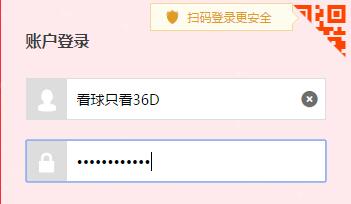
淘宝登录界面的一部分,用户名可以直接看到,密码一般都用小黑点掩盖。
switch (index) {

    case 0:

        //默认,输入什么即显示什么

        echoLineEdit->setEchoMode(QLineEdit::Normal);

        break;

    case 1:

        //密码,一般是用小黑点覆盖你所输入的字符

        echoLineEdit->setEchoMode(QLineEdit::Password);

        break;

    case 2:

        //编辑时输入字符显示输入内容,否则用小黑点代替

        echoLineEdit->setEchoMode(QLineEdit::PasswordEchoOnEdit);

        break;

    case 3:

        //任何输入都看不见(只是看不见,不是不能输入)

        echoLineEdit->setEchoMode(QLineEdit::NoEcho);

    }
3.setAlignment()设置文本位置
switch (index) {

    case 0:

        alignmentLineEdit->setAlignment(Qt::AlignLeft);

        break;

    case 1:

        alignmentLineEdit->setAlignment(Qt::AlignCenter);

        break;

    case 2:

        alignmentLineEdit->setAlignment(Qt::AlignRight);

    }
4.setReadOnly()设置能否编辑
switch (index) {

    case 0:

        accessLineEdit->setReadOnly(false);

        break;

    case 1:

        accessLineEdit->setReadOnly(true);

    }
5.setValidator()对输入进行限制
这种方式的实质是通过正则表达式限制输入的内容。

比如上面的手机号输入框,控制其不能输入英文汉字等无关字符。
switch (index) {

    case 0:

        //无限制

        validatorLineEdit->setValidator(0);

        break;

    case 1:

        //只能输入整数

        validatorLineEdit->setValidator(new QIntValidator(

            validatorLineEdit));

        break;

    case 2:

        //实例,只能输入-180到180之间的小数,小数点后最多两位(可用于限制经纬度等)

        QDoubleValidator *pDfValidator = new QDoubleValidator(-180.0, 180.0 , 2, validatorLineEdit);

        pDfValidator->setNotation(QDoubleValidator::StandardNotation);

        validatorLineEdit->setValidator(pDfValidator);

    }
6.setInputMask()对输入进行限制
通过限制格式限制输入,具体怎么格式化可以参考Qt助手。
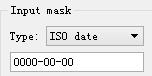
switch (index) {

    case 0:

        inputMaskLineEdit->setInputMask("");

        break;

    case 1:

        inputMaskLineEdit->setInputMask("+99 99 99 99 99;_");

        break;

    case 2:

        inputMaskLineEdit->setInputMask("0000-00-00");

        inputMaskLineEdit->setText("00000000");

        inputMaskLineEdit->setCursorPosition(0);

        break;

    case 3:

        inputMaskLineEdit->setInputMask(">AAAAA-AAAAA-AAAAA-AAAAA-AAAAA;#");

    }
7.setMaxLength()设置可以输入的最多字符数
//最多只能输入9个字符

echoLineEdit->setMaxLength(9);
8.validator和inputmask的结合
比如纬度用“度:分:秒”的格式表示,分和秒的范围都是00-59,度的范围是-89到89。
QRegExp rx("(-|\\+)?[0-8]\\d:[0-5]\\d:[0-5]\\d");

echoLineEdit->setValidator(new QRegExpValidator(rx, echoLineEdit));

echoLineEdit->setInputMask("#00:00:00;0");

echoLineEdit->setText("+00:00:00");
如果不控制输入,那么必须在输入后检查输入是否合法,但控制输入后的输入肯定是合法的,可以省去检查合法的繁琐步骤。只需使用正则表达式控制输入的度分秒范围,然后控制输入的格式。
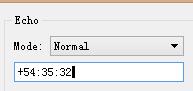
一些测试代码供参考——
头文件:
#ifndef WINDOW_H

#define WINDOW_H

#include <QWidget>

QT_BEGIN_NAMESPACE

class QComboBox;

class QLineEdit;

QT_END_NAMESPACE

//! [0]

class Window : public QWidget

{

    Q_OBJECT

public:

    Window();

public slots:

    void echoChanged(int);

    void validatorChanged(int);

    void alignmentChanged(int);

    void inputMaskChanged(int);

    void accessChanged(int);

private:

    QLineEdit *echoLineEdit;

    QLineEdit *validatorLineEdit;

    QLineEdit *alignmentLineEdit;

    QLineEdit *inputMaskLineEdit;

    QLineEdit *accessLineEdit;

};

//! [0]

#endif
实现:
#include <QtWidgets>

#include "window.h"

//! [0]

Window::Window()

{

    QGroupBox *echoGroup = new QGroupBox(tr("Echo"));

    QLabel *echoLabel = new QLabel(tr("Mode:"));

    QComboBox *echoComboBox = new QComboBox;

    echoComboBox->addItem(tr("Normal"));

    echoComboBox->addItem(tr("Password"));

    echoComboBox->addItem(tr("PasswordEchoOnEdit"));

    echoComboBox->addItem(tr("No Echo"));

    echoLineEdit = new QLineEdit;

    //test

    /*QRegExp rx("(-|\\+)?[0-8]\\d:[0-5]\\d:[0-5]\\d");

    echoLineEdit->setValidator(new QRegExpValidator(rx, echoLineEdit));

    echoLineEdit->setInputMask("#00:00:00;0");

    echoLineEdit->setText("+00:00:00");*/

    //echoLineEdit->setMaxLength(9);

    echoLineEdit->setPlaceholderText("电影、影人、影院、电视剧");

    echoLineEdit->setFocus();

//! [0]

//! [1]

    QGroupBox *validatorGroup = new QGroupBox(tr("Validator"));

    QLabel *validatorLabel = new QLabel(tr("Type:"));

    QComboBox *validatorComboBox = new QComboBox;

    validatorComboBox->addItem(tr("No validator"));

    validatorComboBox->addItem(tr("Integer validator"));

    validatorComboBox->addItem(tr("Double validator"));

    validatorLineEdit = new QLineEdit;

    validatorLineEdit->setPlaceholderText("Placeholder Text");

//! [1]

//! [2]

    QGroupBox *alignmentGroup = new QGroupBox(tr("Alignment"));

    QLabel *alignmentLabel = new QLabel(tr("Type:"));

    QComboBox *alignmentComboBox = new QComboBox;

    alignmentComboBox->addItem(tr("Left"));

    alignmentComboBox->addItem(tr("Centered"));

    alignmentComboBox->addItem(tr("Right"));

    alignmentLineEdit = new QLineEdit;

    alignmentLineEdit->setPlaceholderText("Placeholder Text");

//! [2]

//! [3]

    QGroupBox *inputMaskGroup = new QGroupBox(tr("Input mask"));

    QLabel *inputMaskLabel = new QLabel(tr("Type:"));

    QComboBox *inputMaskComboBox = new QComboBox;

    inputMaskComboBox->addItem(tr("No mask"));

    inputMaskComboBox->addItem(tr("Phone number"));

    inputMaskComboBox->addItem(tr("ISO date"));

    inputMaskComboBox->addItem(tr("License key"));

    inputMaskLineEdit = new QLineEdit;

    inputMaskLineEdit->setPlaceholderText("Placeholder Text");

//! [3]

//! [4]

    QGroupBox *accessGroup = new QGroupBox(tr("Access"));

    QLabel *accessLabel = new QLabel(tr("Read-only:"));

    QComboBox *accessComboBox = new QComboBox;

    accessComboBox->addItem(tr("False"));

    accessComboBox->addItem(tr("True"));

    accessLineEdit = new QLineEdit;

    accessLineEdit->setPlaceholderText("Placeholder Text");

//! [4]

//! [5]

    connect(echoComboBox, SIGNAL(activated(int)),

            this, SLOT(echoChanged(int)));

    connect(validatorComboBox, SIGNAL(activated(int)),

            this, SLOT(validatorChanged(int)));

    connect(alignmentComboBox, SIGNAL(activated(int)),

            this, SLOT(alignmentChanged(int)));

    connect(inputMaskComboBox, SIGNAL(activated(int)),

            this, SLOT(inputMaskChanged(int)));

    connect(accessComboBox, SIGNAL(activated(int)),

            this, SLOT(accessChanged(int)));

//! [5]

//! [6]

    QGridLayout *echoLayout = new QGridLayout;

    echoLayout->addWidget(echoLabel, 0, 0);

    echoLayout->addWidget(echoComboBox, 0, 1);

    echoLayout->addWidget(echoLineEdit, 1, 0, 1, 2);

    echoGroup->setLayout(echoLayout);

//! [6]

//! [7]

    QGridLayout *validatorLayout = new QGridLayout;

    validatorLayout->addWidget(validatorLabel, 0, 0);

    validatorLayout->addWidget(validatorComboBox, 0, 1);

    validatorLayout->addWidget(validatorLineEdit, 1, 0, 1, 2);

    validatorGroup->setLayout(validatorLayout);

    QGridLayout *alignmentLayout = new QGridLayout;

    alignmentLayout->addWidget(alignmentLabel, 0, 0);

    alignmentLayout->addWidget(alignmentComboBox, 0, 1);

    alignmentLayout->addWidget(alignmentLineEdit, 1, 0, 1, 2);

    alignmentGroup-> setLayout(alignmentLayout);

    QGridLayout *inputMaskLayout = new QGridLayout;

    inputMaskLayout->addWidget(inputMaskLabel, 0, 0);

    inputMaskLayout->addWidget(inputMaskComboBox, 0, 1);

    inputMaskLayout->addWidget(inputMaskLineEdit, 1, 0, 1, 2);

    inputMaskGroup->setLayout(inputMaskLayout);

    QGridLayout *accessLayout = new QGridLayout;

    accessLayout->addWidget(accessLabel, 0, 0);

    accessLayout->addWidget(accessComboBox, 0, 1);

    accessLayout->addWidget(accessLineEdit, 1, 0, 1, 2);

    accessGroup->setLayout(accessLayout);

//! [7]

//! [8]

    QGridLayout *layout = new QGridLayout;

    layout->addWidget(echoGroup, 0, 0);

    layout->addWidget(validatorGroup, 1, 0);

    layout->addWidget(alignmentGroup, 2, 0);

    layout->addWidget(inputMaskGroup, 0, 1);

    layout->addWidget(accessGroup, 1, 1);

    setLayout(layout);

    setWindowTitle(tr("Line Edits"));

}

//! [8]

//! [9]

void Window::echoChanged(int index)

{

    switch (index) {

    case 0:

        //默认,输入什么即显示什么

        echoLineEdit->setEchoMode(QLineEdit::Normal);

        break;

    case 1:

        //密码,一般是用小黑点覆盖你所输入的字符

        echoLineEdit->setEchoMode(QLineEdit::Password);

        break;

    case 2:

        //编辑时输入字符显示输入内容,否则用小黑点代替

        echoLineEdit->setEchoMode(QLineEdit::PasswordEchoOnEdit);

        break;

    case 3:

        //任何输入都看不见(只是看不见,不是不能输入)

        echoLineEdit->setEchoMode(QLineEdit::NoEcho);

    }

}

//! [9]

//! [10]

void Window::validatorChanged(int index)

{

    switch (index) {

    case 0:

        //无限制

        validatorLineEdit->setValidator(0);

        break;

    case 1:

        //只能输入整数

        validatorLineEdit->setValidator(new QIntValidator(

            validatorLineEdit));

        break;

    case 2:

        //实例,只能输入-180到180之间的小数,小数点后最多两位(可用于限制经纬度等)

        QDoubleValidator *pDfValidator = new QDoubleValidator(-180.0, 180.0 , 2, validatorLineEdit);

        pDfValidator->setNotation(QDoubleValidator::StandardNotation);

        validatorLineEdit->setValidator(pDfValidator);

    }

    validatorLineEdit->clear();

}

//! [10]

//! [11]

void Window::alignmentChanged(int index)

{

    switch (index) {

    case 0:

        alignmentLineEdit->setAlignment(Qt::AlignLeft);

        break;

    case 1:

        alignmentLineEdit->setAlignment(Qt::AlignCenter);

        break;

    case 2:

        alignmentLineEdit->setAlignment(Qt::AlignRight);

    }

}

//! [11]

//! [12]

void Window::inputMaskChanged(int index)

{

    switch (index) {

    case 0:

        inputMaskLineEdit->setInputMask("");

        break;

    case 1:

        inputMaskLineEdit->setInputMask("+99 99 99 99 99;_");

        break;

    case 2:

        inputMaskLineEdit->setInputMask("0000-00-00");

        inputMaskLineEdit->setText("00000000");

        inputMaskLineEdit->setCursorPosition(0);

        break;

    case 3:

        inputMaskLineEdit->setInputMask(">AAAAA-AAAAA-AAAAA-AAAAA-AAAAA;#");

    }

}

//! [12]

//! [13]

void Window::accessChanged(int index)

{

    switch (index) {

    case 0:

        accessLineEdit->setReadOnly(false);

        break;

    case 1:

        accessLineEdit->setReadOnly(true);

    }

}

//! [13]
Qt——QLineEdit使用总结的更多相关文章
- Qt QLineEdit
//lineEdit显示文字 QLineEdit *lineEdit = new QLineEdit(widget); lineEdit->setObjectName(QString()); l ...
- [Qt] QLineEdit 仿QQ签名框
今天鼓捣了半天,终于实现了自定义Qt中的QlineEdit控件的大致效果. 这个问题对于新手而言,主要有以下几个难点: 1.继承QLineEdit控件 2.QSS设置QLineEdit的相关样式,可以 ...
- Qt QLineEdit 漂亮的搜索框 && 密码模式 && 格式化输入 && 提示文字 && 选择内容并移动 && 清除全部输入
先上一个漂亮的搜索框效果图, 输入搜索文本效果, 点击搜索图标效果: //实现代码 void MainWindow::iniLineEdit() { ui->lineEdit->setPl ...
- Qt - QLineEdit编辑框
QLineEdit输入内容获取及合理性检查? 控件自带触发信息: void textChanged(const QString &);void textEdited(const QString ...
- qt qlineedit只输入数字
lineEdit->setValidator(new QRegExpValidator(QRegExp("[0-9]+$")));
- [Qt] QlineEdit 限制输入,例如只能输入整数
要注意validor的作用域,如果超出作用域,则会无效.例如下面的代码,在UI的类的构造函数里.所以要new一个validtor. QIntValidator *intValidator = new ...
- QT中的一些信号
QLineEdit: 通过改变QLineEdit的echoMode(),可以设置其属性,比如以密码的形式输入. 文本的长度可以由maxLength()限制,可以通过使用validator()或者inp ...
- Qt之自定义QLineEdit右键菜单
一.QLineEdit说明 QLineEdit是单行文本框,不同于QTextEdit,他只能显示一行文本,通常可以用作用户名.密码和搜索框等.它还提供了一些列的信号和槽,方便我们使用,有兴趣的小伙伴可 ...
- Qt Style Sheet实践(四):行文本编辑框QLineEdit及自动补全
导读 行文本输入框在用于界面的文本输入,在WEB登录表单中应用广泛.一般行文本编辑框可定制性较高,既可以当作密码输入框,又可以作为文本过滤器.QLineEdit本身使用方法也很简单,无需过多的设置就能 ...
随机推荐
- iOS开发融云即时通讯集成详细步骤
1.融云即时通讯iOS SDK下载地址 http://rongcloud.cn/downloads 选择iOS SDK下载 2.进行应用开发之前,需要先在融云开发者平台创建应用,如果您已经注 ...
- AOP这些应用场景(交叉业务)
1.统计某个方法的性能,可以在每个业务方法执行前后 记录方法执行的当前时间,执行后的时间-执行前的时间= 方法执行时间. 这样就可以在开发过程中(项目未交付给客户前)统计程序的性能. 2.安全 ,权 ...
- iOS开发者必备的10款工具
当前iOS和Android两大移动操作系统“二足鼎立”,几乎覆盖了市面上大部分的智能手机.相比Android,iOS开发适配更简单,且随着各种实用工具和Swift语言的出现,iOS开发门槛地降低,开发 ...
- Oracle 11g 中恢复管理器RMAN介绍
这是我平时摘录的笔记,从管理艺术那本书上摘录出来的,放到这里 RMAN 可在数据库服务器的帮助下从数据库内备份数据文件,可构造数据文件映像副本.控制文件和控制文件映像.对当日志 SPFILE 和RMA ...
- DW Basic Knowledge2
DW的元数据是指除去数据本身之外的所有信息. 围绕DBMS方面的元数据可以描述为表定义,分区设置,索引视图定义,以及DBMS级安全方面的特权 与授权等内容. 在任何场合下,ODS要么是一个处在OLTP ...
- JavaScript“尽快失败”的原则
我第一次听说编码原则中有"尽快失败"这一条时,觉得很奇怪,为什么代码要失败?应该成功才对呀.但事实上,当代码在遇到错误的时候应该尽快的终止.为了检测各种状态,我们需要频繁的创建if ...
- HDU 1695 GCD (欧拉函数+容斥原理)
GCD Time Limit: 6000/3000 MS (Java/Others) Memory Limit: 32768/32768 K (Java/Others)Total Submiss ...
- Network client/server
<Beginning Linux Programming_4th> chapter 15 Sockets 1 A simple local client/server 1) clie ...
- 通过CDC获取 HDC
通过CDC获取HDC 通过CDC(设备描述表)获取HDC(设备上下文句柄)的方法: //第一种 void ...::OnDraw(CDC *pDC) { ...... HDC hDC=pDC-> ...
- python中*args和**args的不同
上一段代码,大家感受一下 def test_param(*args): print(args) def test_param2(**args): print(args) test_param('tes ...