
postman(八):使用newman来执行postman脚本




[root@localhost bin]# newman run -h

Usage: run <collection> [options]

URL or path to a Postman Collection.

Options:

-e, --environment <path> Specify a URL or Path to a Postman Environment.

-g, --globals <path> Specify a URL or Path to a file containing Postman Globals.

--folder <path> Specify folder to run from a collection. Can be specified multiple times to run multiple folders (default: [])

-r, --reporters [reporters] Specify the reporters to use for this run. (default: ["cli"])

-n, --iteration-count <n> Define the number of iterations to run.

-d, --iteration-data <path> Specify a data file to use for iterations (either json or csv).

--export-environment <path> Exports the environment to a file after completing the run.

--export-globals <path> Specify an output file to dump Globals before exiting.

--export-collection <path> Specify an output file to save the executed collection

--postman-api-key <apiKey> API Key used to load the resources from the Postman API.

--delay-request [n] Specify the extent of delay between requests (milliseconds) (default: )

--bail [modifiers] Specify whether or not to gracefully stop a collection run on encountering an errorand whether to end the run with an error based on the optional modifier.

-x , --suppress-exit-code Specify whether or not to override the default exit code for the current run.

--silent Prevents newman from showing output to CLI.

--disable-unicode Forces unicode compliant symbols to be replaced by their plain text equivalents

--global-var <value> Allows the specification of global variables via the command line, in a key=value format (default: [])

--color <value> Enable/Disable colored output. (auto|on|off) (default: "auto")

--timeout [n] Specify a timeout for collection run (in milliseconds) (default: )

--timeout-request [n] Specify a timeout for requests (in milliseconds). (default: )

--timeout-script [n] Specify a timeout for script (in milliseconds). (default: )

--ignore-redirects If present, Newman will not follow HTTP Redirects.

-k, --insecure Disables SSL validations.

--ssl-client-cert <path> Specify the path to the Client SSL certificate. Supports .cert and .pfx files.

--ssl-client-key <path> Specify the path to the Client SSL key (not needed for .pfx files)

--ssl-client-passphrase <path> Specify the Client SSL passphrase (optional, needed for passphrase protected keys).

-h, --help output usage information

<collection>是指单个请求或者从postman导出的集合文件(也就是json格式的脚本)

options是一些组合参数,介绍下我用到的几个参数

() -e 指定环境变量,把在postman中设置的环境变量导出,然后再把路径填写到这里即可

() -g 指定全局变量,把在postman中设置的全局变量导出,然后再把路径填写到这里即可

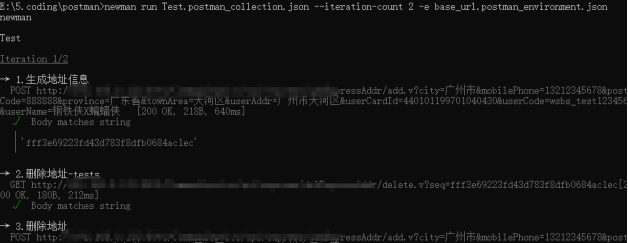
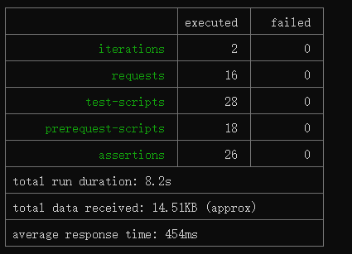
() -n 指定迭代次数,即运行n次脚本

() --timeout-request 指定请求的超时时间

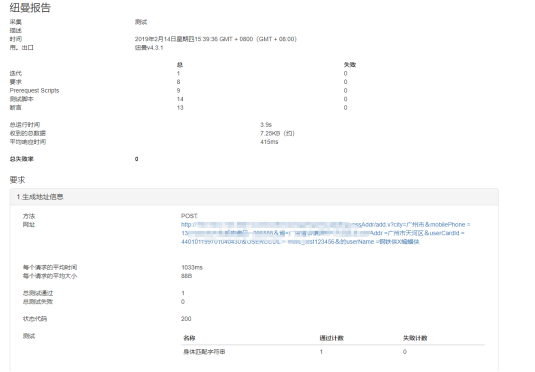
() -r 指定运行报告的格式,可以为json格式、html格式,默认为cli格式,即在命令行展示运行结果
postman(八):使用newman来执行postman脚本的更多相关文章
- postman—使用newman来执行postman脚本
我们知道postman是基于javascript语言编写的,而导出的json格式的postman脚本也无法直接在服务器运行,它需要在newman中执行(可以把newman看做postman脚本的运行环 ...
- Android系统Recovery工作原理之使用update.zip升级过程分析(八)---解析并执行升级脚本updater-script【转】
本文转载自:http://blog.csdn.net/mu0206mu/article/details/7465551 Android系统Recovery工作原理之使用update.zip升级过程分 ...
- 第七篇 Postman+Node.js+Newman+Jenkins实现自动化测试
今天终于不咋忙了,学习整理一下一直想做却没实现的事儿,这事已经折磨团队半年之久了.因为项目是B端业务的测试,测试过程中需要生产大量的测试数据,而且都是跨多个系统的测试,对于后置流程的测试,这些同学往往 ...
- postman用法总结+newman持续集成
一.postman 1.GET 请求:点击Params,输入参数及value,可输入多个显示在URL链接上(GET请求的请求头与请求参数如在接口文档中无特别声明时可以不填) 2.POST请求:在bod ...
- postman(一)批量执行接口测试用例
postman(一)批量执行接口测试用例 学习了:https://blog.csdn.net/github_36032947/article/details/78611405 还可以把collecti ...
- Postman+Postman interceptor的安装和使用-解决把chrome浏览器登录状态同步到postman进行有依赖的接口测试 Postman 使用方法详解
Postman+Postman interceptor的安装和使用-解决把chrome浏览器登录状态同步到postman进行有依赖的接口测试 问题引入:做接口测试时,有依赖关系的接口往往不好测试( ...
- 【转】linux 定时执行shell脚本
在oracle 中可以利用dbms_job包定时执行pl/sql.sql过程,在像备份等需要在操作系统级定时任务只能采用crontab来完成 本文讲述crontab具体用法,以供备忘. 在oracle ...
- AngularJs中,如何在render完成之后,执行Js脚本
AngularJs是Google开源的前端JS框架.使用AngularJs, 我们能够容易地.健壮的开发出类似于Gmail一样的单页Web应用.AngularJs这个新兴的MVC前端框架,具有以下特点 ...
- crontab不执行perl脚本分析
在新装的Linux服务器上部署了一个作业监控磁盘空间并提前告警,在shell脚本里面调用了一个perl脚本发送告警邮件.结果出现了一个很奇怪的现象:如果手工执行该脚本/home/oracle/scri ...
随机推荐
- word2vec生成词向量和字向量
生成字符向量的过程中需要注意: 1)在收集数据生成corpus时候,通过Word2Vec生成字向量的时候,产生了“ ”空格字符向量,但是加载模型是不会成功的.那么你不是生成的binary文件,就可以修 ...
- Web开发——HTML DOM基础
文档资料参考: 参考:HTML DOM 参考手册 参考:HTML DOM 教程 目录: 1.HTML DOM (文档对象模型) 2.查找 HTML 元素 2.1 通过 id 查找 HTML 元素 2. ...
- 大数据量下的集合过滤—Bloom Filter
算法背景 如果想判断一个元素是不是在一个集合里,一般想到的是将集合中所有元素保存起来,然后通过比较确定.链表.树.散列表(又叫哈希表,Hash table)等等数据结构都是这种思路,存储位置要么是磁盘 ...
- vue:不同环境配置不同打包命令
修改prod.env.js 'use strict'const target = process.env.npm_lifecycle_event;if (target == 'build') { // ...
- sql 范式:1NF、2NF、3NF、BCNF(函数依赖)
第一范式(1NF) 每个属性都是不可分的基本数据项.(必须有主键,列不可分) eg:非第一范式的表:(列可再分) 学院名称 高级职称人数 教授 副教授 信电学院 3 34 管理学院 5 23 外语学院 ...
- pycharm新建py文件时,自动补充文件头注释信息
步骤: 1.File -->Settings 2.选择 File and Code Templates -> Files -> Python Script 文件头注释信息代码样式: ...
- java框架之SpringBoot(1)-入门
简介 Spring Boot 用来简化 Spring 应用开发,约定大于配置,去繁从简,just run 就能创建一个独立的.产品级别的应用. 背景: J2EE 笨重的开发.繁多的配置.低下的开发效率 ...
- 公众号获取unionid
然后在微信客户端输入unionid接口的地址(比如发给文件传输助手www.XXX.COM/unionid.php),随便给别人发过去,在点击该链接,就能看到打印的accessToken,openid, ...
- svn更新项目之后,项目报错一大堆并且tomcat部署项目时找不到项目
原因是:svn更新项目以后jdk路劲不对,需要使用自己安装的jdk,即可.具体步骤如下 第一步:右击项目-->Build path-->Configure Build path... 第二 ...
- CSRF与JSON
之前遇到提交json的请求想要进行csrf攻击都是用的闭合表单的方法,很笨很麻烦, 这次看到了别人的操作记录一下. 这里用到了ajax异步请求(但是这里我有个疑问就是:这里用到了cors跨域,是不是必 ...