
harbor Configuring Harbor with HTTPS Access
首先,下载fq (fanqiang) harbor-offline-installer-v1.2.0-rc5.tgz
tar xvf harbor-offline-installer-<version>.tgz本文参考(https://github.com/vmware/harbor/blob/master/docs/configure_https.md )
- Create your own CA certificate:
  openssl req \

    -newkey rsa:4096 -nodes -sha256 -keyout ca.key \

    -x509 -days 365 -out ca.crt
- Generate a Certificate Signing Request:
If you use FQDN like reg.yourdomain.com to connect your registry host, then you must use reg.yourdomain.com as CN (Common Name). Otherwise, if you use IP address to connect your registry host, CN can be anything like your name and so on:
  openssl req \

    -newkey rsa:4096 -nodes -sha256 -keyout yourdomain.com.key \

    -out yourdomain.com.csr
- Generate the certificate of your registry host:
If you're using IP, say 10.1.1.5 to connect your registry host, you may instead run the command below:
  echo subjectAltName = IP:10.1.1.50 > extfile.cnf

  openssl x509 -req -days 365 -in 10.1.1.5.csr -CA ca.crt -CAkey ca.key -CAcreateserial -extfile extfile.cnf -out 10.1.1.50.com

.crt
Configuration and Installation
After obtaining the yourdomain.com.crt and yourdomain.com.key files, you can put them into directory such as/root/cert/:
  cp 10.1.1.50.crt /root/cert/

  cp 10.1.1.50.key /root/cert/
Next, edit the file make/harbor.cfg , update the hostname and the protocol, and update the attributes ssl_cert andssl_cert_key:
  #set hostname

  hostname = 10.1.1.50

  #set ui_url_protocol

  ui_url_protocol = https

  ......

  #The path of cert and key files for nginx, they are applied only the protocol is set to https

  ssl_cert = /root/cert/10.1.1.50.crt

  ssl_cert_key = /root/cert/10.1.1.50.key
Generate configuration files for Harbor:
./prepare
Finally, restart Harbor:
docker-compose up -d
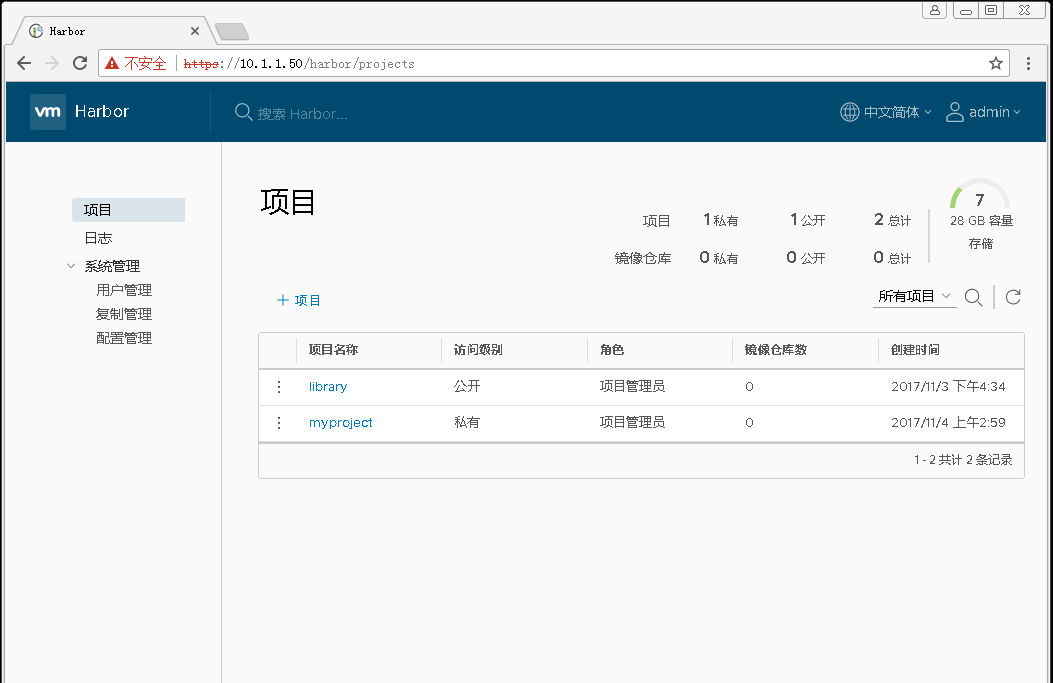
After setting up HTTPS for Harbor, you can verify it by the following steps:
Open a browser and enter the address: https://10.1.1.50 . It should display the user interface of Harbor.
docker login reg.yourdomain.com
(admin/Harbor12345) --succeed
Troubleshooting
You may get an intermediate certificate from a certificate issuer. In this case, you should merge the intermediate certificate with your own certificate to create a certificate bundle. You can achieve this by the below command:
[
自签CA证书:
cd /etc/pki/CA
touch index.txt
echo 01 > serial
openssl genrsa -out /etc/pki/CA/private/cakey.pem 2048
chmod 600 private/cakey.pem
openssl req -new -x509 -key /etc/pki/CA/private/cakey.pem -days 7300 -out /etc/pki/CA/cacert.pem
cd /etc/docker/certs.d/
mkdir 10.1.1.50
cd 10.1.1.50/
cp /etc/pki/CA/cacert.pem ./
cat /etc/pki/CA/cacert.pem >> /etc/pki/tls/certs/ca-bundle.crt
systemctl restart docker
docker-compose stop
docker-compose up -d
docker-compose ps
]
harbor Configuring Harbor with HTTPS Access的更多相关文章
- 【Docker】企业级镜像仓库harbor的搭建(http/https)及使用
一:用途 Harbor是一个用于存储和分发Docker镜像的企业级Registry服务器. 二:安装docker-ce 环境:阿里云轻量应用服务器CentOS 7.3 这里通过yum Docker源仓 ...
- Configuring HTTP and HTTPS
Configuring HTTP and HTTPS .NET Framework (current version) Other Versions WCF services and clie ...
- (七)VMware Harbor 问题:Get https://192.168.3.135:8088/v2/: http:server gave HTTP response to HTTPS client
(一)问题描述 登陆时,报错 docker Get https://192.168.3.135:8088/v2/: http:server gave HTTP response to HTTPS cl ...
- harbor官方关于创建https的有关命令
官方地址:https://goharbor.io/docs/2.0.0/install-config/configure-https/ 命令总结: openssl genrsa -out ca.key ...
- Installation and Configuration Guide
Harbor can be installed by one of three approaches: Online installer: The installer downloads Harbor ...
- Docker 私有仓库 Harbor registry 安全认证搭建 [Https]
Harbor源码地址:https://github.com/vmware/harborHarbort特性:基于角色控制用户和仓库都是基于项目进行组织的, 而用户基于项目可以拥有不同的权限.基于镜像的复 ...
- 私有仓库harbor安装包括https
1. 下载离线的 harbor gz包 wget https://github.com/vmware/harbor/releases/download/v1.2.0/harbor-offline-in ...
- Harbor + Https 部署
关闭防火墙和selinux systemctl stop firewalld sed -i 's/SELINUX=.*/SELINUX=disabled/g' /etc/sysconfig/selin ...
- K8S集群集成harbor(1.9.3)服务并配置HTTPS
一.简介 简介请参考:https://www.cnblogs.com/panwenbin-logs/p/10218099.html 二.安装Harbor主机环境及安装要求 主机环境: OS: Cent ...
随机推荐
- CSS总结div中的内容垂直居中的五种方法
一.行高(line-height)法 如果要垂直居中的只有一行或几个文字,那它的制作最为简单,只要让文字的行高和容器的高度相同即可,比如: p { height:30px; line-height:3 ...
- 【读书笔记】iOS-nonatomic
原子性atomicity(nonatomic),是关系线程安全的,但是会影响性能.如果确定不考虑线程安全问题可以使用nonatomic. 参考资料:<iPhone与iPad开发实战-iOS经典应 ...
- “一切都是消息”--iMSF(即时消息服务框架)入门简介
“一切都是消息”--这是iMSF(即时消息服务框架)的设计哲学. MSF的名字是 Message Service Framework 的简称,由于目前框架主要功能在于处理即时(immediately) ...
- Oracle 11g数据库详细安装过程
1.Oracle 11g下载 官方网址为:http://www.oracle.com/technetwork/database/enterprise-edition/downloads/index.h ...
- (网页)HTML小技巧的一些小技巧
转自CSDN: 1.怎样定义网页语言(字符集)? 在制作网页过程中,你首先要定义网页语言,以便访问者浏览器自动设置语言,而我们用所见即所得的HTML工具时,都没有注意到这个问题, ...
- Chrome_浏览器开发人员工具
Google Chrome 浏览器开发人员工具,让网页开发变得更轻松 无论是 IE 6/7 的 Internet Explorer Developer Toolbar 或者是 IE 8 自带的 Dev ...
- SQLSERVER 死锁
select request_session_id spid, OBJECT_NAME(resource_associated_entity_id) tableName from sys.dm_tra ...
- if 嵌套if 的先后顺序的区别 (自测)
# 验证 verify very good! # username = input("请输入用户名").capitalize()# password = input("请 ...
- CSS 中伪类的顺序
因为css渲染方式的关系: 快速记忆方法:LoVe HAte 原则: L:link V:vistered H:hover A:active li :link { color: greenyellow; ...
- WPF之托盘图标的设定
首先需要在项目中引用System.Windows.Forms,System.Drawing; using System; using System.Collections.Generic; using ...