
【Docker】企业级镜像仓库harbor的搭建(http/https)及使用
一:用途###
Harbor是一个用于存储和分发Docker镜像的企业级Registry服务器。
二:安装docker-ce###
环境:阿里云轻量应用服务器CentOS 7.3
这里通过yum Docker源仓库安装:
①安装yum 管理依赖包
sudo yum install-y yum-utils device-mapper-persistent-data lvm2
②添加Docker 源仓库
sudo yum-config-manager --add-repo https://download.docker.com/linux/centos/docker-ce.repo
③安装Docker CE
sudo yum install docker-ce docker-ce-cli containerd.io
三:安装docker-compose###
参考这篇博客:https://www.cnblogs.com/wucaiyun1/p/11811112.html
四:安装harbor###
https://github.com/goharbor/harbor/blob/master/docs/installation_guide.md
①下载harbor
wget https://storage.googleapis.com/harbor-releases/harbor-offline-installer-v1.6.1.tgz
或者到github releases下载
https://github.com/goharbor/harbor/releases
-------------------------------------------------------------------http方式-------------------------------------------------------------------
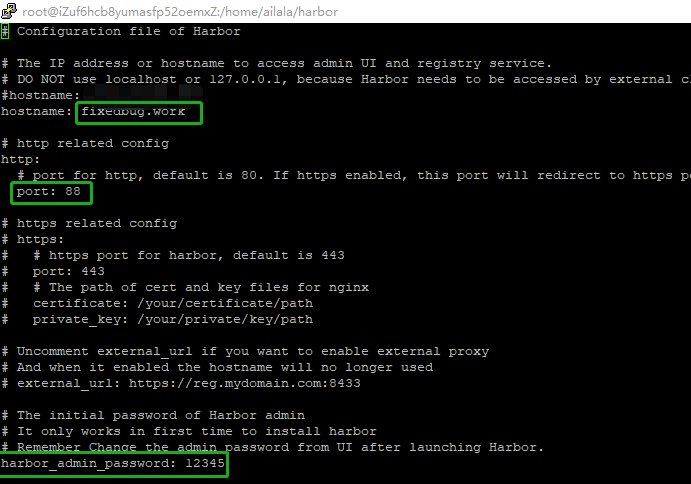
②配置安装(http方式)
[root@iZuf6hcb8yumasfp52oemxZ ailala]# tar -xf harbor-offline-installer-v1.6.1.tgz

[root@iZuf6hcb8yumasfp52oemxZ ailala]# cd harbor

[root@iZuf6hcb8yumasfp52oemxZ harbor]# vi harbor.yml
-------------------------------------------------------------------http方式-------------------------------------------------------------------
-------------------------------------------------------------------https方式-------------------------------------------------------------------
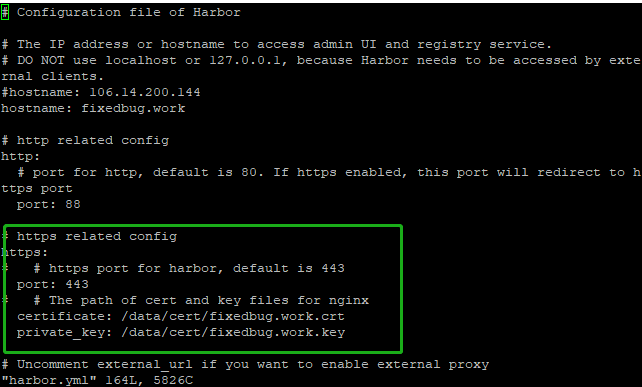
②配置安装(https方式)
https://github.com/goharbor/harbor/blob/master/docs/configure_https.md
Getting Certificate Authority####
openssl genrsa -out ca.key 4096
openssl req -x509 -new -nodes -sha512 -days 3650 \

-subj "/C=CN/ST=Shanghai/L=Shanghai/O=example/OU=Personal/CN=fixedbug.work" \

-key ca.key \

-out ca.crt
Getting Server Certificate####
- Create your own Private Key:
openssl genrsa -out fixedbug.work.key 4096
- Generate a Certificate Signing Request:
openssl req -sha512 -new \

    -subj "/C=CN/ST=Shanghai/L=Shanghai/O=example/OU=Personal/CN=fixedbug.work" \

    -key fixedbug.work.key \

    -out fixedbug.work.csr
- Generate the certificate of your registry host:
cat > v3.ext <<-EOF

authorityKeyIdentifier=keyid,issuer

basicConstraints=CA:FALSE

keyUsage = digitalSignature, nonRepudiation, keyEncipherment, dataEncipherment

extendedKeyUsage = serverAuth

subjectAltName = @alt_names

[alt_names]

DNS.1=fixedbug.work

DNS.2=fixedbug

DNS.3=hostname

EOF
openssl x509 -req -sha512 -days 3650 \

    -extfile v3.ext \

    -CA ca.crt -CAkey ca.key -CAcreateserial \

    -in fixedbug.work.csr \

    -out fixedbug.work.crt
Configuration and Installation####
- Configure Server Certificate and Key for Harbor
  cp yourdomain.com.crt /data/cert/

  cp yourdomain.com.key /data/cert/
- Configure Server Certificate, Key and CA for Docker
Convert server yourdomain.com.crt to yourdomain.com.cert:
openssl x509 -inform PEM -in fixedbug.work.crt -out fixedbug.work.cert
Delpoy yourdomain.com.cert, yourdomain.com.key, and ca.crt for Docker:
  cp yourdomain.com.cert /etc/docker/certs.d/yourdomain.com/

  cp yourdomain.com.key /etc/docker/certs.d/yourdomain.com/

  cp ca.crt /etc/docker/certs.d/yourdomain.com/
/etc/docker/certs.d/

    └── yourdomain.com:port

       ├── yourdomain.com.cert  <-- Server certificate signed by CA

       ├── yourdomain.com.key   <-- Server key signed by CA

       └── ca.crt               <-- Certificate authority that signed the registry certificate
- Configure Harbor
-------------------------------------------------------------------https方式-------------------------------------------------------------------
[root@iZuf6hcb8yumasfp52oemxZ harbor]# ./prepare
[root@iZuf6hcb8yumasfp52oemxZ harbor]# ./install
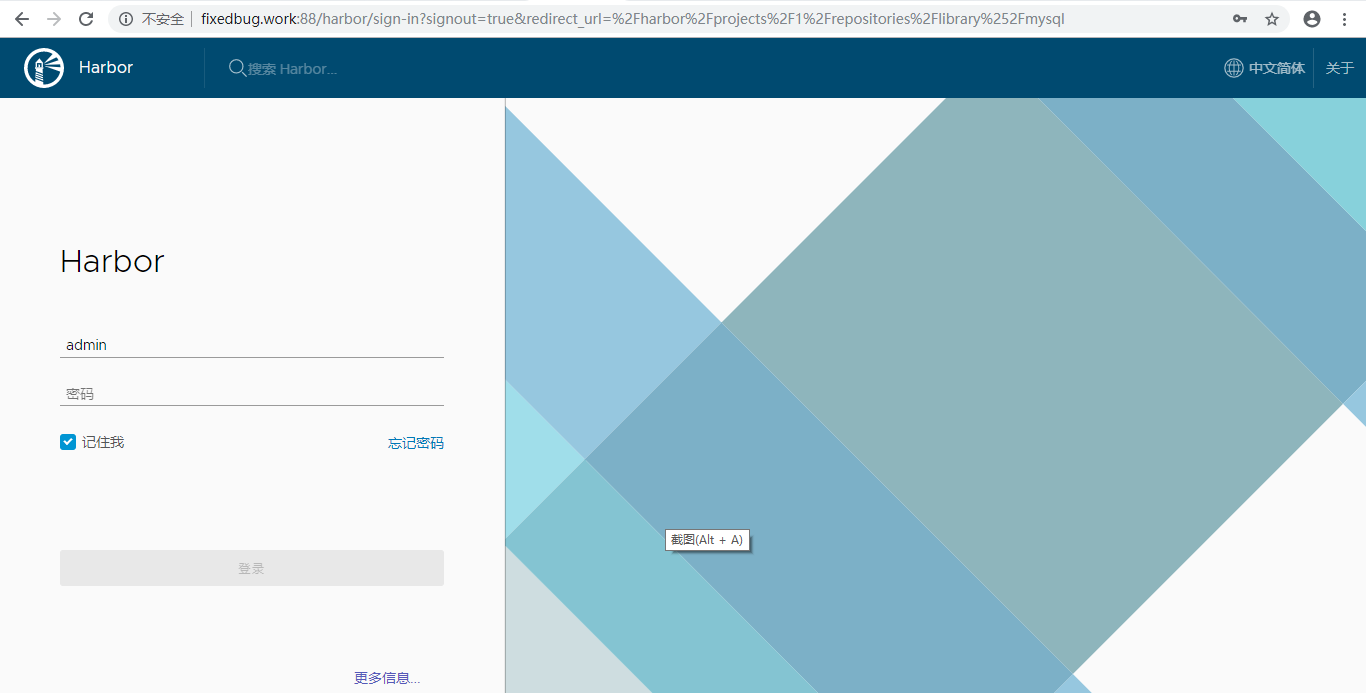
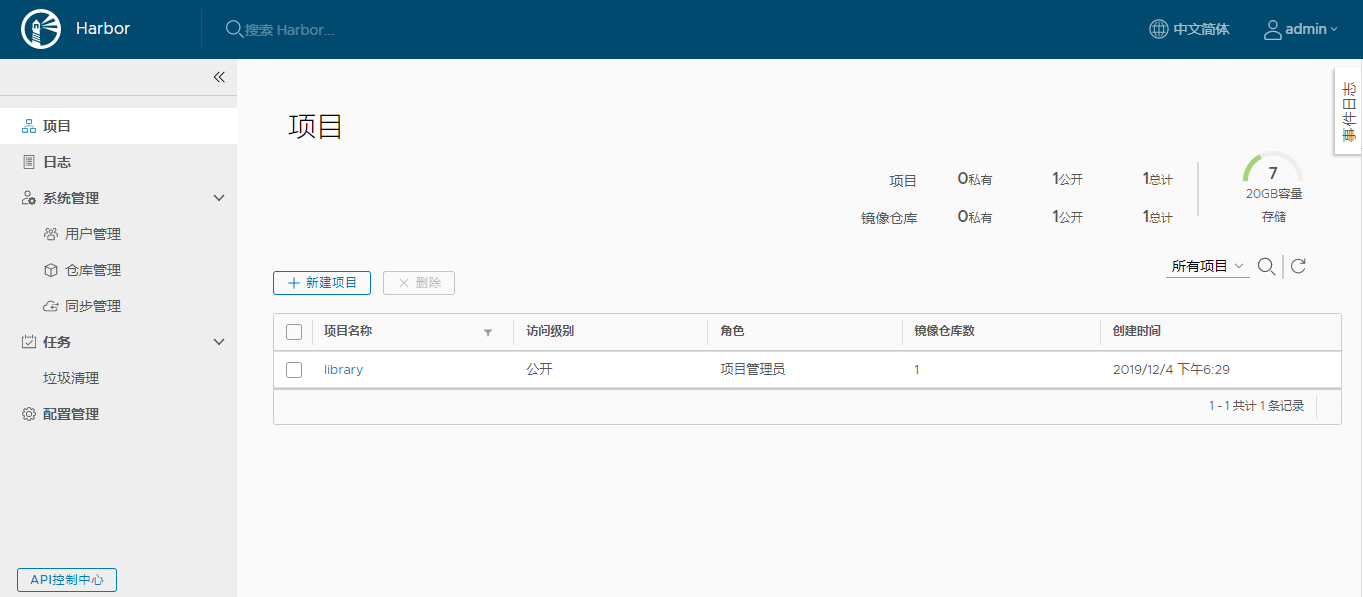
③登录
五:上传镜像到harbor仓库###
在本机配置harbor仓库http可信
/etc/docker/daemon.json中添加“"insecure-registries":["reg.slito.com"]”,不然会报错,默认是走https的,重启docker;

登录harbor仓库
[root@iZuf6hcb8yumasfp52oemxZ harbor]# docker login fixedbug.work:88

Username: admin

Password:

WARNING! Your password will be stored unencrypted in /root/.docker/config.json.

Configure a credential helper to remove this warning. See

https://docs.docker.com/engine/reference/commandline/login/#credentials-store

Login Succeeded
上传镜像
[root@iZuf6hcb8yumasfp52oemxZ harbor]# docker tag mysql:8 fixedbug.work:88/library/mysql:v1
[root@iZuf6hcb8yumasfp52oemxZ harbor]# docker push fixedbug.work:88/library/mysql:v1

The push refers to repository [fixedbug.work:88/library/mysql]

55f5c7d40658: Pushed

8d0c9963a6ad: Pushed

17b62e7a629c: Pushed

8eae701cdfcf: Pushing  31.11MB/341.1MB

d4078c1b9fdb: Pushed

8eae701cdfcf: Pushed

2a9aab74013a: Pushing  33.62MB/44.77MB

414373ffccb4: Pushed

2a9aab74013a: Pushed

51734435c93c: Pushed

5a8a245abd1c: Pushed

99b5261d397c: Pushing  23.78MB/55.34MB

99b5261d397c: Pushed

v1: digest: sha256:a65e1689b806ccb757887565a3c1d8e7467f14621012d472076cad4117eb06f3 size: 2828

[root@iZuf6hcb8yumasfp52oemxZ harbor]#
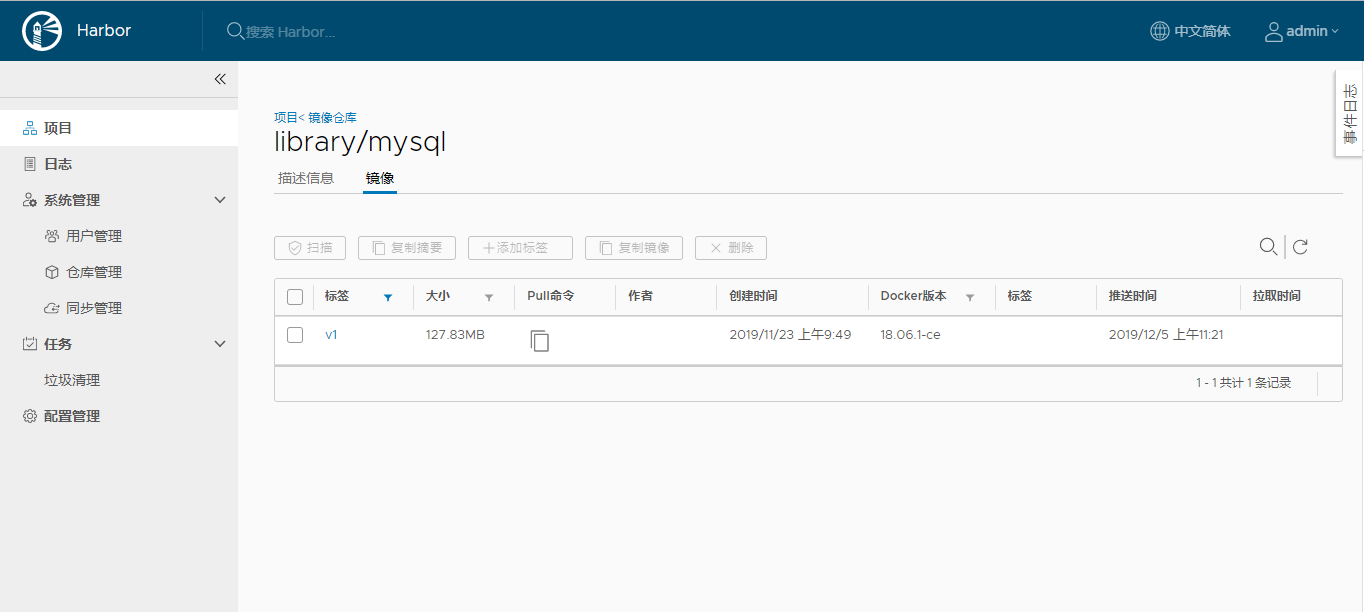
在harbor中查看
六:下载harbor中的镜像###
[root@iZuf6hcb8yumasfp52oemxZ ~]# docker rmi fixedbug.work:88/library/mysql:v1

Untagged: fixedbug.work:88/library/mysql:v1

Untagged: fixedbug.work:88/library/mysql@sha256:a65e1689b806ccb757887565a3c1d8e7467f14621012d472076cad4117eb06f3

[root@iZuf6hcb8yumasfp52oemxZ ~]# docker images | grep mysql

mysql                           8                               d435eee2caa5        12 days ago         456MB
[root@iZuf6hcb8yumasfp52oemxZ ~]# docker pull fixedbug.work:88/library/mysql:v1

v1: Pulling from library/mysql

Digest: sha256:a65e1689b806ccb757887565a3c1d8e7467f14621012d472076cad4117eb06f3

Status: Downloaded newer image for fixedbug.work:88/library/mysql:v1

fixedbug.work:88/library/mysql:v1

[root@iZuf6hcb8yumasfp52oemxZ ~]# docker images | grep mysql

mysql                            8                               d435eee2caa5        12 days ago         456MB

fixedbug.work:88/library/mysql   v1                              d435eee2caa5        12 days ago         456MB
踩坑记录:域名只是用来替代IP的,没有备案会封锁对应IP的80和433端口,这个IP必须是国内的才行。如果域名指向国外IP,备案还是不备案都不妨碍80和433端口的使用。
【Docker】企业级镜像仓库harbor的搭建(http/https)及使用的更多相关文章
- Docker 企业级镜像仓库 Harbor 的搭建与维护
目录 一.什么是 Harbor 二.Harbor 安装 2.1.Harbor 安装环境 2.2.Harbor安装 2.3 配置HTTPS 三.Harbor 的使用 3.1.登录Harbor并使用 3. ...
- Docker: 企业级镜像仓库Harbor的使用
上一节,演示了Harbor的安装部署 这次我们来讲解 Harbor的使用. 我们需要了解到: 1. 如何推镜像到镜像仓库 2. 如何从镜像仓库拉取镜像 3. 如何运行从私有仓库拉取的镜像 # 查看 h ...
- 企业级Docker容器镜像仓库Harbor的搭建
Harbor简述 Habor是由VMWare公司开源的容器镜像仓库.事实上,Habor是在Docker Registry上进行了相应的企业级扩展,从而获得了更加广泛的应用,这些新的企业级特性包括:管理 ...
- docker企业级镜像仓库Harbor管理
Harbor概述 Harbor是由VMWare公司开源的容器镜像仓库.事实上,Harbor是在Docker Registry上进行了相应的企业级扩展,从而获得了更加广泛的应用,这些新的企业级特性包括: ...
- Docker: 企业级镜像仓库Harbor部署(http)
Harbor离线安装包下载地址:https://github.com/goharbor/harbor Docker compose(安装harbor需要用到docker compose)下载地址:ht ...
- Docker企业级镜像仓库harbor(vmware 中国团队)
第一步:安装docker和docker-compose 第二步:下载harbor-offline-installer-v1.3.0.tgz 第三步:上传到/opt,并解压 第四步:修改harbor.c ...
- docker企业级镜像仓库harbor
第一步:安装docker和docker-compose 第二步:下载harbor-offine-installer-v1.5.1.tgz 第三步:上传到/opt,并解压 第四步:修改harbor.cf ...
- 企业级镜像仓库harbor搭建
企业级镜像仓库harbor搭建 一. Harbor概述 VMware公司最近开源了企业级Registry项目Harbor,其的目标是帮助用户迅速搭建一个企业级的Docker registry 服 ...
- 企业级镜像仓库 harbor
企业级镜像仓库 harbor 前言 a. 本文主要为 Docker的视频教程 笔记. b. 环境为 CentOS 7.0 云服务器 c. 上一篇:跨 Docker 宿主机网络 overlay 类型 h ...
随机推荐
- H5页面在iOS网页中的数字被识别为电话号码,字体颜色变黑色,且颜色不可改变
解决办法:在html中添加代码: <meta name="format-detection" content="telephone=no" />
- spring data jpa 原生sql 别名字段无法注入
开发四年只会写业务代码,分布式高并发都不会还做程序员?->>> 在使用entityManager.createNativeQuery(sql,User.class)这个方法时, ...
- 解决移动端1px边框问题的几种方法
1.边框粗细原因 在移动端下设置border为1px,在某些设备上看比1px粗. 这些由于不同的手机有不同的像素密度.在window对象中有一个devicePixelRatio属性,他可以反应css中 ...
- @bzoj - 4378@ [POI2015] Logistyka
目录 @description@ @solution@ @accepted code@ @details@ @description@ 维护一个长度为 n 的序列,一开始都是 0,支持以下两种操作: ...
- 如何用phpmyadmin导入大容量.sql文件,直接使用cmd命令进行导入
很多使用php+mysql建站的站长朋友们,经常要用到phpMyAdmin数据库管理工具备份和恢复数据库,当站点运行很久的时候,MySQL数据库会非常大,当站点碰到问题时,需要使用phpMyAdmin ...
- Spring读取配置文件,地址问题,绝对路径,相对路径
Spring在读取配置文件时,是相对于bin,或者WEB-INF的: “applicationContext.xml”就是找bin或WEB-INF及子文件夹下的文件: “/res/applicatio ...
- 云数据库 MySQL 8.0 重磅发布,更适合企业使用场景的RDS数据库
点击订阅新品发布会! 新产品.新版本.新技术.新功能.价格调整,评论在下方,下期更新!关注更多内容,了解更多 最新发布 云数据库MySQL 8.0 升级发布会 2019年5月29日15时,阿里云云数据 ...
- 如何安装java环境和如何配置java环境
https://jingyan.baidu.com/article/0202781175839b1bcc9ce529.html java如今是一门十分热门的可跨平台面向对象的高级编程语言,那么作为学习 ...
- CentOS7增加或修改SSH端口号
https://blog.csdn.net/ausboyue/article/details/53691953 前言:开启某服务或软件的端口,要从该服务或软件监听的端口(多以修改配置文件为主),SeL ...
- JS中数组声明
<!DOCTYPE html> <html lang="en"> <head> <meta charset="UTF-8&quo ...