
【gulp】gulp-file-include 合并 html 文件
gulp-file-include 是 gulp 插件,它提供了一个 include 方法让我们可以像后端模板那样把公共部分的页面导入进来。
安装依赖包(包括了 gulp-file-include 和 del)
npm install --save-dev gulp-file-include del
项目结构目录
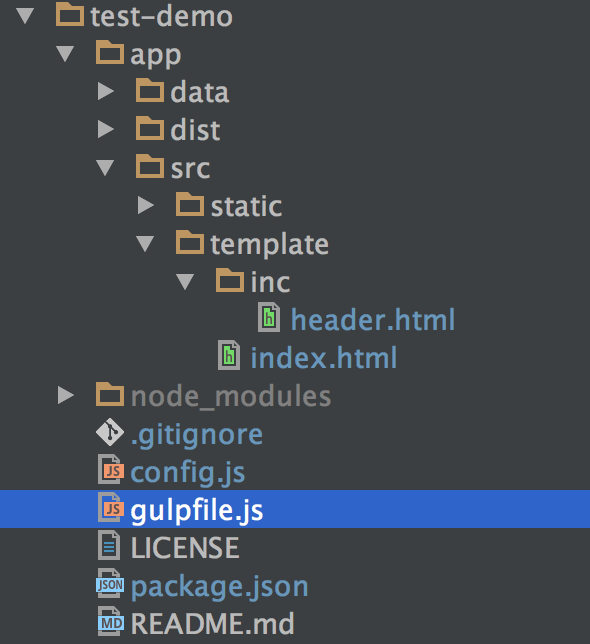
修改 gulpfile.js,结合 browser-sync 一起使用
'use strict';

var gulp = require('gulp'),

    del = require('del'),

    fileinclude = require('gulp-file-include'),

    browserSync = require('browser-sync').create();

// 清除 dist 文件夹

gulp.task('clean', function () {

    return del.sync('./app/dist');

});

// html 整合

gulp.task('html', function () {

    return gulp.src('./app/src/template/*.html')

    .pipe(fileinclude())

    .pipe(gulp.dest('./app/dist'));

});

// 配置服务器

gulp.task('serve', function () {

    browserSync.init({

        server: {

            baseDir: './app/dist'

        },

        port: 8000

    });

    // 监听 html

    gulp.watch('./app/src/template/**/*.html', ['html']).on('change', browserSync.reload);
});

gulp.task('default', ['clean', 'html', 'serve']);
html:
<!doctype html>

<html lang="en">

<head>

    <meta charset="UTF-8">

    <meta name="viewport"

          content="width=device-width, user-scalable=no, initial-scale=1.0, maximum-scale=1.0, minimum-scale=1.0">

    <meta http-equiv="X-UA-Compatible" content="ie=edge">

    <title>Document</title>

</head>

<body>

    @@include('inc/header.html', {"title": "home"})

    <p></p>

</body>

</html>
header.html:
<h1>@@title</h1>
打包:
gulp
浏览器会自动打开页面 http://localhost:8000,显示 home。在 dist 文件夹中查看 index.html:
<!doctype html>

<html lang="en">

<head>

    <meta charset="UTF-8">

    <meta name="viewport"

          content="width=device-width, user-scalable=no, initial-scale=1.0, maximum-scale=1.0, minimum-scale=1.0">

    <meta http-equiv="X-UA-Compatible" content="ie=edge">

    <title>Document</title>

</head>

<body>

    <h1>home</h1>

    <p></p>

</body>

</html>
当然,gulp-file-include 还有很多强大的功能,具体内容可以参考官网,这里我就不多说了。
【gulp】gulp-file-include 合并 html 文件的更多相关文章
- 一篇迟到的gulp文章,代码合并压缩,less编译
前言 这篇文章本应该在去年17年写的,但因为种种原因没有写,其实主要是因为懒(捂脸).gulp出来的时间已经很早了,16年的时候还很流行,到17年就被webpack 碾压下去了,不过由于本人接触gul ...
- gulp完成javascript压缩合并,css压缩
最近需要对项目进行优化,主要是对js的压缩合并和css文件的压缩,查找相关资料之后发现gulp可以实现相关的功能,特此分享一下使用心得. 1.安装gulp gulp是基于Node.js的前端构建工具. ...
- Gulp压缩前端CS,JS,图片文件
Gulp 基于Node.js的前端构建工具,Gulp有许多插件(这里是插件),使用Gulp可以实现前端代码的编译(sass.less).压缩.图片的压缩等,当然主要是前端工程化,不过我目前只是需要压缩 ...
- 合并Excel文件
//合并Excel文件 private void MargeExcelFile(string destFile, string dirPath) { DirectoryInfo dir = new D ...
- 合并BIN文件的两种方法(转)
源:http://blog.chinaunix.net/uid-20745340-id-1878803.html 合并BIN文件的两种方法 在单片机的开发过程中,经常需要将两个单独的BIN文件合并成一 ...
- 转:Intellij idea Version Control File Status Colors ( 版本控制文件状态颜色 )
https://blog.csdn.net/Bruce_Lee__/article/details/80261308 Added —— 添加 Added in not active changelis ...
- 使用Python批量合并PDF文件(带书签功能)
网上找了几个合并pdf的软件,发现不是很好用,一般都没有添加书签的功能. 又去找了下python合并pdf的脚本,发现也没有添加书签的功能的. 于是自己动手编写了一个小工具,使用了PyPDF2. 下面 ...
- MVC学习十一:合并资源文件(BundleConfig)
在BundleConfig.cs文件下 //1.用户可以 手动 添加 js绑定对象,取一个 名字(虚拟路径),添加要绑定的JS文件 路径 bundles.Add(new ScriptBundle(&q ...
- Aspose.Pdf合并PDF文件
使用Aspose.Pdf类库,有很多种方法可以合并PDF文件,这里简单介绍小生见到的几种: Doucment.Pages.Add PdfFileEditor.Append PdfFileEditor. ...
- [原]Nginx+Lua服务端合并静态文件
http://homeway.me 0x01.About 源代码已经上传到github:https://github.com/grasses/nginx-lua-static-merger nginx ...
随机推荐
- LeetCode(119. 杨辉三角 II)
问题描述 给定一个非负索引 k,其中 k ≤ 33,返回杨辉三角的第 k 行. 在杨辉三角中,每个数是它左上方和右上方的数的和. 示例: 输入: 3 输出: [1,3,3,1] 进阶: 你可以优化你的 ...
- [CSAcademy]Virus on a Tree
[CSAcademy]Virus on a Tree 题目大意: 给你一棵\(n(n\le10^5)\)个点的树,一开始点\(1\)有病毒,可以沿着边扩散.你可以事先切掉若干条边,使得病毒扩散不超过\ ...
- BZOJ4855 : [Jsoi2016]轻重路径
首先用树状数组维护dfs序来快速支持一个点子树大小的询问. 每次删掉一个叶子时,从根开始往叶子走,显然只有$2size[x]\leq size[father]$的点的父亲才有可能换重儿子. 从根开始往 ...
- 浏览器JS报错Uncaught RangeError Maximum call stack size exceeded
JavaScript错误:Uncaught RangeError: Maximum call stack size exceeded 堆栈溢出 原因:有小类到大类的递归查询导致溢出 解决方法思想: A ...
- python:什么是单例?一个简单的单例
单例:即一个类只能生成唯一的一个实例,python中的类如果没有被实例化,则cls._instance为None 如下: class Singleton(object): def __new__(cl ...
- jmeter接口测试实例1-添加学生信息
jmeter实例1:添加学生信息 进入jmeter,添加线程组改名称为添加学生信息(为了好区分接口),添加http请求,输入IP,方法,路径,在body data中输入json串,同上面postman ...
- oracle增加表空间大小
第一步:查看表空间的名字及文件所在位置: select tablespace_name, file_id, file_name, round(bytes/(1024*1024),0) total_sp ...
- JDBC(11)—数据库连接池
在实际开发过程中,特别是在web应用系统中,如果程序直接访问数据库中的数据,每一次数据访问请求丢必须经历建立数据库连接.打开数据库.存取数据和关闭数据库连接.而连接并打开数据库是一件既消费资源又费时的 ...
- RMQ(Range MinimumQuery)问题之ST算法
ST算法------是用来求解给定区间RMQ的最值,本文以最小值为例 ST算法分为两部分 离线预处理(nlogn):运用DP思想,用于求解区间最值,并保存到一个二维数组中. 在线查询 (O(1)):对 ...
- 直接打开virtualbox报错
错误现象: Failed to instantiate CLSID_VirtualBox w/ IVirtualBox, but CLSID_VirtualBox w/ IUnknown works. ...