
java 中 热部署与卸载关系
今天发现早年在大象笔记中写的一篇笔记,之前放在ijavaboy上的,现在它已经访问不了了。前几天又有同事在讨论这个问题。这里拿来分享一下。
在web应用开发或者游戏服务器开发的过程中,我们时时刻刻都在使用热部署。热部署的目的很简单,就是为了节省应用开发和发布的时间。比如,我们在使用Tomcat或者Jboss等应用服务器开发应用时,我们经常会开启热部署功能。热部署,简单点来说,就是我们将打包好的应用直接替换掉原有的应用,不用关闭或者重启服务器,一切就是这么简单。那么,热部署到底是如何实现的呢?在本文中,我将写一个实例,这个实例就是一个容器应用,允许用户发布自己的应用,同时支持热部署。
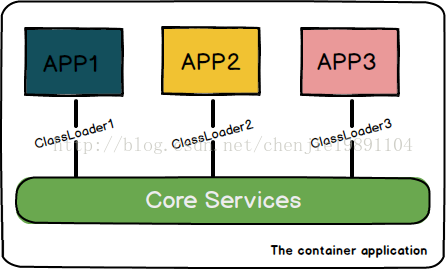
- public interface IApplication {
- public void init();
- public void execute();
- public void destory();
- }
- public ClassLoader createClassLoader(ClassLoader parentClassLoader, String... folders) {
- List<URL> jarsToLoad = new ArrayList<URL>();
- for (String folder : folders) {
- List<String> jarPaths = scanJarFiles(folder);
- for (String jar : jarPaths) {
- try {
- File file = new File(jar);
- jarsToLoad.add(file.toURI().toURL());
- } catch (MalformedURLException e) {
- e.printStackTrace();
- }
- }
- }
- URL[] urls = new URL[jarsToLoad.size()];
- jarsToLoad.toArray(urls);
- return new URLClassLoader(urls, parentClassLoader);
- }
- <apps>
- <app>
- <name> TestApplication1</name >
- <file> com.ijavaboy.app.TestApplication1</file >
- </app>
- <app>
- <name> TestApplication2</name >
- <file> com.ijavaboy.app.TestApplication2</file >
- </app>
- </apps>
- public void createApplication(String basePath, AppConfig config){
- String folderName = basePath + GlobalSetting. JAR_FOLDER + config.getName();
- ClassLoader loader = this.jarLoader .createClassLoader(ApplicationManager. class.getClassLoader(), folderName);
- try {
- Class<?> appClass = loader. loadClass(config.getFile());
- IApplication app = (IApplication)appClass.newInstance();
- app.init();
- this.apps .put(config.getName(), app);
- } catch (ClassNotFoundException e) {
- e.printStackTrace();
- } catch (InstantiationException e) {
- e.printStackTrace();
- } catch (IllegalAccessException e) {
- e.printStackTrace();
- }
- public void loadAllApplications(String basePath){
- for(AppConfig config : this.configManager.getConfigs()){
- this.createApplication(basePath, config);
- }
- }
- public class TestApplication1 implements IApplication{
- @Override
- public void init() {
- System. out.println("TestApplication1-->init" );
- }
- @Override
- public void execute() {
- System. out.println("TestApplication1-->do something" );
- }
- @Override
- public void destory() {
- System. out.println("TestApplication1-->destoryed" );
- }
- }
- <app>
- <name> TestApplication1</name >
- <file> com.ijavaboy.app.TestApplication1</file >
- </app>
- public void fileChanged (FileChangeEvent event) throws Exception {
- String ext = event.getFile().getName().getExtension();
- if(!"jar" .equalsIgnoreCase(ext)){
- return;
- }
- String name = event.getFile().getName().getParent().getBaseName();
- ApplicationManager. getInstance().reloadApplication(name);
- public void reloadApplication (String name){
- IApplication oldApp = this.apps .remove(name);
- if(oldApp == null){
- return;
- }
- oldApp.destory(); //call the destroy method in the user's application
- AppConfig config = this.configManager .getConfig(name);
- if(config == null){
- return;
- }
- createApplication(getBasePath(), config);
- public void initMonitorForChange(String basePath){
- try {
- this.fileManager = VFS.getManager();
- File file = new File(basePath + GlobalSetting.JAR_FOLDER);
- FileObject monitoredDir = this.fileManager .resolveFile(file.getAbsolutePath());
- FileListener fileMonitorListener = new JarFileChangeListener();
- this.fileMonitor = new DefaultFileMonitor(fileMonitorListener);
- this.fileMonitor .setRecursive(true);
- this.fileMonitor .addFile(monitoredDir);
- this.fileMonitor .start();
- System. out.println("Now to listen " + monitoredDir.getName().getPath());
- } catch (FileSystemException e) {
- e.printStackTrace();
- }
- }
- public static void main(String[] args){
- Thread t = new Thread(new Runnable() {
- @Override
- public void run() {
- ApplicationManager manager = ApplicationManager.getInstance();
- manager.init();
- }
- });
- t.start();
- while(true ){
- try {
- Thread. sleep(300);
- } catch (InterruptedException e) {
- e.printStackTrace();
- }
- }
- }
java 中 热部署与卸载关系的更多相关文章
- paip.提升用户体验--提升java的热部署热更新能力
paip.提升用户体验--提升java的热部署热更新能力 想让java做到php那么好的热部署能力 "fix online"/在线修复吗??直接在服务器上修改源码生效,无需重启应 ...
- java的热部署和热加载
ps:热部署和热加载其实是两个类似但不同的概念,之前理解不深,so,这篇文章重构了下. 一.热部署与热加载 在应用运行的时升级软件,无需重新启动的方式有两种,热部署和热加载. 对于Java应用程序来说 ...
- 计算机基础--Java中int char byte的关系
计算机基础--Java中int char byte的关系 重要:一个汉字占用2byte,Java中用char(0-65535 Unicode16)型字符来存字(直接打印输出的话是字而非数字),当然要用 ...
- JAVA代码热部署,在线不停服动态更新
本地debug的时候,可以实时编译并更新代码,线上也可以不停服来动态更新类,即所说的java热部署. JDK代理的两种方式: 1.premain方式是Java SE5开始就提供的代理方式,但其必须 ...
- Java服务器热部署的实现原理
转自:http://blog.csdn.net/chenjie19891104/article/details/42807959 在web应用开发或者游戏服务器开发的过程中,我们时时刻刻都在使用热部署 ...
- Java 项目热部署,节省构建时间的正确姿势
上周末,帮杨小邪(我的大学室友)远程调试项目.SpringBoot 构建,没有热部署,改一下就得重启相关模块.小小的 bug ,搞了我一个多小时,大部分时间都还在构建上(特么,下次得收钱才行).我跟他 ...
- java中接口与多重继承的关系
在Java语言中, abstract class 和interface 是支持抽象类定义的两种机制.正是由于这两种机制的存在,才赋予了Java强大的 面向对象能力.abstract class和int ...
- spring-boot-devtools在Idea中热部署方法
1 pom.xml文件 注:热部署功能spring-boot-1.3开始有的 <!--添加依赖--> <dependency> <groupId>org.sprin ...
- SpringBoot热部署:spring-boot-devtools在Idea中热部署方法
1 pom.xml文件 注:热部署功能spring-boot-1.3开始有的 <!--添加依赖--> <dependency> <groupId>org.sprin ...
随机推荐
- [CC-INVENTRY]Arranging the Inventory
[CC-INVENTRY]Arranging the Inventory 题目大意: 有一排长度为\(n(\sum n\le10^6)\)的格子,有些格子是空的,有些格子上有一个箱子. 现在你要用最小 ...
- the lime limited error
转载自:https://blog.csdn.net/MTOY_320/article/details/78363375?locationNum=7&fps=1 经常会遇到这种令人抓狂的情况 自 ...
- 一步一步教你从零开始写C语言链表---构建一个链表
版权声明:本文为博主原创文章,如有需要,请注明转载地址:http://blog.csdn.net/morixinguan.若是侵权用于商业用途,请联系博主,否则将追究责任 https://blog ...
- ES6 对对象的扩展
1.对象类别 普通对象:具有JavaScript对象的所有默认内部行为 特异对象: 具有某些与默认行为不符的内部行为 标准对象: ECMAScript 6 规范中新定义的对象,例如Array,Date ...
- 数据格式JSON
JSON(JavaScript Object Notation) 是一种轻量级的数据交换格式.JSON采用完全独立于语言的文本格式,这些特性使JSON成为理想的数据交换语言.易于人阅读和编写,同时也易 ...
- asp.net mvc ViewData 和 ViewBag区别,TempData
ViewData 和 ViewBag都是页面级别的生命周期,TempData--Passing data between the current and next HTTP requests Temp ...
- E. Thematic Contests 二分,离散化
题目意思是给你n个问题即数字,n的大小代表问题所在的话题,题目要求举办多场比赛,每场比赛的只能一种问题,且后一场比赛的问题必须是前一场的两倍,求举办比赛可能最多的问题总数 传送门 解题思路:将出现每种 ...
- arcgis pro指数库
来自:https://pro.arcgis.com/zh-cn/pro-app/help/data/imagery/indices-gallery.htm 植被和土壤指数 MSAVI “修正土壤调节植 ...
- springboot获取properties文件的配置内容(转载)
1.使用@Value注解读取读取properties配置文件时,默认读取的是application.properties. application.properties: demo.name=Name ...
- Creating an LMDB database in Python
LMDB is the database of choice when using Caffe with large datasets. This is a tutorial of how to cr ...