
51job_selenium测试2
Python爬虫视频教程零基础小白到scrapy爬虫高手-轻松入门
https://item.taobao.com/item.htm?spm=a1z38n.10677092.0.0.482434a6EmUbbW&id=564564604865
# -*- coding: utf-8 -*-

"""

Spyder Editor

This is a temporary script file.

"""

import requests,bs4,openpyxl,time,selenium

from openpyxl.cell import get_column_letter,column_index_from_string

from selenium import webdriver

excelName="51job.xlsx"

sheetName="Sheet1"

wb1=openpyxl.load_workbook(excelName)

sheet=wb1.get_sheet_by_name(sheetName)

start=1

charset="gb2312"

site="http://jobs.51job.com/all/co198308.html"

browser=webdriver.Firefox()

browser.get(site)

linkElem=browser.find_element_by_link_text("下一页")

linkElem.click()

#elem = browser.find_element_by_class_name('el')

#返回标签的值

#elem.text

#elems = browser.find_elements_by_class_name('el')

elem=browser.find_elements_by_class_name('el')

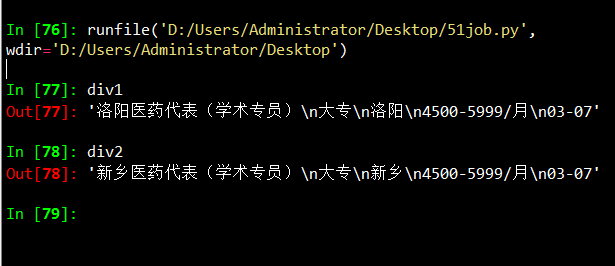
div1=elem[0].text

div2=elem[1].text

#每个网站爬取相应数据

def Craw(site):

    res=requests.get(site)

    res.encoding = charset

    soup1=bs4.BeautifulSoup(res.text,"lxml")

    div=soup1.select('.el')

    len_div=len(div)

    for i in range(len_div):

        #print ("i:",i)

        content=div[i].getText()

        content_list=content.split('\n')

        name=content_list[1]

        #print ("name:",name)

        education=content_list[2]

        #print ("education:",education)

        position=content_list[3]

        #print ("position:",position)

        salary=content_list[4]

        #print ("salary:",salary)

        date=content_list[5]

        #print ("date:",date)

        sheet['A'+str(i+2)].value=name

        sheet['B'+str(i+2)].value=education

        sheet['C'+str(i+2)].value=position

        sheet['D'+str(i+2)].value=salary

        sheet['E'+str(i+2)].value=date

'''

Craw(site)

wb1.save(excelName)

    '''
Finding Elements on the Page
WebDriver objects have quite a few methods for finding elements on a page. They are divided into the find_element_* and find_elements_* methods. Thefind_element_* methods return a single WebElement object, representing the first element on the page that matches your query. The find_elements_* methods return a list of WebElement_* objects for every matching element on the page.
Table 11-3 shows several examples of find_element_* and find_elements_* methods being called on a WebDriver object that’s stored in the variable browser.
Table 11-3. Selenium’s WebDriver Methods for Finding Elements
|
Method name |
WebElement object/list returned |
|---|---|
browser.find_element_by_class_name(name) |
Elements that use the CSS class |
browser.find_element_by_css_selector(selector) |
Elements that match the CSS |
browser.find_element_by_id(id) |
Elements with a matching |
browser.find_element_by_link_text(text) |
|
browser.find_element_by_partial_link_text(text) |
|
browser.find_element_by_name(name) |
Elements with a matching |
browser.find_element_by_tag_name(name) |
Elements with a matching tag |
Except for the *_by_tag_name() methods, the arguments to all the methods are case sensitive. If no elements exist on the page that match what the method is looking for, the selenium module raises a NoSuchElement exception. If you do not want this exception to crash your program, add try and except statements to your code.
Once you have the WebElement object, you can find out more about it by reading the attributes or calling the methods in Table 11-4.
Table 11-4. WebElement Attributes and Methods
|
Attribute or method |
Description |
|---|---|
|
|
The tag name, such as |
|
|
The value for the element’s |
|
|
The text within the element, such as |
|
|
For text field or text area elements, clears the text typed into it |
|
|
Returns |
|
|
For input elements, returns |
|
|
For checkbox or radio button elements, returns |
|
|
A dictionary with keys |
Table 11-5. Commonly Used Variables in the selenium.webdriver.common.keysModule
|
Attributes |
Meanings |
|---|---|
|
|
The keyboard arrow keys |
|
|
The ENTER and RETURN keys |
|
|
The |
|
|
The ESC, BACKSPACE, and DELETE keys |
|
|
The F1 to F12 keys at the top of the keyboard |
|
|
The TAB key |
51job_selenium测试2的更多相关文章
- 51job_selenium测试
Python爬虫视频教程零基础小白到scrapy爬虫高手-轻松入门 https://item.taobao.com/item.htm?spm=a1z38n.10677092.0.0.482434a6E ...
- SignalR系列续集[系列8:SignalR的性能监测与服务器的负载测试]
目录 SignalR系列目录 前言 也是好久没写博客了,近期确实很忙,嗯..几个项目..头要炸..今天忙里偷闲.继续我们的小系列.. 先谢谢大家的支持.. 我们来聊聊SignalR的性能监测与服务器的 ...
- Apache Ignite之集群应用测试
集群发现机制 在Ignite中的集群号称是无中心的,而且支持命令行启动和嵌入应用启动,所以按理说很简单.而且集群有自动发现机制感觉对于懒人开发来说太好了,抱着试一试的心态测试一下吧. 在Apache ...
- 测试一下StringBuffer和StringBuilder及字面常量拼接三种字符串的效率
之前一篇里写过字符串常用类的三种方式<java中的字符串相关知识整理>,只不过这个只是分析并不知道他们之间会有多大的区别,或者所谓的StringBuffer能提升多少拼接效率呢?为此写个简 ...
- TechEmpower 13轮测试中的ASP.NET Core性能测试
应用性能直接影响到托管服务的成本,因此公司在开发应用时需要格外注意应用所使用的Web框架,初创公司尤其如此.此外,糟糕的应用性能也会影响到用户体验,甚至会因此受到相关搜索引擎的降级处罚.在选择框架时, ...
- .NET Core系列 :4 测试
2016.6.27 微软已经正式发布了.NET Core 1.0 RTM,但是工具链还是预览版,同样的大量的开源测试库也都是至少发布了Alpha测试版支持.NET Core, 这篇文章 The Sta ...
- 渗透测试工具BurpSuite做网站的安全测试(基础版)
渗透测试工具BurpSuite做网站的安全测试(基础版) 版权声明:本文为博主原创文章,未经博主允许不得转载. 学习网址: https://t0data.gitbooks.io/burpsuite/c ...
- 在ubuntu16.10 PHP测试连接MySQL中出现Call to undefined function: mysql_connect()
1.问题: 测试php7.0 链接mysql数据库的时候发生错误: Fatal error: Uncaught Error: Call to undefined function mysqli_con ...
- 【初学python】使用python调用monkey测试
目前公司主要开发安卓平台的APP,平时测试经常需要使用monkey测试,所以尝试了下用python调用monkey,代码如下: import os apk = {'j': 'com.***.test1 ...
随机推荐
- 20135316Linux内核学习笔记第六周
20135316王剑桥<Linux内核分析>MOOC课程http://mooc.study.163.com/course/USTC 1000029000 一.进程控制块PCB--task_ ...
- Java awt项目开发
通过Java awt 界面上的知识编写的扫雷游戏 代码中有详细的注解 package com.langsin.saolei; import java.awt.Color;import java.awt ...
- Java实现小学四则运算练习系统(UI)
github项目地址 :https://github.com/feser-xuan/Arithmetic_test3_UI 小伙伴的博客链接:http://www.cnblogs.com/fukang ...
- TimeLine CSS/Javascript 时间线
https://casbootadminserver.herokuapp.com/#/applications/23bd8218/trace
- Maven2查看源码
- Docker(二十七)-Docker 清理占用的磁盘空间
1. docker system命令 docker system df命令,类似于Linux上的df命令,用于查看Docker的磁盘使用情况: docker system dfTYPE TOTAL A ...
- pandas.Series
1.系列(Series)是能够保存任何类型的数据(整数,字符串,浮点数,Python对象等)的一维标记数组.轴标签统称为索引. Pandas系列可以使用以下构造函数创建 - pandas.Series ...
- jmeter作用域规则
创建测试计划时,会创建一个有序的一系列将要被执行的请求列表,这些请求通常被组织在有序的控制器下 一些控制器会影响包含在它下面的请求顺序 ,这些特殊的控制器可以参考这里:the component re ...
- 近端梯度算法(Proximal Gradient Descent)
L1正则化是一种常用的获取稀疏解的手段,同时L1范数也是L0范数的松弛范数.求解L1正则化问题最常用的手段就是通过加速近端梯度算法来实现的. 考虑一个这样的问题: minx f(x)+λg(x) x ...
- json_decode()相关报错
错误描述 PHP Warning: json_decode() expects parameter 1 to be string, array given in xxx.php on line 29 ...