
实验19:Frame-Relay
实验16-1. 帧中继多点子接口
Ø 实验目的
通过本实验,读者可以掌握如下技能:
(1) 帧中继的基本配置
(2) 帧中继的静态映射
(3) 多点子接口的应用
Ø 实验拓扑
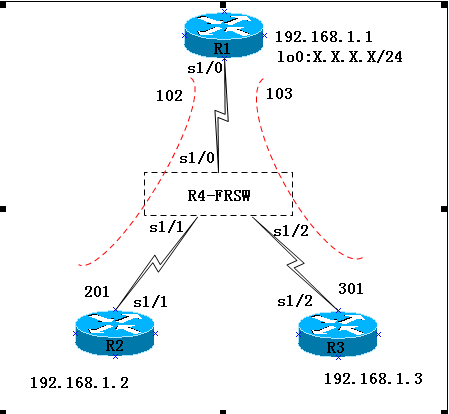
实验步骤
n 步骤1:配置R4模拟FRSW
R4(config)#no ip routing
R4(config)#frame-relay switching
//启用帧中继交换
R4(config)#int s1/0
R4(config-if)#no sh
R4(config-if)#encapsulation frame-relay
R4(config-if)#frame-relay intf-type dce
R4(config-if)#clock rate 64000
R4(config-if)#frame-relay lmi-type cisco
R4(config-if)#frame-relay route 102 interface s1/1 201
R4(config-if)#frame-relay route 103 interface s1/2 301
//配置帧中继路由
R4(config)#int s1/1
R4(config-if)#no sh
R4(config-if)#encapsulation frame-relay
R4(config-if)#frame-relay lmi-type cisco
R4(config-if)#clock rate 64000
R4(config-if)#frame-relay intf-type dce
R4(config-if)#frame-relay route 201 interface s1/0 102
R4(config)#int s1/2
R4(config-if)#no sh
R4(config-if)#encapsulation frame-relay
R4(config-if)#frame-relay lmi-type cisco
R4(config-if)#clock rate 64000
R4(config-if)#frame-relay intf-type dce
R4(config-if)#frame-relay route 301 interface s1/0 103
n 步骤2: DTE的配置
R1(config)#int s1/0
R1(config-if)#no ip address //主接口下不需要IP 地址
R1(config-if)#encap frame-relay //封装帧中继
R1(config-if)#no frame-relay inverse-arp //关闭自动映射
R1(config-if)#no shut
R1(config)#int s1/0.2 multipoint //创建点到多点子接口
R1(config-subif)#ip add 192.168.1.1 255.255.255.0
R1(config-subif)#frame-relay map ip 192.168.1.2 102 broadcast
R1(config-subif)#frame-relay map ip 192.168.1.3 103 broadcast
//配置帧中继映射
【提示】可以使用“no interface s1/0.2”命令来删除子接口,然而需要重新启动路由器,该子接口才真正被删除。
R1(config-if)#frame-relay lmi-type cisco
//如果采用的是cisco 路由器且IOS 是11.2 及以后版本的,路由器可以自动适应LMI 的类型,则本步骤可不做。国内帧中继线路一般采用ansi 的LMI 信令类型,我们这里采用的是cisco。
R2(config)#int s1/1
R2(config-if)#ip address 192.168.1.2 255.255.255.0
R2(config-if)#encapsulation frame-relay
R2(config-if)#no shutdown
R2(config-if)#no frame-relay inverse-arp //关闭自动映射
R2(config-if)#frame-relay map ip 192.168.1.1 201 broadcast
R3(config)#int s1/2
R3(config-if)#ip address 192.168.1.3 255.255.255.0
R3(config-if)#encapsulation frame-relay
R3(config-if)#no shutdown
R3(config-if)#no frame-relay inverse-arp //关闭自动映射
R3(config-if)#frame-relay map ip 192.168.1.1 301 broadcast
n 步骤3:测试连通性
从各个路由器ping 其他路由器:
R1#ping 192.168.1.2
Type escape sequence to abort.
Sending 5, 100-byte ICMP Echos to 192.168.1.2, timeout is 2 seconds:
!!!!!
Success rate is 100 percent (5/5), round-trip min/avg/max = 8/34/84 ms
R1#ping 192.168.1.3
Type escape sequence to abort.
Sending 5, 100-byte ICMP Echos to 192.168.2.3, timeout is 2 seconds:
!!!!!
Success rate is 100 percent (5/5), round-trip min/avg/max = 4/27/96 ms
Ø 实验调试
可以使用“show frame-relay map”、“show frame pvc”、“show frame lmi”等命令检查帧中继交换机是否正常
R1#show frame-relay map
Serial1/0.2 (up): ip 192.168.1.2 dlci 102(0x66,0x1860), static,
broadcast,
CISCO, status defined, active
Serial1/0.2 (up): ip 192.168.1.3 dlci 103(0x67,0x1870), static,
broadcast,
CISCO, status defined, active
从命令输出中可以得到的信息有:
n 192.168.1.2 映射到102
n Static:表明是静态手工的
n Broadcast:该PVC 允许广播包的通过
n Active:该PVC 是激活的
该命令是很重要的一条命令,如果在映射表中不存在映射,路由器将无法通信。可以使用名命令“clear frame-relay inarp”命令清除无效的帧中继映射表。
R1#show frame-relay pvc
PVC Statistics for interface Serial1/0 (Frame Relay DTE)
Active Inactive Deleted Static
Local 2 0 0 0
Switched 0 0 0 0
Unused 4 0 0 0
DLCI = 102, DLCI USAGE = LOCAL, PVC STATUS = ACTIVE, INTERFACE = Serial1/0.2
input pkts 15 output pkts 15 in bytes 1560
out bytes 1560 dropped pkts 0 in pkts dropped 0
out pkts dropped 0 out bytes dropped 0
in FECN pkts 0 in BECN pkts 0 out FECN pkts 0
out BECN pkts 0 in DE pkts 0 out DE pkts 0
out bcast pkts 0 out bcast bytes 0
5 minute input rate 0 bits/sec, 0 packets/sec
5 minute output rate 0 bits/sec, 0 packets/sec
pvc create time 00:15:23, last time pvc status changed 00:14:23
DLCI = 103, DLCI USAGE = LOCAL, PVC STATUS = ACTIVE, INTERFACE = Serial1/0.2
input pkts 21 output pkts 30 in bytes 2114
out bytes 3120 dropped pkts 0 in pkts dropped 0
out pkts dropped 0 out bytes dropped 0
in FECN pkts 0 in BECN pkts 0 out FECN pkts 0
out BECN pkts 0 in DE pkts 0 out DE pkts 0
out bcast pkts 0 out bcast bytes 0
5 minute input rate 0 bits/sec, 0 packets/sec
5 minute output rate 0 bits/sec, 0 packets/sec
pvc create time 00:15:35, last time pvc status changed 00:14:35
从命令输出中可以得到的信息有:
n DLCI = 102:表明该PVC 的DLCI 为102
n PVC STATUS = ACTIVE:表明PVC 的状态是激活的;若PVC STATUS = INACTIVE—表明远端路由器没正确配置;若PVC STATUS = DELETED—表明输入了错误的DLCI,该PVC 不存在。
R1#show frame-relay lmi
LMI Statistics for interface Serial1/0(Frame Relay DTE) LMI TYPE = ANSI
Invalid Unnumbered info 0 Invalid Prot Disc 0
Invalid dummy Call Ref 0 Invalid Msg Type 0
Invalid Status Message 0 Invalid Lock Shift 0
Invalid Information ID 0 Invalid Report IE Len 0
Invalid Report Request 0 Invalid Keep IE Len 0
Num Status Enq. Sent 103 Num Status msgs Rcvd 104
Num Update Status Rcvd 0 Num Status Timeouts 0
Last Full Status Req 00:00:17 Last Full Status Rcvd 00:00:17
从命令输出中可以得到的信息有:
n LMI TYPE = ANSI:表明帧中继LMI 类型为ANSI;
n Frame Relay DTE:这是帧中继DTE
n Num Status Enq. Sent 103:表明路由器向帧中继交换机发送的LMI 状态查询消息的数量;
n Num Status msgs Rcvd 104:表明路由器从帧中继交换机收到的LMI 状态信息数量
【提示】
在R1,R2,R3上运行RIP ,在R2上添加回环接口并宣告网段,在R3上查看是否能学到该网段
R2(config-if)#int lo0
R2(config-if)#ip add 2.2.2.2 255.255.255.0
R2(config)#router rip
R2(config-router)#net 2.0.0.0
注意:如果路由协议运行RIP,封装Frame-relay的物理接口默认关闭水平分割,multipoint默认启用水平分割
R3#show ip route
Codes: C - connected, S - static, R - RIP, M - mobile, B - BGP
D - EIGRP, EX - EIGRP external, O - OSPF, IA - OSPF inter area
N1 - OSPF NSSA external type 1, N2 - OSPF NSSA external type 2
E1 - OSPF external type 1, E2 - OSPF external type 2
Gateway of last resort is not set
R 2.0.0.0/8 [120/1] via 192.168.2.1, 00:00:47, Serial1/2
C 192.168.1.0/24 is directly connected, Serial1/2
实验16-2:帧中继点到点子接口
Ø 实验目的
通过本实验,读者可以掌握点到点子接口的配置
Ø 实验拓扑
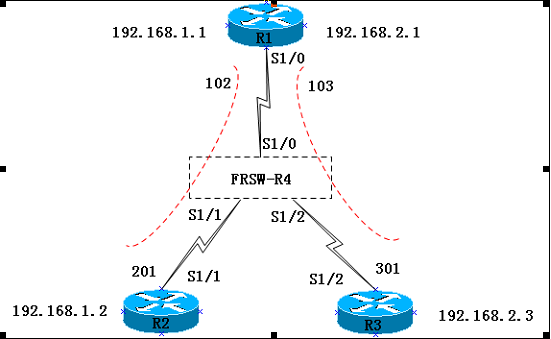
实验步骤
n 步骤1:R1配置如下
R1(config)#interface serial1/0
R1(config-if)#no ip address
R1(config-if)#encap frame-relay
R1(config-if)#no frame-relay inverse-arp
R1(config-if)#no shutdown
R1(config)#int s1/0.2 point-to-point //创建点到点子接口
R1(config-subif)#ip address 192.168.1.1 255.255.255.0
R1(config-subif)#frame-relay interface-dlci 102
R1(config)#int s1/0.3 point-to-point
R1(config-subif)#ip address 192.168.2.1 255.255.255.0
R1(config-subif)#frame-relay interface-dlci 103
R1(config)#int lo0
R1(config-if)#ip add 1.1.1.1 255.255.255.0
R1(config)#router rip
R1(config-router)#network 1.0.0.0
R1(config-router)#network 192.168.1.0
R1(config-router)#network 192.168.2.0
n 步骤2:R2配置如下:
R2(config)#interface serial 1/1
R2(config-if)#no ip address
R2(config-if)#encapsulation frame-relay
R2(config-if)#no frame-relay inverse-arp
R2(config-if)#no shutdown
R2(config-if)#exit
R2(config)#int s1/1.1 point-to-point
R2(config-subif)#ip address 192.168.1.2 255.255.255.0
R2(config-subif)#frame-relay interface-dlci 201
R2(config-subif)#exit
R2(config)#int lo0
R2(config-if)#ip add 2.2.2.2 255.255.255.0
R2(config)#router rip
R2(config-router)#network 2.0.0.0
R2(config-router)#network 192.168.1.0
n 步骤3:R3配置如下:
R3(config)#interface serial 1/2
R3(config-if)#no ip address
R3(config-if)#encapsulation frame-relay
R3(config-if)#no frame-relay inverse-arp
R3(config-if)#no shutdown
R3(config-if)#exit
R3(config)#interface serial 1/2.1 point-to-point
R3(config-subif)#ip address 192.168.2.3 255.255.255.0
R3(config-subif)#frame-relay interface-dlci 301
R3(config-subif)#exit
R3(config)#int lo0
R3(config-if)#ip add 3.3.3.3 255.255.255.0
R3(config)#router rip
R3(config-router)#network 3.0.0.0
R3(config-router)#network 192.168.2.0
Ø 实验调试
在各个路由器上检查路由表,注意路由的下一跳。
R3#show ip route
R3#show ip rou
Codes: C - connected, S - static, R - RIP, M - mobile, B - BGP
D - EIGRP, EX - EIGRP external, O - OSPF, IA - OSPF inter area
N1 - OSPF NSSA external type 1, N2 - OSPF NSSA external type 2
E1 - OSPF external type 1, E2 - OSPF external type 2
i - IS-IS, su - IS-IS summary, L1 - IS-IS level-1, L2 - IS-IS level-2
ia - IS-IS inter area, * - candidate default, U - per-user static route
o - ODR, P - periodic downloaded static route
Gateway of last resort is not set
R 1.0.0.0/8 [120/1] via 192.168.2.1, 00:00:02, Serial1/2.1
R 2.0.0.0/8 [120/1] via 192.168.2.1, 00:00:02, Serial1/2.1
3.0.0.0/24 is subnetted, 1 subnets
C 3.3.3.0 is directly connected, Loopback0
R 192.168.1.0/24 [120/1] via 192.168.2.1, 00:00:02, Serial1/2.1
C 192.168.2.0/24 is directly connected, Serial1/2.1
实验19:Frame-Relay的更多相关文章
- CCNA实验(9) -- Frame Relay
帧中继的一些特点:1.中小企业常用的广域网线路2.通信费用较低3.配置较为复杂 1.将Cisco路由器配置为帧中继交换机2.帧中继基本配置.帧中继映射3.在帧中继的链路上运行RIPv24.帧中继的多点 ...
- Frame Relay - 简单介绍及基本配置
Frame Relay如今越来越不流行了,只是在过去的设计中被广泛应用. 所以工作上还是能常常见到的, 这篇博文从二层简单总结下FR的一些概念 在介绍Frame Relay之前,先了解下广播介质和非广 ...
- Frame Relay Voice Traffic Shaping and Frament
本文全称应该是:Frame Relay Voice-Adaptive Traffic Shaping and Fragmentation,标题限制字数,没办法了 帧中继的流量整型向来是个头疼的地方 ...
- CCNA 之 十二 Frame Relay 帧中继
Fram Relay 帧中继 帧中继简介 VC.LMI.DLCI的概念 帧中继映射 Inverse-ARP的操作 帧中继配置 帧中继简介 分组交换广域网接入方式的一个代表,分组交换是以分组的形式在广域 ...
- [nRF51822] 12、基础实验代码解析大全 · 实验19 - PWM
一.PWM概述: PWM(Pulse Width Modulation):脉冲宽度调制技术,通过对一系列脉冲的宽度进行调制,来等效地获得所需要波形. PWM 的几个基本概念: 1) 占空比:占空比是指 ...
- 008 frame relay
Router>en Router#config t Enter configuration commands, one per line. End with CNTL/Z. Router(co ...
- 【Python】【demo实验19】【练习实例】【不同位数相同阿拉伯数字组成的数之和】
原题: 求s=a+aa+aaa+aaaa+aa...a的值,其中a是一个数字.例如2+22+222+2222+22222(此时共有5个数相加),几个数相加由键盘控制. 我的代码: #!/usr/bin ...
- CCNP路由实验之十二 MPLS
个.第3个数据包„„同样的操作.包含查询路由表.重写MAC地址,CRC校验等. 系列路由器.或者12000系列路由器. Netflow switching 通过一种标准的交换机制,处理了流的第一 ...
- 华为路由器帧中继 FR 实验
帧中继简介 帧中继( Frame Relay)是一种用于连接计算机系统的面向分组的通信方法.它主要用在公共或专用网上的局域网互联以及广域网连接.大多数公共电信局都提供帧中继服务,把它作为建立高性能的虚 ...
随机推荐
- MySQL之分库分表(MyCAT实现)
分库分表介绍 随着微服务这种架构的兴起,我们应用从一个完整的大的应用,切分为很多可以独立提供服务的小应用.每个应用都有独立的数据库. 数据的切分分为两种: 垂直切分:按照业务模块进行切分,将不同模块的 ...
- 前端Tips#3 - 简写的 border-radius 100% 和 50% 是等效的
本文同步自 JSCON简时空 - 技术博客,点击阅读 视频讲解 视频地址 文字讲解 1.先讲结论 border-radius 这个 css 属性大家应该使用得非常娴熟,现实中用到的场景基本都是四个圆角 ...
- 输入URI,按下回车发生了什么?
当我们输入URL,按下回车发生了什么? 这个题目很俗套- -但是是面试经常出现的题目了.今天听尼古拉斯•屌•大斌哥介绍关于从URI到浏览器呈现给我们页面发生了什么.感觉收获颇多.索性就翻阅了一些其他资 ...
- 使用JavaMail发送邮件(含文本/附件/图片)的工具类
记录利用公司内搭建的smtp邮件服务器,使用javax mail发送邮件的程序 package com.test.mailTest; import java.util.Date; import jav ...
- Linux网络管理之多网卡绑定
一.bonding介绍 在企业Linux服务器管理里中,服务器的可靠性.可用性以及I/O速度都非常重要,保持服务器的高可用和安全性是生产环境的重要指标,其中最重要的一点是服务器网络连接的高可用性.通常 ...
- Linux 学习笔记 6 搭建nginx 实现二级域名访问
前言 在前一节的内容里面,我们学习了如何使用yum 包管理工具来安装我们需要的软件,这节内容,通过搭建Nginx 反向代理服务器,以及学习服务的配置等内容. NGINX Nginx是一款轻量级的Web ...
- es snapshot备份到hdfs及从hdfs恢复snapshot
snapshot可以将es整个集群,具体索引数据备份到磁盘,hdfs等.需要时,可以从磁盘,hdfs恢复数据到es. 具体参考: https://elasticsearch.cn/article/61 ...
- mongo windows 安装
下载安装包 一路next 打开cmd 或者 power shell 准备本地目录. D: #进入d盘 md data #创建目录 data cd data #进入目录 data md config # ...
- [AI开发]小型数据集解决实际工程问题——交通拥堵、交通事故实时告警
这篇文章其实主要是想介绍在深度学习过程中如何使用小型数据集,这种数据集样本数量一般在1000以下,有时候甚至只有几百.一般提到神经网络,大家都会说数据量越丰富,准确性越高,但是实际工作中,可能收集不了 ...
- .net生成荣誉证书
参考:https://blog.csdn.net/ljk126wy/article/details/84299373 采用生成pdf 方式 效果如下: 用adobe acrobat 制作一个模板 ...