
Spring boot内置Tomcat的临时目录被删除导致文件上传不了-问题解析
1、问题
在过年后,部分运营人员反应说运营后台上传不了图片,然后查看日志,发现报错内容是/tmp/tomcat* 目录不存在。
环境:
- spring boot 1.5.15
- Centos7.6(aliyun)
2、 问题解析
- 为什么需要使用这个
/tmp/tomcat*? - 那个
/tmp/tomcat*目录为什么不存在?
2.1、 为什么需要使用这个/tmp/tomcat*?
默认情况下,spring boot 的内置 Tomcat ,会在/tmp创建两个目录 /tmp/tomcat*,这个目录用于存储编译的JSP 和 上传的文件。
2.2、那个 /tmp/tomcat* 目录为什么不存在?
不存在是因为被Linux 的机制进行清除了。
这个机制是什么原理:
首先我们得从服务 systemd-tmpfiles-clean 说起。
[root@djx ~]# systemctl  status  systemd-tmpfiles-clean

● systemd-tmpfiles-clean.service - Cleanup of Temporary Directories

   Loaded: loaded (/usr/lib/systemd/system/systemd-tmpfiles-clean.service; static; vendor preset: disabled)

   Active: inactive (dead) since Tue 2020-02-25 09:10:36 CST; 12h ago

     Docs: man:tmpfiles.d(5)

           man:systemd-tmpfiles(8)

  Process: 21819 ExecStart=/usr/bin/systemd-tmpfiles --clean (code=exited, status=0/SUCCESS)

 Main PID: 21819 (code=exited, status=0/SUCCESS)

Feb 25 09:10:36 djx systemd[1]: Starting Cleanup of Temporary Directories...

Feb 25 09:10:36 djx systemd[1]: Started Cleanup of Temporary Directories.
我们可以看到这个服务今天上午 9点执行了一次,我们继续看看这个服务对应的执行命令是什么?
cat  /usr/lib/systemd/system/systemd-tmpfiles-clean.service

#  This file is part of systemd.

#

#  systemd is free software; you can redistribute it and/or modify it

#  under the terms of the GNU Lesser General Public License as published by

#  the Free Software Foundation; either version 2.1 of the License, or

#  (at your option) any later version.

[Unit]

Description=Cleanup of Temporary Directories

Documentation=man:tmpfiles.d(5) man:systemd-tmpfiles(8)

DefaultDependencies=no

Conflicts=shutdown.target

After=systemd-readahead-collect.service systemd-readahead-replay.service local-fs.target time-sync.target

Before=shutdown.target

[Service]

Type=oneshot

ExecStart=/usr/bin/systemd-tmpfiles --clean

IOSchedulingClass=idle
我们先记住这个执行命令是/usr/bin/systemd-tmpfiles --clean,我们再来关心下,与这个服务相关的定时器 /usr/lib/systemd/system/systemd-tmpfiles-clean.timer
cat  /usr/lib/systemd/system/systemd-tmpfiles-clean.timer

#  This file is part of systemd.

#

#  systemd is free software; you can redistribute it and/or modify it

#  under the terms of the GNU Lesser General Public License as published by

#  the Free Software Foundation; either version 2.1 of the License, or

#  (at your option) any later version.

[Unit]

Description=Daily Cleanup of Temporary Directories

Documentation=man:tmpfiles.d(5) man:systemd-tmpfiles(8)

[Timer]

OnBootSec=15min

OnUnitActiveSec=1d
我们从这知道在启动后的15分钟或者距离上一次执行一天 会执行我们上面的命令/usr/bin/systemd-tmpfiles --clean。
那么上面这个命令具体又执行了什么? 我们在 man systemd-tmpfiles 中找到了一些东西。
DESCRIPTION

       systemd-tmpfiles creates, deletes, and cleans up volatile and temporary files and directories, based on the configuration file format and location

       specified in tmpfiles.d(5).

       If invoked with no arguments, it applies all directives from all configuration files. If one or more filenames are passed on the command line, only

       the directives in these files are applied. If only the basename of a configuration file is specified, all configuration directories as specified in

       tmpfiles.d(5) are searched for a matching file.
从上面这个描述我得到了两个信息:
- 就是 systemd-tmpfiles 用来创建和清理临时性的目录和文件。
- systemd-tmpfiles 会从 tmpfiles.d 中获取配置文件。
当然我们在 man systemd-tmpfiles 中还可以了解到一些参数命令。
我们接着去看 tmpfiles.d, 我们在 man tmpfiles.d中可以看到 tmpfiles.d 的作用就是用于清理临时文件和目录的配置。 我们还可以看到它的配置存储于
/etc/tmpfiles.d/*.conf

/run/tmpfiles.d/*.conf

/usr/lib/tmpfiles.d/*.conf
在这里我们还可以看到配置文件里面的相关注解。
接下来我们去上面列出的三个目录里面找找看有没有相关清理/tmp的东西。
最后在 /usr/lib/tmpfiles.d/tmp.conf 里面找到了,
cat /usr/lib/tmpfiles.d/tmp.conf

#  This file is part of systemd.

#

#  systemd is free software; you can redistribute it and/or modify it

#  under the terms of the GNU Lesser General Public License as published by

#  the Free Software Foundation; either version 2.1 of the License, or

#  (at your option) any later version.

# See tmpfiles.d(5) for details

# Clear tmp directories separately, to make them easier to override

v /tmp 1777 root root 10d

v /var/tmp 1777 root root 30d

# Exclude namespace mountpoints created with PrivateTmp=yes

x /tmp/systemd-private-%b-*

X /tmp/systemd-private-%b-*/tmp

x /var/tmp/systemd-private-%b-*

X /var/tmp/systemd-private-%b-*/tmp
我们可以看其中的两个配置
v /tmp 1777 root root 10d  # 就是当 /tmp 目录不存在的时间进行创建(权限为777,用户和用户组为root),并清理/tmp下超过10天的文件。

x /tmp/systemd-private-%b-*  # 忽略清理的目录

X /tmp/systemd-private-%b-*/tmp # 这个只忽略目录,但不忽略该目录下面的内容
意思就是 清理/tmp 目录下超过10天没有变化的文件,但不清理/tmp/systemd-private-%b-* 和 /tmp/systemd-private-%b-*/tmp.
总结 系统会自动进行清理 /tmp 目录下10天没有变化的文件和目录
过年期间我们的 Tomcat 生成的目录如果10天没有发生变化,也就会被删除。
三、解决办法
修改 springboot 配置,不要在/tmp 下创建目录
配置参数 :server.tomcat.basedir
修改 清理 /tmp 下面的文件的机制
在/usr/lib/tmpfiles.d/tmp.conf 下面增加一个 x /tmp/tomcat*
四、spring boot 官方解答
官方相关的 issue :
- https://github.com/spring-projects/spring-boot/issues/5009
- https://github.com/spring-projects/spring-boot/issues/9616
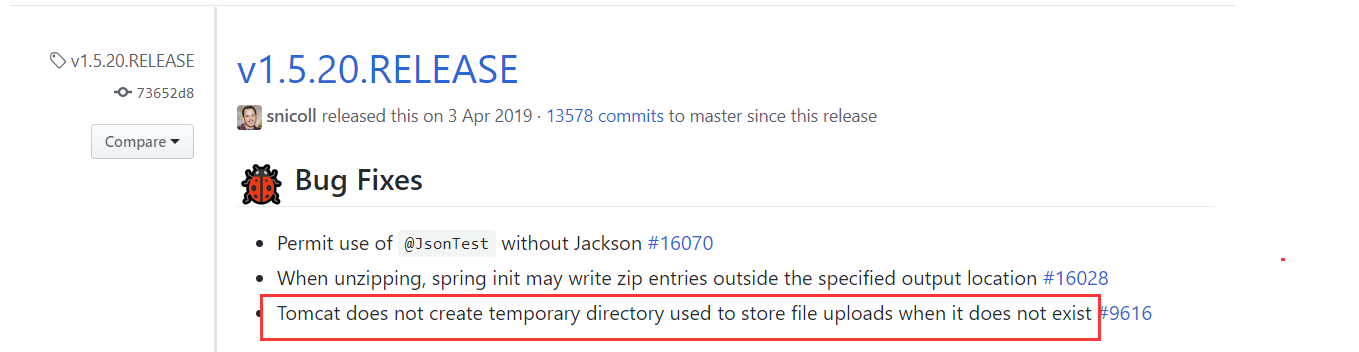
在 https://github.com/spring-projects/spring-boot/issues/9616,
在最底部我们可以
You can see the list of releases that contain the fix in the commit that closed this issue. In the 2.1.x line it was fixed in 2.1.4.
看到 2.1.4 版本已经解决了该问题。在 1系列的版本中,我们可以看到在 1.5.20 中也修复了,github对应的提交记录
参考:https://www.cnblogs.com/samtech/p/9490166.html
Spring boot内置Tomcat的临时目录被删除导致文件上传不了-问题解析的更多相关文章
- Spring boot 内置tomcat禁止不安全HTTP方法
Spring boot 内置tomcat禁止不安全HTTP方法 在tomcat的web.xml中可以配置如下内容,让tomcat禁止不安全的HTTP方法 <security-constraint ...
- 自定义Spring Boot内置tomcat的404页面
spring boot 的相关404页面配置都是针对项目路径下的(如果配置了 context-path) 在context-path不为空的情况下,如果访问路径不带context-path,这时候会显 ...
- Spring Boot内置Tomcat
Spring Boot默认支持Tomcat/Jetty/Undertow作为底层容器.在之前实战相关的文章中,可以看到引入spring-boot-starter-web就默认使用tomcat容器,这是 ...
- 配置spring boot 内置tomcat的accessLog日志
#配置内置tomcat的访问日志server.tomcat.accesslog.buffered=trueserver.tomcat.accesslog.directory=/home/hygw/lo ...
- SpringBoot内置Tomcat缓存文件目录被意外删除导致异常
在项目中,一般会将文件临时保存到缓存目录 当时使用 File.createTempFile("tmp", ext, (File) request.getServletContext ...
- springboot-为内置tomcat设置虚拟目录
需求 项目使用springboot开发,以jar包方式部署.项目中文件上传均保存到D判断下的upload目录下. 在浏览器中输入http://localhost:8080/upload/logo_1. ...
- 如何优雅的关闭基于Spring Boot 内嵌 Tomcat 的 Web 应用
背景 最近在搞云化项目的启动脚本,觉得以往kill方式关闭服务项目太粗暴了,这种kill关闭应用的方式会让当前应用将所有处理中的请求丢弃,响应失败.这种形式的响应失败在处理重要业务逻辑中是要极力避免的 ...
- Spring Boot 内嵌Tomcat的端口号的修改
操作非常的简单,不过如果从来没有操作过,也是需要查找一下资料的,所以,在此我简单的记录一下自己的操作步骤以备后用! 1:我的Eclipse版本,不同的开发工具可能有所差异,不过大同小异 2:如何进入对 ...
- Spring Boot内嵌Tomcat session超时问题
最近让Spring Boot内嵌Tomcat的session超时问题给坑了一把. 在应用中需要设置session超时时间,然后就习惯的在application.properties配置文件中设置如下, ...
随机推荐
- Beat our dice game and get the flag 击败我们的骰子游戏拿到旗子
文件名:ebCTF-Teaser-BIN100-Dice.exe 话不多说 用PEID一看没壳 拖进OD 让我们摇出31337这五个数字才能拿到正确的flag cmp dword ptr ss:[eb ...
- 在eclipse中用java调用python报错 Exception in thread "main" ImportError: Cannot import site module and its dependencies
最近做项目需要用java调用python,配置了jython后,运行了例子代码: 获得一个元组里面的元素: import org.python.util.PythonInterpreter; publ ...
- java小心机(2)| 重载和构造器的小细节
每天进步一点点,距离大腿又近一步! 阅读本文大概需要10分钟 java小心机,为你诉说java鲜为人知的一面 涉及基本数据类型的重载 基本类型能从一个"较小"的类型自动提升到&qu ...
- exp2:// 一次存储型XSS从易到难的挖掘过程
一日在某站点发现一个找茬活动,感觉是另类的src就参与了一下.就发生了这次有趣的XSS测试过程. 0×00 开始 (注意1)XSS不仅存在于页面上直观所在的位置,所有用户输入的信息都有可能通过不同形式 ...
- P1553 数字反转(升级版)
题目描述 给定一个数,请将该数各个位上数字反转得到一个新数. 这次与NOIp2011普及组第一题不同的是:这个数可以是小数,分数,百分数,整数.整数反转是将所有数位对调:小数反转是把整数部分的数反转, ...
- STM32学习笔记:基础例子
本例子代码参考了STM32库开发实战指南中的代码,由于使用的板子是尚学STM32F103ZET6,为了配合板上已有资源,也参考了其配套代码.为了便于书写文本,我尽量将代码都写到了一个文件中,这种方式是 ...
- 爬虫之协程,selenium
1.什么是代理?代理和爬虫之间的关联是什么? 2.在requests的get和post方法常用的参数有哪些?分别有什么作用?(四个参数) - url headers parmas/data proxi ...
- flask中使用SQLAlchemy操作mysql的一些注意事项和坑
一 ImportError: cannot import name 'db' 由于app最后才加载,所以其他文件,比如models.py不能从app.py导入任何变量, 要使用db可以先定义一个,之后 ...
- .net 项目更改默认命名空间
这个项目是我去年毕业设计做的项目,项目创建的时候由于手抖把Landlordtenant写成了 LandloRdtenant(R大写了),当时不知道如何改回来又担心改完之后报错也就没管了. 今天尝试使用 ...
- 集合详解之 Collection
集合详解之 Collection 先来看看集合的继承关系图,如下图所示: 其中: 外框为虚线的表示接口,边框为实线的表示类: 箭头为虚线的表示实现了接口,箭头为实线的表示继承了类. 为了方便理解,我隐 ...