
Android笔记(四十二) Android中的数据存储——SQLite(四)update
update方法的四个参数:
| update()方法参数 | 对应的sql部分 | 描述 |
| table | update table_name | 更新的表名 |
| values | set column=xxx | ContentValues |
| whereClause | where column | 修改条件 |
| whereArgs | where column = xx | 修改条件的参数 |
看代码:
MainActivity.java
package cn.lixyz.sqlite;

import android.app.Activity;

import android.content.ContentValues;

import android.content.Context;

import android.database.Cursor;

import android.database.sqlite.SQLiteDatabase;

import android.database.sqlite.SQLiteDatabase.CursorFactory;

import android.database.sqlite.SQLiteOpenHelper;

import android.os.Bundle;

import android.util.Log;

import android.view.View;

import android.widget.Button;

import android.widget.EditText;

import android.widget.Toast;

public class MainActivity extends Activity {

    private EditText name, age, paramter, originalAge, newAge;

    private Button insertButton, selectButton, paramterSelect, updateButton;

    private SQLiteDatabase database;

    private MySQLiteOpenHelper msop;

    public String inputSex;

    @Override

    protected void onCreate(Bundle savedInstanceState) {

        super.onCreate(savedInstanceState);

        setContentView(R.layout.activity_main);

        findView();

        msop = new MySQLiteOpenHelper(this, "user.db", null, 1);

        database = msop.getReadableDatabase();

    }

    private void findView() {

        name = (EditText) findViewById(R.id.name);

        age = (EditText) findViewById(R.id.age);

        insertButton = (Button) findViewById(R.id.insertButton);

        selectButton = (Button) findViewById(R.id.selectButton);

        paramter = (EditText) findViewById(R.id.paramter);

        paramterSelect = (Button) findViewById(R.id.paramterSelect);

        originalAge = (EditText) findViewById(R.id.originalAge);

        newAge = (EditText) findViewById(R.id.newAge);

        updateButton = (Button) findViewById(R.id.updateButton);

    }

    public void clickButton(View view) {

        switch (view.getId()) {

        case R.id.selectButton:

            selectData();

            break;

        case R.id.insertButton:

            insertData();

            break;

        case R.id.paramterSelect:

            paramterSelect();

            break;

        case R.id.updateButton:

            updateData();

            break;

        }

    }

    private void updateData() {

        String oldAge = originalAge.getText().toString();

        String updateAge = newAge.getText().toString();

        ContentValues cv = new ContentValues();

        cv.put("age", updateAge);

        String whereColumn = "age=?";// 修改条件

        String[] whereArgs = { oldAge };

        int i = database.update("user", cv, whereColumn, whereArgs);

        if (1 > 0) {

            Toast.makeText(MainActivity.this, "更新成功", Toast.LENGTH_SHORT).show();

        } else {

            Toast.makeText(MainActivity.this, "更新不成功", Toast.LENGTH_SHORT).show();

        }

    }

    private void paramterSelect() {

        String inputAge = paramter.getText().toString();

        Cursor c = database.rawQuery("select * from user where age>?", new String[] { inputAge });

        if (c.moveToFirst()) {

            do {

                int id = c.getInt(c.getColumnIndex("id"));

                String name = c.getString(c.getColumnIndex("name"));

                String age = c.getString(c.getColumnIndex("age"));

                Log.d("TTTT", "id=" + id + ",name=" + name + ",age=" + age);

            } while (c.moveToNext());

        }

        c.close();

    }

    private void insertData() {

        String inputAge = age.getText().toString();

        String inputName = name.getText().toString();

        ContentValues cv = new ContentValues();

        cv.put("name", inputName);

        cv.put("age", inputAge);

        database.insert("user", null, cv);

        Toast.makeText(MainActivity.this, "插入成功", Toast.LENGTH_SHORT).show();

        age.setText("");

        name.setText("");

    }

    private void selectData() {

        Cursor c = database.query("user", null, null, null, null, null, null);

        if (c.moveToFirst()) {

            do {

                int id = c.getInt(c.getColumnIndex("id"));

                String name = c.getString(c.getColumnIndex("name"));

                String age = c.getString(c.getColumnIndex("age"));

                Log.d("TTTT", "id=" + id + ",姓名=" + name + ",年龄=" + age);

            } while (c.moveToNext());

        }

        c.close();

    }

    class MySQLiteOpenHelper extends SQLiteOpenHelper {

        private static final String CREATE_USER = "create table user(id integer primary key autoincrement,name text,age text)";

        private Context mContext;

        public MySQLiteOpenHelper(Context context, String name, CursorFactory factory, int version) {

            super(context, name, factory, version);

            mContext = context;

        }

        @Override

        public void onCreate(SQLiteDatabase db) {

            db.execSQL(CREATE_USER);

        }

        @Override

        public void onUpgrade(SQLiteDatabase db, int oldVersion, int newVersion) {

            // TODO Auto-generated method stub

        }

    }

}
activity_main.xml
<LinearLayout xmlns:android="http://schemas.android.com/apk/res/android"

    xmlns:tools="http://schemas.android.com/tools"

    android:layout_width="match_parent"

    android:layout_height="match_parent"

    android:orientation="vertical"

    tools:context=".MainActivity" >

    <EditText

        android:id="@+id/name"

        android:layout_width="match_parent"

        android:layout_height="wrap_content"

        android:hint="输入姓名" />

    <EditText

        android:id="@+id/age"

        android:layout_width="match_parent"

        android:layout_height="wrap_content"

        android:hint="输入年龄" />

    <Button

        android:id="@+id/insertButton"

        android:layout_width="match_parent"

        android:layout_height="wrap_content"

        android:onClick="clickButton"

        android:text="点击插入" />

    <Button

        android:id="@+id/selectButton"

        android:layout_width="match_parent"

        android:layout_height="wrap_content"

        android:onClick="clickButton"

        android:text="点击查询" />

    <TextView

        android:id="@+id/text"

        android:layout_width="match_parent"

        android:layout_height="wrap_content"

        android:text="条件搜索" />

    <EditText

        android:id="@+id/paramter"

        android:layout_width="match_parent"

        android:layout_height="wrap_content"

        android:hint="您要搜多少岁以上的?" />

    <Button

        android:id="@+id/paramterSelect"

        android:layout_width="match_parent"

        android:layout_height="wrap_content"

        android:onClick="clickButton"

        android:text="点击搜索" />

    <TextView

        android:layout_width="match_parent"

        android:layout_height="wrap_content"

        android:text="update" />

    <LinearLayout

        android:layout_width="match_parent"

        android:layout_height="wrap_content"

        android:orientation="horizontal" >

        <EditText

            android:id="@+id/originalAge"

            android:layout_width="wrap_content"

            android:layout_height="wrap_content"

            android:hint="要修改的年龄" />

        <TextView

            android:layout_width="wrap_content"

            android:layout_height="wrap_content"

            android:text="修改为" />

        <EditText

            android:id="@+id/newAge"

            android:layout_width="wrap_content"

            android:layout_height="wrap_content"

            android:hint="新年龄" />

    </LinearLayout>

    <Button

        android:id="@+id/updateButton"

        android:layout_width="match_parent"

        android:layout_height="wrap_content"

        android:onClick="clickButton"

        android:text="UPDATE" />

</LinearLayout>
运行结果:
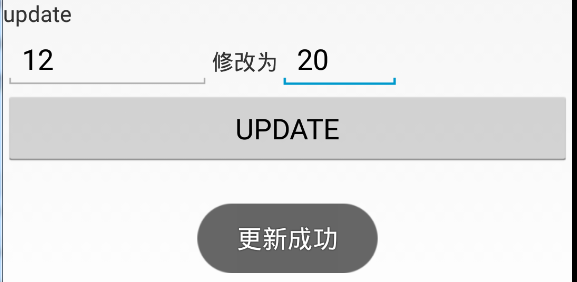
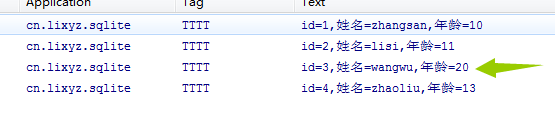
通过结果可以看到,将之前数据库内的年龄为12的修改为20
Android笔记(四十二) Android中的数据存储——SQLite(四)update的更多相关文章
- Android笔记(四十) Android中的数据存储——SQLite(二) insert
准备工作: 我们模拟一个注册的页面,先看UI 我们需要创建一个数据库:user,数据库包含表user,user表包含字段id.username.password.mobilephone MainAct ...
- Android笔记(四十四) Android中的数据存储——SQLite(六)整合
实现注册.登录.注销账户 MainActivity.java package cn.lixyz.activity; import android.app.Activity; import androi ...
- Android笔记(六十五) android中的动画——属性动画(propertyanimation)
补间动画只能定义起始和结束两个帧在“透明度”.“旋转”.“倾斜”.“位移”4个方面的变化,逐帧动画也只能是播放多个图片,无法满足我们日常复杂的动画需求,所以谷歌在3.0开始,推出了属性动画(prope ...
- Android笔记(六十二)网络框架volley
什么是Volley 很多时候,我们的APP都需要用到网络技术,使用HTTP协议来发送接收数据,谷歌推出了一个网络框架——volley,该框架适合进行数据量不大,但通信频繁的网络操作. 它的优点: (1 ...
- Android笔记(七十五) Android中的图片压缩
这几天在做图记的时候遇第一次遇到了OOM,好激动~~ 追究原因,是因为在ListView中加载的图片太大造成的,因为我使用的都是手机相机直接拍摄的照片,图片都比较大,所以在加载的时候会出现内存溢出,那 ...
- Android笔记(七十二) Style和Theme
我们尝尝需要使用setText.setColor.setTextSize等属性来设置控件的样式,但是每个控件都需要设置这些属性,工作量无疑是巨大的,并且后期维护起来也不方便. Style Androi ...
- Android笔记(六十六) android中的动画——XML文件定义属性动画
除了直接在java代码中定义动画之外,还可以使用xml文件定义动画,以便重用. 如果想要使用XML来编写动画,首先要在res目录下面新建一个animator文件夹,所有属性动画的XML文件都应该存放在 ...
- Android笔记(四十一) Android中的数据存储——SQLite(三)select
SQLite 通过query实现查询,它通过一系列参数来定义查询条件. 各参数说明: query()方法参数 对应sql部分 描述 table from table_name 表名称 colums s ...
- Android笔记(十二)AndroidManiFest.xml
AndroidManiFest.xml清单文件是每个Android项目所必须的,它是整个Android应用的全局描述文件.AndroidManiFest.xml清单文件说明了该应用的名称.所使用的图标 ...
随机推荐
- LODOP很简短的问答(纯文字)
打印机选择打印机,参考样例5,7http://www.c-lodop.com/LodopDemo.html打印机的一些优先级,参考http://www.c-lodop.com/blogs/Blog00 ...
- [LeetCode] 636. Exclusive Time of Functions 函数的独家时间
Given the running logs of n functions that are executed in a nonpreemptive single threaded CPU, find ...
- docker笔记2--镜像容器基本使用
1 docker的安装 系统:centos7 (1)配置好yum (2)yum -y install docker (3)查看状态 systemctl status docker 2 docker镜像 ...
- Oracle ROWNUM的陷阱
先抛出一个问题: 我有一张表T,现在我想对表中1/4的记录作UPDATE操作,我的SQL如下: Update t set col1='123' where mod(rownum,4)=1 我能够得到想 ...
- 使用 pthread_cancel 引入的死锁问题
先来说一下 pthread_cancel 基本概念. pthread_cancel 调用并不是强制终止线程,它只提出请求.线程如何处理 cancel 信号则由目标线程自己决定,可以是忽略.可以是立即终 ...
- java中的Stream流
java中的Stream流 说到Stream便容易想到I/O Stream,而实际上,谁规定"流"就一定是"IO流"呢?在Java 8中,得益于Lambda所带 ...
- 解决dubbo注册zookeeper默认内网ip注册
前端时间做新项目的时候遇到一个dubbo的一个问题,在我们项目搭建好后使用了其他同事的支付服务,支付服务架构的方式使用了dubbo服务的方式,使用zookeeper作为注册中心,我们新项目使用dubb ...
- 题解 P3957 【跳房子】
对于这题有一个不用单调队列并且不是玄学设置区间最大值的做法 这题校内模拟考的时候打二分+枚举,结果写炸了,跑过来看题解发现为什么他们的区间最大值都是 $ 1005 $ ???特别懵,其实我的代码在dp ...
- Linux04 目录的相关操作(mkdir、rmdir、rm、cp)
一.创建目录:mkdir mkdir 目录名 二.删除目录:rmdir / rm rmdir 目录名 rm -r 目录名 每一级子目录都会询问是否删除 rm -rf 目录名 慎用,给 ...
- Django项目常见面试问题
1.python中的lambda是什么意思,可以举例 匿名函数 a = lambda x:x+1 print(a(1)) 2.请写出以下代码执行的结果 class Parent(object): x ...