
Android StickyListHeadersListView头部悬停 分组列表实现
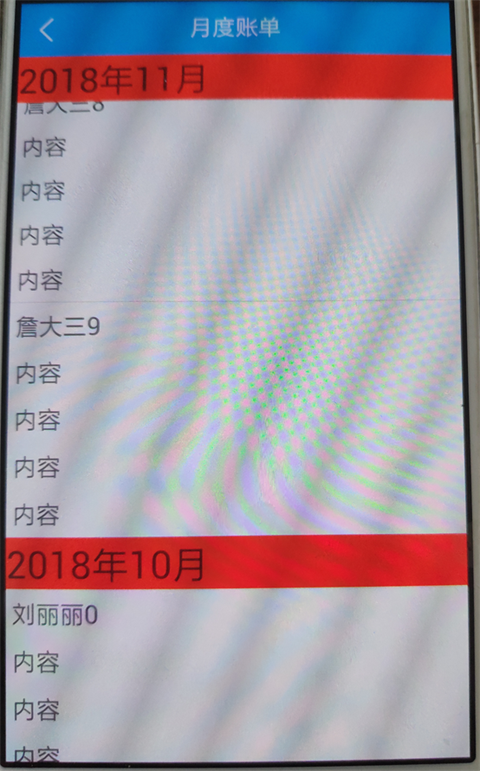
最近在做分组列表,头部悬停的效果,在github上就搜到了StickyListHeaders(https://github.com/emilsjolander/StickyListHeaders)这个库,自己动手实现了一个demo,实际效果图见文末。
引用类库:
implementation 'se.emilsjolander:stickylistheaders:2.7.0'
子布局item_pay_bill_month_body_list.xml:
<?xml version="1.0" encoding="utf-8"?>

<LinearLayout xmlns:android="http://schemas.android.com/apk/res/android"

    android:layout_width="match_parent"

    android:layout_height="match_parent"

    android:orientation="vertical">

    <TextView

        android:id="@+id/item_body_tv1"

        android:layout_width="match_parent"

        android:layout_height="wrap_content"

        android:layout_margin="5dp"

        android:text="内容"

        android:textSize="20sp" />

    <TextView

        android:id="@+id/item_body_tv2"

        android:layout_width="match_parent"

        android:layout_height="wrap_content"

        android:layout_margin="5dp"

        android:text="内容"

        android:textSize="20sp" />

    <TextView

        android:id="@+id/item_body_tv3"

        android:layout_width="match_parent"

        android:layout_height="wrap_content"

        android:layout_margin="5dp"

        android:text="内容"

        android:textSize="20sp" />

    <TextView

        android:id="@+id/item_body_tv4"

        android:layout_width="match_parent"

        android:layout_height="wrap_content"

        android:layout_margin="5dp"

        android:text="内容"

        android:textSize="20sp" />

    <TextView

        android:id="@+id/item_body_tv5"

        android:layout_width="match_parent"

        android:layout_height="wrap_content"

        android:layout_margin="5dp"

        android:text="内容"

        android:textSize="20sp" />

</LinearLayout>
头部布局item_pay_bill_month_header_list.xml:
<?xml version="1.0" encoding="utf-8"?>

<LinearLayout xmlns:android="http://schemas.android.com/apk/res/android"

    android:layout_width="match_parent"

    android:layout_height="match_parent"

    android:orientation="vertical">

    <TextView

        android:id="@+id/item_head_tv"

        android:layout_width="match_parent"

        android:layout_height="wrap_content"

        android:background="#f00"

        android:text="头部"

        android:textSize="30sp" />

</LinearLayout>
列表适配器PayBillMonthListAdapter.java:
package com.aldx.hccraftsman.adapter;

import android.content.Context;

import android.view.LayoutInflater;

import android.view.View;

import android.view.ViewGroup;

import android.widget.BaseAdapter;

import android.widget.TextView;

import com.aldx.hccraftsman.R;

import com.aldx.hccraftsman.model.PayBillMonth;

import java.util.ArrayList;

import java.util.List;

import se.emilsjolander.stickylistheaders.StickyListHeadersAdapter;

/**

 * author: chenzheng

 * created on: 2018/11/3 11:24

 * description:

 */

public class PayBillMonthListAdapter extends BaseAdapter implements StickyListHeadersAdapter {

    private Context context;

    private List<PayBillMonth> monthList = new ArrayList<>();

    public PayBillMonthListAdapter(Context context) {

        this.context = context;

    }

    public void setItems(List<PayBillMonth> monthList) {

        this.monthList = monthList;

        notifyDataSetChanged();

    }

    //设置数据的个数

    @Override

    public int getCount() {

        return monthList.size();

    }

    //设置item的条数

    @Override

    public Object getItem(int i) {

        return monthList.get(i);

    }

    //获得相应数据集合中特定位置的数据项

    @Override

    public long getItemId(int i) {

        return i;

    }

    //获得头部相应数据集合中特定位置的数据项

    @Override

    public long getHeaderId(int position) {

        return monthList.get(position).yearmonth;

    }

    //绑定内容的数据

    @Override

    public View getView(int i, View view, ViewGroup viewGroup) {

        BodyHolder bodyHolder = null;

        if (view == null) {

            view = LayoutInflater.from(context).inflate(R.layout.item_pay_bill_month_body_list, viewGroup, false);

            bodyHolder = new BodyHolder(view);

            view.setTag(bodyHolder);

        } else {

            bodyHolder = (BodyHolder) view.getTag();

        }

        //设置数据

        bodyHolder.bodyTv.setText(monthList.get(i).name);

        return view;

    }

    //绑定头部的数据

    @Override

    public View getHeaderView(int position, View convertView, ViewGroup parent) {

        HeadHolder headHolder = null;

        if (convertView == null) {

            convertView = LayoutInflater.from(context).inflate(R.layout.item_pay_bill_month_header_list, parent, false);

            headHolder = new HeadHolder(convertView);

            convertView.setTag(headHolder);

        } else {

            headHolder = (HeadHolder) convertView.getTag();

        }

        //设置数据

        headHolder.headTv.setText(monthList.get(position).monthName);

        return convertView;

    }

    //头部的内部类

    class HeadHolder {

        private TextView headTv;

        public HeadHolder(View itemHeadView) {

            headTv = (TextView) itemHeadView.findViewById(R.id.item_head_tv);

        }

    }

    //内容的内部类

    class BodyHolder {

        private TextView bodyTv;

        public BodyHolder(View itemBodyView) {

            bodyTv = (TextView) itemBodyView.findViewById(R.id.item_body_tv1);

        }

    }

}
PayBillMonthListActivity.java:
package com.aldx.hccraftsman.activity;

import android.content.Context;

import android.content.Intent;

import android.os.Bundle;

import android.view.View;

import android.widget.ImageView;

import android.widget.LinearLayout;

import android.widget.TextView;

import com.aldx.hccraftsman.R;

import com.aldx.hccraftsman.adapter.PayBillMonthListAdapter;

import com.aldx.hccraftsman.model.PayBillMonth;

import java.util.ArrayList;

import java.util.List;

import butterknife.BindView;

import butterknife.ButterKnife;

import butterknife.OnClick;

import se.emilsjolander.stickylistheaders.StickyListHeadersListView;

/**

 * author: chenzheng

 * created on: 2018/11/3 14:36

 * description:  月度账单

 */

public class PayBillMonthListActivity extends BaseActivity {

    @BindView(R.id.back_iv)

    ImageView backIv;

    @BindView(R.id.layout_back)

    LinearLayout layoutBack;

    @BindView(R.id.title_tv)

    TextView titleTv;

    @BindView(R.id.right_tv)

    TextView rightTv;

    @BindView(R.id.layout_right)

    LinearLayout layoutRight;

    @BindView(R.id.stickyListView)

    StickyListHeadersListView stickyListView;

    private String companyId;

    private List<PayBillMonth> list = new ArrayList<>();

    private PayBillMonthListAdapter payBillMonthListAdapter;

    @Override

    protected void onCreate(Bundle savedInstanceState) {

        super.onCreate(savedInstanceState);

        setContentView(R.layout.activity_pay_bill_month_list);

        companyId = getIntent().getStringExtra("companyId");

        ButterKnife.bind(this);

        initView();

        initData();

    }

    private void initData() {

        for (int i = 0; i < 10; i++) {

            PayBillMonth p1 = new PayBillMonth();

            p1.yearmonth = 201811;

            p1.monthName = "2018年11月";

            p1.name = "詹大三" + i;

            list.add(p1);

        }

        for (int i = 0; i < 7; i++) {

            PayBillMonth p1 = new PayBillMonth();

            p1.yearmonth = 201810;

            p1.monthName = "2018年10月";

            p1.name = "刘丽丽" + i;

            list.add(p1);

        }

        for (int i = 0; i < 2; i++) {

            PayBillMonth p1 = new PayBillMonth();

            p1.yearmonth = 201809;

            p1.monthName = "2018年09月";

            p1.name = "姜大成" + i;

            list.add(p1);

        }

        payBillMonthListAdapter.setItems(list);

    }

    private void initView() {

        titleTv.setText("月度账单");

        payBillMonthListAdapter = new PayBillMonthListAdapter(this);

        stickyListView.setAdapter(payBillMonthListAdapter);

    }

    @OnClick({R.id.layout_back, R.id.layout_right})

    public void onViewClicked(View view) {

        switch (view.getId()) {

            case R.id.layout_back:

                finish();

                break;

            case R.id.layout_right:

                break;

        }

    }

    public static void startActivity(Context context, String companyId) {

        Intent intent = new Intent(context, PayBillMonthListActivity.class);

        intent.putExtra("companyId", companyId);

        context.startActivity(intent);

    }

}
页面布局activity_pay_bill_month_list.xml:
<?xml version="1.0" encoding="utf-8"?>

<LinearLayout xmlns:android="http://schemas.android.com/apk/res/android"

    android:layout_width="match_parent"

    android:layout_height="match_parent"

    android:orientation="vertical">

    <include

        android:id="@+id/include_id"

        layout="@layout/titlelayout_theme"

        android:layout_width="match_parent"

        android:layout_height="wrap_content" />

    <se.emilsjolander.stickylistheaders.StickyListHeadersListView

        android:id="@+id/stickyListView"

        android:layout_width="match_parent"

        android:layout_height="match_parent" />

</LinearLayout>
实体类PayBillMonth:
package com.aldx.hccraftsman.model;

/**

 * author: chenzheng

 * created on: 2018/11/3 14:18

 * description:

 */

public class PayBillMonth {

    public long yearmonth;

    public String monthName;

    public String name;

    public String money;

    public String time;

}
效果图:
Android StickyListHeadersListView头部悬停 分组列表实现的更多相关文章
- Android ExpandableListView BaseExpandableListAdapter (类似QQ分组列表)
分组列表视图(ExpandableListView) 和ListView不同的是它是一个两级的滚动列表视图,每一个组可以展开,显示一些子项,类似于QQ列表,这些项目来至于ExpandableListA ...
- 史上最易懂——ReactNative分组列表SectionList使用详情及示例详解
React Native系列 <逻辑性最强的React Native环境搭建与调试> <ReactNative开发工具有这一篇足矣> <解决React Native un ...
- Android学习系列(11)--App列表之拖拽ListView(下)
接着上篇Android学习系列(10)--App列表之拖拽ListView(上)我们继续实现ListView的拖拽效果. 7.重写onTouchEvent()方法. 在这个方法中我们主要是处理 ...
- Android学习系列(10)--App列表之拖拽ListView(上)
研究了很久的拖拽ListView的实现,受益良多,特此与尔共飨. 鉴于这部分内容网上的资料少而简陋,而具体的实现过程或许对大家才有帮助,为了详尽而不失真,我们一步一步分析,分成两篇文章. ...
- [WP8.1UI控件编程]SemanticZoom控件实现分组列表
11.1.5 SemanticZoom实现分组列表 SemanticZoom控件可以让用户实现一种更加高级的列表,这种列表可以对列表的项目进行分组,同时这个SemanticZoom控件会提供两个具有相 ...
- Android Studio鼠标悬停显示注释
Android Studio鼠标悬停显示注释 在AS中配置 如果你想从网上查看注释,到这一步就操作完成. 下面说明让软件使用本地注释: 使用本地注释 以Windows为例: 找到下面文件 C:\Use ...
- Android实现SQLite数据库联系人列表
Android实现SQLite数据库联系人列表 开发工具:Andorid Studio 1.3 运行环境:Android 4.4 KitKat 工程内容 实现一个通讯录查看程序: 要求使用SQLite ...
- Android水平(横向)翻页列表,类似水平GridVIew
Android水平(横向)翻页列表,类似于水平方向的GridView,行列自定义,但要翻页切换,考虑加载性能,当Item数据很多时加载和翻页要流畅,翻页时要有动画效果,效果图如下: 实现方式: 1:翻 ...
- Android学习系列(15)--App列表之游标ListView(索引ListView)
游标ListView,提供索引标签,使用户能够快速定位列表项. 也可以叫索引ListView,有的人称也为Tweaked ListView,可能更形象些吧. 一看图啥都懂了: 1. ...
随机推荐
- C++2.0新特性(四)——<decltype、lambda>
一.关键字decltype 引入新关键字decltype可以让编译器找出表达式的类型,为了区别typeof,以下做一个概念区分: typeof 是一个一元运算,放在一个运算数之前,运算数可以是任意类型 ...
- Mysql中EXISTS关键字用法、总结
在做教务系统的时候,一个学生(alumni_info)有多个教育经历(alumni_education),使用的数据库是mysql,之前使用左链接查询的,发现数据量才只有几万条时,查询就很慢了,早上想 ...
- 读取本地word 浏览器下载(设置编码格式)
String filePath = "C:\\word\\报告.doc"; BufferedWriter bos = null; BufferedReader bis = null ...
- 如何在wcf中用net tcp协议进行通讯
快速阅读 如何在wcf中用net tcp协议进行通讯,一个打开Wcf的公共类.比较好好,可以记下来. 配置文件中注意配置 Service,binding,behaviors. Service中配置en ...
- 面向SOA服务架构的案例分析的研究
随着互联网应用的不断发展,网络业务的种类.数量不断增加,计算机网络管理的研究重 点正在由过去的个别资源监控.应用可用性阶段,向着如何通过网络获得所需业务.业务流程的优化.保障业务服务水平方向发展.但这 ...
- appium+python 微信小程序的自动化
sudo kill -9 $(lsof -i:8889 -t) mitmweb -p 8889 -s addons.py mitmdump -q -p 8889 -s addons.py http: ...
- 腾讯云CENTOS7安装MSSQL2017
腾讯云CENTOS7安装MSSQL2017 mkdir -p /opt/sqlserver2017cd /opt/sqlserver2017/ 下载离线包:wget https://packages. ...
- MySQL枚举类型enum字段在插入不在指定范围的值时, 是否是"插入了enum的第一个值"?
刚刚在看<<深入浅出MySQL>>一书的"ENUM类型"一节, 以下面的代码举例, 得出结论: "还可以看出对于不在ENUM指定范围内的值时, 并 ...
- MiniUI表单验证实践
学习实践: <form id="form2"> <div id="update_pas" style="width:380px&qu ...
- 解决:WdatePicker新增状态下只能取比当前月份大的月份,编辑状态下只能取比当前input里指定月份的月份大的值
onclick="WdatePicker({ dateFmt: 'yyyy-MM', autoPickDate: true, minDate: this.value==''?'%y-#{%M ...