
ubuntu14.04 部署nfs服务
安装nfs服务
apt-get install nfs-kernel-server
修改配置文件,共享目录为/var/www,*号可替换为客户端IP地址,*默认为任何部署了nfs客户端的IP可以挂载该目录(默认共享目录仅支持一台客户端挂载)
root@CS151230001:~# cat /etc/exports

# /etc/exports: the access control list for filesystems which may be exported

#		to NFS clients.  See exports(5).

#

# Example for NFSv2 and NFSv3:

# /srv/homes       hostname1(rw,sync,no_subtree_check) hostname2(ro,sync,no_subtree_check)

#

#/data2/html1/ *(rw,sync,no_root_squash,no_subtree_check)

# Example for NFSv4:

# /srv/nfs4        gss/krb5i(rw,sync,fsid=0,crossmnt,no_subtree_check)

# /srv/nfs4/homes  gss/krb5i(rw,sync,no_subtree_check)

#

/var/www/ *(insecure,rw,sync,no_root_squash,no_subtree_check)
配置固定端口,方便添加防火墙策略,尤其是云服务器
root@CS151230001:~# cat /etc/default/nfs-kernel-server

# Number of servers to start up

RPCNFSDCOUNT=8

# Runtime priority of server (see nice(1))

RPCNFSDPRIORITY=0

# Options for rpc.mountd.

# If you have a port-based firewall, you might want to set up

# a fixed port here using the --port option. For more information,

# see rpc.mountd(8) or http://wiki.debian.org/SecuringNFS

# To disable NFSv4 on the server, specify '--no-nfs-version 4' here

RPCMOUNTDOPTS="--manage-gids --port 32767"

# Do you want to start the svcgssd daemon? It is only required for Kerberos

# exports. Valid alternatives are "yes" and "no"; the default is "no".

NEED_SVCGSSD=""

# Options for rpc.svcgssd.

RPCSVCGSSDOPTS=""

# Options for rpc.nfsd.

RPCNFSDOPTS="--nfs-version 2,3,4 --debug --syslog"
root@CS151230001:~# cat /etc/default/nfs-common

# If you do not set values for the NEED_ options, they will be attempted

# autodetected; this should be sufficient for most people. Valid alternatives

# for the NEED_ options are "yes" and "no".

# Do you want to start the statd daemon? It is not needed for NFSv4.

NEED_STATD=

# Options for rpc.statd.

#   Should rpc.statd listen on a specific port? This is especially useful

#   when you have a port-based firewall. To use a fixed port, set this

#   this variable to a statd argument like: "--port 4000 --outgoing-port 4001".

#   For more information, see rpc.statd(8) or http://wiki.debian.org/SecuringNFS

STATDOPTS="--port 32765 --outgoing-port 32766"

# Do you want to start the gssd daemon? It is required for Kerberos mounts.

NEED_GSSD=
重启以下服务
/etc/init.d/rpcbind restart

/etc/init.d/nfs-kernel-server restart
重载配置文件
exportfs -rv
查询监听端口
rpcinfo -p
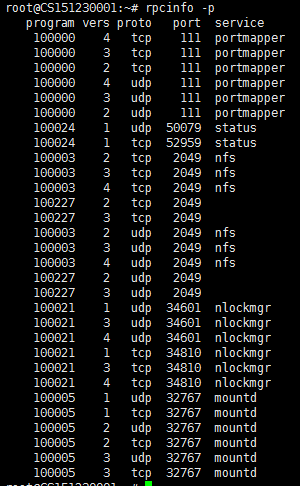
测试是否共享目录成功
showmount -e 服务器IP地址
参考:
https://blog.csdn.net/yuanhangq220/article/details/82421183
NFS挂载时出现"access denied by server while mounting"的解决方法
1、使用了非法端口,也就是使用了大于1024的端口。
这个错误,可以通过查看日志确认:
[root@local~ /]# cat /var/log/messages | grep mount
Jan 2 12:49:04 localhost mountd[1644]: refused mount request from 192.168.0.100 for /home/nfsshare/ (/home/nfsshare): illegal port 1689
解决办法:
修改配置文件/etc/exports,加入 insecure 选项,重启nfs服务,再尝试挂载。
/home/nfsshare/ *(insecure,rw,async,no_root_squash)
http://www.heminjie.com/system/linux/2998.html
ubuntu14.04 部署nfs服务的更多相关文章
- [原创]ubuntu14.04部署ELK+redis日志分析系统
ubuntu14.04部署ELK+redis日志分析系统 [环境] host1:172.17.0.4 搭建ELK+redis服务 host2:172.17.0.3 搭建logstash+nginx服务 ...
- ubuntu14.04 server ftp 服务安装配置详解
ubuntu14.04 server ftp 服务安装配置详解 cheungmine 2016-01-27 http://wiki.ubuntu.com.cn/Vsftpd 0 安装好vsftpd服务 ...
- day03 部署NFS服务
day03 部署NFS服务 NFS的原理 1.什么是NFS 共享网络文件存储服务器 2.NFS的原理 1.用户访问NFS客户端,将请求转化为函数 2.NFS通过TCP/IP连接服务端 3.NFS服务端 ...
- ubuntu14.04部署kickstart
转自:http://www.mamicode.com/info-detail-1646465.html kickstart用于在内网自动安装系统. 使用pxe安装系统需要安装dhcp,tftp,htt ...
- LINUX 系统下部署 NFS服务
NFS服务 NFS,是Network File System的简写,即网络文件系统.也被称为NFS: NFS允许一个系统在网络上与他人共享目录和文件. NFS通常运行于2049端口. 部署NFS 前提 ...
- Linux部署NFS服务共享文件
NFS(网络文件系统)用于linux共享文件 第1步:配置所需要的环境 使用两台Linux主机 主机名称 操作系统 IP地址 NFS Centos7 192.168.218.139 NFSa Cent ...
- ubuntu12.04配置NFS服务详解
1:安装nfs sudo apt-get install nfs-kernel-server 2:配置服务 sudo vim /etc/exports 在末尾添加 /home/jyg *(rw,syn ...
- 阿里云 Ubuntu14.04 部署 LAMP
1.更新软件源 sudo apt-get update 2.安装Apache sudo apt-get install apache2 3.查看Apache是否安装成功 apache2 –v 如下所示 ...
- CentOS7 部署nfs服务
参考博客 参考博客 https://blog.51cto.com/addam/1576144 错误1: 客户端挂载nfs报错mount: wrong fs type, bad option, bad ...
随机推荐
- Python Tkinter 之Listbox控件
Listbox为列表框控件,它可以包含一个或多个文本项(text item),可以设置为单选或多选.使用方式为Listbox(root,option...). 常用的参数列表如下: 一些常用的函数:
- IDEA修改Servlet的代码生成模板
file--->settings,打开settings面板
- 爬虫请求库之selenium
一.介绍 selenium最初是一个自动化测试工具,而爬虫中使用它主要是为了解决requests无法直接执行JavaScript代码的问题 selenium本质是通过驱动浏览器,完全模拟浏览器的操作, ...
- 【LEETCODE】55、数组分类,适中级别,题目:79、611、950
第950题,这题我是真的没想到居然会说使用队列去做,大神的答案,拿过来瞻仰一下 package y2019.Algorithm.array; import java.util.HashMap; imp ...
- 3.02定义常量之const
[注:本程序验证是使用vs2013版] #include <stdio.h> #include <stdlib.h> #include <string.h> #pr ...
- Java线程设计模式(五)
多线程的设计模式:Future模式.Master-Worker模式,生产消费者模式 public interface Data { String getRequest(); } public clas ...
- Java线程之间通讯(三)
使用wait和notify方法实现了线程间的通讯,都是Object 类的方法,java所有的对象都提供了这两个方法 1.wait和notify必须配合synchronized使用 2.wait方法释放 ...
- 如何更精准地设置 C# / .NET Core 项目的输出路径?(包括添加和删除各种前后缀)
原文:如何更精准地设置 C# / .NET Core 项目的输出路径?(包括添加和删除各种前后缀) 我们都知道可以通过在 Visual Studio 中设置输出路径(OutputPath)来更改项目输 ...
- java框架学习系列
这篇文章的目的主要是作为一个框架学习的索引,方便查找及顺序学习 一.struts2学习 1. java之struts框架入门教程 2. java之struts2的执行流程讲解 3. java之stru ...
- springboot笔记06——使用Thymeleaf模板引擎
前言 Springboot 推荐使用Thymeleaf做视图层.Thymeleaf支持 html 原型,然后在 html 标签里增加额外的属性来达到模板+数据的展示方式.浏览器解释 html 时会忽略 ...