
Ubuntu16.04安装Supervisor
安装
sudo apt-get install supervisor
启动,否则会报 unix:///tmp/supervisor.sock no such file
service supervisor start
或者
supervisord -c /etc/supervisor/supervisord.conf
生成配置文件
echo_supervisord_conf > /etc/supervisor/supervisord.conf
注意里面的注释去掉
[inet_http_server]         ; inet (TCP) server disabled by default

port=127.0.0.1:9001        ; (ip_address:port specifier, *:port for all iface)

username=user              ; (default is no username (open server))

password=123               ; (default is no password (open server))
配置文件路径
[include]

files = /etc/supervisor/conf.d/*.conf
查看状态
supervisorctl status #查看supervisorctl状态

supervisorctl start openfalcon #启动子进程

supervisorctl stop openfalcon  #关闭子进程

supervisorctl restart openfalcon #重启子进程
比如
lintong@master:~$ supervisorctl status

openfalcon                       RUNNING   pid 10759, uptime 0:18:46
配置文件在 /etc/supervisor 目录下
lintong@master:/etc/supervisor$ ls

conf.d  start_openfalcon.conf  supervisord.conf
内容
[program:openfalcon]

command = cd ~/software/open-falcon-v0.2.1 & open-falcon start

user = lintong

autostart = true

autoresart = true

stderr_logfile = /var/log/supervisor/openfalcon.stderr.log

stdout_logfile = /var/log/supervisor/openfalcon.stdout.log
重新加载配置
supervisorctl reload
更新配置
supervisorctl update
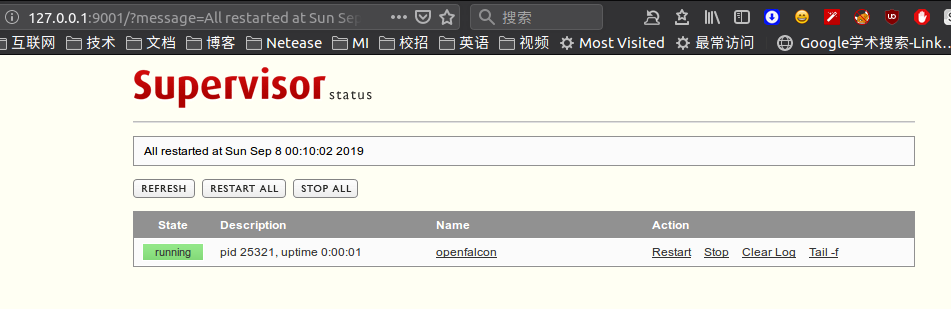
web界面,账号密码参考 /etc/supervisord.conf
localhost:9001
下面是几个例子
lintong@lintong-B250M-DS3H:/etc/supervisor/conf.d$ ls

es.conf  hadoop.conf  hive.conf  redis.conf
hadoop
[program:hadoop]

directory=/home/lintong/software/apache/hadoop-2.9.1

command = bash ./sbin/start-all.sh

user = lintong

autostart = true

autoresart = false

stderr_logfile = /var/log/supervisor/hadoop.stderr.log

stdout_logfile = /var/log/supervisor/hadoop.stdout.log
hive
[program:hive]

directory=/home/lintong/software/apache/apache-hive-2.3.3-bin

command = bash ./bin/hiveserver2 start

user = lintong

autostart = true

autoresart = true

stderr_logfile = /var/log/supervisor/hive.stderr.log

stdout_logfile = /var/log/supervisor/hive.stdout.log
es
[program:es]

directory=/home/lintong/software/apache/elasticsearch-6.2.4

command = bash ./bin/elasticsearch

user = lintong

autostart = true

autoresart = true

stderr_logfile = /var/log/supervisor/es.stderr.log

stdout_logfile = /var/log/supervisor/es.stdout.log
kafka_manager
其中的/bin/bash -c 'source "$0" && exec "$@"'是为了解决cant find command问题
[program:kafka-manager]

directory=/home/lintong/software/apache/kafka-manager-1.3.3.17/bin

command = /bin/bash -c 'source "$0" && exec "$@"' kafka-manager -Dconfig.file=/home/lintong/software/apache/kafka-manager-1.3.3.17/conf/application.conf -Dhttp.port=7778

user = lintong

autostart = true

autoresart = false

stderr_logfile = /var/log/supervisor/kafka_manager.stderr.log

stdout_logfile = /var/log/supervisor/kafka_manager.stdout.log
kibana
[program:kibana]

directory=/home/lintong/software/apache/kibana-6.2.4-linux-x86_64

command = bash ./bin/kibana

user = lintong

autostart = false

autoresart = true

stderr_logfile = /var/log/supervisor/kibana.stderr.log

stdout_logfile = /var/log/supervisor/kibana.stdout.log
zkui
[program:zkui]

directory=/home/lintong/software/zkui/target

command = java -jar zkui-2.0-SNAPSHOT-jar-with-dependencies.jar

user = lintong

autostart = false

autorestart = true

stderr_logfile = /var/log/supervisor/zkui.stderr.log

stdout_logfile = /var/log/supervisor/zkui.stdout.log
kafka-manager
[program:kafka-manager]

directory=/home/lintong/software/kafka-manager-1.3.3.17

command = bash ./bin/kafka-manager -Dconfig.file=/home/lintong/software/kafka-manager-1.3.3.17/conf/application.conf -Dhttp.port=7778

user = lintong

autostart = false

autorestart = true

stderr_logfile = /var/log/supervisor/kafka-manager.stderr.log

stdout_logfile = /var/log/supervisor/kafka-manager.stdout.log
Ubuntu16.04安装Supervisor的更多相关文章
- ubuntu16.04安装jdk,tomcat
ubuntu16.04安装jdk,tomcat 最近装了一下tomcat,网上的教程很多,我也试了很多次,但是有一些教程关于tomcat配置是错误的,让我走上了歧途.差点重装系统,还好王总及时出手帮助 ...
- Ubuntu16.04 安装openjdk-7-jdk
Ubuntu16.04 安装openjdk-7-jdk sudo apt-get install openjdk-7-jre 或者sudo apt-get install openjdk-7-jdk ...
- Ubuntu16.04安装GTK3主题:OSX-Arc
Ubuntu16.04安装GTK3主题:OSX-Arc GTK3主题:OSX-Arc描述: 前几个月,Gnome3.20升3.22的时候,出现了大量主题崩溃的现象,其中包括Arc.Flatabulou ...
- Ubuntu16.04安装opencv for python/c++
Ubuntu16.04安装opencv for python/c++ 网上关于opencv的安装已经有了不少资料,但是没有一篇资料能让我一次性安装成功,因此花费了大量时间去解决各种意外,希望这篇能给一 ...
- ubuntu16.04安装不上有道词典的解决办法
转自:http://www.linuxdiyf.com/linux/21143.html ubuntu16.04安装不上有道词典,提示: le@hu-pc:~/下载$ sudo dpkg -i you ...
- Ubuntu16.04安装mongodb
Ubuntu16.04安装mongodb copy from: http://blog.csdn.net/zhushh/article/details/52451441 1.导入软件源的公钥 sudo ...
- 【Tools】ubuntu16.04安装搜狗输入法
Ubuntu16,04 安装搜狗输入法 1.下载搜狗输入法的安装包 下载地址为:http://pinyin.sogou.com/linux/ 2.按键Ctr+Alt+T打开终端,输入以下命令切换到下载 ...
- Ubuntu16.04安装cuda9.0+cudnn7.0
Ubuntu16.04安装cuda9.0+cudnn7.0 这篇记录拖了好久,估计是去年6月份就已经安装过几遍,然后一方面因为俺比较懒,一方面后面没有经常在自己电脑上跑算法,比较少装cuda和cudn ...
- Ubuntu16.04安装TensorFlow及Mnist训练
版权声明:本文为博主原创文章,欢迎转载,并请注明出处.联系方式:460356155@qq.com TensorFlow是Google开发的开源的深度学习框架,也是当前使用最广泛的深度学习框架. 一.安 ...
随机推荐
- Unexpected EOF in archive 或者 rmtlseek not stopped at a record boundary
多半都是文件在传输.复制的时候,发生了损坏: 尽量cp不要用mv 其次,注意文件的大小:
- 使用MPU6050陀螺仪自制Arduino数字量角器
MPU6050惯性单元是一个3轴加速度计和一个3轴陀螺仪组合的单元.它还包含温度传感器和DCM,可执行复杂的任务. MPU6050通常用于制作无人机和其他远程控制机器人,如自平衡机器人.在本篇文章中, ...
- python测试开发django-67.templates模板变量取值
前言 django 的模板里面变量取值是通过句点语法来取值,就是一个点(.)符号.取值的对象也可以是字符串,int类型,list列表,字典键值对,也可以是一个类的实例对象. views视图 比如我在 ...
- Object类.时间日期类.System类.Stringbuilder类.包装类
Object类 java.lang.Object类是java语言中的根类,即所有类的父类.它中描述的所有方法都可以使用.在对象实例化的时候,最终找的父类就是Object. 如果一个类没有特别指定父类, ...
- django小知识(2)
昨日内容回顾 1.choices参数 class Userinfo(models.Model): username = ... age = ... gender_choice = ( (1,'male ...
- React Virtual DOM Explained in Simple English
If you are using React or learning React, you must have heard of the term “Virtual DOM”. Now what is ...
- 【测试题】sequence
题目 给定一个长度为n(n<=5000)的由['0'..'9']组成的字符串s,v[i,j]表示由字符串s第i到第j位组成的十进制数字. 将它的某一个上升序列定义为:将这个字符串切割成m段不含前 ...
- 使用mustache 做为docker容器运行动态配置工具
很多时候我们需要在启动容器的时候基于配置文件运行,如果在配置比较简单的时候我们可以通过环境变量 注入,同时当前12 factors 越来越融入大家的开发中了(对于配置通过环境变量处理),但是好多老的软 ...
- .NET总结--ASP.NET工作原理
前言 前前后后写了不少关于某些技术啥的博客,一直在追新求深,而真正使用上的时候才发现了解的太少太少了,从事.net开发三年有余了不是它不行了而是我坚持不住了,如今不得不向生活低头,这个系列作为三年技术 ...
- 【JZOJ6214】【20190614】tetris
题目 这是一道和俄罗斯方块有关的有趣题目 底面宽度为\(N\),高度无限,初始时方块高度为\(A_i\) 你可以决定每次会下落一个\(1 \times K\)或者\(K \times 1\)的方块 你 ...