
Ubuntu16.04安装Supervisor
安装
sudo apt-get install supervisor
启动,否则会报 unix:///tmp/supervisor.sock no such file
service supervisor start
或者
supervisord -c /etc/supervisor/supervisord.conf
生成配置文件
echo_supervisord_conf > /etc/supervisor/supervisord.conf
注意里面的注释去掉
[inet_http_server]         ; inet (TCP) server disabled by default

port=127.0.0.1:9001        ; (ip_address:port specifier, *:port for all iface)

username=user              ; (default is no username (open server))

password=123               ; (default is no password (open server))
配置文件路径
[include]

files = /etc/supervisor/conf.d/*.conf
查看状态
supervisorctl status #查看supervisorctl状态

supervisorctl start openfalcon #启动子进程

supervisorctl stop openfalcon  #关闭子进程

supervisorctl restart openfalcon #重启子进程
比如
lintong@master:~$ supervisorctl status

openfalcon                       RUNNING   pid 10759, uptime 0:18:46
配置文件在 /etc/supervisor 目录下
lintong@master:/etc/supervisor$ ls

conf.d  start_openfalcon.conf  supervisord.conf
内容
[program:openfalcon]

command = cd ~/software/open-falcon-v0.2.1 & open-falcon start

user = lintong

autostart = true

autoresart = true

stderr_logfile = /var/log/supervisor/openfalcon.stderr.log

stdout_logfile = /var/log/supervisor/openfalcon.stdout.log
重新加载配置
supervisorctl reload
更新配置
supervisorctl update
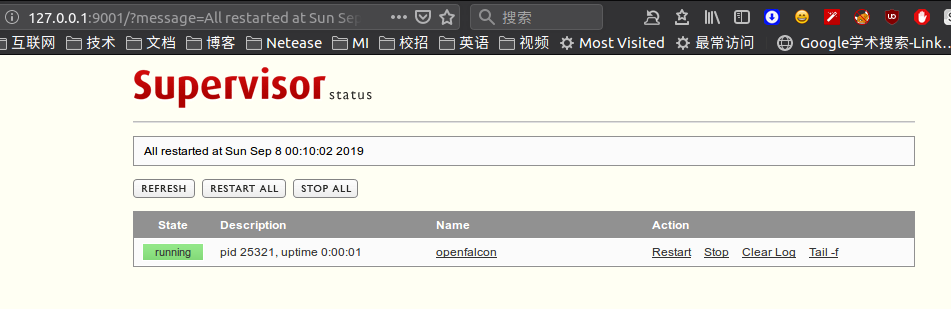
web界面,账号密码参考 /etc/supervisord.conf
localhost:9001
下面是几个例子
lintong@lintong-B250M-DS3H:/etc/supervisor/conf.d$ ls

es.conf  hadoop.conf  hive.conf  redis.conf
hadoop
[program:hadoop]

directory=/home/lintong/software/apache/hadoop-2.9.1

command = bash ./sbin/start-all.sh

user = lintong

autostart = true

autoresart = false

stderr_logfile = /var/log/supervisor/hadoop.stderr.log

stdout_logfile = /var/log/supervisor/hadoop.stdout.log
hive
[program:hive]

directory=/home/lintong/software/apache/apache-hive-2.3.3-bin

command = bash ./bin/hiveserver2 start

user = lintong

autostart = true

autoresart = true

stderr_logfile = /var/log/supervisor/hive.stderr.log

stdout_logfile = /var/log/supervisor/hive.stdout.log
es
[program:es]

directory=/home/lintong/software/apache/elasticsearch-6.2.4

command = bash ./bin/elasticsearch

user = lintong

autostart = true

autoresart = true

stderr_logfile = /var/log/supervisor/es.stderr.log

stdout_logfile = /var/log/supervisor/es.stdout.log
kafka_manager
其中的/bin/bash -c 'source "$0" && exec "$@"'是为了解决cant find command问题
[program:kafka-manager]

directory=/home/lintong/software/apache/kafka-manager-1.3.3.17/bin

command = /bin/bash -c 'source "$0" && exec "$@"' kafka-manager -Dconfig.file=/home/lintong/software/apache/kafka-manager-1.3.3.17/conf/application.conf -Dhttp.port=7778

user = lintong

autostart = true

autoresart = false

stderr_logfile = /var/log/supervisor/kafka_manager.stderr.log

stdout_logfile = /var/log/supervisor/kafka_manager.stdout.log
kibana
[program:kibana]

directory=/home/lintong/software/apache/kibana-6.2.4-linux-x86_64

command = bash ./bin/kibana

user = lintong

autostart = false

autoresart = true

stderr_logfile = /var/log/supervisor/kibana.stderr.log

stdout_logfile = /var/log/supervisor/kibana.stdout.log
zkui
[program:zkui]

directory=/home/lintong/software/zkui/target

command = java -jar zkui-2.0-SNAPSHOT-jar-with-dependencies.jar

user = lintong

autostart = false

autorestart = true

stderr_logfile = /var/log/supervisor/zkui.stderr.log

stdout_logfile = /var/log/supervisor/zkui.stdout.log
kafka-manager
[program:kafka-manager]

directory=/home/lintong/software/kafka-manager-1.3.3.17

command = bash ./bin/kafka-manager -Dconfig.file=/home/lintong/software/kafka-manager-1.3.3.17/conf/application.conf -Dhttp.port=7778

user = lintong

autostart = false

autorestart = true

stderr_logfile = /var/log/supervisor/kafka-manager.stderr.log

stdout_logfile = /var/log/supervisor/kafka-manager.stdout.log
Ubuntu16.04安装Supervisor的更多相关文章
- ubuntu16.04安装jdk,tomcat
ubuntu16.04安装jdk,tomcat 最近装了一下tomcat,网上的教程很多,我也试了很多次,但是有一些教程关于tomcat配置是错误的,让我走上了歧途.差点重装系统,还好王总及时出手帮助 ...
- Ubuntu16.04 安装openjdk-7-jdk
Ubuntu16.04 安装openjdk-7-jdk sudo apt-get install openjdk-7-jre 或者sudo apt-get install openjdk-7-jdk ...
- Ubuntu16.04安装GTK3主题:OSX-Arc
Ubuntu16.04安装GTK3主题:OSX-Arc GTK3主题:OSX-Arc描述: 前几个月,Gnome3.20升3.22的时候,出现了大量主题崩溃的现象,其中包括Arc.Flatabulou ...
- Ubuntu16.04安装opencv for python/c++
Ubuntu16.04安装opencv for python/c++ 网上关于opencv的安装已经有了不少资料,但是没有一篇资料能让我一次性安装成功,因此花费了大量时间去解决各种意外,希望这篇能给一 ...
- ubuntu16.04安装不上有道词典的解决办法
转自:http://www.linuxdiyf.com/linux/21143.html ubuntu16.04安装不上有道词典,提示: le@hu-pc:~/下载$ sudo dpkg -i you ...
- Ubuntu16.04安装mongodb
Ubuntu16.04安装mongodb copy from: http://blog.csdn.net/zhushh/article/details/52451441 1.导入软件源的公钥 sudo ...
- 【Tools】ubuntu16.04安装搜狗输入法
Ubuntu16,04 安装搜狗输入法 1.下载搜狗输入法的安装包 下载地址为:http://pinyin.sogou.com/linux/ 2.按键Ctr+Alt+T打开终端,输入以下命令切换到下载 ...
- Ubuntu16.04安装cuda9.0+cudnn7.0
Ubuntu16.04安装cuda9.0+cudnn7.0 这篇记录拖了好久,估计是去年6月份就已经安装过几遍,然后一方面因为俺比较懒,一方面后面没有经常在自己电脑上跑算法,比较少装cuda和cudn ...
- Ubuntu16.04安装TensorFlow及Mnist训练
版权声明:本文为博主原创文章,欢迎转载,并请注明出处.联系方式:460356155@qq.com TensorFlow是Google开发的开源的深度学习框架,也是当前使用最广泛的深度学习框架. 一.安 ...
随机推荐
- 团队——Beta版本发布
目录 最棒团队成员信息 一.7次冲刺博客链接 二.解决的Alpha版本问题 / Beta计划任务(与Alpha版本不同点) 二.项目本次α版本的发布地址.下载安装说明 四.PM最终报告(详细报告在各冲 ...
- Android adb连接后adb devices显示unauthorized解决办法
adb链接手机后,显示unauthorized.原因是命令所在目录不对,这个adb devices命令是在夜神模拟器目录下执行的,所以出现该问题,切换目录后解决: 如果切换目录后仍然不行:重启adb. ...
- CentOS 7.2搭建FastDFS 分布式文件系统,实现高可用集群
分布式集群搭建结构 双Tracker 2组Group 轮询存储策略 Keepalived+Nginx高可用 Nginx缓存 4个存储节点 一. 集群规划清单 1.安装清单 软件名称 版本 百度云盘存放 ...
- Jmeter 分布式部署-远程服务器的搭建与设置
1.在附属机上安装完成jmeter,且配置好环境变量 在/opt/tools目录下解压jmeter文件 然后配置环境变量 vi /root/.bash_profile export JMETER_ ...
- Zipkin 的 Docker 镜像使用
1.Zipkin 在 dockerhub 上网址:https://hub.docker.com/r/openzipkin/zipkin 2.下载镜像 docker pull openzipkin/zi ...
- mysql 的 docker image 使用(官方文档节选)
1.创建一个 mysql 实例: $ docker run --name some-mysql -e MYSQL_ROOT_PASSWORD=my-secret-pw -d mysql:tag 2.创 ...
- vue 实战总结
相对angular 和react ,本人比较喜欢vue,现在的工作项目也在用vue,前两个有朋友在问我在使用vue中有没有遇到一些很难解决的问题,一下我也只能说出一两个,所以索性就抽时间总结一下我在项 ...
- Spring搬迁
Spring简介 加载bean流程 Bean的生命周期 双亲委派 自定义类加载器 Spring事务 异步Async Spring设计模式 Spring单例 SpringMVC流程 备注:app ...
- 《Elasticsearch实战》读书笔记
遗留问题: 1._source字段和field字段的区别 2.q和search的区别(查询请求中) 3.输入关键字的大小写,参考prefix查询,match_phrase_prefix查询(4.4.2 ...
- 【Beta】“北航社团帮”测试报告——小程序v2.0与网页端v1.0
目录 测试计划.过程和结果 后端测试--单元测试与覆盖率 后端测试--压力测试 展示部分数据 平均数据 前端测试--小程序v2.0 授权登录与权限检查 新功能的测试 兼容性测试 性能测试 前端测试-- ...