
【Vue】Re17 Router 第四部分(参数传递,守卫函数)
一、案例搭建
新建Profile组件
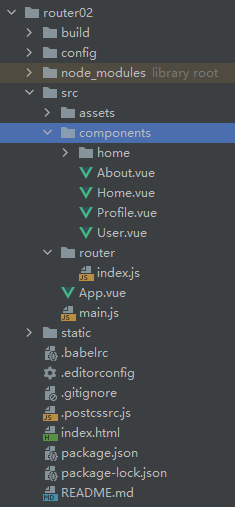
组件写好内容后配置路由
  {

    path : '/profile',

    component : () => import('../components/Profile')

  }
二、参数配置
App.vue配置profile
我们可以使用对象对to的url进行封装
path属性就是url
query属性就是我们的请求数据【给地址的请求参数】
<template>

  <div id="app">

    <router-link to="/home" tag="button" >去首页</router-link>

    <router-link to="/about" tag="button" >去关于</router-link>

    <router-link :to="/user/+username" tag="button" >用户管理</router-link>

    <router-link :to="ppp" tag="button" >profile</router-link>

<!--    <button @click="toHome">首页</button>-->

<!--    <button @click="toAbout">关于</button>-->

    <router-view></router-view>

  </div>

</template>

<script>

export default {

  name: 'App',

  data()  {

    return {

      username : 'aaa',

      ppp : {

        path : '/profile',

        query : {

          name : 'aaa',

          age : 22,

          gender : true

        }

      }

    }

  }

  // methods : {

  //   toHome () {

  //     this.$router.push('/home');

  //   },

  //   toAbout () {

  //     this.$router.push('/about');

  //   }

  // }

}

</script>

<style>

#app {

  font-family: 'Avenir', Helvetica, Arial, sans-serif;

  -webkit-font-smoothing: antialiased;

  -moz-osx-font-smoothing: grayscale;

  text-align: center;

  color: #2c3e50;

  margin-top: 60px;

}

</style>
可以看到参数这样传递过来了
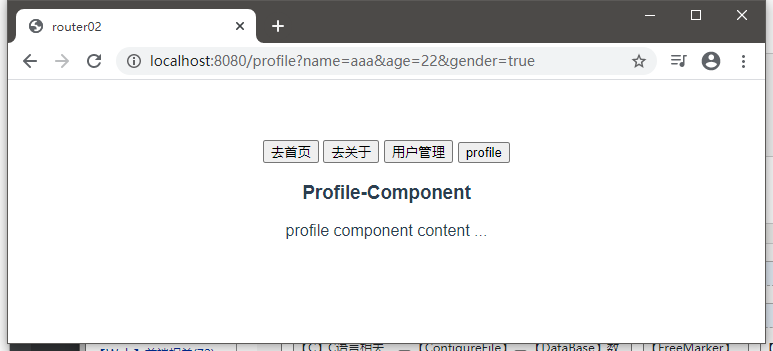
如果要取出请求参数,则可以这样:
写在方法里面获取,记得先从this对象引用
<template>

  <div>

    <h3>Profile-Component</h3>

    <p>

      profile component content ... <br>

      name -> {{$route.query.name}} <br>

      age -> {{$route.query.age}} <br>

      gender -> {{$route.query.gender}}

    </p>

  </div>

</template>

<script>

export default {

  name: "Profile"

}

</script>

<style scoped>

</style>
路由的代码写法:
<template>

  <div id="app">

    <router-link to="/home" tag="button" >去首页</router-link>

    <router-link to="/about" tag="button" >去关于</router-link>

    <router-link :to="/user/+username" tag="button" >用户管理</router-link>

<!--    <router-link :to="ppp" tag="button" >profile</router-link>-->

    <button @click="toProfile" >profile</button>

<!--    <button @click="toHome">首页</button>-->

<!--    <button @click="toAbout">关于</button>-->

    <router-view></router-view>

  </div>

</template>

<script>

export default {

  name: 'App',

  data()  {

    return {

      username : 'aaa',

      ppp : {

        path : '/profile',

        query : {

          name : 'aaa',

          age : 22,

          gender : true

        }

      }

    }

  },

  methods : {

    toHome () {

      this.$router.push('/home');

    },

    toAbout () {

      this.$router.push('/about');

    },

    toProfile() {

      this.$router.push(this.ppp);

    }

  }

}

</script>

<style>

#app {

  font-family: 'Avenir', Helvetica, Arial, sans-serif;

  -webkit-font-smoothing: antialiased;

  -moz-osx-font-smoothing: grayscale;

  text-align: center;

  color: #2c3e50;

  margin-top: 60px;

}

</style>
三、$route & $router的区别?
router是全局路由控制器对象
route是当前活跃的路由对象,是routes属性数组中的一个元素,也可以是router对象内部的一个属性对象
https://www.bilibili.com/video/BV15741177Eh?p=113
四、导航守卫方法
1、回顾Vue实例的生命周期
  created() {

    // todo ... Vue创建时调用此函数,

  },

  mounted() {

    // todo ... Vue实例开始挂载虚拟DOM时调用此函数

  },

  updated() {

    // todo ... ... 组件数据发生更新时调用

  },
点击不同的子组件,更换标签文本的需求:
每一次访问不同的组件都会调用created函数
所以可以:
created() {

  // todo ... Vue创建时调用此函数,

  document.title = '关于-About';

},
但是这样N个组件就要写N次了,都是路由跳转的方式进行的
那么只要在监听路由跳转,在那个时刻把title组件的某一个数据就行了
import Vue from 'vue';

import Router from 'vue-router';

Vue.use(Router);

/* 方式一 */

const Home = resolve => {

  require.ensure(

    ['../components/Home.vue'],

    () => resolve(require('../components/Home.vue'))

  )

}

/* 方式二 */

const About = resolve => {

  require(['../components/About.vue'],resolve);

}

/* 方式三 */

const User = () => import('../components/User.vue');

const News = () => import('../components/home/News');

const Messages = () => import('../components/home/Messages');

const routerList = [

  /* 重定向首页路由配置 */

  {

    path : '', /* 缺省值默认指向 '/' */

    redirect : '/home',

  },

  {

    path : '/home', /* 为什么这里是path不是url? 因为完整的url还包括 项目根url(协议头 + 域名(或者IP地址) + 端口号 + 项目根名称路径(可选))  */

    name : 'home', /* 名字可以不加 */

    component : Home, /* 使用懒加载后component这里高亮显示 */

    children : [ /* 设置子路由 */

      {

        path : '', /* 这个缺省默认/home */

        redirect : 'news',

      },

      {

        path : 'news', /* 等同于 /home + /news = /home/news 这里不需要再加斜杠了 */

        component : News,

        meta : {

          title : '新闻列表 - News'

        }

      },

      {

        path : 'messages',

        component : Messages,

        meta : {

          title : '消息列表 - Messages'

        }

      }

    ],

    meta : {

      title : '首页 - Home'

    }

  },

  {

    path : '/about',

    name : 'about',

    component : About,

    meta : {

      title : '关于 - About'

    }

  },

  {

    path : '/user/:username', /* 动态路径:冒号+字符 */

    name : 'user',

    component : User,

    meta : {

      title : '用户 - User'

    }

  },

  {

    path : '/profile',

    component : () => import('../components/Profile'),

    meta : {

      title : '档案 - Profile'

    }

  }

]

const router = new Router({

  routes : routerList,

  mode : 'history',

});

/* 在创建实例后调用 */

router.beforeEach((to, from, next) => {

  // 调用这个方法以为着重写,一定要调用 next方法, 否则路由无法跳转

  // from 来自于哪个路由对象

  // to 跳转到哪个路由对象

  // 按照案例的需求,就可以这样设置了 route就是一个个routes的元素对象

  // 可以设置一个meta属性对象,放入title属性和对应的值即可

  document.title = to.meta.title;

  // 但是子路由没有命名的话会早曾undefined显示,因为meta属性为空

  // 解决方案 document.title = to.matched[0].meta.title;

  // 跳转要放在最后,不然是跳完了再执行标签的文本更换

  next();

});

export default router;
afterEach守卫方法:
router.afterEach((to, from) => {

  // 因为是跳转之后调用,自然而然的不需要next函数了

  // TODO ... ...

});
上述的两个都是全局守卫方法,在路由配置中重写并调用
五、局部路由守卫
详细资料:
https://router.vuejs.org/guide/advanced/navigation-guards.html
You can define beforeEnter guards directly on a route's configuration object:
const router = new VueRouter({

  routes: [

    {

      path: '/foo',

      component: Foo,

      beforeEnter: (to, from, next) => {

        // ...

      }

    }

  ]

})
In-Component Guards
Finally, you can directly define route navigation guards inside route components (the ones passed to the router configuration) with the following options:
beforeRouteEnterbeforeRouteUpdatebeforeRouteLeave
const Foo = {

  template: `...`,

  beforeRouteEnter (to, from, next) {

    // called before the route that renders this component is confirmed.

    // does NOT have access to `this` component instance,

    // because it has not been created yet when this guard is called!

  },

  beforeRouteUpdate (to, from, next) {

    // called when the route that renders this component has changed.

    // This component being reused (by using an explicit `key`) in the new route or not doesn't change anything.

    // For example, for a route with dynamic params `/foo/:id`, when we

    // navigate between `/foo/1` and `/foo/2`, the same `Foo` component instance

    // will be reused (unless you provided a `key` to `<router-view>`), and this hook will be called when that happens.

    // has access to `this` component instance.

  },

  beforeRouteLeave (to, from, next) {

    // called when the route that renders this component is about to

    // be navigated away from.

    // has access to `this` component instance.

  }

}
【Vue】Re17 Router 第四部分(参数传递,守卫函数)的更多相关文章
- 四 Vue学习 router学习
index.js: 按需加载组件: const login = r => require.ensure([], () => r(require('@/page/login')), 'log ...
- vue之router钩子函数
模块一:全局导航钩子函数 1.vue router.beforeEach(全局前置守卫) beforeEach的钩子函数,它是一个全局的before 钩子函数, (before each)意思是在 每 ...
- Vue的路由动态重定向和导航守卫
一.重定向 重定向也是通过 routes 配置来完成,下面例子是从 /a 重定向到 /b: const router = new VueRouter({ routes: [ { path: '/a', ...
- 详解vue 路由跳转四种方式 (带参数)
详解vue 路由跳转四种方式 (带参数):https://www.jb51.net/article/160401.htm 1. router-link ? 1 2 3 4 5 6 7 8 9 10 ...
- Vue学习笔记-Vue.js-2.X 学习(四)===>脚手架Vue-CLI(基本工作和创建)
(五) 脚手架Vue-CLI 一 Vue-CLI前提(nodejs和webpack) 二 Vue学习-nodejs按装配置,Node.js 就是运行在服务端的 JavaScript. 1. 去nod ...
- 三、vue之router
三.vue之router 此时vue的脚手架.创建项目已经完成. ... vue的运行流程 index.html-->main.js-->App.vue-->router/index ...
- Vue中router两种传参方式
Vue中router两种传参方式 1.Vue中router使用query传参 相关Html: <!DOCTYPE html> <html lang="en"> ...
- Vue基础系列(四)——Vue中的指令(上)
写在前面的话: 文章是个人学习过程中的总结,为方便以后回头在学习. 文章中会参考官方文档和其他的一些文章,示例均为亲自编写和实践,若有写的不对的地方欢迎大家和我一起交流. VUE基础系列目录 < ...
- vue 中router.go;router.push和router.replace的区别
vue 中router.go:router.push和router.replace的区别:https://blog.csdn.net/div_ma/article/details/79467165 t ...
- 【vue】 router.beforeEach
import store from '@/store' const Vue = require('vue') const Router = require('vue-router') Vue.use( ...
随机推荐
- JavaScript语法形式3 外链式
定义 script 标签,在 script 标签中,通过src属性导入外部js文件,并且加载执行外部js文件中国的程序代码内容 因为代码执行顺序问题,一般定义 script 标签 在 body标签 ...
- React事件处理 事件绑定 事件对象
React 元素的事件处理和 DOM 元素的很相似,但是有一点语法上的不同: React 事件的命名采用小驼峰式,而不是纯小写. onClick onChange 使用 JSX 语法时你需要传入一个 ...
- 打开 gpedit.msc 组策略时弹出错误提示,"找不到资源 string.Advanced_EnableSSL3Fallback ”。
原因是升级到 IE9 或者 IE 11 语言包没有及时更新. 解决方案一:用360再打补丁. 方案二:未尝试. https://www.microsoft.com/en-us/download/con ...
- H5弹窗底层滑动
H5弹窗底层滑动 背景 产品提出H5 弹出窗滑动时,底层页面也会跟随滑动,需要调整禁止底层滑动,增加用户体验. 问题产生原因 ios 滑动时有回弹效果 顶层元素滑动默认行为 解决办法 阻止元素的默认( ...
- IDEA安装配置
1.安装IDEA选择免费体验 2.下载对应版本的破解补丁 agent.jar -2.1 将agent.jar补丁和important.txt放置到idea安装目录 3.修改VMoption javaa ...
- Linux驱动中的异步函数(aio_read和aio_write)
Linux驱动中的异步函数(aio_read和aio_write) 我们可以在signal_handler使用了read和write函数处理设备文件的读写操作.然而这两个函数可以分别用aio_read ...
- Linux 获取 指定目录 下的 最大子目录深度
命令 function getDirMaxDepth() { folder_name="$1" if [ ! -d "$folder_name" ];then ...
- selenium无头浏览器
from selenium.webdriver import Edge # 在这里导入浏览器设置相关的类 from selenium.webdriver.edge.options import Opt ...
- 【创龙全国产T3核心板】赋能工业领域新发展
在工业5.0时代浪潮持续推进并具备确定性的时代背景下,工业领域创新升级的需求日益增长,为满足各种工业环境下的应用需求,面向工业领域,创龙科技推出了基于全志T3处理器的元器件全国产化工业级核心板--SO ...
- linux 清理 pyinstaller 打包程序运行留下的临时文件
前言 pyinstaller 打包的 python 二进制可执行程序运行的时候,会在 /tmp 目录下生成 _MEI* (*指的是随机数字)文件夹, 如果程序没有正常退出或者终止了,_MEI* 文件夹 ...