
Azure – Key Vault Certificate
前言
之前有介绍过读写 Certificate Store, 但在 production server 经常会遇到权限的问题.
为了一劳永逸, 可以考虑把 Certificate 放到 Azure Key Vault 里, 然后通过 API 去拿.
这样做的另一个好处是对 Server 依赖更少.
主要参考:
How can I create an X509Certificate2 object from an Azure Key Vault KeyBundle
Azure Key Vault Certificate client library for .NET
Azure Setup
去 Key Vault 页面点击 import

选择 import 添加名字密码就可以了.
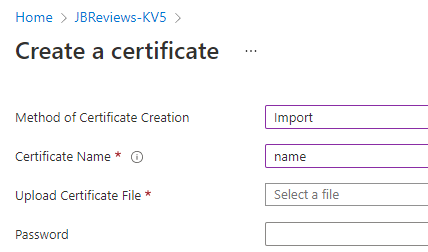
Azure CLI
az keyvault certificate import --vault-name "MyProject-KV" --name "oidc-encryption" --file "C:\oidc-encryption.pfx" --password "mypassword"
ASP.NET Core Setup
install nuget
dotnet add package Azure.Identity

dotnet add package Azure.Security.KeyVault.Certificates

dotnet add package Azure.Security.KeyVault.Secrets
get certificate from Azure
var certificateClient = new CertificateClient(new Uri("https://kv-name.vault.azure.net/"), new DefaultAzureCredential());

var secretClient = new SecretClient(new Uri("https://kv-name.vault.azure.net/"), new DefaultAzureCredential());

var certResponse = await certificateClient.GetCertificateAsync("Certificate Name");

var identifier = new KeyVaultSecretIdentifier(certResponse.Value.SecretId);

var secretResponse = await secretClient.GetSecretAsync(identifier.Name, identifier.Version);

var secret = secretResponse.Value;

var privateKeyBytes = Convert.FromBase64String(secret.Value);

var certificate = new X509Certificate2(rawData: privateKeyBytes, password: (string?)null, keyStorageFlags: X509KeyStorageFlags.MachineKeySet | X509KeyStorageFlags.EphemeralKeySet);
list all certificate
AsyncPageable<CertificateProperties> allCertificates = client.GetPropertiesOfCertificatesAsync();

await foreach (CertificateProperties certificateProperties in allCertificates)

{

    Console.WriteLine(certificateProperties.Name);

}
注意它返回的是一个叫 AsyncPageable 的冬冬. 它不是很好操作.
要好的调用体验可以参考: Use System.Linq.Async with AsyncPageable
import certificate to Azure
TODO...
Azure – Key Vault Certificate的更多相关文章
- 【Azure 环境】把OpenSSL生产的自签名证书导入到Azure Key Vault Certificate中报错
问题描述 通过本地生成的自签名证书导入到Azure Key Vault Certificate报错. 错误信息 the specified PEM X.509 certificate content ...
- 【Azure Developer - 密钥保管库 】使用 Python Azure SDK 实现从 Azure Key Vault Certificate 中下载证书(PEM文件)
问题描述 在Azure Key Vault中,我们可以从Azure门户中下载证书PEM文件到本地. 可以通过OpenSSL把PFX文件转换到PEM文件.然后用TXT方式查看内容,操作步骤如下图: Op ...
- The thumbprint of same asymmetric key is not same in 'SQL Server Connector for Microsoft Azure Key Vault' 1.0.4.0 and 'SQL Server Connector for Microsoft Azure Key
https://support.microsoft.com/en-us/help/4470999/db-backup-problems-to-sql-server-connector-for-azur ...
- Azure Key Vault (3) 在Azure Windows VM里使用Key Vaule
<Windows Azure Platform 系列文章目录> 本章我们介绍如何在Azure Windows VM里面,使用.NET使用Azure Key Vault 我们需要对Key V ...
- Azure Key Vault (2) 使用Azure Portal创建和查看Azure Key Vault
<Windows Azure Platform 系列文章目录> 请注意: 文本仅简单介绍如何在Azure Portal创建和创建Key Vault,如果需要结合Application做二次 ...
- Azure Key Vault (1) 入门
<Windows Azure Platform 系列文章目录> 为什么要使用Azure Key Vault? 我们假设在微软云Azure上有1个场景,在Windows VM里面有1个.NE ...
- 【Azure Developer】Python代码通过AAD认证访问微软Azure密钥保管库(Azure Key Vault)中机密信息(Secret)
关键字说明 什么是 Azure Active Directory?Azure Active Directory(Azure AD, AAD) 是 Microsoft 的基于云的标识和访问管理服务,可帮 ...
- 【Azure Developer】解决Azure Key Vault管理Storage的示例代码在中国区Azure遇见的各种认证/授权问题 - C# Example Code
问题描述 使用Azure密钥保管库(Key Vault)来托管存储账号(Storage Account)密钥的示例中,从Github中下载的示例代码在中国区Azure运行时候会遇见各种认证和授权问题, ...
- 【Azure 环境】Azure Key Vault (密钥保管库)中所保管的Keys, Secrets,Certificates是否可以实现数据粒度的权限控制呢?
问题描述 Key Vault (密钥保管库) 能不能针对用户授权实现指定用户只能访问某个或某些特定的key? 如当前有两个用户(User1, User2),在Key Vault中有10个Key,Use ...
- Azure Key Vault(二)- 入门简介
一,引言 在介绍 Azure Key Vault 之前,先简单介绍一下 HSM(硬件安全模块). -------------------- 我是分割线 -------------------- 1,什 ...
随机推荐
- 免费CDN使用整理
免费CDN使用整理 最近在使用web优化的时候,需要用到cdn,遇到了一些问题,比如某些cdn在特定的条件下访问不同,整理一波免费的CDN,任君采撷 名称 国家 链接 测速 特色 UNPKG 国外 h ...
- webpack4.15.1 学习笔记(三) — 模块热替换HMR
目录 模块热替换 HMR HMR监听文件变化 HMR 修改样式表 模块热替换 HMR 允许在运行时更新各种模块,而无需进行完全刷新.不适用于生产环境,意味着应当只在开发环境使用.启用HMR实际上就是更 ...
- AI时代你一定要知道的Agent概念
这两年,随着人工智能(AI)和计算能力的发展,AI应用的落地速度大大加快.以ChatGPT为代表的AI应用迅速火遍全球,成为打工人的常用工具.紧接着,多模态.AI Agent等各种高大尚的名词也逐渐进 ...
- OpenGL之ShadowMap
流程:先创建一个RenderTexture,然后用灯光的视口渲染. 然后切换到正常相机,进行渲染,使用RenderTexture中的深度或者颜色纹理,然后还原当前顶点在灯光中的深度,两者对比,比缓存中 ...
- win10安装和使用wireshark
win10安装和使用wiresharkhttps://blog.csdn.net/qq_34732729/article/details/105126146https://blog.csdn.net/ ...
- AMD 驱动安装 error 192解决问题
AMD 驱动安装 error 192解决问题 环境:win10专业版.自动更新已禁止.硬件安装设置[是](window自动下载驱动) [以下环境均在安全模式下进行 (win+r msconfig,安全 ...
- 【FastDFS】06 SpringBoot实现上传
创建SpringBoot工程: 再导入所需要的依赖: <dependency> <groupId>net.oschina.zcx7878</groupId> < ...
- tensorflow1.x——如何在C++多线程中调用同一个session会话
相关内容: tensorflow1.x--如何在python多线程中调用同一个session会话 ================================================= 从 ...
- python编程中的circular import问题
循环引入,circular import是编程语言中常见的问题,在C语言中我们可以使用宏定义来处理,在c++语言中我们可以使用宏定义和类的预定义等方式来解决,那么在python编程中呢? 其实在pyt ...
- java多线程之自定义线程池
1.背景 线程池.....大家常用.... 自己搞一个,顺便练习一下多线程编程 2.自定义线程代码 2.1.拒绝策略接口 @FunctionalInterface public interface M ...