
HTML / CSS – Email Marketing HTML Template
前言
虽然现在的 Email Client 有在进步, 但是比起 browser 还是差太远了. 假如你用 HTML5 + CSS3 的方式去写 Email Template 的话是不行的.
这篇特地学习一下如何写好 Email Marketing HTML Template.
参考
Youtube – The RIGHT WAY to Build HTML Email Templates 2022
Youtube – HTML Email Template Built the RIGHT WAY - 2022! (主要参考)
HTML and CSS in Emails: What Works in 2022?
Email Client Testing Explained (一些 checker 确保写的没有错)
Mailtrap HTML Email Checker (我在用的 checker)
概念
Email Client 有超级无敌多的 CSS 是不支持的, 而且即便它支持, 也可能需要 follow 一些特定条件.
所以一个好的思路是, 只要你不知道它能不能用, 那就是不能用. 只用那些教程里面教的方法去做就好了.
给几个例子, 感受一下它有多糟糕:
1. 不要用 div, 全部用 table.
2. 不要用 marigin, 用 padding, 而且只用在特定 element 上用, 比如 td, span 之类的.
3. 只用原始的 font family 比如 serif, san-serif
4. 可以用 attribute 实现就不要用 style, 比如 table width="100%"
5. 只能用 inline style
DOCTYPE, html, meta
DOCTYPE
我们写网页的 DOCTYPE 是这样的
<!DOCTYPE html>
但在 email client, 这个是不 ok 的.
参考: Which Doctype Should I Use in HTML Email?
要用 XHTML 1.0 Transitional doctype
<!DOCTYPE html PUBLIC "-//W3C//DTD XHTML 1.0 Transitional//EN" "http://www.w3.org/TR/xhtml1/DTD/xhtml1-transitional.dtd">
html
<html xmlns="http://www.w3.org/1999/xhtml">
meta
<meta http-equiv="content-type" content="text/html; charset=UTF-8">
提醒, IE=edge 和 viewport 和平常的网页是一样的
<meta http-equiv="X-UA-Compatible" content="IE=edge" />

<meta name="viewport" content="width=device-width, initial-scale=1.0" />
Standard CSS Reset
body {

  margin: 0;

}

table {

  border-spacing: 0;

}

td {

  padding: 0;

}

img {

  border: 0;

}
注: 上面写的是 CSS Style 而不是 inline style, 那是因为我用 Gulp 打包. 最终它会变成 inline style 的. 参考: Gulp for inline style email template
大体结构
写网站一般上的结构类似下面这样
<body>

  <header></header>

  <main>

    <section>

      <div class="container grid">

        <div class="left-column"></div>

        <div class="right-column"></div>

      </div>

    </section>

  </main>

  <footer></footer>

</body>
container 通常会有 max-width, margin-inline: auto (for 居中), 然后 column 就用 grid 1fr, 1fr 这样搞布局.
而 Email Client 差很多...
<body>

  <center> <!--main wrapper-->

    <table> <!--main-->

      <tr><td></td></tr> <!--section / header-->

      <tr> <!--section -->

        <td>

          <table></table> <!-- 下面会讲 -->

        </td>

      </tr>

      <tr><td></td></tr> <!--section -->

      <tr><td></td></tr> <!--section / footer -->

    </table>

  </center>

</body>
1. 没有 div, 基本上全部都是 table > tr > td (经常会出现只有 1 个 tr 1 个 td 但依然得写整个 table 结构, 相当繁琐)
2. <center> 会把里面的 table 居中. 相等于 table margin-inline: auto. (Email Client 是无法写 margin 的, 要做 spacing 靠 padding)
3. wrapper 负责整个 body 的 background-color
4. main 是所以内容的 container, 通常 max-width: 600px
5. main 里面就是每一个 "section" 了, 里面再开一个 table for 内容
6. 提醒: table width 默认是 hug content 哦, 通常需要 set 成 100% 如果要 td 平均的话 table-layout: fixed
接着 section 里的 table 长这样
<table class="two-column">

  <tr>

    <td>

      <table class="column">

        <tr>

          <td>

            <!-- 内容 -->

              <h1></h1>

              <p></p>

          </td>

        </tr>

      </table>

      <table class="column">

        <tr>

          <td>

            <!-- 内容 -->

            <a href=""><img src="" alt=""></a>

            <a href=""><img src="" alt=""></a>

          </td>

        </tr>

      </table>

    </td>

  </tr>

</table>
看你需要多少 column, 就开多少 table
以上就是大体的结构. 概念就是 nested table 很多.
如何做 RWD & Spacing & Alignment
用 padding 做 spacing
把 table.column 变成 display: inline-block 做 RWD
text-align, verical-align 以外. 如果想居中可以靠 padding 推. (因为大部分 dimension 都是写死的, 要居中可以硬硬算出来)
看 Youtube – HTML Email Template Built the RIGHT WAY - 2022! 就能体会它怎样做 RWD, Spacing, Alignment 了.
可以用的 CSS
width : px, %
max-width
padding (apply to td), 支持 shorthand
background-color: rgba, hex
color
box-shadow
font-size
display
不可用 CSS
text-align (用 td attribute align 代替)
vertical-align (用 td attribute valigh 代替)
white-space: preline (用 <br> 代替)
可以用的 Attribute
td height, align, valign
img width
table width
CSS – 冷知识 – font-size: 0 clear anchor spacing between
Mailtrap HTML Email Checker
很好的工具. 可以检查我们写的 HTML 对不对. Free version 有使用 limit. 但基本够用
Sign in 好了之后去 Control Panel 拿 username password
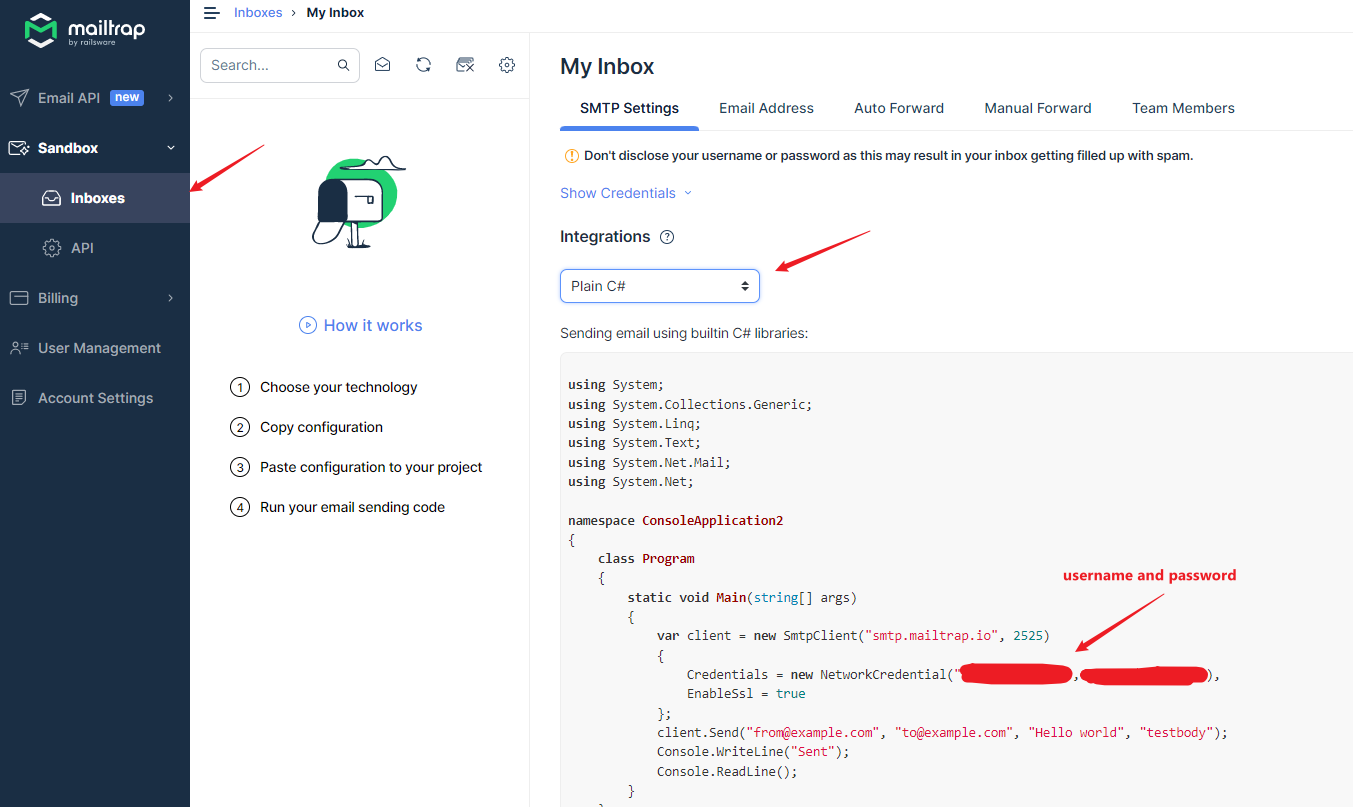
下面是 MailKit SMTP Client 演示代码


var username = "abc";

var password = "xyz";

var htmlFile = @"C:\path\email-template.html";

using var client = new SmtpClient();

await client.ConnectAsync(

    host: "smtp.mailtrap.io",

    port: 2525,

    options: MailKit.Security.SecureSocketOptions.StartTls

);

await client.AuthenticateAsync(username, password);

var message = new MimeMessage();

message.From.Add(new MailboxAddress("", "from@example.com"));

message.To.Add(new MailboxAddress("", "to@example.com"));

var builder = new BodyBuilder

{

    HtmlBody = await System.IO.File.ReadAllTextAsync(htmlFile, System.Text.Encoding.UTF8),

    TextBody = "Test Email Only"

};

message.Subject = "Hello world";

message.Body = builder.ToMessageBody();

await client.SendAsync(message);

await client.DisconnectAsync(quit: true);
发送之后, 就可以到 inbox 查看了
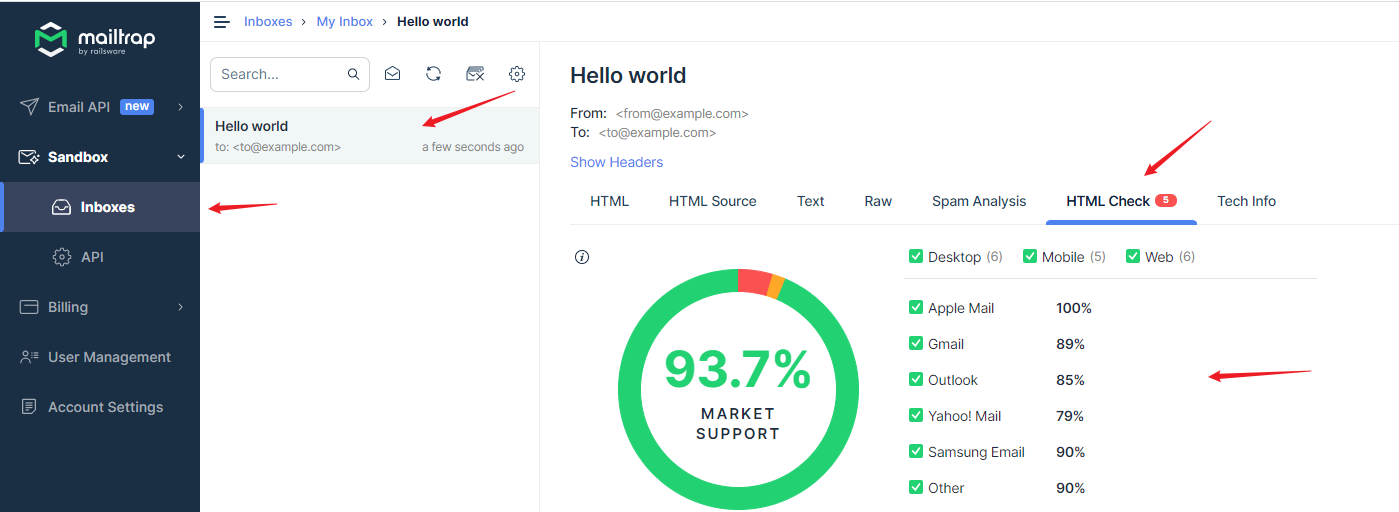
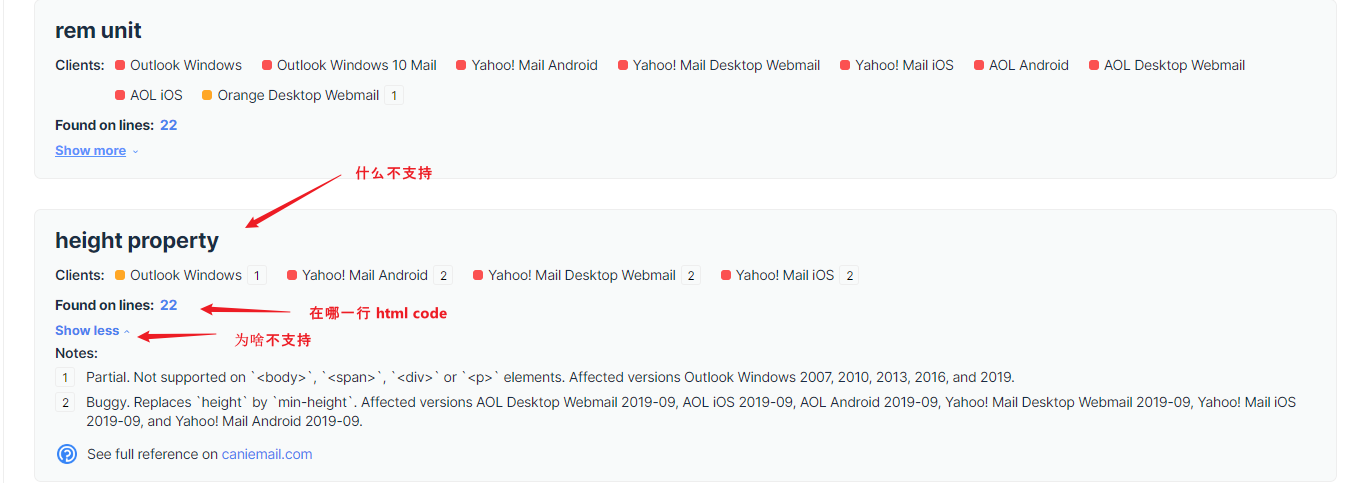
它下面会逐个列出有问题的. 红色是不支持, 黄色是 partial 部分支持
总结
我还没有机会真的做一个 Marketing Email. 目前只是用来做 forgot password 这类 internal 自己用的.
所以 design 再丑也无所谓. 以后做了美美的在来完整这篇.
HTML / CSS – Email Marketing HTML Template的更多相关文章
- html & email template
html & email template inline style build tools https://templates.mailchimp.com/getting-started/h ...
- [TypeStyle] Generate static css + html files using TypeStyle
You can easily use TypeStyle to build static html files with encapsulated CSS. You can use this patt ...
- Marketing with Microsoft Dynamics CRM IDEA CONFERENCE
Object:Marketing with Microsoft Dynamics CRM IDEA CONFERENCE 24 SEPTEMBER 2015 | BROADCAST ONLINE ...
- How to Verify Email Address
http://www.ruanyifeng.com/blog/2017/06/smtp-protocol.html 如何验证 Email 地址:SMTP 协议入门教程 https://en.wiki ...
- webpack4 单独抽离打包 css 的新实现
webpack4 单独抽离打包 css 的新实现 前言 之前我们使用的打包 css 无非两种方式:① 将 css 代码打包进 入口 js 文件中:② 使用第三方插件(extract-text-webp ...
- 四、Vue过渡与动画、过渡css类名、自定义指定、过滤器
一.过渡 动画 1.1简单的过渡动画使用 parent.vue [0]定义一个待显示的数据 [1]定义一个显示隐藏flag [2]使用动画过滤标签,name用来连接style样式:v-show用来控制 ...
- css 实现输入效果
<template> <h1>Pure CSS Typing animation.</h1> </template> <script> ...
- git全局配置
使用git的童鞋都知道,git是非常好的版本管理工具,工具再好要想用的得心应手还是要下凡功夫的,比如可以通过对git的全局配置文件.gitconfig进行适当的配置,可以在日常项目开发中节省很多的时间 ...
- discuz默认模板文件结构详解-模板文件夹介绍
| — template — default 系统内置风格模板(默认风格)| — template — default – discuz_style_default.xml 风格安装文件,可用 ...
- 02: vue.js常用指令
目录:Vue其他篇 01: vue.js安装 02: vue.js常用指令 目录: 1.1 vuejs简介 1.2 选择器:根据id.class等查找 1.3 静态绑定数据 data 1.4 插值 { ...
随机推荐
- Linux 文件夹和文件操作【Linux 常用命令系列一】
〇.前言 本文首先介绍了 Linux 中文件的结构,将全部文件夹罗列并介绍了大概的用途: 然后通过实例介绍了文件夹相关的常用操作,仅供参考. 一.Linux 系统的文件结构 列一下系统全部文件夹: / ...
- PHP 缓存技术
PHP 缓存介绍 什么是缓存 数据交换的缓冲区(称作Cache) 临时文件交换区 缓存作用 减少网络延迟,加快页面打开速度 减少数据查询次数,降低数据库压力 降低系统负荷,极大的提升系统性能 常用缓存 ...
- oeasy教您玩转vim - 25 - 更多颜色
更多颜色 回忆上节课内容 我们上次深入了配色方案 定义了自己的配色方案 oeasy 建立了自己的配色 oeasy 在状态栏应用了自己的配色 明确能用的颜色 先胡乱地尝试一下修改颜色代码 hi ...
- Known框架实战演练——进销存系统需求
概述 该项目是一个开源.简易.轻量级的进销存管理系统,作为Known框架的实战演练项目. 项目代码:JxcLite 开源地址: https://gitee.com/known/JxcLite 功能模块 ...
- abc--cf训练日常总结
ABC 最近遇到好多思维和位运算的题目不会做,特地过来总结一些小小的知识点. 思维题目 https://atcoder.jp/contests/abc353/tasks/abc353_c 这道题目要求 ...
- .NET 窗口/屏幕截图
图像采集源除了显示控件(上一篇<.NET 控件转图片>有介绍从界面控件转图片),更多的是窗口以及屏幕. 窗口截图最常用的方法是GDI,直接上Demo吧: 1 private void Gd ...
- Jmeter JDBC连接配置
JDBC连接配置(JDBC Connection Configuration),用于创建数据库连接,后续可对数据库进行增删查等操作.和组件[JDBC请求(JDBC Request)]搭配使用 组件路径 ...
- 【Java】SPI机制
SPI全称: 服务供应商接口 Service Provider Interface 服务发现机制 入门概念视频来自于: https://www.bilibili.com/video/BV1E44y1N ...
- 【Docker】06 部署挂载本地目录的Nginx
1.拉取Nginx镜像: docker pull nginx:1.19 2.生成一个测试的Nginx容器: docker run --rm --name nginx-test -p 8080:80 - ...
- ubuntu18.04server系统(cuda11.1)环境下进行mindspore_gpu_1.5版本源码编译
注意: 经过多次尝试发现mindspore_gpu的源码编译必须有sudo权限,否则就会报错. 软硬件环境: 操作系统:Ubuntu18.04.6 (全新系统) CPU:i7 9700k GPU: ...