
WPF 切换主题使用 luna 复古版本
本文告诉大家如何在 WPF 里面使用 luna 等复古主题
今天在 lsj 说他准备优化 WPF 的程序集时,准备删除 luna 等程序集时,找到了一段有趣的注释,发现在 WPF 里面可以通过一些有趣的反射的方法修改主题,让应用使用 luna 的主题,实现复古的界面
使用方法非常简单,在 App.xaml.cs 的构造函数里面,添加如下代码即可
        public App()

        {

            SetTheme("luna", "normalcolor");

        }

        /// <summary>

        /// Sets the WPF system theme.

        /// </summary>

        /// <param name="themeName">The name of the theme. (ie "aero")</param>

        /// <param name="themeColor">The name of the color. (ie "normalcolor")</param>

        /// Copy https://github.com/danielmoore/SystemThemeChange/blob/master/App.xaml.cs

        public static void SetTheme(string themeName, string themeColor)

        {

            const BindingFlags staticNonPublic = BindingFlags.Static | BindingFlags.NonPublic;

            var presentationFrameworkAsm = Assembly.GetAssembly(typeof(Window));

            var themeWrapper = presentationFrameworkAsm.GetType("MS.Win32.UxThemeWrapper");

            var isActiveField = themeWrapper.GetField("_isActive", staticNonPublic);

            var themeColorField = themeWrapper.GetField("_themeColor", staticNonPublic);

            var themeNameField = themeWrapper.GetField("_themeName", staticNonPublic);

            // Set this to true so WPF doesn't default to classic.

            isActiveField.SetValue(null, true);

            themeColorField.SetValue(null, themeColor);

            themeNameField.SetValue(null, themeName);

        }
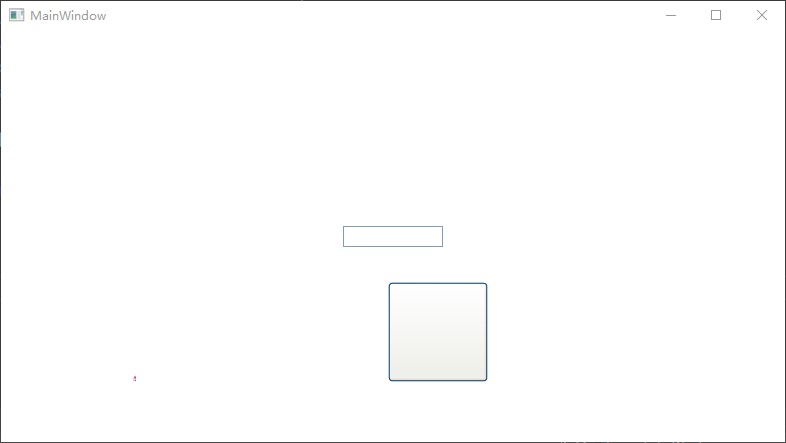
为了展示界面效果,我添加了如下界面
    <Grid>

        <TextBox Width="100" HorizontalAlignment="Center" VerticalAlignment="Center"></TextBox>

        <Button Margin="100,200,10,10" Height="100" Width="100"></Button>

    </Grid>
软件运行效果如下
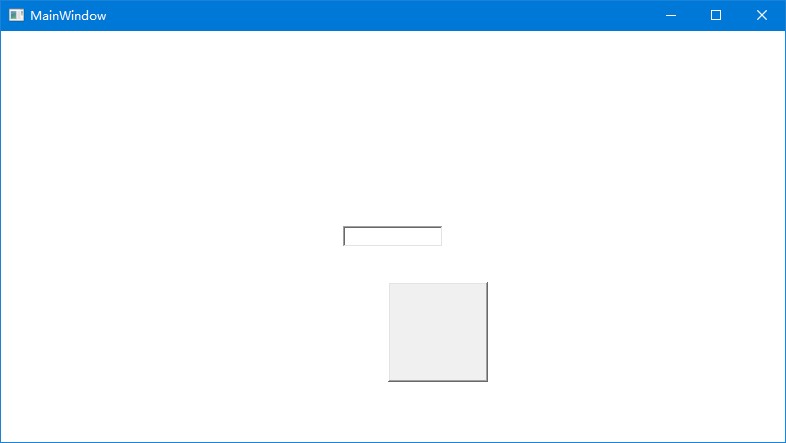
再换成 Aero 效果,修改代码如下
        public App()

        {

            SetTheme("areo", "normalcolor");

        }
可以看到界面更加好看
以上方法实际上在很久之前就有大佬写了,详细请看 danielmoore/SystemThemeChange: A demonstration of a theme change helper for WPF
在 WPF 里面,可以看到 UxThemeWrapper 有如下注释
    internal static class UxThemeWrapper

    {

        // There are apps that override the system theme with one of their own

        // choosing, and intercept (and discard) WM_THEMECHANGED messages to

        // keep their theme in place even when the end-user selects a different

        // theme.   They do this using private reflection to assign values to

        // the three state variables.

        //

        // This state (i.e. where the three variables have values that differ from

        // the ones we choose) is unsupported.  So is the technique for getting

        // into that state (i.e. private reflection).  Nevertheless, .Net wants

        // to preserve some level of compatibility - at the very least, avoid

        // crashing.  [The apps use the result of GetField("_isActive") without

        // checking for null.]

        //

        // We do this in three steps:

        // 1) preserve the three fields;  this fixes the crashes.

        // 2) if the app overrides the values, use the overridden values

        //      in preference to ours.

        // 3) during WM_THEMECHANGED, restore the preference for our values.

        //      If the app overrides them again, step (2) will kick in.

        // Note that step (3) will never happen if the app is intercepting

        // WM_THEMECHANGED.

        private static bool    _isActive;

        private static string  _themeName;

        private static string  _themeColor;

    }
也就是以上的写法是符合预期的
本文以上的测试代码放在github 和 gitee 欢迎访问
可以通过如下方式获取本文的源代码,先创建一个空文件夹,接着使用命令行 cd 命令进入此空文件夹,在命令行里面输入以下代码,即可获取到本文的代码
git init

git remote add origin https://gitee.com/lindexi/lindexi_gd.git

git pull origin 3a6a955fdd761b3f45d9195abc241c70574413d3
以上使用的是 gitee 的源,如果 gitee 不能访问,请替换为 github 的源
git remote remove origin

git remote add origin https://github.com/lindexi/lindexi_gd.git
获取代码之后,进入 BearweakiqeNurwhallcarnearcowar 文件夹
WPF 切换主题使用 luna 复古版本的更多相关文章
- iOS 实现快速切换主题详细教程(附上源码)
前言 iOS 实现主题切换,相信在未来的app里也是会频繁出现的,尽管现在只是出现在主流的APP,如(QQ.新浪微博.酷狗音乐.网易云音乐等),但是现在是看颜值.追求个性的年代,所以根据用户喜好自定义 ...
- 【ExtJs】使用Cookie、切换主题和语言
转自:http://witmax.cn/extjs-cookie-theme-lang.html 使用Cookie: 1 2 3 Ext.state.Manager.setProvider(new ...
- LNMP下wordpress无法切换主题,只显示当前主题解决方法
最近在lnmp下发现wordpress后台无法切换主题,只能显示当前主题,开始还以为是文件没传完,又重置了一遍,还是一样.百度得知,原来军哥的LNMP安装包默认关闭了scandir函数,为了安全考虑. ...
- Android 实现切换主题皮肤功能(类似于众多app中的 夜间模式,主题包等)
首先来个最简单的一键切换主题功能,就做个白天和晚上的主题好了. 先看我们的styles文件: <resources> <!-- Base application theme. --& ...
- laravel4通过控制视图模板路劲来动态切换主题
通过控制视图模板路劲来动态切换主题 App::before(function($request) { $paths = Terminal::isMobile() ? array(__dir__.'/v ...
- win10 uwp 切换主题
本文主要说如何在UWP切换主题,并且如何制作主题. 一般我们的应用都要有多种颜色,一种是正常的白天颜色,一种是晚上的黑夜颜色,还需要一种辅助的高对比颜色.这是微软建议的,一般应用都要包含的颜色. 我们 ...
- WPF实现主题更换的简单DEMO
WPF实现主题更换的简单DEMO 实现主题更换功能主要是三个知识点: 动态资源 ( DynamicResource ) INotifyPropertyChanged 接口 界面元素与数据模型的绑定 ( ...
- ionic动态切换主题皮肤
本来想通过css自定义属性值: :root{ --red:red; } p{ color:var(--red); } div{ background:var(--red); } 在ionic2设置动态 ...
- jQuery实现无刷新切换主题皮肤功能
主题皮肤切换功能在很多网站和系统中应用,用户可以根据此功能设置自己喜欢的主题颜色风格,增强了用户体验.本文将围绕如何使用jQuery实现点击无刷新切换主题皮肤功能. 查看演示DEMO:https:// ...
- Thinkphp动态切换主题
'DEFAULT_THEME' => '2014', 'TMPL_DETECT_THEME' => true, // 自动侦测模板主题 'THEME_LIST' => '2012,2 ...
随机推荐
- WinAppSDK / WinUI3 项目无法使用 SystemEvents 的问题
SystemEvents 是一个开发 win32 窗口项目很常用的类,其中封装了一些常用的系统广播消息.在 WinUI3 项目中,SystemEvents 事件经常无法触发,简单排查了一下原因. Sy ...
- PyQt5报错:This application failed to start because no Qt platform plugin could be initialized
问题背景: 想使用PyQt5来创建一个可视化窗口,先在pycharm里面安装PyQt5,版本为5.14.0.之后在代码中调用此包:from PyQt5 import QtCore, QtGui, Qt ...
- vscode插件设置——Golang开发环境配置
适用读者: Go初学者, 到这里, 你应该是处于已经完成了 go 的安装之后, 准备写个 "Hello Gopher" 之前. 本篇力求给初学者-未来的Gopher 们 一个正确的 ...
- 为什么医疗保健需要MFT来帮助保护EHR文件传输
毫无疑问,医疗保健行业需要EHR技术来处理患者,设施,提供者等之间的敏感患者信息.但是,如果没有安全的MFT解决方案,您将无法安全地传输患者文件,从而使您的运营面临遭受数据泄露,尴尬,声誉损失以及随之 ...
- XMIND思维导图工具入门使用方法(常用操作和快捷键)
基本操作 Tab 置入子项目 ENTER 置入平级项目 CTRL+ALT+F ZEN 专注模式 进阶操作 联系 CTRL+SHIFT+R 内容链接 概要 用括号简要概括要点[界面上部概要选项] 外框 ...
- Scala选择分支if else
1 package com.atguigu.chapter03 2 3 import scala.io.StdIn 4 5 /** 6 * Scala 中 if else 表达式其实是有返回值的,具体 ...
- 5 CSS伪类选择器
5 伪类选择器 anchor伪类:专用于控制链接的显示效果 More Actions:link a:link 选择所有未被访问的链接. :visited a:visited 选择所有已被访问的链接. ...
- #扩展欧拉定理#CF906D Power Tower
题目 给定一个数列,有\(m\)组询问 定义 \[\large f(x-1)={a_x}^{f(x)} \] 若 \(f(r)=a_r\) 求 \(f(l)\) 对固定的 \(mod\) 取模 分析 ...
- Hi3861 通过UART串口协议与其它开发板进行通信
一.搭建编译环境 1.下载虚拟机VMware和Ubuntu20.0.14 下载 VMware Workstation Pro | CN https://www.vmware.com/cn/produc ...
- HarmonyOS系统级推送服务,打造消息通知新体验
8月4日,第五届华为开发者大会 2023(HDC.Together)再次启航.在本次大会上,华为为广大用户带来了HarmonyOS 4全新升级的体验,同时,针对HarmonyOS应用的开发,此次也全面 ...