
iOS 使用两个tableview的瀑布流
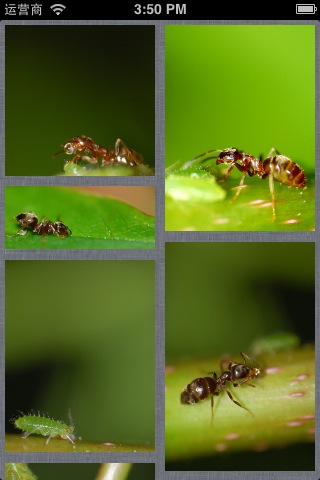
代码
|
1
2
3
4
5
6
7
8
9
10
11
12
13
14
15
16
17
18
19
20
21
22
23
24
25
26
27
28
29
30
31
32
33
34
35
36
37
38
39
40
41
42
43
44
45
46
47
48
49
50
51
52
53
54
55
56
57
58
59
60
61
62
63
64
65
66
67
68
69
70
71
72
73
74
75
76
77
78
79
80
81
82
83
84
85
86
87
88
89
90
91
92
93
94
95
96
97
98
99
100
101
102
103
104
105
106
107
108
109
110
111
112
113
114
115
116
117
118
119
120
121
122
123
124
125
126
127
128
129
130
131
132
133
134
135
136
137
138
139
140
141
142
143
144
145
146
147
148
149
150
151
|
//// DocViewController.m// getrightbutton////#import "DocViewController.h"#define heightofimage(image) image.size.height*150.0/image.size.width@interface DocViewController (){ NSMutableArray *arrdata; NSMutableArray *arrdata1; NSMutableArray *arrdata2; NSMutableArray *arrdata1_1; NSMutableArray *arrdata2_1; float he1,he2;}@property (weak, nonatomic) IBOutlet UITableView *tableview01;@property (weak, nonatomic) IBOutlet UITableView *tableview02;@end@implementation DocViewController@synthesize tableview01,tableview02;- (void)viewDidLoad{ [super viewDidLoad]; // Do any additional setup after loading the view, typically from a nib. [[NSNotificationCenter defaultCenter] addObserver:self selector:@selector(Backhome) name:@"Back" object:nil]; he1 = 0.0; he2 = 0.0; arrdata1 = [[NSMutableArray alloc] initWithCapacity:1]; arrdata2 = [[NSMutableArray alloc] initWithCapacity:1]; arrdata1_1 = [[NSMutableArray alloc] initWithCapacity:1]; arrdata2_1 = [[NSMutableArray alloc] initWithCapacity:1]; for (int i = 1; i < 11; i++) { UIImage *image = [UIImage imageNamed:[NSString stringWithFormat:@"%d.jpeg",i]]; float hecu = image.size.height*150.0/image.size.width; if (he2 >= he1) { he1 = he1 + hecu; NSArray *arr = [[NSArray alloc] initWithObjects:[NSString stringWithFormat:@"%d",i],[NSString stringWithFormat:@"%f",hecu], nil];// [arrdata1_1 addObject:[NSString stringWithFormat:@"%d",i]];// [arrdata1_1 addObject:[NSString stringWithFormat:@"%f",hecu]]; [arrdata1 addObject:arr]; }else{ he2 = he2 + hecu; NSArray *arr = [[NSArray alloc] initWithObjects:[NSString stringWithFormat:@"%d",i],[NSString stringWithFormat:@"%f",hecu], nil]; [arrdata2 addObject:arr]; } NSLog(@"%f(h1 = %f,,,,h2 = %f)",hecu,he1,he2); } tableview01.showsVerticalScrollIndicator = NO; tableview02.showsVerticalScrollIndicator = NO; NSLog(@"%@+++++++%@",arrdata1,arrdata2);}- (NSInteger)tableView:(UITableView *)tableView numberOfRowsInSection:(NSInteger)section{// return 100; if (tableView == tableview01) { return [arrdata1 count]; }else{ return [arrdata2 count]; } return 0;}- (UITableViewCell *)tableView:(UITableView *)tableView cellForRowAtIndexPath:(NSIndexPath *)indexPath{ NSInteger row = indexPath.row; if (tableView == tableview01) {// tableview02// [tableview02 setContentOffset:tableview01.contentOffset]; static NSString *id1 = @"sd1"; UITableViewCell *cell = [tableView dequeueReusableCellWithIdentifier:id1]; if (cell == nil) { NSArray *nib = [[NSBundle mainBundle] loadNibNamed:@"CellView" owner:self options:nil]; if (nib > 0) { cell = _ccell; } } UIImage *image = [UIImage imageNamed:[NSString stringWithFormat:@"%d.jpeg",[[[arrdata1 objectAtIndex:row] objectAtIndex:0] integerValue]]]; UIImageView *imageview = (UIImageView *)[cell viewWithTag:101]; [imageview setImage:image]; CGRect rect = imageview.frame; rect.size.height = [[[arrdata1 objectAtIndex:row] objectAtIndex:1] floatValue]; imageview.frame = rect; return cell; }else{// [tableview01 setContentOffset:tableview02.contentOffset]; static NSString *id = @"sd"; UITableViewCell *cell = [tableView dequeueReusableCellWithIdentifier:id]; if (cell == nil) { NSArray *nib = [[NSBundle mainBundle] loadNibNamed:@"CellView" owner:self options:nil]; if (nib > 0) { cell = _ccell; } } UIImage *image = [UIImage imageNamed:[NSString stringWithFormat:@"%d.jpeg",[[[arrdata2 objectAtIndex:row] objectAtIndex:0] integerValue]]]; UIImageView *imageview = (UIImageView *)[cell viewWithTag:101]; [imageview setImage:image]; CGRect rect = imageview.frame; rect.size.height = [[[arrdata2 objectAtIndex:row] objectAtIndex:1] floatValue]; imageview.frame = rect; return cell; } return nil;}- (float)tableView:(UITableView *)tableView heightForRowAtIndexPath:(NSIndexPath *)indexPath{ NSInteger row = indexPath.row; if (tableView == tableview01) { return [[[arrdata1 objectAtIndex:row] objectAtIndex:1] floatValue] +10; }else{ return [[[arrdata2 objectAtIndex:row] objectAtIndex:1] floatValue] +10; } return 0.0;}- (void)tableView:(UITableView *)tableView didSelectRowAtIndexPath:(NSIndexPath *)indexPath{ DocwebViewController *controller = [[DocwebViewController alloc] init]; [self presentModalViewController:controller animated:YES];}- (void)Backhome{ [self dismissModalViewControllerAnimated:YES];}- (void)scrollViewDidScroll:(UIScrollView *)scrollView{ if (scrollView == tableview01) { [tableview02 setContentOffset:tableview01.contentOffset]; }else{ [tableview01 setContentOffset:tableview02.contentOffset]; } }- (void)didReceiveMemoryWarning{ [super didReceiveMemoryWarning]; // Dispose of any resources that can be recreated.}@end |
iOS 使用两个tableview的瀑布流的更多相关文章
- iOS 两个tableview的 瀑布流
iOS 两个tableview的 瀑布流1. [代码]Objective-C //// DocViewController.m// getrightbutton//// Created ...
- ios 让两个tableView同时处于选中状态
- (void)tableView:(UITableView *)tableView didHighlightRowAtIndexPath:(NSIndexPath *)indexPath { [_l ...
- iOS瀑布流实现(Swift)
这段时间突然想到一个很久之前用到的知识-瀑布流,本来想用一个简单的方法,发现自己走入了歧途,最终只能狠下心来重写UICollectionViewFlowLayout.下面我将用两种方法实现瀑布流,以及 ...
- IOS 瀑布流
本篇博客应该算的上CollectionView的高级应用了,从iOS开发之窥探UICollectionViewController(一)到今天的(五),可谓是由浅入深的窥探了一下UICollectio ...
- IOS 瀑布流UICollectionView实现
IOS 瀑布流UICollectionView实现 在实现瀑布流之前先来看看瀑布流的雏形(此方法的雏形 UICollectionView) 对于UICollectionView我们有几点注意事项 它和 ...
- iOS横向瀑布流的封装
前段时间, 做一个羡慕, 需要使用到瀑布流! 说道瀑布流, 或许大家都不陌生, 瀑布流的实现也有很多种! 从scrollView 到 tableView 书写的瀑布流, 然后再到2012年iOS6 苹 ...
- iOS 瀑布流之栅格布局
代码地址如下:http://www.demodashi.com/demo/14760.html 一 .效果预览 二.确定需求 由下面的需求示意图可知模块的最小单位是正方形,边长是屏幕宽除去边距间隔后的 ...
- iOS开发:一个瀑布流的设计与实现(已实现缓存池功能,该功能使得瀑布流cell可以循环利用)
一个瀑布流的实现有三种方式: 继承自UIScrollView,仿写UITableView的dataSource和delegate,创造一个缓存池用来实现循环利用cell 写多个UITableview( ...
- iOS开发:代码通用性以及其规范 第一篇(附带,自定义UITextView\进度条\双表显示\瀑布流 代码设计思路)
在iOS团队开发中,我见过一些人的代码,也修改过他们的代码.有的人的代码写的非常之规范.通用,几乎不用交流,就可以知道如何修改以及在它基础上扩展延生.有的人的代码写的很垃圾,一眼看过去,简直会怀疑自己 ...
随机推荐
- hiho_1041 国庆出游
题目 给定一棵树,N个节点,N - 1条边.给定m个节点,能否找出一种遍历方法,使得首次到达节点ai的时间小于首次到达节点aj的时间(i < j).且经过的路径上的每条边都最多走两遍 分析 我的 ...
- Redis常用的基本命令整理
SET key value [EX seconds] [PX milliseconds] [NX|XX] 设置缓存 K-V,如果 key 已经存在,则重写 EX seconds -- 设置过期时间, ...
- mysql:恢复mysql表结构
mysql,frm格式恢复mysql表结构,以tuser.frm格式为例 新增数据库,如下,创建数据库名为ab 打开数据库,双击打开数据库 点右键新建表结构 新增表,里面只添加一个字段 ...
- iOS 控制单个控制器旋转
iOS 控制单个控制器旋转 控制单个ViewController 的旋转 //不旋转,保持竖屏 //iOS 5 - (BOOL) shouldAutorotateToInterfaceOrientat ...
- 学习ASP.NET之前,先了解它
ASP.NET是一个使用HTML,CSS,JavaScript和服务器脚本构建的网页和网站的开发框架,不是一门编程语言. ASP.NET支持三种不同的开发模式:Web Pages(Web页面),MVC ...
- Ubuntu下解决bash 没有那个文件或目录的方法
因为之前电脑硬盘坏掉,维修换了新硬盘,今天重新安装了ubuntu,装好之后就赶紧搭建工作环境,将备份的资料拷贝进来,搭建交叉编译环境,但是发现,修改bashrc中PATH绝对路径指向交叉编译器后,在命 ...
- 【MYSQL】创建虚表来辅助数据库查询
在进行数据库查询时,有时需要用到对既有的数据表进行多表查询得出的临时条件的数据表,就可以暂时创建成为虚表,并赋予简单明了的字段名以及临时表名. 例题a:查询出每门课程低于平均成绩的学生姓名.课程名称. ...
- (08)odoo继承机制
* 全局的引用 所有的的模型定义外,都在注册中心注册了,我们可以用全局变量来引用这些模型 self.env[mode name] 比如得到合作伙伴这个模型 self.evn['res.pa ...
- hdu---(Tell me the area)(几何/三角形面积以及圆面积的一些知识)
Tell me the area Time Limit: 3000/1000 MS (Java/Others) Memory Limit: 65536/32768 K (Java/Others) ...
- hdu----(5045)Contest(数位dp)
Contest Time Limit: 2000/1000 MS (Java/Others) Memory Limit: 65536/65536 K (Java/Others)Total Sub ...